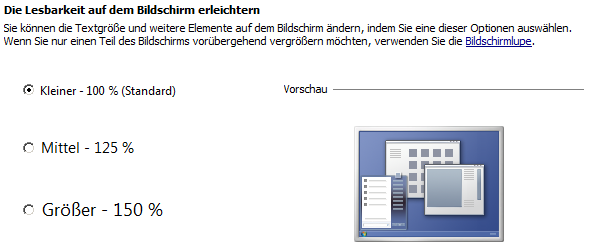
Leider wird dann der Text bei einem Button zu gross.
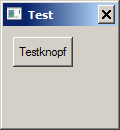
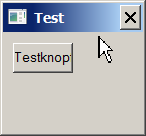
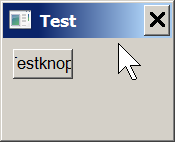
Das könnte man ja durch eine andere Font Größe ausgleichen. Aber woher weiß ich was aktiv ist und wie viel ich korrigieren muss?
Gruß Rene

You can use GadgetWidth/GadgetHeight with #PB_Gadget_RequiredSize now. This code is obsolete.
Interessant ist hier, daß zwar das Fenster skaliert, die Gadgets aber nicht mit. Obwohl, das Fenster scheint nur in der Breite zu skalieren... komisch.topsoft hat geschrieben:Das könnte man ja durch eine andere Font Größe ausgleichen.

topsoft hat geschrieben: Aber woher weiß ich was aktiv ist ...
Code: Alles auswählen
    DTHDC = GetDC_(GetDesktopWindow_())
    DPIY = GetDeviceCaps_(DTHDC,#LOGPIXELSY)
    DPIX = GetDeviceCaps_(DTHDC,#LOGPIXELSX)
    ReleaseDC_(GetDesktopWindow_(),DTHDC)

Code: Alles auswählen
; DPI_Aware
; Autor: unbekannt
;
; Default DPI on Windows is 96 DPI
#DEFAULT_DPI_X = 96.0
#DEFAULT_DPI_Y = 96.0
;
Define.d scaleFactorX = 1.0, scaleFactorY = 1.0
;
Declare   InitDPI()
Declare.i EnumChilds_(hWnd.i, parent.i)
Declare.i ScaleX(x.i)
Declare.i ScaleY(y.i)
Declare   WindowScaleDpi(winNr.i)

Prototype.i IsProcessDPIAware_()
Prototype.i SetProcessDPIAware_()
;
Procedure InitDPI(); Windows 5.0 or higher needed for minimum functionality of this procedure.
Protected.i hDC, lPx, lPy, hDll, font, fontSize, fontStyle, charSet
Protected.i IsDPIAware, SetDPIAware
Protected.s fontName
Protected   ncm.NONCLIENTMETRICS
Shared.d    scaleFactorX, scaleFactorY
;
If (OSVersion() >= #PB_OS_Windows_Vista)
  hDll = OpenLibrary(#PB_Any, "user32.dll")
  If (hDll)
    IsDPIAware.IsProcessDPIAware_   = GetFunction(hDll, "IsProcessDPIAware")
    SetDPIAware.SetProcessDPIAware_ = GetFunction(hDll, "SetProcessDPIAware")
    If (IsDPIAware And SetDPIAware)
      If (IsDPIAware()) : SetDPIAware() : EndIf
    EndIf
  CloseLibrary(hDll)
  EndIf
EndIf
;
hDC = GetDC_(#Null)
If (hDC)
  lPx = GetDeviceCaps_(hDC, #LOGPIXELSX)
  lPy = GetDeviceCaps_(hDC, #LOGPIXELSY)
  ;
  If (lPx > 0) : scaleFactorX = (lPx / #DEFAULT_DPI_X) : EndIf
  If (lPy > 0) : scaleFactorY = (lPy / #DEFAULT_DPI_Y) : EndIf
  ;
  ncm\cbSize = SizeOf(NONCLIENTMETRICS)
  ;
  If (SystemParametersInfo_(#SPI_GETNONCLIENTMETRICS, SizeOf(NONCLIENTMETRICS), ncm, #Null))
    fontName = PeekS(@ncm\lfMessageFont\lfFaceName)
    charSet  = ncm\lfMessageFont\lfCharSet
    fontSize = -MulDiv_(ncm\lfMessageFont\lfHeight, 72, GetDeviceCaps_(hDC, #LOGPIXELSY))
    ;
    If (ncm\lfMessageFont\lfWeight >= 700) : fontStyle | #PB_Font_Bold   : EndIf
    If (ncm\lfMessageFont\lfItalic > 0)    : fontStyle | #PB_Font_Italic : EndIf
    ;
    font = LoadFont(#PB_Any, fontName, fontSize, #PB_Font_HighQuality|fontStyle)
    If (font) : SetGadgetFont(#PB_Default, FontID(font)) : EndIf
  EndIf
  ;
  ReleaseDC_(#Null, hDC)
EndIf
;
EndProcedure
;
Procedure.i EnumChilds_(hWnd, parent)
Protected.s     buffer = Space(256)
Protected.RECT  rct
Protected.POINT pt1, pt2
;
GetClassName_(hWnd, @buffer, 256)
;
If (buffer)
  GetWindowRect_(hWnd, rct)
  pt1\x = rct\left
  pt1\y = rct\top
  ScreenToClient_(GetParent_(hWnd), pt1)
  pt2\x = rct\right
  pt2\y = rct\bottom
  ScreenToClient_(GetParent_(hWnd), pt2)
  SetWindowPos_(hWnd, 0, ScaleX(pt1\x), ScaleY(pt1\y), ScaleX(pt2\x - pt1\x), ScaleY(pt2\y - pt1\y), #SWP_NOZORDER)
  ProcedureReturn #True
EndIf
;
EndProcedure
;
Procedure.i ScaleX(x.i)
Protected.i retVal
Shared.d    scaleFactorX
;
retVal = Round(x * scaleFactorX, #PB_Round_Nearest)
;
ProcedureReturn retVal
EndProcedure
;
Procedure.i ScaleY(y.i)
Protected.i retVal
Shared.d    scaleFactorY
;
retVal = Round(y * scaleFactorY, #PB_Round_Nearest)
;
ProcedureReturn retVal
EndProcedure
;
; Skaliert alle Gadgets eines Windows
Procedure WindowScaleDpi(winNr.i)
;
EnumChildWindows_(WindowID(winNr), @EnumChilds_(), WindowID(winNr))
;
EndProcedure
;
Code: Alles auswählen
EnableExplicit
;
#WIN   = 0
#WIN_W = 300
#WIN_H = 250
#WIN_T = "DPI-Awareness"
#WIN_F = #PB_Window_MinimizeGadget|#PB_Window_ScreenCentered
;
Enumeration;Gadgets
  #G_TXT
  #G_BTN
EndEnumeration
;
XIncludeFile "DPI_Aware.pbi"
;
InitDPI(); Selbsterklärend
;
OpenWindow(#WIN, 0, 0, ScaleX(#WIN_W), ScaleY(#WIN_H), #WIN_T, #WIN_F); Höhe & Breite skalieren
TextGadget(#G_TXT, 10, 10, 200, 20, "Ich bin ein Textgadget")
ButtonGadget(#G_BTN, 10, 35, 100, 20, "Drück mich")
;
WindowScaleDPI(#WIN); Hier werden dann alle Gadgets eines Windows skaliert
;
Repeat
Until WaitWindowEvent() = #PB_Event_CloseWindow
;