ProGUI V3 Alpha 4 Ready for testing!

Developed or developing a new product in PureBasic? Tell the world about it.
PrincieD
Addict
Addict
Posts: 913
Joined: Wed Aug 10, 2005 2:08 pm
Location: Yorkshire, England
Contact:

Re: ProGUI V3 Alpha 3 Ready for testing!

Post by PrincieD »

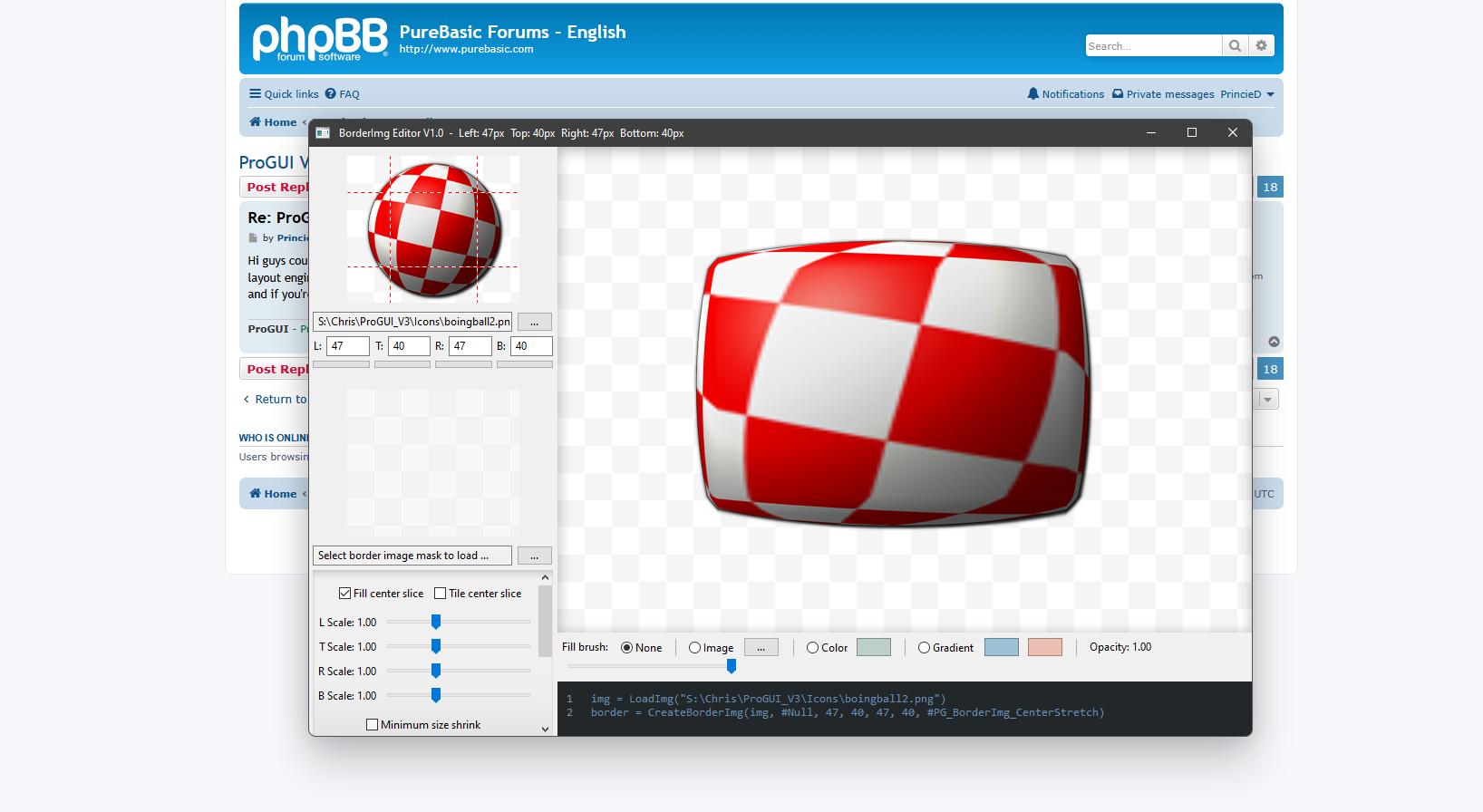
Hi guys could you give this a go please? It's the Image Border Creator app, it combines a lot of Win32 common controls with ProGUI native widgets and layout engines. And now the new Windows 11 skin (which is still work in progress), If you're running it on Windows 10 it will look like a Windows 11 window and if you're running it on Windows 11 it should "almost" look like a Windows 11 window. https://www.progui.co.uk/downloads/BorderImgEditor.zip

Image

You can experiment with the images in the icons directory.

You can right click for a context menu and select a light or dark background on both the main preview and the 9 slice editors. You can also use the mouse wheel to zoom in and out on the 9 slice editors
ProGUI - Professional Graphical User Interface Library - http://www.progui.co.uk
PrincieD
Addict
Addict
Posts: 913
Joined: Wed Aug 10, 2005 2:08 pm
Location: Yorkshire, England
Contact:

Re: ProGUI V3 Alpha 3 Ready for testing!

Post by PrincieD »

Alpha 4 released! see top of thread :)

This is the source for the "test_CustomButtonWidget.pb" (gives you an idea of how easy it is to create custom widgets):

Code: Select all

#ProGUI_UseDll = #True

CompilerIf Not #PB_Compiler_Thread
    MessageRequester("ProGUI", "Please enable threadsafe executable", #PB_MessageRequester_Ok)
    End
CompilerEndIf

CompilerIf #PB_Compiler_DPIAware
    MessageRequester("ProGUI", "Please disable DPI aware executable, ProGUI handles per-monitor DPI", #PB_MessageRequester_Ok)
    End
CompilerEndIf

CompilerIf #ProGUI_UseDll
    IncludeFile "ProGUI_PB.pbi"
CompilerElse
    IncludeFile "ProGUI.pbi"
CompilerEndIf

CompilerIf #PB_Compiler_Backend = #PB_Backend_C
    Debug "Using C backend"
CompilerEndIf

StartProGUI(#PG_RenderDirect2D)

;- Constants

EnumerationBinary
    
    #_Button_IsMouseDown
    #_Button_IsHover
    
EndEnumeration

;- Structures

Structure ButtonWidget
    
    text.s
    flags.i
    
EndStructure

;- Macros

;- *** Internal Functions ***

Procedure eventHandler_ButtonDraw(Widget, EventType, *event.PG_EventDraw, *userData)
    
    Protected *button.ButtonWidget
    
    *button = WidgetGetUserData(Widget)
    
    If *button\text
        DrawSkinText(Widget, "", 0, 0, *event\width, *event\height, *button\text)
    EndIf
    
EndProcedure

Procedure eventHandler_ButtonMouse(Widget, EventType, *event.PG_EventMouse, *userData)
    
    Protected *button.ButtonWidget
    
    *button = WidgetGetUserData(Widget)
    
    Select EventType
            
        Case #PG_Event_MouseEnter
            
            If *button\flags & #_Button_IsMouseDown
                WidgetSetSkinState(Widget, "active")
            Else
                WidgetSetSkinState(Widget, "hover")
            EndIf
            
            *button\flags | #_Button_IsHover
            
        Case #PG_Event_MouseLeave
            
            If *button\flags & #_Button_IsMouseDown
                WidgetSetSkinState(Widget, "hover")
            Else
                WidgetSetSkinState(Widget, "")
            EndIf
            
            *button\flags &~ #_Button_IsHover
            
        Case #PG_Event_MouseLeftButtonDown, #PG_Event_MouseLeftDoubleClick
            
            WidgetSetMouseCapture(Widget)
            WidgetSetSkinState(Widget, "active")
            *button\flags | #_Button_IsMouseDown
            
        Case #PG_Event_MouseLeftButtonUp
            
            WidgetReleaseMouseCapture()
            
            If *button\flags & #_Button_IsHover
                DispatchEvent(Widget, #PG_Event_Action)
                WidgetSetSkinState(Widget, "hover")
            Else
                WidgetSetSkinState(Widget, "")
            EndIf
            
            *button\flags &~ #_Button_IsMouseDown
            
    EndSelect
    
EndProcedure

Procedure skin_Init_Button()
    
    SkinSetValue("mybutton", "", "", "background", "#E1E1E1")
    SkinSetValue("mybutton", "", "", "border", "solid 1px #ADADAD")
    SkinSetValue("mybutton", "", "", "color", "black")
    SkinSetValue("mybutton", "", "", "text-align", "center")
    SkinSetValue("mybutton", "", "", "vertical-align", "center")
    SkinSetValue("mybutton", "hover", "", "background", "#E5F1FB")
    SkinSetValue("mybutton", "hover", "", "border", "solid 1px #0078D7")
    SkinSetValue("mybutton", "hover", "", "color", "black")
    SkinSetValue("mybutton", "active", "", "background", "#CCE4F7")
    SkinSetValue("mybutton", "active", "", "border", "solid 1px #005499")
    SkinSetValue("mybutton", "active", "", "color", "black")
    SkinSetValue("mybutton", "", "", "transition", "background .4s, border .4s")
    SkinSetValue("mybutton", "active", "", "transition", "background .3s, border .3s")
    
EndProcedure

;- *** Public Functions ***

ProcedureDLL CreateCustomButton(x, y, Width, Height, Text.s = "", Flags = #Null)
    
    Protected *button.ButtonWidget, widget
    
    If Width < 0
        Width = 0
    EndIf
    
    If Height < 0
        Height = 0
    EndIf
    
    *button = AllocateStructure(ButtonWidget)
    *button\text = Text
    
    widget = CreateWidget(x, y, Width, Height, *button, Flags | #PG_Widget_Hide)
    
    WidgetSetClass(widget, "mybutton")
    
    AddEventHandler(widget, #PG_Event_Draw, @eventHandler_ButtonDraw())
    AddEventHandler(widget, #PG_Event_MouseEnter, @eventHandler_ButtonMouse())
    AddEventHandler(widget, #PG_Event_MouseLeave, @eventHandler_ButtonMouse())
    AddEventHandler(widget, #PG_Event_MouseLeftButtonDown, @eventHandler_ButtonMouse())
    AddEventHandler(widget, #PG_Event_MouseLeftButtonUp, @eventHandler_ButtonMouse())
    AddEventHandler(widget, #PG_Event_MouseLeftDoubleClick, @eventHandler_ButtonMouse())
    
    WidgetSetCursor(widget, #PG_Cursor_Default)
    
    If Not Flags & #PG_Widget_Hide And Not Flags & #PG_Widget_NoDraw
        WidgetShow(widget)
    EndIf
    
    ProcedureReturn widget
    
EndProcedure

Global SignalQuit
Procedure WindowCloseEventHandler(Window, EventType, *eventData, *userData)
    
    SignalQuit = #True
    
EndProcedure

skin_Init_Button()

window = CreateWindow(0, 0, 800, 600, "Test", #PG_Window_MinimizeWidget | #PG_Window_MaximizeWidget | #PG_Window_Sizeable)
AddEventHandler(window, #PG_Event_WindowClose, @WindowCloseEventHandler())

myButton = CreateCustomButton(100, 100, 100, 26, "Hello World")

WindowShow(window, #True, #PG_WindowShow_ScreenCentered)

Repeat
    
    Event = WaitWindowEvent()
    
Until Event = #PB_Event_CloseWindow Or Event = #PB_Event_RightClick Or SignalQuit

StopProGUI()
Cheers! Chris.
ProGUI - Professional Graphical User Interface Library - http://www.progui.co.uk
PrincieD
Addict
Addict
Posts: 913
Joined: Wed Aug 10, 2005 2:08 pm
Location: Yorkshire, England
Contact:

Re: ProGUI V3 Alpha 4 Ready for testing!

Post by PrincieD »

Hi guys, Alpha 4.1 will be released shortly (just fixing a few bugs). This is a new demo of swapping between the Windows 10 CSS theme and Windows 11 CSS theme in realtime with a couple of native Win32 radio buttons running on Windows 10. I've decided to integrate the Windows 11 skin as a theme in the base Windows 10 skin instead of a separate skin. The "Windows" skin or "Default" skin is no longer hard coded and is now in a separate "Skins" folder (under "Default") which will be loaded (instead of created internally). The cool thing is you can load up the CSS in the folder with something like VSCode and edit the CSS in real-time while your app is running and your app will update immediately.

https://www.youtube.com/shorts/N33-Bzq8bFI

Code: Select all

#ProGUI_UseDll = 0;#True

CompilerIf Not #PB_Compiler_Thread
    MessageRequester("ProGUI", "Please enable threadsafe executable", #PB_MessageRequester_Ok)
    End
CompilerEndIf

CompilerIf #PB_Compiler_DPIAware
    MessageRequester("ProGUI", "Please disable DPI aware executable, ProGUI handles per-monitor DPI", #PB_MessageRequester_Ok)
    End
CompilerEndIf

CompilerIf #ProGUI_UseDll
    IncludeFile "ProGUI_PB.pbi"
CompilerElse
    IncludeFile "ProGUI.pbi"
CompilerEndIf

CompilerIf #PB_Compiler_Backend = #PB_Backend_C
    Debug "Using C backend"
CompilerEndIf

StartProGUI()

Procedure eventHandler_Windows10()

    SkinSetTheme("")
    
EndProcedure

Procedure eventHandler_Windows11()
    
    SkinSetTheme("win11")
    
EndProcedure


Global SignalQuit
Procedure WindowCloseEventHandler(Window, EventType, *eventData, *userData)
    
    SignalQuit = #True
    
EndProcedure

;window2 = CreateWindow(0, 0, 400, 400, "Test2", #PG_Window_MinimizeWidget | #PG_Window_MaximizeWidget | #PG_Window_Sizeable)
;AddEventHandler(window, #PG_Event_WindowClose, @WindowCloseEventHandler())

window = CreateWindow(0, 0, 800, 600, "Test", #PG_Window_MinimizeWidget | #PG_Window_MaximizeWidget | #PG_Window_Sizeable | #PG_Window_LayoutFlex)
AddEventHandler(window, #PG_Event_WindowClose, @WindowCloseEventHandler())

LayoutFlexSetJustify(0, #PG_Flex_Justify_Center)
LayoutFlexSetAlignItems(0, #PG_Flex_AlignItems_Center)

gadget = OptionGadget(#PB_Any, 0, 0, 0, 0, "Windows 10 theme")
BindGadgetEvent(gadget, @eventHandler_Windows10())
widget = CreateOsWidget(0, 0, 130, 19, GadgetID(gadget))

If OSVersion() <= #PB_OS_Windows_10
    SetGadgetState(gadget, #True)
EndIf

gadget = OptionGadget(#PB_Any, 0, 0, 0, 0, "Windows 11 theme")
BindGadgetEvent(gadget, @eventHandler_Windows11())
widget = CreateOsWidget(0, 0, 130, 19, GadgetID(gadget))

If OSVersion() >= #PB_OS_Windows_11
    SetGadgetState(gadget, #True)
EndIf

;WindowShow(window2)
WindowShow(window, #True, #PG_WindowShow_ScreenCentered)

Repeat
    
    Event = WaitWindowEvent()
    
Until Event = #PB_Event_CloseWindow Or SignalQuit

StopProGUI()
default.css:

Code: Select all

/* ---[ Window-client Styles ]--- */

	.window-client {
		background: rgb(240, 240, 240);
	}

	/* Inactive State */
	.window-client:inactive {
		background: rgb(240, 240, 240);
	}

/* ---[ Window Styles ]--- */

	.window {
		border: 1px var(color-winborder-active) mask-inner;
		box-shadow: 2px 3px 26px rgba(0, 0, 0, 0.4);
	}

	/* Inactive State */
	.window:inactive {
		border: 1px var(color-winborder-inactive) mask-inner;
		box-shadow: 1px 1px 19px rgba(0, 0, 0, 0.35);
	}

	/* Maximized State */
	.window:maximized {
		border: none;
		border-radius: none;
	}

/* ---[ Titlebar Styles ]--- */

	.titlebar {
		background: var(color-titlebar-active, white);
	}

	/* Deactive State */
	.titlebar:deactive {
		background: white;
	}

/* ---[ TitlebarTitle Styles ]--- */

	.titlebarTitle {
		color: var(color-titlebar-text);
		text-align: left;
		vertical-align: center;
		text-overflow: ellipsis;
		text-rendermode: cleartype;
	}

	/* Deactive State */
	.titlebarTitle:deactive {
		color: var(color-titlebar-deactive-text);
	}

/* ---[ TitlebarAppIcon Styles ]--- */

	.titlebarAppIcon {
		background: url('exe-icon') no-repeat center;
	}

/* ---[ TitlebarMinimize Styles ]--- */

	.titlebarMinimize {
		background: var(glyph-titlebar-active-min) no-repeat center;
		transition: background .3s, border .3s;
	}

	/* Active State */
	.titlebarMinimize:active {
		background: var(glyph-titlebar-active-min) no-repeat center, var(color-titlebar-active-button-active);
		background-opacity: 100%;
	}

	/* Deactive State */
	.titlebarMinimize:deactive {
		background: var(glyph-titlebar-deactive-min) no-repeat center;
		background-opacity: 40%;
		transition: background 0s, border 0s;
	}

	/* Deactive-hover State */
	.titlebarMinimize:deactive-hover {
		background: var(glyph-titlebar-deactive-min) no-repeat center, rgba(0, 0, 0, 0.1);
		background-opacity: 100%;
		transition: background 0s, border 0s;
	}

	/* Hover State */
	.titlebarMinimize:hover {
		background: var(glyph-titlebar-active-min) no-repeat center, var(color-titlebar-active-button-hover);
		background-opacity: 100%;
		transition: background 0s, border 0s;
	}

	/* Hover-active State */
	.titlebarMinimize:hover-active {
		background: var(glyph-titlebar-active-min) no-repeat center;
		background-opacity: 100%;
		transition: background 0s, border 0s;
	}

/* ---[ TitlebarMaximize Styles ]--- */

	.titlebarMaximize {
		background: var(glyph-titlebar-active-max) no-repeat center;
		transition: background .3s, border .3s;
	}

	/* Active State */
	.titlebarMaximize:active {
		background: var(glyph-titlebar-active-max) no-repeat center, var(color-titlebar-active-button-active);
	}

	/* Deactive State */
	.titlebarMaximize:deactive {
		background: var(glyph-titlebar-deactive-max) no-repeat center;
		background-opacity: 40%;
		transition: background 0s, border 0s;
	}

	/* Deactive-hover State */
	.titlebarMaximize:deactive-hover {
		background: var(glyph-titlebar-deactive-max) no-repeat center, rgba(0, 0, 0, 0.1);
		background-opacity: 100%;
		transition: background 0s, border 0s;
	}

	/* Hover State */
	.titlebarMaximize:hover {
		background: var(glyph-titlebar-active-max) no-repeat center, var(color-titlebar-active-button-hover);
		transition: background 0s, border 0s;
	}

	/* Hover-active State */
	.titlebarMaximize:hover-active {
		background: var(glyph-titlebar-active-max) no-repeat center;
		transition: background 0s, border 0s;
	}

	/* Maximized State */
	.titlebarMaximize:maximized {
		background: var(glyph-titlebar-active-restore) no-repeat center;
		transition: background .3s, border .3s;
	}

	/* Maximized-active State */
	.titlebarMaximize:maximized-active {
		background: var(glyph-titlebar-active-restore) no-repeat center, var(color-titlebar-active-button-active);
	}

	/* Maximized-deactive State */
	.titlebarMaximize:maximized-deactive {
		background: var(glyph-titlebar-deactive-restore) no-repeat center;
		background-opacity: 40%;
		transition: background 0s, border 0s;
	}

	/* Maximized-deactive-hover State */
	.titlebarMaximize:maximized-deactive-hover {
		background: var(glyph-titlebar-deactive-restore) no-repeat center, rgba(0, 0, 0, 0.1);
		background-opacity: 100%;
		transition: background 0s, border 0s;
	}

	/* Maximized-hover State */
	.titlebarMaximize:maximized-hover {
		background: var(glyph-titlebar-active-restore) no-repeat center, var(color-titlebar-active-button-hover);
		transition: background 0s, border 0s;
	}

	/* Maximized-hover-active State */
	.titlebarMaximize:maximized-hover-active {
		background: var(glyph-titlebar-active-restore) no-repeat center;
		transition: background 0s, border 0s;
	}

/* ---[ TitlebarClose Styles ]--- */

	.titlebarClose {
		background: var(glyph-titlebar-active-close) no-repeat center, var(color-titlebar-close);
		transition: background .3s, border .3s;
	}

	/* Active State */
	.titlebarClose:active {
		background: var(glyph-titlebar-active-close-hover) no-repeat center, var(color-titlebar-close-active);
		background-opacity: 100%;
	}

	/* Deactive State */
	.titlebarClose:deactive {
		background: var(glyph-titlebar-deactive-close) no-repeat center;
		background-opacity: 40%;
		transition: background 0s, border 0s;
	}

	/* Deactive-hover State */
	.titlebarClose:deactive-hover {
		background: var(glyph-titlebar-active-close-hover) no-repeat center, var(color-titlebar-close-hover);
		background-opacity: 100%;
		transition: background 0s, border 0s;
	}

	/* Hover State */
	.titlebarClose:hover {
		background: var(glyph-titlebar-active-close-hover) no-repeat center, var(color-titlebar-close-hover);
		background-opacity: 100%;
		transition: background 0s, border 0s;
	}

	/* Hover-active State */
	.titlebarClose:hover-active {
		background: var(glyph-titlebar-active-close) no-repeat center, var(color-titlebar-close);
		background-opacity: 100%;
		transition: background 0s, border 0s;
	}

/* ---[ Vscrollbar Styles ]--- */

	.vscrollbar {
		background-color: #f0f0f0;
	}

	.vscrollbar thumb1 {
		background: url('data/0_up_n.png; 1_up_n.png; 2_up_n.png; snaptodpi trim') center no-repeat, #f0f0f0;
		transition: background-color 1s;
	}

	.vscrollbar thumb2 {
		background: url('data/0_down_n.png; 1_down_n.png; 2_down_n.png; snaptodpi trim') center no-repeat, #f0f0f0;
		transition: background-color 1s;
	}

	.vscrollbar trackbar {
		background-color: #cdcdcd;
		transition: background-color 1s;
	}

	/* Active State */
	.vscrollbar:active thumb1 {
		background: url('data/0_up_a.png; 1_up_a.png; 2_up_a.png; snaptodpi trim') center no-repeat, #606060;
		transition: background-color 0s;
	}

	.vscrollbar:active thumb2 {
		background: url('data/0_down_a.png; 1_down_a.png; 2_down_a.png; snaptodpi trim') center no-repeat, #606060;
		transition: background-color 0s;
	}

	.vscrollbar:active trackbar {
		background-color: #606060;
		transition: background-color 0s;
	}

	/* Hover State */
	.vscrollbar:hover thumb1 {
		background: url('data/0_up_h.png; 1_up_h.png; 2_up_h.png; snaptodpi trim') center no-repeat, #dadada;
		transition: background-color .3s;
	}

	.vscrollbar:hover thumb2 {
		background: url('data/0_down_h.png; 1_down_h.png; 2_down_h.png; snaptodpi trim') center no-repeat, #dadada;
		transition: background-color .3s;
	}

	.vscrollbar:hover trackbar {
		background-color: #a6a6a6;
		transition: background-color .3s;
	}

/* ---[ Hscrollbar Styles ]--- */

	.hscrollbar {
		background-color: #f0f0f0;
	}

	.hscrollbar thumb1 {
		background: url('data/0_left_n.png; 1_left_n.png; 2_left_n.png; snaptodpi trim') center no-repeat, #f0f0f0;
		transition: background-color 1s;
	}

	.hscrollbar thumb2 {
		background: url('data/0_right_n.png; 1_right_n.png; 2_right_n.png; snaptodpi trim') center no-repeat, #f0f0f0;
		transition: background-color 1s;
	}

	.hscrollbar trackbar {
		background-color: #cdcdcd;
		transition: background-color 1s;
	}

	/* Active State */
	.hscrollbar:active thumb1 {
		background: url('data/0_left_a.png; 1_left_a.png; 2_left_a.png; snaptodpi trim') center no-repeat, #606060;
		transition: background-color 0s;
	}

	.hscrollbar:active thumb2 {
		background: url('data/0_right_a.png; 1_right_a.png; 2_right_a.png; snaptodpi trim') center no-repeat, #606060;
		transition: background-color 0s;
	}

	.hscrollbar:active trackbar {
		background-color: #606060;
		transition: background-color 0s;
	}

	/* Hover State */
	.hscrollbar:hover thumb1 {
		background: url('data/0_left_h.png; 1_left_h.png; 2_left_h.png; snaptodpi trim') center no-repeat, #dadada;
		transition: background-color .3s;
	}

	.hscrollbar:hover thumb2 {
		background: url('data/0_right_h.png; 1_right_h.png; 2_right_h.png; snaptodpi trim') center no-repeat, #dadada;
		transition: background-color .3s;
	}

	.hscrollbar:hover trackbar {
		background-color: #a6a6a6;
		transition: background-color .3s;
	}

/* ---[ Scrollbarbox Styles ]--- */

	.scrollbarbox {
		background-color: #f0f0f0;
	}

/* ---[ Button Styles ]--- */

	.button {
		background: #e1e1e1;
		border: solid 1px #adadad;
		color: black;
		text-align: center;
		vertical-align: center;
		transition: background .4s, border .4s;
	}

	/* Active State */
	.button:active {
		background: #cce4f7;
		border: solid 1px #005499;
		color: black;
		transition: background .3s, border .3s;
	}

	/* Hover State */
	.button:hover {
		background: #e5f1fb;
		border: solid 1px #0078d7;
		color: black;
	}
win11.css :

Code: Select all

/* ---[ Window Styles ]--- */

	.window {
		border: 1px var(color-winborder-active) mask-inner;
		box-shadow: 0 0px 42px rgba(0, 0, 0, 0.179), 0 30px 66px rgba(0, 0, 0, 0.18);
		border-radius: 8px;
	}

	/* Inactive State */
	.window:inactive {
		border: 1px rgba(0, 0, 0, 0.23) mask-inner;
		box-shadow: 0px 0px 21px rgba(0, 0, 0, 0.18), 0 35px 66px rgba(0, 0, 0, 0.12);
	}

/* ---[ Titlebar Styles ]--- */

	.titlebar {
		background: var(color-titlebar-active, rgb(243, 243, 243));
		transition: background .3s;
	}

	/* Deactive State */
	.titlebar:deactive {
		background: rgb(243, 243, 243);
	}

/* ---[ TitlebarClose Styles ]--- */

	.titlebarClose {
		background: var(glyph-titlebar-active-close) no-repeat center, rgba(196, 43, 28, 0);
	}

	/* Active State */
	.titlebarClose:active {
		background: var(glyph-titlebar-active-close-hover) no-repeat center, rgba(196, 43, 28, 0.6);
	}

	/* Deactive-hover State */
	.titlebarClose:deactive-hover {
		background: var(glyph-titlebar-active-close-hover) no-repeat center, rgb(196, 43, 28);
	}

	/* Hover State */
	.titlebarClose:hover {
		background: var(glyph-titlebar-active-close-hover) no-repeat center, rgb(196, 43, 28);
	}

	/* Hover-active State */
	.titlebarClose:hover-active {
		background: var(glyph-titlebar-active-close) no-repeat center, rgba(196, 43, 28, 0.6);
	}
ProGUI - Professional Graphical User Interface Library - http://www.progui.co.uk
PrincieD
Addict
Addict
Posts: 913
Joined: Wed Aug 10, 2005 2:08 pm
Location: Yorkshire, England
Contact:

Re: ProGUI V3 Alpha 4 Ready for testing!

Post by PrincieD »

So now when you call "StartProGUI()" it loads in the default skin from the skins directory and if the OS is Windows 11 or greater it calls internally a 'SkinSetTheme("win11")'. There's already a 'dark' theme for Windows 10 where the scrollbars are rendered in a dark theme - so I'll do the same for Windows 11 where it will be "win11-dark". The nice thing is why I decided to integrate the Windows 11 skin as a theme into default is you can just do a "SkinSetTheme()" without having to load in a different skin - and it's all nicely self contained into the default skin. Darkmode detection would just be a case of setting the relevant theme in the skin ... anyhooo! let's fix these bugs first heh
ProGUI - Professional Graphical User Interface Library - http://www.progui.co.uk
PrincieD
Addict
Addict
Posts: 913
Joined: Wed Aug 10, 2005 2:08 pm
Location: Yorkshire, England
Contact:

Re: ProGUI V3 Alpha 4 Ready for testing!

Post by PrincieD »

So when you're developing your app just copy then skins directory, ProGUI.dll, ProGUI.lib and ProGUI_pb.pbi into your working directory and include ProGUI_pb.pbi into your source and you are good to go.

When you deploy, you'll only need the skins directory and ProGUI.dll in the same working directory (where your exe is).
ProGUI - Professional Graphical User Interface Library - http://www.progui.co.uk
PrincieD
Addict
Addict
Posts: 913
Joined: Wed Aug 10, 2005 2:08 pm
Location: Yorkshire, England
Contact:

Re: ProGUI V3 Alpha 4 Ready for testing!

Post by PrincieD »

Another nice feature is "power" users of your app can modify the skin directory and CSS (images etc) and customize - in realtime while it's running
ProGUI - Professional Graphical User Interface Library - http://www.progui.co.uk
PrincieD
Addict
Addict
Posts: 913
Joined: Wed Aug 10, 2005 2:08 pm
Location: Yorkshire, England
Contact:

Re: ProGUI V3 Alpha 4 Ready for testing!

Post by PrincieD »

What I like though is you can do a SkinSetTheme("") before any window has opened or a SkinSetTheme("win11") - you can also do that in realtime :D
ProGUI - Professional Graphical User Interface Library - http://www.progui.co.uk
Post Reply