DGbasic: A Retro-Style IDE built 100% in PureBasic

Working on new editor enhancements?
User avatar
DaveG
New User
New User
Posts: 5
Joined: Mon Feb 16, 2026 7:19 pm
Location: Nl

DGbasic: A Retro-Style IDE built 100% in PureBasic

Post by DaveG »

Hi everyone,

I wanted to share a passion project I've been working on for a while called DGbasic.
It is a retro-inspired programming language and fully integrated Development Environment (IDE), designed to bring back the fun and simplicity of "old school" BASIC coding, but with a modern engine under the hood.

How it works: The entire project is written in PureBasic.

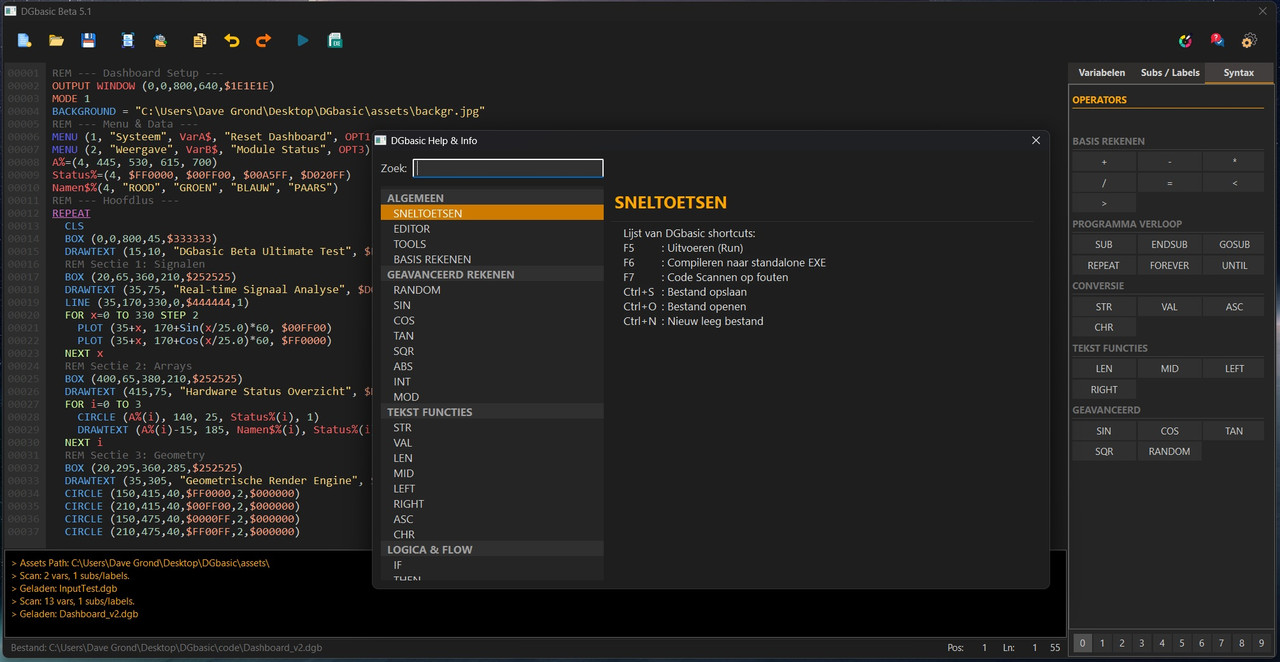
The IDE: The code editor is built from scratch using a CanvasGadget. It handles custom syntax highlighting, line numbers, cursor management, and even a custom-built help system overlay.

The Language: DGbasic acts as a transpiler. It parses the custom retro-syntax (like single-line IF...THEN...ELSE, GOSUB, and simplified Graphics commands) and translates it into optimized PureBasic code.

The Output: It then utilizes the PureBasic compiler (via CLI) to generate standalone EXEs.

Key Features (Beta 5.1):
Retro Syntax: Simplified commands for 2D graphics, sprites, and logic.
Modern UI: A custom Dark Mode interface with integrated tools (Color Picker, Syntax Helper, Asset Manager).
Graphics Wrapper: It wraps PureBasic's powerful VectorDrawing and Sprite libraries into easy-to-use commands like OUTPUT DARKWINDOW, SPRITELOAD, and DRAWTEXT.
Hot-Swap Testing: You can run code directly from the IDE or compile to an executable.
It's been a great challenge to build an entire IDE logic using PureBasic's gadget system. It really shows how flexible PB is for creating custom tools.

Here is a screenshot of the current build (Beta 5.1):
Image

I'm still actively developing it, adding more commands and refining the editor logic. Thanks for looking!
Master of modern PureBasic interface design.
(I just ask my AI to draw rectangles on a Canvas until it accidentally looks like a button.)
Fred
Administrator
Administrator
Posts: 18514
Joined: Fri May 17, 2002 4:39 pm
Location: France
Contact:

Re: DGbasic: A Retro-Style IDE built 100% in PureBasic

Post by Fred »

WOW ! :shock:
User avatar
Mindphazer
Enthusiast
Enthusiast
Posts: 530
Joined: Mon Sep 10, 2012 10:41 am
Location: Savoie

Re: DGbasic: A Retro-Style IDE built 100% in PureBasic

Post by Mindphazer »

Indeed !
Just WOW
MacBook Pro 16" M4 Pro - 24 Gb - MacOS 26.1 - Iphone 17 Pro Max - iPad at home
...and unfortunately... Windows at work...
BarryG
Addict
Addict
Posts: 4331
Joined: Thu Apr 18, 2019 8:17 am

Re: DGbasic: A Retro-Style IDE built 100% in PureBasic

Post by BarryG »

Looks interesting. Would love to test it. :) But, it's not for PureBasic code? Which BASIC does it translate from?
dcr3
Enthusiast
Enthusiast
Posts: 191
Joined: Fri Aug 04, 2017 11:03 pm

Re: DGbasic: A Retro-Style IDE built 100% in PureBasic

Post by dcr3 »

BarryG wrote: Mon Feb 16, 2026 11:36 pm Looks interesting. Would love to test it. :) But, it's not for PureBasic code? Which BASIC does it translate from?
DaveG wrote: Mon Feb 16, 2026 7:36 pm The Language: DGbasic acts as a transpiler. It parses the custom retro-syntax (like single-line IF...THEN...ELSE, GOSUB, and simplified Graphics commands) and translates it into optimized PureBasic code.

The Output: It then utilizes the PureBasic compiler (via CLI) to generate standalone EXEs.
Axolotl
Addict
Addict
Posts: 936
Joined: Wed Dec 31, 2008 3:36 pm

Re: DGbasic: A Retro-Style IDE built 100% in PureBasic

Post by Axolotl »

Looks nice. Very well done.
Surely something for the showcase area.
Just because it worked doesn't mean it works.
PureBasic 6.04 (x86) and <latest stable version and current alpha/beta> (x64) on Windows 11 Home. Now started with Linux (VM: Ubuntu 22.04).
BarryG
Addict
Addict
Posts: 4331
Joined: Thu Apr 18, 2019 8:17 am

Re: DGbasic: A Retro-Style IDE built 100% in PureBasic

Post by BarryG »

@dcr3: I know that, but there's lot of old BASIC dialects out there. I was wondering which custom retro-syntaxes it supports.
User avatar
DaveG
New User
New User
Posts: 5
Joined: Mon Feb 16, 2026 7:19 pm
Location: Nl

Re: DGbasic: A Retro-Style IDE built 100% in PureBasic

Post by DaveG »

Thanks everyone for the kind words! It’s really encouraging to see this kind of feedback :)

@BarryG: Good question. It doesn't emulate one specific dialect 1:1. Instead, it is a custom blend heavily inspired by the syntax of GW-BASIC, Commodore 64 BASIC, and Sinclair BASIC.

The goal is to capture that specific "retro feel" (like single-line logic and simple commands), but I've expanded it with modern functions that you wouldn't find in those old dialects—specifically to take advantage of PureBasic's modern vector drawing and engine capabilities. It's basically the best of both worlds: 80s simplicity with 2026s performance.

As for testing it: I'm afraid it will take quite a while before I have a public release ready. There is still a lot of development and refining to do before it's stable enough for public use.

Cheers,
Dave
Master of modern PureBasic interface design.
(I just ask my AI to draw rectangles on a Canvas until it accidentally looks like a button.)
threedslider
Enthusiast
Enthusiast
Posts: 603
Joined: Sat Feb 12, 2022 7:15 pm

Re: DGbasic: A Retro-Style IDE built 100% in PureBasic

Post by threedslider »

Impressive work !

I am looking forward to your project :shock:

And Welcome to this forum as well ! :wink:
User avatar
idle
Always Here
Always Here
Posts: 6202
Joined: Fri Sep 21, 2007 5:52 am
Location: New Zealand

Re: DGbasic: A Retro-Style IDE built 100% in PureBasic

Post by idle »

That's pretty neat. Doing the editor in the canvas is quite a bit of work.
User avatar
Kwai chang caine
Always Here
Always Here
Posts: 5664
Joined: Sun Nov 05, 2006 11:42 pm
Location: Lyon - France

Re: DGbasic: A Retro-Style IDE built 100% in PureBasic

Post by Kwai chang caine »

Really splendid !!! :shock:
Incredible to see a new time what PB can create when it is in MASTERS hands 8)

Unfortunately, I'm not really a fan of games, although I find them very impressive and beautiful. 8)

My love is utilities tools, and here..your jewel is apparently on the top of realization i have so far see :shock:
Congratulations !!! i understand you are proud of your amazing and surely very long work :wink:
Furthermore... In canvas... Respect.. 8)
ImageThe happiness is a road...
Not a destination

PureBasic French Forum
Axolotl
Addict
Addict
Posts: 936
Joined: Wed Dec 31, 2008 3:36 pm

Re: DGbasic: A Retro-Style IDE built 100% in PureBasic

Post by Axolotl »

Just out of curiosity...
Have you created your own text editor based on Canvas, or do you use Mr.L's?
Hint: Nice Implementation of PBEdit - a Canvas-based Texteditor
Just because it worked doesn't mean it works.
PureBasic 6.04 (x86) and <latest stable version and current alpha/beta> (x64) on Windows 11 Home. Now started with Linux (VM: Ubuntu 22.04).
User avatar
DaveG
New User
New User
Posts: 5
Joined: Mon Feb 16, 2026 7:19 pm
Location: Nl

Re: DGbasic: A Retro-Style IDE built 100% in PureBasic

Post by DaveG »

Thanks again everyone for the amazing and kind words!

In the spirit of full transparency, I have a confession to make: my actual programming skills are still quite basic. So, to Kwai chang caine—thank you, but I am definitely not the "master" you mentioned! 😉 I’ve been more of a director on this project, while my AI co-pilot (Gemini) wrote the actual code based on my ideas and logic.
To answer your question, Axolotl: no, the editor doesn't use any external base code like Mr.L's PBEdit. Every single feature in that canvas—from selecting text to the copy/paste logic—was built completely from the ground up by me, through a lot of trial, error, and collaboration with the AI.

It’s been a fantastic learning experience. It also shows how accessible software development is becoming, when someone with limited experience can piece together a functioning retro IDE with the help of AI. I have immense respect for the true PureBasic veterans here who code all of this by hand!

Thanks again for the warm welcome and support!
Master of modern PureBasic interface design.
(I just ask my AI to draw rectangles on a Canvas until it accidentally looks like a button.)
SMaag
Enthusiast
Enthusiast
Posts: 381
Joined: Sat Jan 14, 2023 6:55 pm
Location: Bavaria/Germany

Re: DGbasic: A Retro-Style IDE built 100% in PureBasic

Post by SMaag »

I just tried Gemini 2.5 for Purebasic programming.
It's much better for Purebasic than ChatGPT!
- Faster in Code generation
- less syntactical errors

Cons
- sometimes Gemini loose completely the context. In this cases it switches to pyton.
- I tried to implement a GameOver Procedure for a Game. Gemini answerd with a help text and emergency telephone numbers.
I guess Gemni thought I want to kill me!
User avatar
DaveG
New User
New User
Posts: 5
Joined: Mon Feb 16, 2026 7:19 pm
Location: Nl

Re: DGbasic: A Retro-Style IDE built 100% in PureBasic

Post by DaveG »

I'm currently using Gemini 3 for DGbasic, and the coding process has been remarkably smooth. When working on larger projects like this, I've found a few strategies that really help keep things on track:

Keep Files Small: Try not to let your .pb files grow too large. I've noticed that if a file exceeds roughly 275 lines of code, Gemini tends to start truncating its output or abbreviating sections. Breaking things down into smaller, manageable includes and procedures is key.

Work Smart with Architecture: To work around those size limitations, I implemented a plugin system. It scans a directory and automatically adds new include files as code to a central registry. This makes adding new commands a breeze without cluttering the main logic.

Be Explicit and Maintain Context: Be very clear in your prompts. Also, keep your chat sessions open to build a history of the project. This helps the AI remember past context and mistakes, which significantly improves the quality of its suggestions over time.

Let the AI Learn: Encourage the AI to gather as much information as possible about PureBasic syntax and documentation to build its knowledge base.

To give you a little peek under the hood: I designed DGbasic to be completely modular. The architecture is split into separate components like the uisystem, the main core, the babylon engine (which acts as the transpiler), a manager (which includes handy test code you can inject with a single button click), a dynamic helpfile system, a native module to pass standard PureBasic commands through 1:1, and plugins that handle all the custom commands.

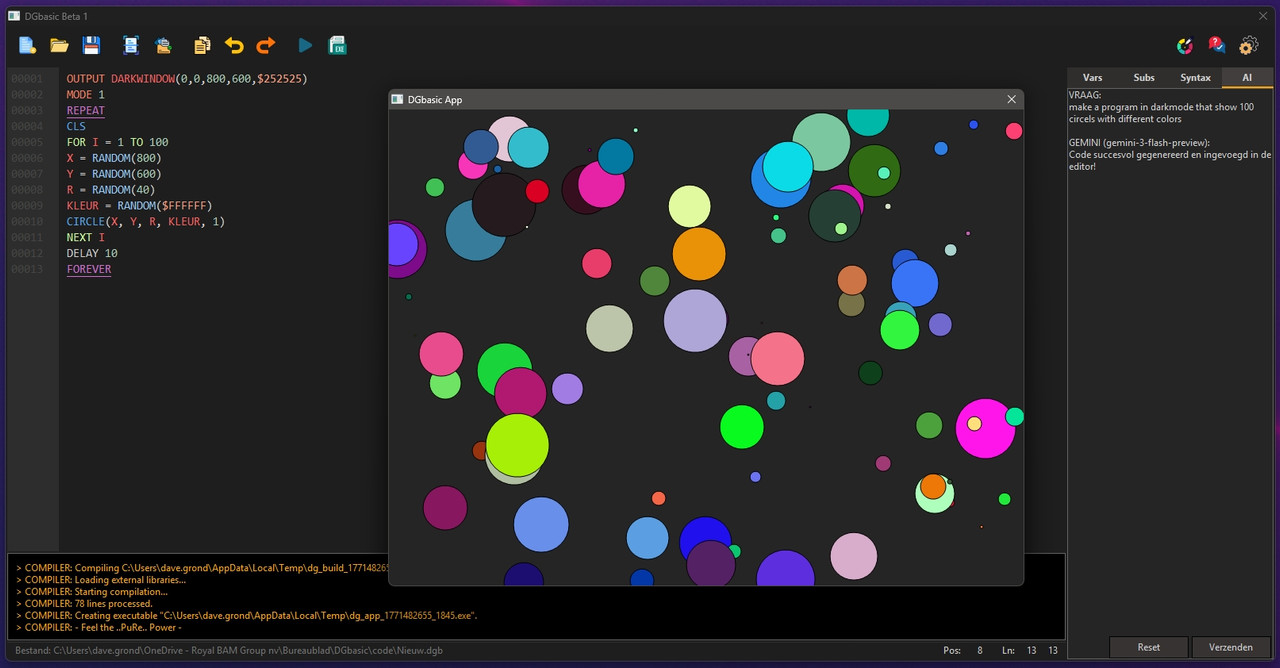
Ironically, I've actually integrated Gemini directly into the DGbasic IDE itself in the latest build! It can now generate programs using my custom retro syntax right from the interface.

As for the AI integration, it took me about 3 hours to build the Gemini API directly into the IDE to generate code on the fly. Honestly, the trickiest part of that process was figuring out how to dynamically inject all the possible DGbasic commands and rules into the API request. I had to make absolutely sure Gemini strictly followed my custom syntax, rather than hallucinating standard PureBasic commands and crashing the compiler!

Here's a screenshot of the latest build showing the AI integration:
Image
Master of modern PureBasic interface design.
(I just ask my AI to draw rectangles on a Canvas until it accidentally looks like a button.)
Post Reply