Sometimes a light source doesn't emit.

Everything related to 3D programming
siesit
User
User
Posts: 24
Joined: Fri Aug 21, 2009 8:40 am
Location: rus
Contact:

Sometimes a light source doesn't emit.

Post by siesit »

Distance greatly affects light sources; distant ones aren't rendered.
And often, some only emit light at a certain angle.

#PB_Light_Point - tested on different machines.
#PB_Light_Spot - illumination density changes unpredictably.

Is there a limit to the number of light sources, or does it depend on distance?

How can this be fixed?

Example:
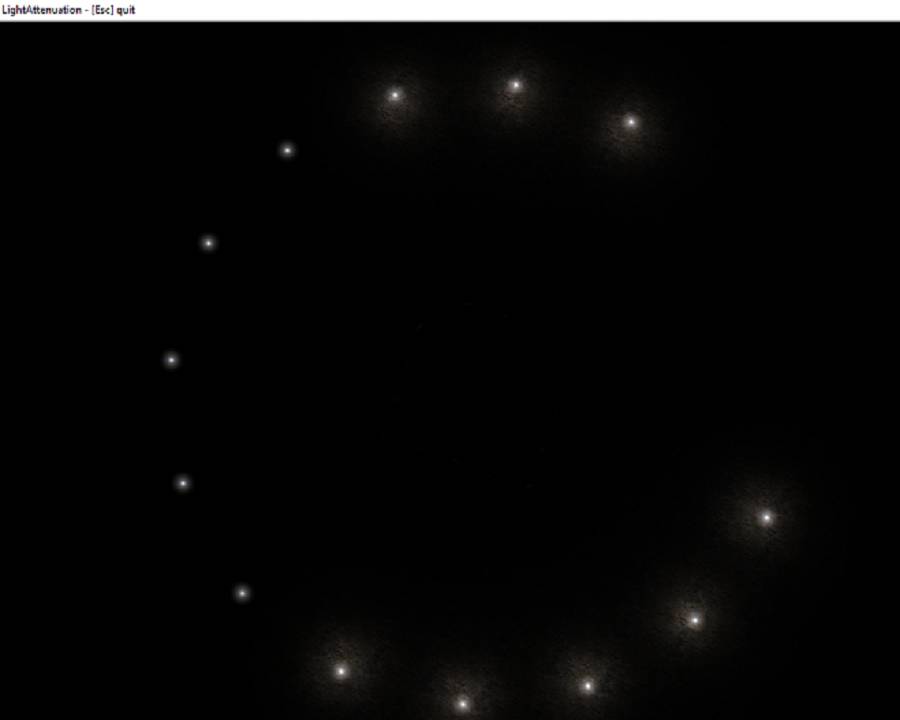
Image

Code: Select all

; ------------------------------------------------------------
;
;   PureBasic - LightAttenuation
;
;    (c) Fantaisie Software
;
; ------------------------------------------------------------
;


#CameraSpeed = 1

Define.f KeyX, KeyY, MouseX, MouseY

InitEngine3D()
InitSprite()
InitKeyboard()
InitMouse()

ExamineDesktops():dx=DesktopWidth(0)*0.8:dy=DesktopHeight(0)*0.8
OpenWindow(0, 0,0, DesktopUnscaledX(dx),DesktopUnscaledY(dy), " LightAttenuation - [Esc] quit",#PB_Window_ScreenCentered)
OpenWindowedScreen(WindowID(0), 0, 0, dx, dy, 0, 0, 0)

Add3DArchive(#PB_Compiler_Home + "examples/3d/Data/Main", #PB_3DArchive_FileSystem)
Add3DArchive(#PB_Compiler_Home + "examples/3d/Data/Textures", #PB_3DArchive_FileSystem)
Add3DArchive(#PB_Compiler_Home + "examples/3d/Data/Scripts",#PB_3DArchive_FileSystem)
Add3DArchive(#PB_Compiler_Home + "examples/3d/Data/Packs/desert.zip", #PB_3DArchive_Zip)
Parse3DScripts()

KeyboardMode(#PB_Keyboard_International)

WorldShadows(#PB_Shadow_Modulative, -1, RGB(128,128,128))

;Materials
;
CreateMaterial(1, LoadTexture(1, "Wood.jpg")):MaterialShininess(1,64,$ffffff)
CreateMaterial(2, LoadTexture(2, "Dirt.jpg"))
CreateMaterial(3, LoadTexture(3, "flare.png"))
MaterialBlendingMode(3,#PB_Material_Add)
DisableMaterialLighting(3,1)

; Ground
;
CreatePlane(0, 360, 360, 64, 64, 15, 15)
CreateEntity(0, MeshID(0), MaterialID(2))

; Meshes
;
CreateCube(1, 4)
CreateSphere(2, 2, 32,32)
CreateCapsule(3, 1.5, 3,32,32,1)
CreateTorus(4, 2, 1,32,32)

; Entities
;
For i=-2 To 2
  For j=-2 To 2
    num+1
    CreateEntity(num, MeshID(Random(3)+1), MaterialID(1), i*8*2 ,2 , j*8*2)
    RotateEntity(num,Random(360),Random(360),Random(360))
  Next
Next

; Camera
;
CreateCamera(0, 0, 0, 100, 100)
MoveCamera(0, 5, 380, -25, #PB_Absolute)
CameraLookAt(0, 0, 0, 0)

; Light
;
For ll = 0 To 12
      CreateLight(ll, RGB(255,255,255), 0, 0, 0, #PB_Light_Point)
      LightAttenuation(ll, 100, 1.0)
      
      ;- Billboard group
      ;
      CreateBillboardGroup(ll, MaterialID(3), 10, 10)
      AddBillboard(ll, 0, 0, 0)
Next


AmbientColor(RGB(0, 0, 0))

Repeat
  While WindowEvent():Wend
  
  If ExamineMouse()
    MouseX = -MouseDeltaX() * #CameraSpeed * 0.05
    MouseY = -MouseDeltaY() * #CameraSpeed * 0.05
  EndIf
  
  If ExamineKeyboard()
    KeyX = (KeyboardPushed(#PB_Key_Right)-KeyboardPushed(#PB_Key_Left))*#CameraSpeed
    Keyy = (KeyboardPushed(#PB_Key_Down)-KeyboardPushed(#PB_Key_Up))*#CameraSpeed    
  EndIf
  
  MoveCamera  (0, KeyX, 0, KeyY)
  RotateCamera(0,  MouseY, MouseX, 0, #PB_Relative)

a.f+0.001  

For ll = 0 To 12

  aa.f=a+(ll*0.4)

  MoveLight(ll,          -132*Cos(aa), 8, -132*Sin(aa),#PB_Absolute)
  MoveBillboardGroup(ll, -132*Cos(aa), 8, -132*Sin(aa),#PB_Absolute)

Next  

  RenderWorld()
  FlipBuffers()
  
Until KeyboardPushed(#PB_Key_Escape) Or Quit = 1
site created by purebasic work-flow-Initiative
miso
Enthusiast
Enthusiast
Posts: 674
Joined: Sat Oct 21, 2023 4:06 pm
Location: Hungary

Re: Sometimes a light source doesn't emit.

Post by miso »

An entity is lit with the closest 8 lights by default, I belive. With shaders, there can be more with arrayed lights or deferred lighting.
I myself not in that deep with the pb 3d yet, so maybe someone other might give you a better answer.

Edit: Bruteforce solution can be if you divide the plane into a couple of different chunks.
miso
Enthusiast
Enthusiast
Posts: 674
Joined: Sat Oct 21, 2023 4:06 pm
Location: Hungary

Re: Sometimes a light source doesn't emit.

Post by miso »

Code: Select all

; ------------------------------------------------------------
;
;   PureBasic - LightAttenuation
;
;    (c) Fantaisie Software
;
; ------------------------------------------------------------
;


#CameraSpeed = 1

Define.f KeyX, KeyY, MouseX, MouseY

InitEngine3D()
InitSprite()
InitKeyboard()
InitMouse()

ExamineDesktops():dx=DesktopWidth(0)*0.8:dy=DesktopHeight(0)*0.8
OpenWindow(0, 0,0, DesktopUnscaledX(dx),DesktopUnscaledY(dy), " LightAttenuation - [Esc] quit",#PB_Window_ScreenCentered)
OpenWindowedScreen(WindowID(0), 0, 0, dx, dy, 0, 0, 0)

Add3DArchive(#PB_Compiler_Home + "examples/3d/Data/Main", #PB_3DArchive_FileSystem)
Add3DArchive(#PB_Compiler_Home + "examples/3d/Data/Textures", #PB_3DArchive_FileSystem)
Add3DArchive(#PB_Compiler_Home + "examples/3d/Data/Scripts",#PB_3DArchive_FileSystem)
Add3DArchive(#PB_Compiler_Home + "examples/3d/Data/Packs/desert.zip", #PB_3DArchive_Zip)
Parse3DScripts()

KeyboardMode(#PB_Keyboard_International)

WorldShadows(#PB_Shadow_Modulative, -1, RGB(128,128,128))

;Materials
;
CreateMaterial(1, LoadTexture(1, "Wood.jpg")):MaterialShininess(1,64,$ffffff)
CreateMaterial(2, LoadTexture(2, "Dirt.jpg"))
CreateMaterial(3, LoadTexture(3, "flare.png"))
MaterialBlendingMode(3,#PB_Material_Add)
DisableMaterialLighting(3,1)

; Ground
;
mesh = CreatePlane(#PB_Any, 90, 90, 32, 32, 15, 15)

For i=0 To 4
  For j=0 To 4
    CreateEntity(#PB_Any, MeshID(mesh), MaterialID(2),i*90-180,0,j*90-180)
  Next j
Next i


;CreateEntity(0, MeshID(0), MaterialID(2))


; Meshes
;
CreateCube(1, 4)
CreateSphere(2, 2, 32,32)
CreateCapsule(3, 1.5, 3,32,32,1)
CreateTorus(4, 2, 1,32,32)

; Entities
;
For i=-2 To 2
  For j=-2 To 2
    num+1
    CreateEntity(num, MeshID(Random(3)+1), MaterialID(1), i*8*2 ,2 , j*8*2)
    RotateEntity(num,Random(360),Random(360),Random(360))
  Next
Next

; Camera
;
CreateCamera(0, 0, 0, 100, 100)
MoveCamera(0, 5, 380, -25, #PB_Absolute)
CameraLookAt(0, 0, 0, 0)

; Light
;
For ll = 0 To 12
      CreateLight(ll, RGB(255,255,255), 0, 0, 0, #PB_Light_Point)
      LightAttenuation(ll, 100, 1.0)
      
      ;- Billboard group
      ;
      CreateBillboardGroup(ll, MaterialID(3), 10, 10)
      AddBillboard(ll, 0, 0, 0)
Next


AmbientColor(RGB(0, 0, 0))

Repeat
  While WindowEvent():Wend
  
  If ExamineMouse()
    MouseX = -MouseDeltaX() * #CameraSpeed * 0.05
    MouseY = -MouseDeltaY() * #CameraSpeed * 0.05
  EndIf
  
  If ExamineKeyboard()
    KeyX = (KeyboardPushed(#PB_Key_Right)-KeyboardPushed(#PB_Key_Left))*#CameraSpeed
    Keyy = (KeyboardPushed(#PB_Key_Down)-KeyboardPushed(#PB_Key_Up))*#CameraSpeed    
  EndIf
  
  MoveCamera  (0, KeyX, 0, KeyY)
  RotateCamera(0,  MouseY, MouseX, 0, #PB_Relative)

a.f+0.001  

For ll = 0 To 12

  aa.f=a+(ll*0.4)

  MoveLight(ll,          -132*Cos(aa), 8, -132*Sin(aa),#PB_Absolute)
  MoveBillboardGroup(ll, -132*Cos(aa), 8, -132*Sin(aa),#PB_Absolute)

Next  

  RenderWorld()
  FlipBuffers()
  
Until KeyboardPushed(#PB_Key_Escape) Or Quit = 1

miso
Enthusiast
Enthusiast
Posts: 674
Joined: Sat Oct 21, 2023 4:06 pm
Location: Hungary

Re: Sometimes a light source doesn't emit.

Post by miso »

Also problems with the additive material. Use this:

Code: Select all

MaterialBlendingMode(3,#PB_Material_Add)
SetMaterialAttribute(3,#PB_Material_DepthWrite,#False)
SetMaterialAttribute(3,#PB_Material_AlphaReject,#True)
DisableMaterialLighting(3,1)
To remove the artifact that makes the quad rectangle visible, you have to edit the texture. (Making absolutely black the edge parts that must be invisible)
Post Reply