
Thats why i love my ventilator with watercooling. The important element is the water cooling. IT is simple and cheap to lower the temperature of the water, by cooling the water down by several degrees. That lowers the room temperature by a few degrees and is a rather affordable and easy to do method to cool down your working/sleeping room in combination with the fridge you aleady own.
ProGUI V3 Alpha 4 Ready for testing!
Re: ProGUI V3 Alpha 3 Ready for testing!
 is a thing now.
Re: ProGUI V3 Alpha 3 Ready for testing!
That's a good system, I haven't heard of water cooling in homes before. Air conditioning isn't really a thing in the UK too (apart from shops and offices) because our climiate is generally cold (so we have radiators) this is why when we do have heat waves we're totally not prepared for it.Bitblazer wrote: Tue Aug 19, 2025 8:54 amThats why i love my ventilator with watercooling. The important element is the water cooling. IT is simple and cheap to lower the temperature of the water, by cooling the water down by several degrees. That lowers the room temperature by a few degrees and is a rather affordable and easy to do method to cool down your working/sleeping room in combination with the fridge you aleady own.
ProGUI - Professional Graphical User Interface Library - http://www.progui.co.uk
-
Zach
- Addict

- Posts: 1678
- Joined: Sun Dec 12, 2010 12:36 am
- Location: Somewhere in the midwest
- Contact:
Re: ProGUI V3 Alpha 3 Ready for testing!
You guys need to be extremely aware that Evaporative coolers can make your comfort much worse. You are dumping all that moisture into the air, so you will end up with a slightly cooler environment, yes, but it will also be much more humid. Humid air holds more water by virtue of the fact it is warmer. SO you can end up with not much temperature reduction, but a muggy environment.
Better off to save up your money and buy a window unit of some sort for a dedicated room, or if you have the airflow, one or two units to help cool down the whole house. Of course that will also depend on electricity prices, but I know I'd never dream of using an evaporative cooler unless I lived in the literal desert (a hot and dry environment with low humidity).
In the USA they are nicknamed "swamp coolers" because that's what they turn the environment into.
Better off to save up your money and buy a window unit of some sort for a dedicated room, or if you have the airflow, one or two units to help cool down the whole house. Of course that will also depend on electricity prices, but I know I'd never dream of using an evaporative cooler unless I lived in the literal desert (a hot and dry environment with low humidity).
In the USA they are nicknamed "swamp coolers" because that's what they turn the environment into.
-
Zach
- Addict
- Posts: 1678
- Joined: Sun Dec 12, 2010 12:36 am
- Location: Somewhere in the midwest
- Contact:
Re: ProGUI V3 Alpha 3 Ready for testing!
Hey Chris,
hope you didn't get cooked alive
hope you didn't get cooked alive
Re: ProGUI V3 Alpha 3 Ready for testing!
 barely lol Thankfully autumn is here now!
ProGUI - Professional Graphical User Interface Library - http://www.progui.co.uk
Re: ProGUI V3 Alpha 3 Ready for testing!
Hi guys, back on track now after having a bit of a break.
Skins now support global variables (which are accessible by all skins) with the new SkinSetGlobalVariable(Name.s, Value.s, noUpdate = #False) command. e.g. SkinSetGlobalVariable("my-color", "rgb(255, 0, 0)") So skin CSS examples look like this:
The SkinSetGlobalVariable() command by default will automatically update all windows / widgets with a skin and any property value that has the global variable specified with the CSS 'var()' command (without the '--' prefix). The Value parameter can be anything for example it could be "url('Icons/Window/96_minDark_n.png')" so think of the CSS var() command like a macro replacement.
This was needed with full window skinning to correctly grab the system colours (accent) etc dynamically. Currently implemented global variables:
The cool thing is when creating your own custom widgets you can respect the user's choosen accent color easily etc.. and this will automatically update when the user changes their settings.
Skins now support global variables (which are accessible by all skins) with the new SkinSetGlobalVariable(Name.s, Value.s, noUpdate = #False) command. e.g. SkinSetGlobalVariable("my-color", "rgb(255, 0, 0)") So skin CSS examples look like this:
Code: Select all
SkinSetValue("titlebar", "", "", "background", "var(color-accent)")
SkinSetValue("titlebar", "", "", "background", "linear-gradient(var(color-accent), var(color-accent-dark1))")
SkinSetValue("window", "", "", "border", "1px var(color-winborder-active) mask-inner")
This was needed with full window skinning to correctly grab the system colours (accent) etc dynamically. Currently implemented global variables:
Code: Select all
color-accent
color-accent-dark1
color-accent-dark2
color-accent-dark3
color-accent-light1
color-accent-light2
color-accent-light3
color-foreground
color-background
color-winborder-active
color-winborder-inactive
ProGUI - Professional Graphical User Interface Library - http://www.progui.co.uk
Re: ProGUI V3 Alpha 3 Ready for testing!
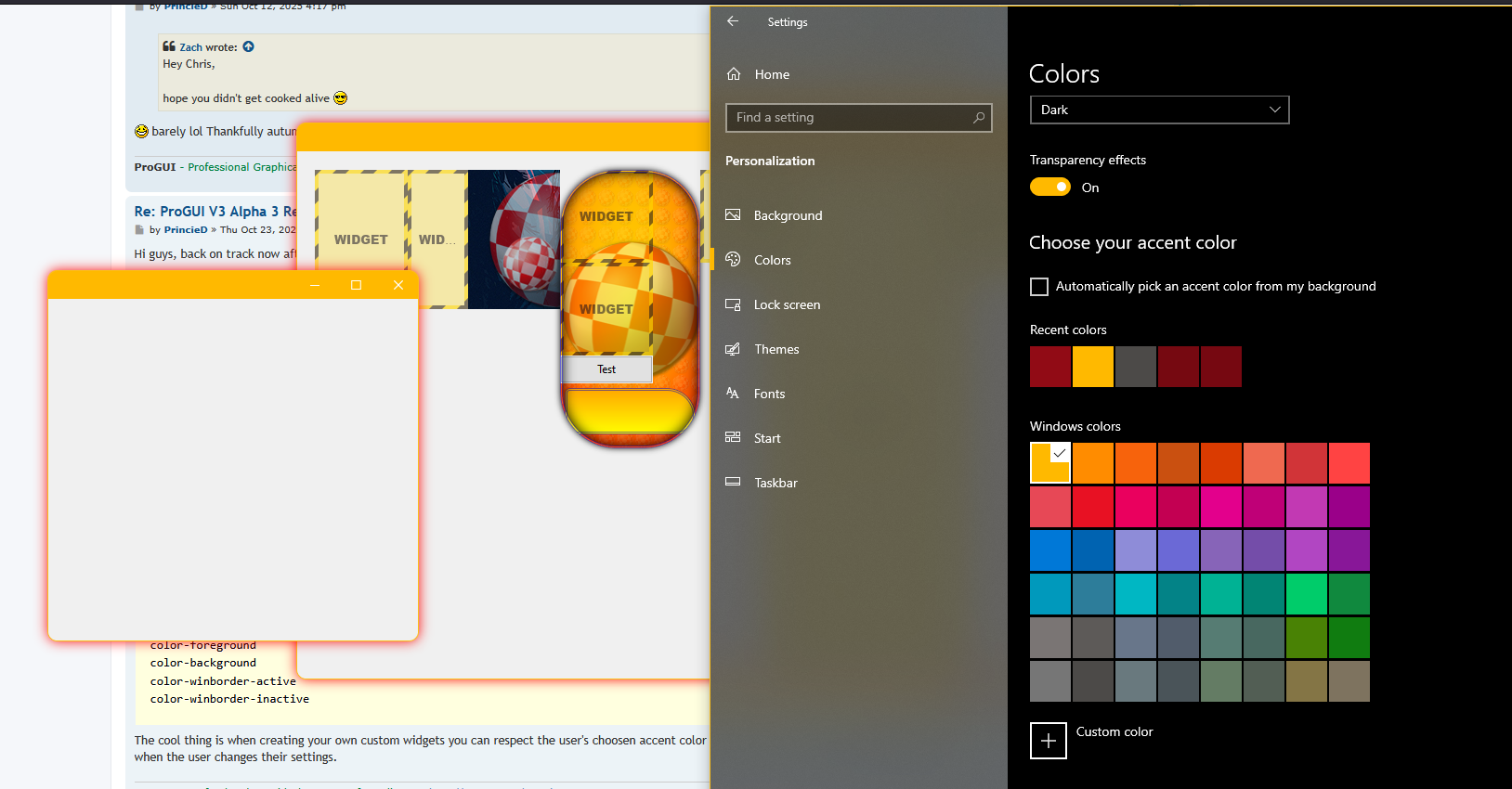
Code: Select all
SkinSetValue("window", "", "", "border-radius", "10px")Ignore the red drop-shadow (SkinSetValue("window", "", "", "box-shadow", "0 0 20px red")) - that's still for testing
ProGUI - Professional Graphical User Interface Library - http://www.progui.co.uk
Re: ProGUI V3 Alpha 3 Ready for testing!
Hi guys, just a quick update.
The event handler engine can now handle adding window specific events to a widget (and not just a window object) with the AddEventHandler(Object, EventType, *Callback, *UserData = #Null) command, for example:
AddEventHandler(mySuperCoolWidget, #PG_Event_WindowMinimize, @WidgetMinimizeEventHandler())
This works regardless of what window the widget is currently in so the LayoutInsertWidget(Layout, Widget, Index = #PG_Last, Flags = #Null) command works automatically depending on what window the layout is in (if any). Makes it dead easy to handle events like #PG_Event_WindowActivate / #PG_Event_WindowDeactivate where you would probably do a WidgetSetSkinState(Widget, State.s = "", Component.s = "") command inside the event callback (as is the case with the window TitleBar widget!).
The full window skinning TitleBar widget is coming along nicely with the system command hover and active button CSS styles now fully respecting the OS settings for accent color and "Title bars and window borders" option with new global CSS variables "var(color-titlebar-active)", "var(color-titlebar-active-button-hover)", "var(color-titlebar-active-button-active)". It's been a pain reversing how Windows calculates these different shades as there is no API.
This is what the TitleBar widget CSS currently looks like:
Hopefully have the beta out for Christmas (fingers crossed!)
Cheers! Chris.
The event handler engine can now handle adding window specific events to a widget (and not just a window object) with the AddEventHandler(Object, EventType, *Callback, *UserData = #Null) command, for example:
AddEventHandler(mySuperCoolWidget, #PG_Event_WindowMinimize, @WidgetMinimizeEventHandler())
This works regardless of what window the widget is currently in so the LayoutInsertWidget(Layout, Widget, Index = #PG_Last, Flags = #Null) command works automatically depending on what window the layout is in (if any). Makes it dead easy to handle events like #PG_Event_WindowActivate / #PG_Event_WindowDeactivate where you would probably do a WidgetSetSkinState(Widget, State.s = "", Component.s = "") command inside the event callback (as is the case with the window TitleBar widget!).
The full window skinning TitleBar widget is coming along nicely with the system command hover and active button CSS styles now fully respecting the OS settings for accent color and "Title bars and window borders" option with new global CSS variables "var(color-titlebar-active)", "var(color-titlebar-active-button-hover)", "var(color-titlebar-active-button-active)". It's been a pain reversing how Windows calculates these different shades as there is no API.
This is what the TitleBar widget CSS currently looks like:
Code: Select all
SkinSetValue("titlebar", "", "", "background", "var(color-titlebar-active)")
SkinSetValue("titlebar", "", "", "color", "white")
SkinSetValue("titlebar", "", "", "text-align", "center")
SkinSetValue("titlebar", "", "", "vertical-align", "center")

; minimize button
SkinSetValue("titlebarMinimize", "", "", "background", "url('Icons/Window/96_minDark_n.png')")
SkinSetValue("titlebarMinimize", "", "", "background-repeat", "no-repeat")
SkinSetValue("titlebarMinimize", "", "", "background-position", "center")
SkinSetValue("titlebarMinimize", "hover", "", "background", "url('Icons/Window/96_minDark_n.png'), var(color-titlebar-active-button-hover)")
SkinSetValue("titlebarMinimize", "active", "", "background", "url('Icons/Window/96_minDark_n.png'), var(color-titlebar-active-button-active)")
SkinSetValue("titlebarMinimize", "hover-active", "", "background", "url('Icons/Window/96_minDark_n.png'), #5E5C5B00") ;- !! is this needed?
SkinSetValue("titlebarMinimize", "", "", "transition", "background .3s, border .3s")
SkinSetValue("titlebarMinimize", "hover", "", "transition", "background 0s, border 0s")
SkinSetValue("titlebarMinimize", "hover-active", "", "transition", "background 0s, border 0s")

; maximize button
SkinSetValue("titlebarMaximize", "", "", "background", "url('Icons/Window/96_maxDark_n.png')")
SkinSetValue("titlebarMaximize", "", "", "background-repeat", "no-repeat")
SkinSetValue("titlebarMaximize", "", "", "background-position", "center")
SkinSetValue("titlebarMaximize", "hover", "", "background", "url('Icons/Window/96_maxDark_n.png'), var(color-titlebar-active-button-hover)")
SkinSetValue("titlebarMaximize", "active", "", "background", "url('Icons/Window/96_maxDark_n.png'), var(color-titlebar-active-button-active)")
SkinSetValue("titlebarMaximize", "hover-active", "", "background", "url('Icons/Window/96_maxDark_n.png'), #5E5C5B00")
SkinSetValue("titlebarMaximize", "", "", "transition", "background .3s, border .3s")
SkinSetValue("titlebarMaximize", "hover", "", "transition", "background 0s, border 0s")
SkinSetValue("titlebarMaximize", "hover-active", "", "transition", "background 0s, border 0s")

; close button
SkinSetValue("titlebarClose", "", "", "background", "url('Icons/Window/96_close_n.png'), #E8112300")
SkinSetValue("titlebarClose", "", "", "background-repeat", "no-repeat")
SkinSetValue("titlebarClose", "", "", "background-position", "center")
SkinSetValue("titlebarClose", "hover", "", "background", "url('Icons/Window/96_close_n.png'), #E81123")
SkinSetValue("titlebarClose", "active", "", "background", "url('Icons/Window/96_close_n.png'), #A92831")
SkinSetValue("titlebarClose", "hover-active", "", "background", "url('Icons/Window/96_close_n.png'), #E8112300")
SkinSetValue("titlebarClose", "", "", "transition", "background .3s, border .3s")
SkinSetValue("titlebarClose", "hover", "", "transition", "background 0s, border 0s")
SkinSetValue("titlebarClose", "hover-active", "", "transition", "background 0s, border 0s")Cheers! Chris.
ProGUI - Professional Graphical User Interface Library - http://www.progui.co.uk
-
Zach
- Addict
- Posts: 1678
- Joined: Sun Dec 12, 2010 12:36 am
- Location: Somewhere in the midwest
- Contact:
Re: ProGUI V3 Alpha 3 Ready for testing!
Cool stuff man
Re: ProGUI V3 Alpha 3 Ready for testing!
Thanks man, it's getting there

ProGUI - Professional Graphical User Interface Library - http://www.progui.co.uk
Re: ProGUI V3 Alpha 3 Ready for testing!
Hi guys another quick update:
The Titlebar widget default CSS currently looks like this:
Notice the global CSS 'var' commands.
And inside the internal 'updateCachedSystemMetrics()' OS procedure we have:
Notice the new CSS 'url' commands at the end of the semi-colon separated list.
'trim' trims/crops the images to none alpha pixels and the new 'snaptodpi' command chooses the nearest DPI image in the list using the current output DPI regardless of the specified width / height (which is centred to the expected DPI width and height). These commands were needed for full window skinning because MS bakes in the offsets (which are incorrect) into the actual image which I'm extracting from "aero.mstyles". So the correct glyphs/icons now display correctly regardless (minimize, maximize, close) of whether you have a light or dark colored accent color or "Title bars and window borders" is selected in your system settings or monitor DPI.
Here is a current complete list of new stuff since the last alpha:
So I don't think the first beta will be ready for Christmas but instead I'll release Alpha 4 (in the next couple of days before I go on holiday myself!) in whatever state it's in
Chris.
The Titlebar widget default CSS currently looks like this:
Code: Select all
SkinSetValue("titlebar", "", "", "background", "var(color-titlebar-active)")
SkinSetValue("titlebar", "", "", "color", "white")
SkinSetValue("titlebar", "", "", "text-align", "center")
SkinSetValue("titlebar", "", "", "vertical-align", "center")

SkinSetValue("titlebar", "deactive", "", "background", "white")

; minimize button
SkinSetValue("titlebarMinimize", "", "", "background", "var(glyph-titlebar-active-min) no-repeat center")
SkinSetValue("titlebarMinimize", "hover", "", "background", "var(glyph-titlebar-active-min) no-repeat center, var(color-titlebar-active-button-hover)")
SkinSetValue("titlebarMinimize", "active", "", "background", "var(glyph-titlebar-active-min) no-repeat center, var(color-titlebar-active-button-active)")
SkinSetValue("titlebarMinimize", "hover-active", "", "background", "var(glyph-titlebar-active-min) no-repeat center")
SkinSetValue("titlebarMinimize", "", "", "transition", "background .3s, border .3s")
SkinSetValue("titlebarMinimize", "hover", "", "transition", "background 0s, border 0s")
SkinSetValue("titlebarMinimize", "hover-active", "", "transition", "background 0s, border 0s")

; maximize button
SkinSetValue("titlebarMaximize", "", "", "background", "var(glyph-titlebar-active-max) no-repeat center")
SkinSetValue("titlebarMaximize", "hover", "", "background", "var(glyph-titlebar-active-max) no-repeat center, var(color-titlebar-active-button-hover)")
SkinSetValue("titlebarMaximize", "active", "", "background", "var(glyph-titlebar-active-max) no-repeat center, var(color-titlebar-active-button-active)")
SkinSetValue("titlebarMaximize", "hover-active", "", "background", "var(glyph-titlebar-active-max) no-repeat center")
SkinSetValue("titlebarMaximize", "", "", "transition", "background .3s, border .3s")
SkinSetValue("titlebarMaximize", "hover", "", "transition", "background 0s, border 0s")
SkinSetValue("titlebarMaximize", "hover-active", "", "transition", "background 0s, border 0s")

; close button
SkinSetValue("titlebarClose", "", "", "background", "var(glyph-titlebar-active-close) no-repeat center, var(color-titlebar-close)")
SkinSetValue("titlebarClose", "hover", "", "background", "var(glyph-titlebar-active-close-hover) no-repeat center, var(color-titlebar-close-hover)")
SkinSetValue("titlebarClose", "active", "", "background", "var(glyph-titlebar-active-close-hover) no-repeat center, var(color-titlebar-close-active)")
SkinSetValue("titlebarClose", "hover-active", "", "background", "var(glyph-titlebar-active-close) no-repeat center, var(color-titlebar-close)")
SkinSetValue("titlebarClose", "", "", "transition", "background .3s, border .3s")
SkinSetValue("titlebarClose", "hover", "", "transition", "background 0s, border 0s")
SkinSetValue("titlebarClose", "hover-active", "", "transition", "background 0s, border 0s")And inside the internal 'updateCachedSystemMetrics()' OS procedure we have:
Code: Select all
If Not useAccent Or (useAccent And _IsAccentColorLight())
	Debug "!!! accent color is light"

	SkinSetGlobalVariable("glyph-titlebar-active-min", "url('Icons/Window/96_min_n.png; 120_min_n.png; 144_min_n.png; snaptodpi trim')", #True)
	SkinSetGlobalVariable("glyph-titlebar-active-max", "url('Icons/Window/96_max_n.png; 120_max_n.png; 144_max_n.png; snaptodpi trim')", #True)
	SkinSetGlobalVariable("glyph-titlebar-active-close", "url('Icons/Window/96_close_n.png; 120_close_n.png; 144_close_n.png; snaptodpi trim')", #True)
	SkinSetGlobalVariable("glyph-titlebar-active-close-hover", "url('Icons/Window/96_close_h.png; 120_close_h.png; 144_close_h.png; snaptodpi trim')", #True)

Else
	Debug "!!! accent color is dark"

	SkinSetGlobalVariable("glyph-titlebar-active-min", "url('Icons/Window/96_minDark_n.png; 120_minDark_n.png; 144_minDark_n.png; snaptodpi trim')", #True)
	SkinSetGlobalVariable("glyph-titlebar-active-max", "url('Icons/Window/96_maxDark_n.png; 120_maxDark_n.png; 144_maxDark_n.png; snaptodpi trim')", #True)
	SkinSetGlobalVariable("glyph-titlebar-active-close", "url('Icons/Window/96_closeDark_n.png; 120_closeDark_n.png; 144_closeDark_n.png; snaptodpi trim')", #True)
	SkinSetGlobalVariable("glyph-titlebar-active-close-hover", "url('Icons/Window/96_closeDark_h.png; 120_closeDark_h.png; 144_closeDark_h.png; snaptodpi trim')", #True)

EndIf
'trim' trims/crops the images to none alpha pixels and the new 'snaptodpi' command chooses the nearest DPI image in the list using the current output DPI regardless of the specified width / height (which is centred to the expected DPI width and height). These commands were needed for full window skinning because MS bakes in the offsets (which are incorrect) into the actual image which I'm extracting from "aero.mstyles". So the correct glyphs/icons now display correctly regardless (minimize, maximize, close) of whether you have a light or dark colored accent color or "Title bars and window borders" is selected in your system settings or monitor DPI.
Here is a current complete list of new stuff since the last alpha:
Code: Select all
StopAnimation(Object, ID, Flags = #Null) -> new #PG_Animation_Kill and #PG_Any for ID
WidgetFree -> FreeWidget
FreeLayout
FreeWindow
WidgetSetLayout -> updated
WindowSetLayout
LayoutInsertWidget
WidgetGetLayoutIndex
WidgetGetParentLayout
WidgetGetParentWidget
LayoutGetParentWindow
LayoutGetParentWidget
LayoutGetParentLayout
SaveImg
LoadImg -> upgraded to handle multiple altSize imgs in path and snaptosize
dark theme for scrollbars
CreateText uses default system font and point size if not specified
TextSetFontName
TextSetPointSize
DrawSkinText
New root CSS class
CSS engine now supports inheritence with "inherit" keyword for property value
CSS engine automatically inherits font and text properties
CSS engine now supports individual widget styling by name/id (#myWidgetName) as well as class with missing properties inherited from the class if set
DrawImgShadow
DrawImgShadowEx
DrawImgShadowInset
DrawImgShadowInsetEx
DrawSkinBoxShadow
CSS "box-shadow" property now working complete with animation transitions, additional none standard CSS flags "inside" (shadow is rendered from inside the border radius), "outside" (shadow is rendered from the outside border radius), "background" (inset shadow is rendered on top of the background), "above" (inset shadow is rendered on top of the draw event rendering), "infront" (inset shadow is rendered on top of all widgets in the widget's layout), "ontop" (inset shadow is rendered on top of widgets and scrollbars)
Widgets now handle rendering the skin background and box-shadow automatically (as well as borders) so a draw event handler isn't always needed (only for rendering specific parts/elements inside the widget).
DrawBorder now has extra #PG_DrawBorder_MaskInside, #PG_DrawBorder_MaskOutside flags
CreateButton
LayoutSetScrollBarOverflow
LayoutGetScrollBarOverflow
CreateTitleBar
Windows are now fully skinned by default, #PG_Window_System in creation flags - uses a OS system window instead
CreateWindow - changed, removed flags and added new
WindowShow - renamed flags and added minimize / maximize
New widget flags #PG_Widget_DragWindow, #PG_Widget_NoSkinRender, #PG_Widget_NoBorder, #PG_Widget_NoSkinOutsetShadow, #PG_Widget_NoSkinBackground, #PG_Widget_NoSkinInsetShadow, #PG_Widget_NoSkinBorder
WindowGetX, WindowGetY changed (added #PG_Window_IncludeSkinDropShadow flag)
added border-mask css property with mask-inner/mask-outer and border shorthand
Skins support global variables with var(someglobalvar)
SkinSetGlobalVariable()
Window events can now be added to a widget as well as a window
Added #PG_Event_WindowActivate, #PG_Event_WindowDeactivate events
Added ImgGetContentBounds(), ImgTrim()
Added #PG_Img_Trim flag to LoadImg()
LoadImg() can now have "trim" as well as "snaptosize" commands in img path
Added #PG_Img_SnaptToDpi flag to LoadImg(), ImgSetProperty() and as command in img path.
ImgAddSize() now has optional DPI parameter.
'trim', 'snaptosize' and 'snaptodpi' commands work with CSS "url" command.Chris.
ProGUI - Professional Graphical User Interface Library - http://www.progui.co.uk
Re: ProGUI V3 Alpha 3 Ready for testing!
Hi guys happy new year! sorry I didn't get the new release out, I ran into some DirectWrite text rendering issues just before everything was ready. Solved now hopefully.
 - spot the difference (using cleartype)
And the default with grayscale rendering (for pre-multiplied layered bitmap rendering):

So there's a new TextSetRenderMode(Text, RenderMode) command and CSS property "text-rendermode" e.g. 'SkinSetValue("titlebarTitle", "", "", "text-rendermode", "cleartype")'. And also a new #PG_Widget_NoCache flag for creating widgets, so at the moment care has to be taken if you want cleartype text because cleartype doesn't work with pre-multipieled alpha bitmaps (it samples the RGB only) for example if widget caching was enabled for a widget where you wanted cleartype then it would look cack because the text would be rendering to a alpha transparent bitmap (unless the background was opaque). I'll solve this down the line with an auto flag but it's worth mentioning.
Anyway, full window skinning:

Just missing the exe icon on the left
- spot the difference (using cleartype)And the default with grayscale rendering (for pre-multiplied layered bitmap rendering):
So there's a new TextSetRenderMode(Text, RenderMode) command and CSS property "text-rendermode" e.g. 'SkinSetValue("titlebarTitle", "", "", "text-rendermode", "cleartype")'. And also a new #PG_Widget_NoCache flag for creating widgets, so at the moment care has to be taken if you want cleartype text because cleartype doesn't work with pre-multipieled alpha bitmaps (it samples the RGB only) for example if widget caching was enabled for a widget where you wanted cleartype then it would look cack because the text would be rendering to a alpha transparent bitmap (unless the background was opaque). I'll solve this down the line with an auto flag but it's worth mentioning.
Anyway, full window skinning:
Just missing the exe icon on the left
ProGUI - Professional Graphical User Interface Library - http://www.progui.co.uk
Re: ProGUI V3 Alpha 3 Ready for testing!
https://www.youtube.com/shorts/jBkgW6EjDCk
Extreme skinning:
lol
Extreme skinning:
Code: Select all
SkinSetValue("window", "", "", "border-radius", "50px")
SkinSetValue("window", "inactive", "", "border-radius", "0px")
SkinSetValue("window", "", "", "transition", "border-radius 1s")
SkinSetValue("window", "inactive", "", "transition", "border-radius 1s")ProGUI - Professional Graphical User Interface Library - http://www.progui.co.uk
Re: ProGUI V3 Alpha 3 Ready for testing!
Hi guys, I've improved window resize rendering performance by roughly 2x using a dynamic DirectCompositon comit wait mode. I keep a rolling average of how long the GPU takes to render a scene and then calcaulate when the DWM (Desktop Window Manager) next present frame is due, if the average will take longer than the next frame can present then I do a DCompDevice->WaitForCommitCompletion() which will wait until the GPU has finished before swapping the "Window" buffers. The result is the occasional dropped frame (and rare DirectX glitching/tearing) but the perfromance is far better than WaitForCommitCompletion() constantly (which is perfect, however because the CPU and GPU are waiting it destroys the performance you would get with the asynchronous behaviour). I can toggle this on and off with a compiler constant, the glitches are rare so I think the perfomance improvement is worth it!
Chris.
Chris.
ProGUI - Professional Graphical User Interface Library - http://www.progui.co.uk
Re: ProGUI V3 Alpha 3 Ready for testing!
Hi guys, could you give this Alpha 4 demo a test please?
https://www.progui.co.uk/downloads/Alpha4_test.zip
I'm mainly interested in what the rendering performance is like on window resizing (it should open up 2 windows, a blank window and a window with a flex layout and some nested widgets with CSS skin effects such as drop-shadow and a win32 button). This is using full window skinning and the "Windows 10" skin should be almost indestinguashable from a native window (if your're running this on Windows 11 then it will obviously look like a Windows 10 window - haven't wrote the windows 11 CSS skin yet) - go mad with the window resizing, try dragging from the top left corner and look at the bottom right corner, it should be rock solid. Also try moving to a different DPI monitor - it should all automatically resize. Also try Aero snapping, that should all work too. It should also respect what ever colour settings you've defined in your OS and automatically update when you change them.
Thanks!
Chris.
https://www.progui.co.uk/downloads/Alpha4_test.zip
I'm mainly interested in what the rendering performance is like on window resizing (it should open up 2 windows, a blank window and a window with a flex layout and some nested widgets with CSS skin effects such as drop-shadow and a win32 button). This is using full window skinning and the "Windows 10" skin should be almost indestinguashable from a native window (if your're running this on Windows 11 then it will obviously look like a Windows 10 window - haven't wrote the windows 11 CSS skin yet) - go mad with the window resizing, try dragging from the top left corner and look at the bottom right corner, it should be rock solid. Also try moving to a different DPI monitor - it should all automatically resize. Also try Aero snapping, that should all work too. It should also respect what ever colour settings you've defined in your OS and automatically update when you change them.
Thanks!
Chris.
ProGUI - Professional Graphical User Interface Library - http://www.progui.co.uk