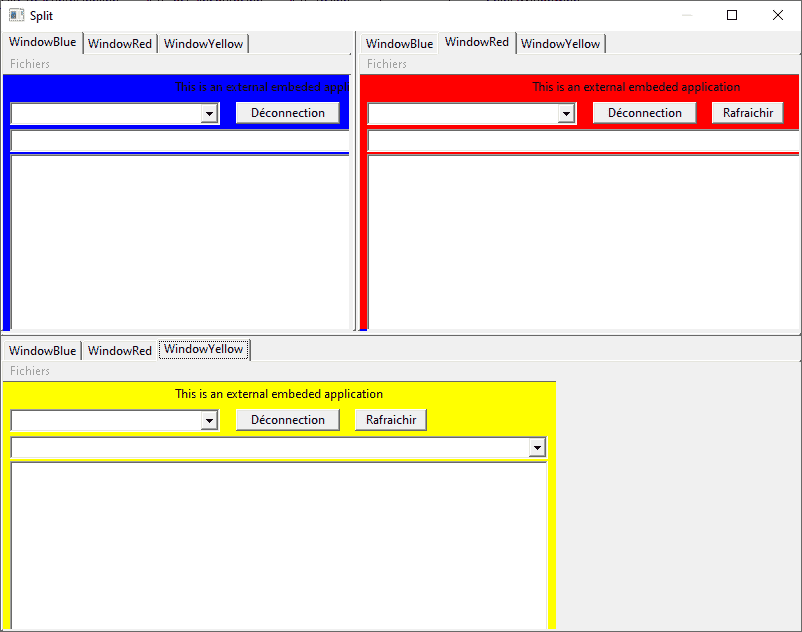
Exe including in splitter not appears [Resolved]

Just starting out? Need help? Post your questions and find answers here.
User avatar
Kwai chang caine
Always Here
Always Here
Posts: 5614
Joined: Sun Nov 05, 2006 11:42 pm
Location: Lyon - France

Exe including in splitter not appears [Resolved]

Post by Kwai chang caine »

Hello at all

I'm always on this #~@£§! of code :twisted: since one week and by force of try to debug it...i doubt of all and i'm desperate :|
If someone understand why the exes embeded not appears :cry:

https://prov.reec.fr/Splitter_Kcc_3.zip

Code: Select all

; https://www.purebasic.fr/english/viewtopic.php?p=649199#p649199 [CHI]
; https://www.purebasic.fr/english/viewtopic.php?p=45782#p45782 [Danilo]

Structure Addon
 Name.s
 Id_Run.i
 H_Addon.i
 Id_Cont.i
 H_Cont.i
EndStructure

Global Dim ArrayAddon.Addon(9)

Enumeration 100
 #FenetreProgramme
 #SplitterV
 #SplitterH
EndEnumeration

ArrayAddon(1)\Name = "WindowBlue"
ArrayAddon(2)\Name = "WindowRed"
ArrayAddon(3)\Name = "WindowYellow"
ArrayAddon(4)\Name = "WindowBlue"
ArrayAddon(5)\Name = "WindowRed"
ArrayAddon(6)\Name = "WindowYellow"
ArrayAddon(7)\Name = "WindowBlue"
ArrayAddon(8)\Name = "WindowRed"
ArrayAddon(9)\Name = "WindowYellow"

Dim ArrayColor(3)

ArrayColor(1) = #Red
ArrayColor(2) = #Yellow
ArrayColor(3) = #Blue

Procedure WindowProc(hWnd,Msg,wParam,lParam)
 
 result = #PB_ProcessPureBasicEvents
 
 If Msg = #WM_SIZE 
  
  If hWnd = WindowID(#FenetreProgramme)    
   
   ResizeGadget(#SplitterV,0,0,lParam&$FFFF,(lParam>>16)&$FFFF)
   ResizeGadget(#SplitterH,0,0,lParam&$FFFF,(lParam>>16)&$FFFF)
   result = 0
   
  Else
   
   For c = 1 To 9
    
    If hWnd = ArrayAddon(c)\H_Cont And ArrayAddon(c)\H_Addon
     SetWindowPos_(ArrayAddon(c)\H_Addon, #HWND_TOP, 0, 0, GadgetWidth(ArrayAddon(c)\Id_Cont), GadgetHeight(ArrayAddon(c)\Id_Cont), #SWP_NOZORDER|#SWP_NOACTIVATE)
     result = 0
    EndIf
    
   Next
   
  EndIf 
  
 EndIf  
 
 ProcedureReturn result
 
EndProcedure

OpenWindow(#FenetreProgramme,0,0,800,600,"Split",#PB_Window_SystemMenu|#PB_Window_ScreenCentered|#PB_Window_SizeGadget|#PB_Window_MaximizeGadget)
SetWindowCallback(@WindowProc())

For Panneau = 1 To 3
 
 PanelGadget(Panneau, 0, 0, WindowWidth(#FenetreProgramme), WindowHeight(#FenetreProgramme))
 
 For Onglet = 1 To 3
  
  MaxOnglets + 1   
  AddGadgetItem(Panneau, -1, ArrayAddon(MaxOnglets)\Name) 
  
  ; Create containers
  ArrayAddon(MaxOnglets)\Id_Cont = ContainerGadget(#PB_Any,0,0,WindowWidth(#FenetreProgramme),WindowHeight(#FenetreProgramme))
  CloseGadgetList()
  ;SetGadgetColor(ArrayAddon(MaxOnglets)\Id_Cont, #PB_Gadget_BackColor, ArrayColor(Onglet))
  ArrayAddon(MaxOnglets)\H_Cont = GadgetID(ArrayAddon(MaxOnglets)\Id_Cont)
  SetWindowLongPtr_(ArrayAddon(MaxOnglets)\H_Cont, #GWL_STYLE, GetWindowLongPtr_(ArrayAddon(MaxOnglets)\H_Cont, #GWL_STYLE)|#WS_CLIPCHILDREN) ; <- important
  
  ; Insert executable
  ArrayAddon(MaxOnglets)\Id_Run = RunProgram(GetPathPart(ProgramFilename()) + "Addons_V\" + ArrayAddon(MaxOnglets)\Name + ".exe","",GetPathPart(ProgramFilename()), #PB_Program_Open|#PB_Program_Hide)
  Delay(10)
  
  If ArrayAddon(MaxOnglets)\Id_Run
   
   While ArrayAddon(MaxOnglets)\H_Addon = #Null
    
    ArrayAddon(MaxOnglets)\H_Addon = FindWindow_(0, ArrayAddon(MaxOnglets)\Name)
    WaitWindowEvent(1)
    
   Wend
   
   Delay(100)
   SetParent_(ArrayAddon(MaxOnglets)\H_Addon, ArrayAddon(MaxOnglets)\H_Cont)
   ShowWindow_(ArrayAddon(MaxOnglets)\H_Addon, #SW_NORMAL)
   RedrawWindow_(ArrayAddon(MaxOnglets)\H_Cont, 0, 0, #RDW_INVALIDATE|#RDW_UPDATENOW)
   
  EndIf
  
 Next
 
 CloseGadgetList()
 Offset + 250
 
Next   

; splitter1 Vertical
SplitterGadget(#SplitterV,0,0,WindowWidth(#FenetreProgramme),WindowHeight(#FenetreProgramme),1,2,#PB_Splitter_Vertical|#PB_Splitter_Separator)
SetGadgetState(#SplitterV,350) ; Set splitter width

; splitter2: splitterV and Panel bas
SplitterGadget(#SplitterH,0,0,WindowWidth(#FenetreProgramme),WindowHeight(#FenetreProgramme),#SplitterV,3,#PB_Splitter_Separator)
SetGadgetState(#SplitterH,300) ; Set splitter width

Repeat
 Event = WaitWindowEvent()
Until Event = #PB_Event_CloseWindow

For i = 1 To 9
 
 If IsProgram(ArrayAddon(i)\Id_Run)
  
  KillProgram(ArrayAddon(i)\Id_Run)
  CloseProgram(ArrayAddon(i)\Id_Run)
  
 EndIf
 
Next 
Have a good day
Last edited by Kwai chang caine on Thu Dec 25, 2025 7:41 pm, edited 1 time in total.
ImageThe happiness is a road...
Not a destination

PureBasic French Forum
infratec
Always Here
Always Here
Posts: 7774
Joined: Sun Sep 07, 2008 12:45 pm
Location: Germany

Re: Exe including in splitter not appears

Post by infratec »

Your wIndow titles are wrong.
Also your x, y values of the windows are strange.

Code: Select all

OpenWindow(#Form, 0, 0, 553, 712, "WindowYellow", #PB_Window_BorderLess|#PB_Window_Invisible)
FindWindow_() searches for window titles. Your title was YellowWindow instead of WindowYellow :!:
User avatar
Kwai chang caine
Always Here
Always Here
Posts: 5614
Joined: Sun Nov 05, 2006 11:42 pm
Location: Lyon - France

Re: Exe including in splitter not appears

Post by Kwai chang caine »

Hello INFRATEC :D
Always on deck, even on Christmas Day :wink:

You find this line surely on the ColorWindows.pb, i use this code only one time for create the Windows test
I modify, the WindowColor in all the code for the constants #Yellow #Red, etc... and in the title and compile for create each windows :wink:
But the name of the windows are goods in each EXE, you can verify in taskbar when you run one of the three with the mouse
And in my code, all the value of the structure are filed, and the H_addon too, proof that Findwindow() found my window :wink:

if i adding in the "Onglet" loop that

Code: Select all

 Debug "Name = " + ArrayAddon(MaxOnglets)\Name
 Debug "Id_Run = " + ArrayAddon(MaxOnglets)\Id_Run
 Debug "H_Addon = " + ArrayAddon(MaxOnglets)\H_Addon
 Debug "Id_Cont = " + ArrayAddon(MaxOnglets)\Id_Cont
 Debug "H_Cont = " + ArrayAddon(MaxOnglets)\H_Cont + #CRLF$
i obtain
Debugger wrote:Name = WindowBlue
Id_Run = 41156536
H_Addon = 7012628
Id_Cont = 41156288
H_Cont = 2100180

Name = WindowRed
Id_Run = 41156384
H_Addon = 7734840
Id_Cont = 41156336
H_Cont = 6750510

Name = WindowYellow
Id_Run = 41156472
H_Addon = 6098710
Id_Cont = 41156424
H_Cont = 3147398

Name = WindowBlue
Id_Run = 42275560
H_Addon = 2754620
Id_Cont = 42275312
H_Cont = 4065804

Name = WindowRed
Id_Run = 42275408
H_Addon = 5638778
Id_Cont = 42275360
H_Cont = 9176668

Name = WindowYellow
Id_Run = 42275496
H_Addon = 7015224
Id_Cont = 42275448
H_Cont = 5376412

Name = WindowBlue
Id_Run = 42288320
H_Addon = 4918418
Id_Cont = 42271968
H_Cont = 5573456

Name = WindowRed
Id_Run = 42288600
H_Addon = 1576538
Id_Cont = 42272016
H_Cont = 2166216

Name = WindowYellow
Id_Run = 42288520
H_Addon = 2950332
Id_Cont = 42272064
H_Cont = 4328754
Last edited by Kwai chang caine on Thu Dec 25, 2025 7:02 pm, edited 4 times in total.
ImageThe happiness is a road...
Not a destination

PureBasic French Forum
infratec
Always Here
Always Here
Posts: 7774
Joined: Sun Sep 07, 2008 12:45 pm
Location: Germany

Re: Exe including in splitter not appears

Post by infratec »

To make it easier:

Code: Select all

Enumeration
  #Form
  #LabelTitre
  #ComboSites
  #BoutonDeconnecte
  #BoutonRafraichir
  #ComboChemins
  #Tree
  #EditorInfos
  #Menu
  #MenuParametres
EndEnumeration


If CountProgramParameters() = 1
  Color$ = ProgramParameter(0)
Else
  Color$ = "Yellow"
EndIf

Select Color$
  Case "Yellow" : Color = #Yellow
  Case "Red" : Color = #Red
  Case "Blue" : Color = #Blue
  Default 
    Color$ = "Yellow" : Color = #Yellow
EndSelect

OpenWindow(#Form, 0, 0, 553, 712, "Window" + Color$, #PB_Window_BorderLess|#PB_Window_Invisible)
TextGadget(#LabelTitre, 0, 4, 553, 19, "This is an external embeded application", #PB_Text_Center)
ComboBoxGadget(#ComboSites, 7, 27, 210, 23, #PB_ComboBox_Editable)
ButtonGadget(#BoutonDeconnecte, 233, 27, 104, 22, "Déconnection")
ButtonGadget(#BoutonRafraichir, 352, 27, 72, 22, "Rafraichir")
ComboBoxGadget(#ComboChemins, 7, 54, 538, 23, #PB_ComboBox_Editable)
TreeGadget(#Tree, 7, 79, 538, 501, #PB_Tree_AlwaysShowSelection)
EditorGadget(#EditorInfos, 7, 587, 538, 96)

SetGadgetFont(#Tree, FontID(LoadFont(#PB_Any, "Arial", 12)))
SetWindowColor(#Form, Color)
SetGadgetColor(#LabelTitre, #PB_Gadget_FrontColor, #Black)
SetGadgetColor(#LabelTitre, #PB_Gadget_BackColor, Color)


; Menu
CreateMenu(#Menu, WindowID(#Form))
MenuTitle("Fichiers")
MenuItem(#MenuParametres, "Ouvrir fichier parametre")


Repeat  
  
  Evenement = WaitWindowEvent()
  EvenementGadget = EventGadget()
  EvenementType = EventType()
  
Until Evenement = #PB_Event_CloseWindow
And

Code: Select all

:
Dim ArrayColor.s(3)

ArrayColor(1) = "Blue"
ArrayColor(2) = "Red"
ArrayColor(3) = "Yellow"
:
ArrayAddon(MaxOnglets)\Id_Run = RunProgram(GetPathPart(ProgramFilename()) + "Addons_V\Window.exe", ArrayColor((MaxOnglets - 1) % 3 + 1),GetPathPart(ProgramFilename()), #PB_Program_Open|#PB_Program_Hide)
Last edited by infratec on Thu Dec 25, 2025 7:04 pm, edited 1 time in total.
infratec
Always Here
Always Here
Posts: 7774
Joined: Sun Sep 07, 2008 12:45 pm
Location: Germany

Re: Exe including in splitter not appears

Post by infratec »

I checked the sourcecode and this was wrong.
But also x y should be 0.

I I change these, your splitter program works as expected.
Image
User avatar
Kwai chang caine
Always Here
Always Here
Posts: 5614
Joined: Sun Nov 05, 2006 11:42 pm
Location: Lyon - France

Re: Exe including in splitter not appears

Post by Kwai chang caine »

Whaaaat !!!! :shock:

You have right (Like usually 8) )
All this time lost, because i'm obsessing over these "PanelGadgets", then the problem was "simply" in the positions of the "EXE" files :shock:

I'm like a mad
Image

You are to much strong, ...only some minutes for see the problem 8)

You give to me a big christmas present, one thousand of thanks MASTER
What would become of me without you ? :oops:

Have the best christmas of the world

Image
ImageThe happiness is a road...
Not a destination

PureBasic French Forum
infratec
Always Here
Always Here
Posts: 7774
Joined: Sun Sep 07, 2008 12:45 pm
Location: Germany

Re: Exe including in splitter not appears [Resolved]

Post by infratec »

To be indpendent from the position of the foreign program ...

Code: Select all

   SetParent_(ArrayAddon(MaxOnglets)\H_Addon, ArrayAddon(MaxOnglets)\H_Cont)
   ShowWindow_(ArrayAddon(MaxOnglets)\H_Addon, #SW_NORMAL)
   ;RedrawWindow_(ArrayAddon(MaxOnglets)\H_Cont, 0, 0, #RDW_INVALIDATE|#RDW_UPDATENOW)
   GetWindowRect_(ArrayAddon(MaxOnglets)\H_Addon, @WRect.RECT)
   MoveWindow_(ArrayAddon(MaxOnglets)\H_Addon, 0, 0, WRect\right - WRect\left , WRect\bottom - WRect\top, #True)
This moves the window to 0, 0 and set redraw to true
User avatar
Kwai chang caine
Always Here
Always Here
Posts: 5614
Joined: Sun Nov 05, 2006 11:42 pm
Location: Lyon - France

Re: Exe including in splitter not appears [Resolved]

Post by Kwai chang caine »

Thanks a lot MASTER, i adding your tips immediately in my code that i redraw completely 8)
What a null bug :oops: :lol:
Have a very good night 8)
ImageThe happiness is a road...
Not a destination

PureBasic French Forum
Post Reply