WebView & JavaScript return String

Just starting out? Need help? Post your questions and find answers here.
jockerfox
New User
New User
Posts: 5
Joined: Thu Dec 11, 2025 10:35 am

WebView & JavaScript return String

Post by jockerfox »

Hi everyone.
I come from B4X and before that from XoJo.
I'm learning PureBasic and I don't mind it as a development environment. For now, I'm using the demo version because I'm evaluating it before possibly purchasing it.
I think my last problem to tackle with PureBasic is the return of a string from a JavaScript function called from PureBasic.
I'll give you two very simple code examples so you can understand me better.

THIS WORKS:

.HTML

Code: Select all

function dammivalore() {
	alert("ciao"); //-> FUNZIONA
}
.PB

Code: Select all

Procedure pio(EventType)
  Debug "Step 1"
  WebViewExecuteScript(WVMap, "dammivalore()") //-> FUNZIONA CHIAMA LA FUNZIONE JAVASCRIPT IN HTML
  Debug "Step 2"
EndProcedure
***********************************************************
What do I expect to get from the following code:
I call the pio(5) procedure from PB, which calls the dammivalore() function in HTML.
dammivalore() returns "10A."
From PB, inside DammiValoreCallback, I have "10A."

But I can't get the return string:

HTML

Code: Select all

function dammivalore(valo) {
	alert("ciao"); //-> FUNZIONA
	return (valo * 2) + "A";
}
.PB

Code: Select all

Procedure DammiValoreCallback(JsonParameters$)
  //-> NON FUNZIONA NIENTE
  Debug "Step 3"
  Dim Parameters(0)
  ParseJSON(0, JsonParameters$)
  ExtractJSONArray(JSONValue(0), Parameters())
  Debug "Parametro ricevuto: " ;+ Str(Parameters(0))
  ProcedureReturn UTF8(Str(Parameters(0))
EndProcedure

; Procedura che chiama la funzione JavaScript
Procedure pio(EventType)
  Debug "Step 1" //-> FUNZIONA
  BindWebViewCallback(WVMap, "dammivalore(5)", @DammiValoreCallback())
  Debug "Step 2" //-> FUNZIONA
EndProcedure
HELP ?????
infratec
Always Here
Always Here
Posts: 7711
Joined: Sun Sep 07, 2008 12:45 pm
Location: Germany

Re: WebView & JavaScript return String

Post by infratec »

It takes to long time for me to write a working code.

Please write a working code and I try to solve your problem. :wink:
jockerfox
New User
New User
Posts: 5
Joined: Thu Dec 11, 2025 10:35 am

Re: WebView & JavaScript return String

Post by jockerfox »

Hi @infratec.
Thank you for helping me.

HTML named map.html

Code: Select all

<!DOCTYPE html>
<html lang="it">
<head>
  <meta charset="UTF-8">
  <title>Mappa Leaflet</title>
  <link rel="stylesheet" href="https://unpkg.com/leaflet@1.9.4/dist/leaflet.css"
     integrity="sha256-p4NxAoJBhIIN+hmNHrzRCf9tD/miZyoHS5obTRR9BMY="
     crossorigin=""/>
  <script src="https://unpkg.com/leaflet@1.9.4/dist/leaflet.js"
     integrity="sha256-20nQCchB9co0qIjJZRGuk2/Z9VM+kNiyxNV1lvTlZBo="
     crossorigin=""></script>
  <style>
    html, body {
      height: 70%;
      width: 70%;
      margin: 10;
      padding: 10;
    }
    #map {
      height: 100%;
      width: 100%;
    }
  </style>
</head>
<body>
  <div id="map"></div>
  <script>
    var map = null;

    //MAPPA
	document.addEventListener('DOMContentLoaded', function() {
		map = L.map('map').setView([10, 30], 3);
		L.tileLayer('https://{s}.tile.openstreetmap.org/{z}/{x}/{y}.png', {
			maxZoom: 19,
			attribution: '&copy; <a href="http://www.openstreetmap.org/copyright">OpenStreetMap</a>'
		}).addTo(map);
	});
	
	function dammivalore(valo) {
		alert("ciao"); //-> FUNZIONA
		return (valo * 2) + "A";
	}
   </script>
</body>
</html>
PUREBASIC
File a1.pb

Code: Select all

XIncludeFile "FormMain.pbf"   ; include il file generato dal Designer
Declare LoadMap()

OpenFormMain() ;Apre la finestra principale
;LoadMap() ;Carica Leaflet
;In attesa di eventi dalla finestra
Repeat
Until FormMain_Events(WaitWindowEvent()) = #False ;PB_Event_CloseWindow

Procedure DammiValoreCallback(JsonParameters$)
  ;NO WORK !!!!!!
  Debug "Step 3"
  Dim Parameters(0)
  ParseJSON(0, JsonParameters$)
  ExtractJSONArray(JSONValue(0), Parameters())
  Debug "Parametro ricevuto: " + Str(Parameters(0))
  ProcedureReturn UTF8(Str(Parameters(0)))
EndProcedure

; Procedura che chiama la funzione JavaScript
Procedure pio(EventType)
  Debug "Step 1" ;OK WORK
  BindWebViewCallback(WVMap, "dammivalore(5)", @DammiValoreCallback())
  Debug "Step 2" ;OK WORK
EndProcedure
File FormMain.pbf

Code: Select all

;
; This code is automatically generated by the Form Designer.
; Manual modification is possible to adjust existing commands, but anything else will be dropped when the code is compiled.
; Event procedures need to be put in another source file.
;

Global FormMain

Global Cnt_Up, MenuSx, Cnt_Giu, Button_1, WVMap

Declare ResizeGadgetsFormMain()

Declare pio(EventType)

Procedure OpenFormMain(x = 0, y = 0, width = 1180, height = 640)
  FormMain = OpenWindow(#PB_Any, x, y, width, height, "", #PB_Window_SystemMenu | #PB_Window_MinimizeGadget | #PB_Window_MaximizeGadget | #PB_Window_SizeGadget | #PB_Window_TitleBar | #PB_Window_ScreenCentered | #PB_Window_SystemMenu | #PB_Window_MinimizeGadget | #PB_Window_MaximizeGadget | #PB_Window_SizeGadget | #PB_Window_TitleBar | #PB_Window_ScreenCentered)
  Cnt_Up = ContainerGadget(#PB_Any, 0, 0, 1180, 50)
  SetGadgetColor(Cnt_Up, #PB_Gadget_BackColor,RGB(128,255,255))
  MenuSx = ButtonGadget(#PB_Any, 10, 10, 100, 25, "<<")
  CloseGadgetList()
  Cnt_Giu = ContainerGadget(#PB_Any, 0, 50, 140, 580)
  SetGadgetColor(Cnt_Giu, #PB_Gadget_BackColor,RGB(255,255,0))
  Button_1 = ButtonGadget(#PB_Any, 20, 40, 100, 25, "")
  CloseGadgetList()
  WVMap = WebViewGadget(#PB_Any, 140, 50, 1040, 590)
EndProcedure

Procedure ResizeGadgetsFormMain()
  Protected FormWindowWidth, FormWindowHeight
  FormWindowWidth = WindowWidth(FormMain)
  FormWindowHeight = WindowHeight(FormMain)
  ResizeGadget(Cnt_Up, 0, 0, FormWindowWidth - 0, FormWindowHeight - 590)
  ResizeGadget(WVMap, 140, 50, FormWindowWidth - 140, FormWindowHeight - 50)
EndProcedure

Procedure FormMain_Events(event)
  Select event
    Case #PB_Event_SizeWindow
      ResizeGadgetsFormMain()
    Case #PB_Event_CloseWindow
      ProcedureReturn #False

    Case #PB_Event_Menu
      Select EventMenu()
      EndSelect

    Case #PB_Event_Gadget
      Select EventGadget()
        Case MenuSx
          pio(EventType())          
      EndSelect
  EndSelect
  ProcedureReturn #True
EndProcedure
infratec
Always Here
Always Here
Posts: 7711
Joined: Sun Sep 07, 2008 12:45 pm
Location: Germany

Re: WebView & JavaScript return String

Post by infratec »

Hm ...
I see a more or less empty window.
One button is << and the other is empty.
And the file map.html is never used.

So I don't know what should happen.
User avatar
Piero
Addict
Addict
Posts: 1156
Joined: Sat Apr 29, 2023 6:04 pm
Location: Italy

Re: WebView & JavaScript return String

Post by Piero »

Code: Select all

; slightly modded from https://www.purebasic.fr/english/viewtopic.php?p=634185#p634185

EnableExplicit : Define Html$, Result$

Enumeration CustomEvent #PB_Event_FirstCustomValue
   #MyEvent_DataReceived
EndEnumeration

Procedure AllocateString(String.s) ; Result = Pointer
   Protected *mem.string = AllocateStructure(String)
   If *mem
      *mem\s = String
   EndIf
   ProcedureReturn *mem
EndProcedure

Procedure.s FreeString(*mem.string) ; Result String
   Protected r1.s
   If *mem
      r1 = *mem\s
      FreeStructure(*mem)
   EndIf
   ProcedureReturn r1
EndProcedure

Procedure GetDataJS(JsonParameters$)
   PostEvent(#MyEvent_DataReceived, EventWindow(), EventGadget(), 0, AllocateString(JsonParameters$))
   ProcedureReturn #Null
EndProcedure

Html$ = ~"<input type='hidden' id='JSvariable1'>\n"

OpenWindow(0, 100, 100, 400, 250, "Hello", #PB_Window_SystemMenu)
WebViewGadget(0, 0, 0, 400, 200, #PB_WebView_Debug)
SetGadgetItemText(0, #PB_WebView_HtmlCode, Html$)
ButtonGadget(1, 10, 210, 120, 25, "Get Data")
BindWebViewCallback(0, "getData", @GetDataJS())

Repeat 
   Select WaitWindowEvent()
      Case #MyEvent_DataReceived
         Result$ = FreeString(EventData())
         Debug Result$
      Case #PB_Event_Gadget
         If EventGadget() = 1 ; note: inside window event
            WebViewExecuteScript(0, "document.getElementById('JSvariable1').value='Ciao'")
            WebViewExecuteScript(0, "window.getData('JSvariable1', document.getElementById('JSvariable1').value)")
         EndIf
      Case #PB_Event_CloseWindow : Break
   EndSelect
ForEver
jockerfox
New User
New User
Posts: 5
Joined: Thu Dec 11, 2025 10:35 am

Re: WebView & JavaScript return String

Post by jockerfox »

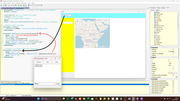
I forgot to include the map upload:
LoadMap() ;Carica Leaflet

Procedure LoadMap()
SetGadgetText(WVMap, "file://D:\PureBasic\RPS\map.html")
EndProcedure


Therefore, the correct file is as follows (the rest of the files remain unchanged):

Code: Select all

XIncludeFile "FormMain.pbf"   ;includes the file generated by the Designer
Declare LoadMap()

OpenFormMain() ;Opens the main window
LoadMap() ;Load Leaflet
;Waiting for events from the window
Repeat
Until FormMain_Events(WaitWindowEvent()) = #False ;PB_Event_CloseWindow

;Prepare and upload the map
Procedure LoadMap()
  SetGadgetText(WVMap, "file://D:\PureBasic\RPS\map.html")
EndProcedure

Procedure DammiValoreCallback(JsonParameters$)
  Debug "Step 3"
  Dim Parameters(0)
  ParseJSON(0, JsonParameters$)
  ExtractJSONArray(JSONValue(0), Parameters())
  Debug "Parametro ricevuto: " + Str(Parameters(0))
  ProcedureReturn UTF8(Str(Parameters(0)))
EndProcedure

; Procedure that calls the JavaScript function
Procedure pio(EventType)
  Debug "Step 1" ;OK
  BindWebViewCallback(WVMap, "dammivalore(5)", @DammiValoreCallback())
  Debug "Step 2" ;OK
EndProcedure

Step
1. opens the window: OpenFormMain()
2. Load Leaflet map in WebView: LoadMap()
3. from the Form I set Event Procedure: pio
3a. the user clicks the Button called MenuSx
3b. PB performs the procedure "Procedure pio(EventType)" where it is performed: BindWebViewCallback(WVMap, "dammivalore(5)", @DammiValoreCallback())
  • I call the function in map.html passing it a numeric value: dammivalore(5)
    I'm posting the JavaScript function so you don't waste time searching for it above:
    function dammivalore(valo) {
    return (valo * 2) + "A";
    }
  • at the end of the "dammivalore" function I expect @DammiValoreCallback() to be executed
    And here I'm completely lost!
    I'd like to read the result of the "dammivalore" function JavaScript, but PB doesn't enter the DammiValoreCallback procedure !
    In fact, it doesn't even execute Debug "Step 3"!
Let's take it one step at a time.
1. First, why doesn't PB enter the DammiValoreCallback procedure?
2. After, the correct code for DammiValoreCallback.
Please :-)

Image
infratec
Always Here
Always Here
Posts: 7711
Joined: Sun Sep 07, 2008 12:45 pm
Location: Germany

Re: WebView & JavaScript return String

Post by infratec »

I think you did not 100% understand the function of BindWebViewCallback()

It creates an own 'hidden' function inside of the webpage.
This function can then be called by something.

I added the following to the second button:

Code: Select all

  Case #PB_Event_Gadget
      Select EventGadget()
        Case MenuSx
          pio(EventType())
        Case Button_1
          WebViewExecuteScript(WVMap, "dammivalore(" + Str(Random(255)) + ")") ; call the function dammivalore() of the web page
      EndSelect
So a press on it calls the function dammivalore() with a random parameter.

I modified the html, so that the 'hidden' function is called:

Code: Select all

	function dammivalore(valo) {
		alert("ciao"); //-> FUNZIONA
		window.mapCallback((valo * 2) + "B");    // the 'hidden' PB function is called
	}
And I modified the a1.pb:

Code: Select all

Procedure.i DammiValoreCallback(Parameters$)
  Debug "Callback reached"
  Debug "Parametro ricevuto: " + Parameters$
  ProcedureReturn #Null
EndProcedure

; Procedure that enables the JavaScript function callback
Procedure pio(EventType)
  Debug "BindWebViewCallback " + Str(WVMap)
  BindWebViewCallback(WVMap, "mapCallback", @DammiValoreCallback()) ; add a hidden function 'mapCallback' to the web page
EndProcedure
A press on the empty button calls the dammicvalore function inside the web page.
The mapCallback procedure then receives the parameter (in this case a string and not an array),

You should not bind the callback function via a button.
It should be directly available after loading the page, else it maybe not available :wink:
User avatar
mk-soft
Always Here
Always Here
Posts: 6433
Joined: Fri May 12, 2006 6:51 pm
Location: Germany

Re: WebView & JavaScript return String

Post by mk-soft »

Edit: infratec was faster ;)

Here is a thought error how BindWebViewCallback works.
BindWebViewCallback creates an extra script function in WebView with the names of the callback. Right Mouse Inspector.
You can then call up this script function in the web page or call it up via WebViewExecuteScript.

Example:

Code: Select all

; TOP

Html$ =  ~"<input type=\"text\" id=\"userInput\" name=\"userInput\">\n"+
         ~"<button id=\"buttonGetData\">Get Data</button>\n"+
         ~"<script>\n"+
         ~"  const buttonGetDataElement=document.getElementById(\"buttonGetData\");\n"+
         ~"  document.addEventListener(\"DOMContentLoaded\", () => {\n"+
         ~"    buttonGetData.addEventListener(\"click\", () => {\n"+
         ~"      var id = \"userInput\";"+
         ~"      var userInput = document.getElementById(id).value;"+
         ~"      window.getData(id, userInput);"+
         ~"    });\n"+
         ~"  });\n"+
         ~"</script>";

Procedure GetDataJS(JsonParameters$)
  ParseJSON(0, JsonParameters$)
  Debug "ID: " + GetJSONString(GetJSONElement(JSONValue(0), 0))
  Debug "Value: " + GetJSONString(GetJSONElement(JSONValue(0), 1))
  
  ;Debug JsonParameters$
  ProcedureReturn 0
EndProcedure


OpenWindow(0, 100, 100, 400, 250, "Hello", #PB_Window_SystemMenu)

WebViewGadget(0, 0, 0, 400, 200, #PB_WebView_Debug)
SetGadgetItemText(0, #PB_WebView_HtmlCode, Html$)
ButtonGadget(1, 10, 210, 120, 25, "Get Data")
; Create an extra script functtion inside web view with the name getData
BindWebViewCallback(0, "getData", @GetDataJS())

Repeat 
  Select WaitWindowEvent()
    Case #PB_Event_Gadget 
      If EventGadget() = 1
        ; Call the extra script getData
        id.s = ~"\"userInput\""
        script.s = ~"window.getData(" + id + ", document.getElementById(" + id +").value)"
        WebViewExecuteScript(0, script)
      EndIf
      
    Case #PB_Event_CloseWindow
      Break
      
  EndSelect
ForEver
My Projects ThreadToGUI / OOP-BaseClass / EventDesigner V3
PB v3.30 / v5.75 - OS Mac Mini OSX 10.xx - VM Window Pro / Linux Ubuntu
Downloads on my Webspace / OneDrive
jockerfox
New User
New User
Posts: 5
Joined: Thu Dec 11, 2025 10:35 am

Re: WebView & JavaScript return String

Post by jockerfox »

Oh yes! Now I understand the mechanism!
I modified my HTML and PB studying what you suggested and it works as I would like.

Sorry if I was a bit slow at first but thanks for the help.
Actually it was easier than i thought but only after you helped me 😀.

My company where I work (a bus company) asked me if I could program a Desktop App: now I can start programming it with ease.
Ok, I could do it in B4J, but I prefer PB (maybe it reminds me of when I was programming in Assembly on a Motorola 68020 about 30 years ago: I was about 20 years old 😅 ).
Also I saw that you all were kind in helping me so I don't see the reason why not to make more than 800 lines in my program.
B4A will be used for Android (I have already made working Apps in B4A).

Thanks again for helping guys!
User avatar
Piero
Addict
Addict
Posts: 1156
Joined: Sat Apr 29, 2023 6:04 pm
Location: Italy

Re: WebView & JavaScript return String

Post by Piero »

So it's even simpler than I thougt…:

Code: Select all

Html$ = "<script>var glob; function yummy(y){return y+' YUM YUM!';}</script>"

Procedure getData(JsonParameters$)
   ParseJSON(0, JsonParameters$)
   Debug "ID: " + GetJSONString(GetJSONElement(JSONValue(0), 0))
   Debug "Value: " + GetJSONString(GetJSONElement(JSONValue(0), 1)) : Debug""
EndProcedure

OpenWindow(0, 100, 100, 400, 250, "Hello", #PB_Window_SystemMenu)
WebViewGadget(0, 0, 0, 400, 200, #PB_WebView_Debug)
SetGadgetItemText(0, #PB_WebView_HtmlCode, Html$)
ButtonGadget(1, 10, 210, 120, 25, "Get Data")
BindWebViewCallback(0, "getData", @getData())

Repeat 
   Select WaitWindowEvent()
      Case #PB_Event_Gadget 
         WebViewExecuteScript(0, "window.getData('glob', glob='Pizza')")
         WebViewExecuteScript(0, "window.getData('yummie', yummy(glob))")
      Case #PB_Event_CloseWindow : Break
   EndSelect
ForEver
Last edited by Piero on Sun Dec 14, 2025 6:32 pm, edited 1 time in total.
User avatar
Piero
Addict
Addict
Posts: 1156
Joined: Sat Apr 29, 2023 6:04 pm
Location: Italy

Re: WebView & JavaScript return String

Post by Piero »

You can even set JS variables from PB! (see updated post above)… Thanks Fred!

PS:
BTW, let me know if I could do better!
Seems to me this allows to get cool JS stuff in PB (I mean, even by using a hidden WebView)…
jockerfox
New User
New User
Posts: 5
Joined: Thu Dec 11, 2025 10:35 am

Re: WebView & JavaScript return String

Post by jockerfox »

Thanks Piero.
I'd already noticed that you can set JS vars via PB.
I'm continuing to develop in the evenings, day after day. The company has asked me to have it ready for use by September 2026. I hope it'll be ready by June.

[ITA]
Grazie Piero.
Avevo già notato che si può impostare le var di JS tramite PB.
Sto continuando a sviluppare la sera giorno dopo giorno. L'azienda mi ha chiesto che sia pronto per l'utilizzo a settembre 2026. Spero a giugno sia pronto.
Post Reply