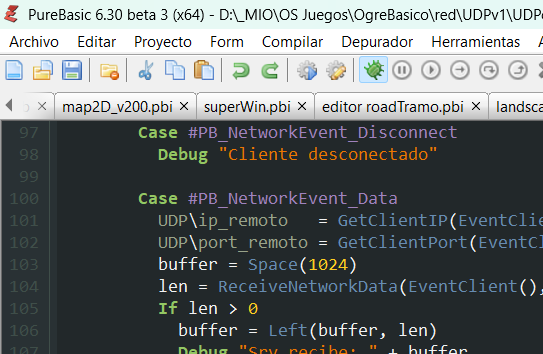
I also had to modify the Dark theme colors. I felt it was too blurry.
I also use Cascadia Mono regular font. It replaced Consolas.
Very nice on the eyes.
Try importing below as colors only.
Code: Select all
; PureBasic IDE Exported Preferences
;
[Sections]
IncludeColors = 1
;
; Color settings
;
[Colors]
ASMKeywordColor = RGB(255, 125, 120)
ASMKeywordColor_Used = 1
BackgroundColor = RGB(0, 0, 0)
BackgroundColor_Used = 1
BasicKeywordColor = RGB(232, 81, 96)
BasicKeywordColor_Used = 1
CommentColor = RGB(0, 255, 128)
CommentColor_Used = 1
ConstantColor = RGB(160, 130, 189)
ConstantColor_Used = 1
LabelColor = RGB(153, 163, 138)
LabelColor_Used = 1
NormalTextColor = RGB(128, 128, 255)
NormalTextColor_Used = 1
NumberColor = RGB(255, 128, 0)
NumberColor_Used = 1
OperatorColor = RGB(241, 242, 243)
OperatorColor_Used = 1
PointerColor = RGB(255, 255, 0)
PointerColor_Used = 1
PureKeywordColor = RGB(0, 128, 255)
PureKeywordColor_Used = 1
SeparatorColor = RGB(241, 242, 243)
SeparatorColor_Used = 1
StringColor = RGB(0, 244, 244)
StringColor_Used = 1
StructureColor = RGB(255, 255, 181)
StructureColor_Used = 1
LineNumberColor = RGB(255, 255, 255)
LineNumberColor_Used = 1
LineNumberBackColor = RGB(41, 49, 52)
LineNumberBackColor_Used = 1
MarkerColor = RGB(0, 170, 170)
MarkerColor_Used = 1
CurrentLineColor = RGB(34, 40, 42)
CurrentLineColor_Used = 1
SelectionColor = RGB(79, 97, 100)
SelectionColor_Used = 1
SelectionFrontColor = RGB(255, 255, 255)
SelectionFrontColor_Used = 1
CursorColor = RGB(255, 255, 255)
CursorColor_Used = 1
Debugger_LineColor = RGB(58, 58, 58)
Debugger_LineColor_Used = 1
Debugger_LineSymbolColor = RGB(232, 232, 255)
Debugger_LineSymbolColor_Used = 1
Debugger_ErrorColor = RGB(255, 0, 0)
Debugger_ErrorColor_Used = 1
Debugger_ErrorSymbolColor = RGB(255, 0, 0)
Debugger_ErrorSymbolColor_Used = 1
Debugger_BreakPointColor = RGB(170, 0, 0)
Debugger_BreakPointColor_Used = 1
Debugger_BreakpoinSymbolColor = RGB(170, 0, 0)
Debugger_BreakpoinSymbolColor_Used = 1
DisabledBackColor = RGB(0, 0, 0)
DisabledBackColor_Used = 1
GoodBraceColor = RGB(0, 102, 102)
GoodBraceColor_Used = 1
BadBraceColor = RGB(255, 0, 0)
BadBraceColor_Used = 1
ProcedureBackColor = RGB(0, 0, 0)
ProcedureBackColor_Used = 1
CustomKeywordColor = RGB(147, 199, 99)
CustomKeywordColor_Used = 1
Debugger_WarningColor = RGB(236, 118, 0)
Debugger_WarningColor_Used = 1
Debugger_WarningSymbolColor = RGB(236, 118, 0)
Debugger_WarningSymbolColor_Used = 1
IndentColor = RGB(0, 170, 170)
IndentColor_Used = 1
ModuleColor = RGB(0, 128, 192)
ModuleColor_Used = 1
SelectionRepeatColor = RGB(70, 70, 89)
SelectionRepeatColor_Used = 1
PlainBackground = RGB(0, 0, 0)
PlainBackground_Used = 1
ToolsPanel_FrontColor = RGB(250, 156, 105)
ToolsPanel_BackColor = RGB(0, 0, 0)