How do you use AntialiasingMode


How do you use AntialiasingMode
I don't know much about this command, but from what I've heard it makes the edges of objects appear smoother. I have tried experimenting on the 3D sample programs that come with purebasic, but it doesn't appear to smooth out the edges on the objects. So I'm wondering if someone can explain this command to me in greater detail or has a example that shows it in action.
Re: How do you use AntialiasingMode
Look at this image:
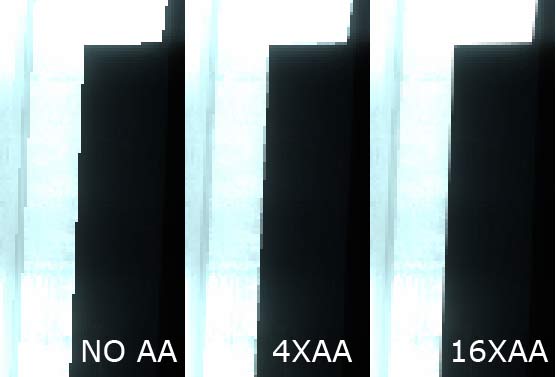
Once anti-aliasing mode is on it multi-samples the edges of any 3d object on screen and makes them less jaggy. It is not something you apply to an object, it works on final render. Mind you full screen AA (especially higher multi-sample values) will slow down the rendering tremendously so use it only if end user system is capable of handling it.
Additionally some NVIDIA (and I presume AMD/ATI) control panel settings (especially ones that increase performance) will override anti-alisaing set by an appliation so you might no see any difference if this is the case.
Once anti-aliasing mode is on it multi-samples the edges of any 3d object on screen and makes them less jaggy. It is not something you apply to an object, it works on final render. Mind you full screen AA (especially higher multi-sample values) will slow down the rendering tremendously so use it only if end user system is capable of handling it.
Additionally some NVIDIA (and I presume AMD/ATI) control panel settings (especially ones that increase performance) will override anti-alisaing set by an appliation so you might no see any difference if this is the case.
Intel Core i7 Quad 2.3 Ghz, 8GB RAM, GeForce GT 630M 2GB, Windows 10 (x64)
Re: How do you use AntialiasingMode
Well my processor is a AMD so maybe thats why i cant see any results. I'll try experimenting on it some more to see if i can get it to work. Thanks for the information.
Re: How do you use AntialiasingMode
Most chipsets produced these days support AA including AMD, Intel and NVIDIA. Question is - have you enabled AA in your video control panel settings. If not then no matter which mode you choose in PB you wont be able to see any results.
Intel Core i7 Quad 2.3 Ghz, 8GB RAM, GeForce GT 630M 2GB, Windows 10 (x64)
Re: How do you use AntialiasingMode
AA was disabled as you said. Although we decided the purebasic AntialiasingMode would no longer be needed because of restrictions on certain computers. Instead we plan on creating a different routine that should solve our problems. Thank you again for taking the time to clear that up for me.

Re: How do you use AntialiasingMode
thanks Olby for the valuable info
regards
regards