
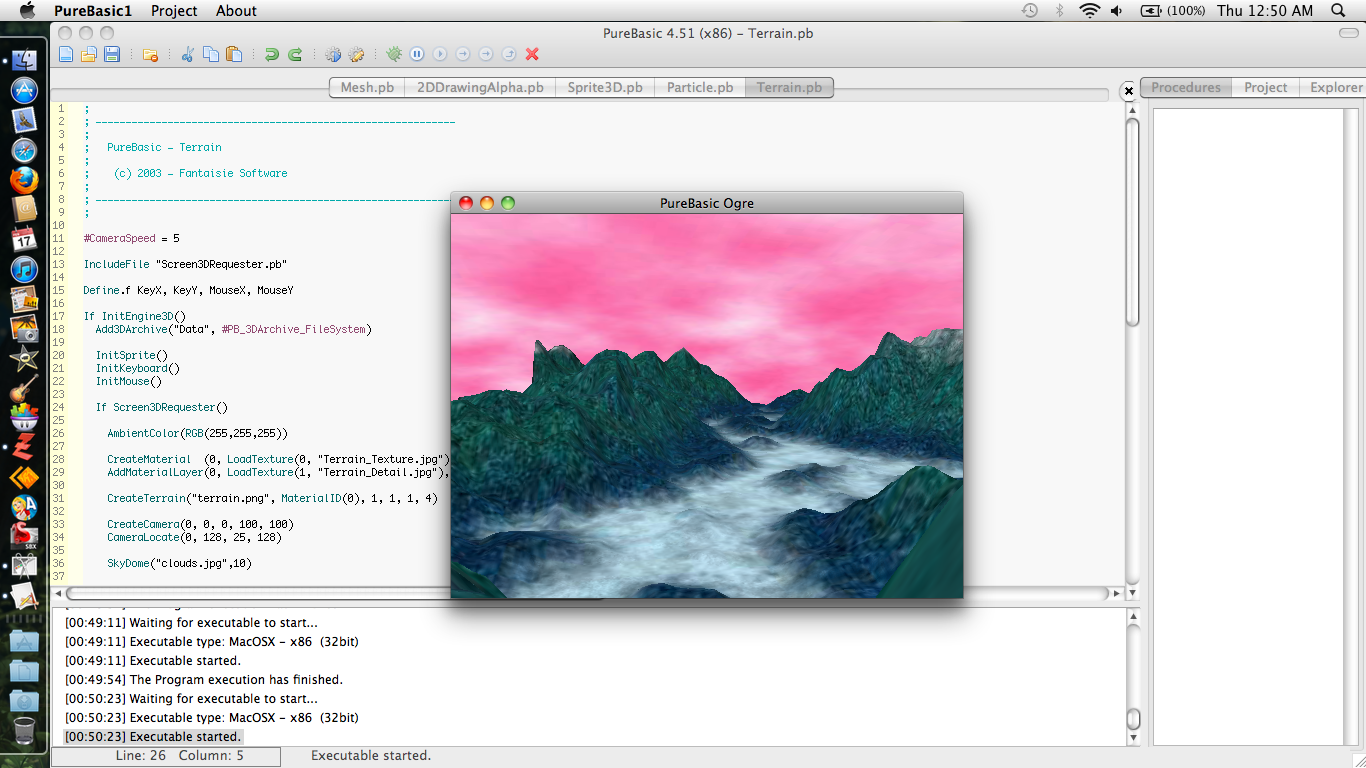
Below is a link to a screen shot of a color error I'm getting in the 3d engine, on mac only. Anyone know anything that could help or is this a bug?
view screen shot
Mac - 3D Engine Color
Mac - 3D Engine Color
www.posemotion.com
PureBasic Tools for OS X: PureMonitor, plist Tool, Data Maker & App Chef
Even the vine knows it surroundings but the man with eyes does not.
PureBasic Tools for OS X: PureMonitor, plist Tool, Data Maker & App Chef
Even the vine knows it surroundings but the man with eyes does not.
-
DarkDragon
- Addict

- Posts: 2348
- Joined: Mon Jun 02, 2003 9:16 am
- Location: Germany
- Contact:
Re: Mac - 3D Engine Color
The only color values in that code is in AmbientColor() and they are RGB(255, 255, 255)?DarkDragon wrote:RGB <-> BGR.
www.posemotion.com
PureBasic Tools for OS X: PureMonitor, plist Tool, Data Maker & App Chef
Even the vine knows it surroundings but the man with eyes does not.
PureBasic Tools for OS X: PureMonitor, plist Tool, Data Maker & App Chef
Even the vine knows it surroundings but the man with eyes does not.
-
DarkDragon
- Addict
- Posts: 2348
- Joined: Mon Jun 02, 2003 9:16 am
- Location: Germany
- Contact:
Re: Mac - 3D Engine Color
Sure, but PB OGRE should wrap the RGB to BGR inside the texturesJ. Baker wrote:The only color values in that code is in AmbientColor() and they are RGB(255, 255, 255)?DarkDragon wrote:RGB <-> BGR.
 on your Mac. That seems to be a bug. Does it also happen with PB sprites? Do the textures on the filesystem look okay?
Here is your screenshot with RGB => BGR:
http://www.bradan.eu/files/rgb2bgr.jpg
Code: Select all
GetClipboardImage(0, 24)

StartDrawing(ImageOutput(0))
For x = 0 To ImageWidth(0) - 1
  For y = 0 To ImageHeight(0) - 1
    c = Point(x, y)
    Plot(x, y, RGB(Blue(c), Green(c), Red(c)))
  Next y
Next x
StopDrawing()

SetClipboardImage(0)
bye,
Daniel
Daniel
Re: Mac - 3D Engine Color
Thanks, I understand now. So far everything else looks fine.
www.posemotion.com
PureBasic Tools for OS X: PureMonitor, plist Tool, Data Maker & App Chef
Even the vine knows it surroundings but the man with eyes does not.
PureBasic Tools for OS X: PureMonitor, plist Tool, Data Maker & App Chef
Even the vine knows it surroundings but the man with eyes does not.


Re: Mac - 3D Engine Color
Already fixed in 4.61beta1
Re: Mac - 3D Engine Color
Sweet! Thanks Fred!Fred wrote:Already fixed in 4.61beta1
www.posemotion.com
PureBasic Tools for OS X: PureMonitor, plist Tool, Data Maker & App Chef
Even the vine knows it surroundings but the man with eyes does not.
PureBasic Tools for OS X: PureMonitor, plist Tool, Data Maker & App Chef
Even the vine knows it surroundings but the man with eyes does not.
Re: [Done] Mac - 3D Engine Color
May be you can check it to confirm ? (just don't use the terrain example as it is broken for now)
Re: [Done] Mac - 3D Engine Color
It works!Fred wrote:May be you can check it to confirm ? (just don't use the terrain example as it is broken for now)

www.posemotion.com
PureBasic Tools for OS X: PureMonitor, plist Tool, Data Maker & App Chef
Even the vine knows it surroundings but the man with eyes does not.
PureBasic Tools for OS X: PureMonitor, plist Tool, Data Maker & App Chef
Even the vine knows it surroundings but the man with eyes does not.