
Hi...
I have a bin file with image files, how to search this image files in bin file and how show this image using the ImageGadget???
anyone can help me??
sorry my english.
How to search image files in bin file.


Re: How to search image files in bin file.
what kind of "bin" file (fileformat?) what kind of images ?
I hear only a train commin...
I hear only a train commin...
Re: How to search image files in bin file.
Bisonte wrote:what kind of "bin" file (fileformat?) what kind of images ?
I hear only a train commin...
here is my bin file.
http://www.mediafire.com/?wcv6432za2o34ep
I want create one application to show an image in this bin file png
and show an preview of this image on ImageGadget.
if anyone can help me is much apreciated.
-
netmaestro

- PureBasic Bullfrog

- Posts: 8453
- Joined: Wed Jul 06, 2005 5:42 am
- Location: Fort Nelson, BC, Canada
Re: How to search image files in bin file.
I don't see any raw images in there, it's probably compressed.
BERESHEIT
Re: How to search image files in bin file.
yes netmaestro is compressed, i think with zlib.netmaestro wrote:I don't see any raw images in there, it's probably compressed.
i use an software "game graphic studio" to see the image in bin file.
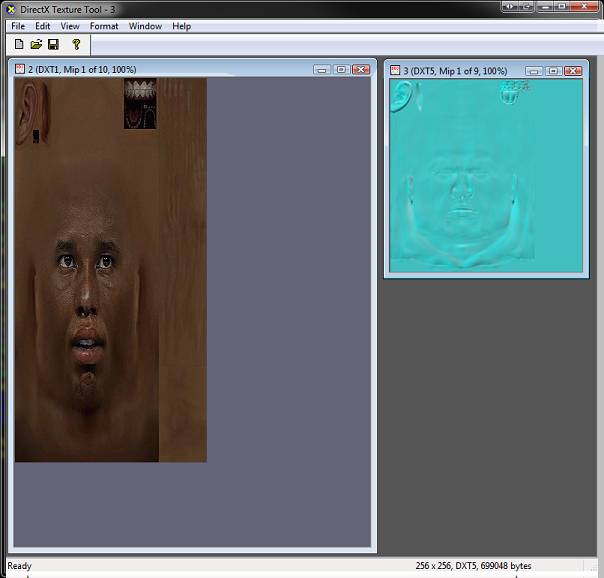
And the image formate is dds


Re: How to search image files in bin file.
Hi,
I found this in an other forum from a user called GameZelda, maybe it can help you:
I found this in an other forum from a user called GameZelda, maybe it can help you:
BerndGameZelda wrote:Most of the files on the container use a filesystem called WESYS.
If the file starts with "\x00\x01\x00WESYS":
struct UncompressedWESYS
{
char magic[8]; // "\x00\x01\x00WESYS"
uint32_t size;
uint32_t zero;
uint8_t wesys[size];
}
If the file starts with "\x00\x01\x01WESYS"
struct ZlibWESYS
{
char magic[8]; // "\x00\x01\x01WESYS"
uint32_t cmprSize;
uint32_t uncmprSize;
uint8_t wesys[cmprSize]; // Uncompress with Zlib
}
---
For the two structures above, once you have the real data, the structure is:
struct WESYSFile
{
uint32_t nFiles;
uint32_t eight; // Always 8. May be a pointer to the file table, that is always at offset 8.
WESYSFileEntry files[nFiles];
}
struct WESYSFileEntry
{
uint32_t offset;
uint32_t size;
uint32_t fileNameOffset; // 0xFFFFFFF0 = unnamed file
}
Re: How to search image files in bin file.
Hi,
with a bit help from ts-softBernd
with a bit help from ts-soft
Code: Select all
CompilerSelect #PB_Compiler_OS
  CompilerCase #PB_OS_Linux
    ImportC #PB_Compiler_Home + "purelibraries/linux/libraries/zlib.a"
CompilerCase #PB_OS_MacOS
  ImportC "/usr/lib/libz.dylib"
  CompilerCase #PB_OS_Windows
    ImportC "zlib.lib"
CompilerEndSelect
  uncompress(*dest, *destLen, *source, sourceLen)
EndImport


Procedure zipUnpackMemory(*source, sourceLen, *dest, destLen)
  If Not uncompress(*dest, @destLen, *source, sourceLen)
    ProcedureReturn destLen
  EndIf
  ProcedureReturn 0
EndProcedure


Filename$ = OpenFileRequester("Chose a WESYS file", "", "All files (*.*)|*.*", 0)
If Filename$
  Uncompresed = #True
  Uncompressed = #True
  File = ReadFile(#PB_Any, Filename$)
  If File
    Size = Lof(File)
    *FileBuffer = AllocateMemory(Size)
    If *FileBuffer
      If ReadData(File, *FileBuffer, Size) = Size
        If PeekS(*FileBuffer + 3, 5) = "WESYS"
          CompressFlag = PeekA(*FileBuffer + 2)
          If CompressFlag = $01
            Uncompressed = #False
            UnCmprSize = PeekL(*FileBuffer + 12)
            *Temp = AllocateMemory(UnCmprSize)
            If *Temp
              If zipUnpackMemory(*FileBuffer + 16, Size - 16, *Temp, UnCmprSize) = UnCmprSize
                FreeMemory(*FileBuffer)
                *FileBuffer = *Temp
                Size = UnCmprSize
                Uncompressed = #True
              Else
                FreeMemory(*Temp)
              EndIf
            EndIf
          EndIf
          If Uncompressed
            Files = PeekL(*FileBuffer) - 1
            For i = 0 To Files
              OutOffset.q = PeekL(*FileBuffer + 4 + 4 + (12 * i)) & $FFFFFFFF
              OutSize.q = PeekL(*FileBuffer + 4 + 4 + 4 + (12 * i)) & $FFFFFFFF
              OutFilenameOffset.q = PeekL(*FileBuffer + 4 + 4 + 4 + 4 + (12 * i)) & $FFFFFFFF

              ;If OutFilenameOffset = $FFFFFFFF Or OutFilenameOffset = $FFFFFFF0
              If OutFilenameOffset > Size
                OutFilename$ = Filename$ + "_" + Str(i + 1)
              Else
                ; not tested yet
                OutFileName$ = GetPathPart(Filename$) + PeekS(*FileBuffer + OutFilenameOffset)
              EndIf

              Debug Hex(OutFilenameOffset)

              If PeekS(*FileBuffer + OutOffset, 3) = "DDS"
                OutFilename$ + ".dds"
              EndIf

              If PeekS(*FileBuffer + OutOffset + 16, 3) = "DDS"
                OutFilename$ + ".dds"
                OutOffset + 16
                OutSize - 16
              EndIf

              OutFile = CreateFile(#PB_Any, OutFilename$)
              If OutFile
                WriteData(OutFile, *FileBuffer + OutOffset, OutSize)
                CloseFile(OutFile)
              EndIf

            Next i
          EndIf
        EndIf
      EndIf
      FreeMemory(*FileBuffer)
    EndIf
    CloseFile(File)
  EndIf
EndIf
Last edited by infratec on Sat Dec 17, 2011 11:45 am, edited 8 times in total.
-
netmaestro
- PureBasic Bullfrog
- Posts: 8453
- Joined: Wed Jul 06, 2005 5:42 am
- Location: Fort Nelson, BC, Canada
Re: How to search image files in bin file.
Thx infratec, it decompresses to 302000 bytes. But I still don't find any images in there. I'm using this code, it's been effective in the past:
Code: Select all
If OpenFile(0, "d:\emerson_face2.bin")
  *mem = AllocateMemory(Lof(0))
  ReadData(0, *mem, Lof(0))
  CloseFile(0)
EndIf

If *mem
  UseJPEGImageDecoder()
  UseJPEG2000ImageDecoder()
  UsePNGImageDecoder()
  UseTIFFImageDecoder()
  *ptr = *mem
  While *ptr < *mem
    If CatchImage(0, *ptr)
      Debug "found one"
    EndIf
    *ptr + 1
  Wend
EndIf
BERESHEIT
Re: How to search image files in bin file.
thanks netmaestro and infratec...
is like the netmaestro says don't find any image on the file.
maybe because the image is in dds formate.
I don't have purebasic skills to resolve this.
if someone can point the way to do this appreciate.
is like the netmaestro says don't find any image on the file.
maybe because the image is in dds formate.
I don't have purebasic skills to resolve this.
if someone can point the way to do this appreciate.
-
netmaestro
- PureBasic Bullfrog
- Posts: 8453
- Joined: Wed Jul 06, 2005 5:42 am
- Location: Fort Nelson, BC, Canada
Re: How to search image files in bin file.
Are you sure it's dds? I tried three tools on it and they all say it's not a valid dds file.
BERESHEIT

Re: How to search image files in bin file.
Here's the four files (without extensions) that were obtained after uncompressing the contents using infratec's code above.
bbk0
bbk1
bbk2
bbk3
Files bbk0 and bbk1 contents start with KTMDL. Files bbk2 and bbk3 have contents that look like a dds file. I haven't found anything that will any of them yet.
@Edit: removed links.
bbk0
bbk1
bbk2
bbk3
Files bbk0 and bbk1 contents start with KTMDL. Files bbk2 and bbk3 have contents that look like a dds file. I haven't found anything that will any of them yet.
@Edit: removed links.
Last edited by Demivec on Wed Dec 14, 2011 5:45 pm, edited 1 time in total.

Re: How to search image files in bin file.
Code: Select all
CompilerSelect #PB_Compiler_OS
  CompilerCase #PB_OS_Linux
    ImportC #PB_Compiler_Home + "purelibraries/linux/libraries/zlib.a"
CompilerCase #PB_OS_MacOS
  ImportC "/usr/lib/libz.dylib"
  CompilerCase #PB_OS_Windows
    ImportC "zlib.lib"
CompilerEndSelect
  uncompress(*dest, *destLen, *source, sourceLen)
EndImport


Procedure zipUnpackMemory(*source, sourceLen, *dest, destLen)
  If Not uncompress(*dest, @destLen, *source, sourceLen)
    ProcedureReturn destLen
  EndIf
  ProcedureReturn 0
EndProcedure

Structure WESYSFileEntry
    offset.l
    size.l
    fileNameOffset.l ; 0xFFFFFFF0 = unnamed file
EndStructure


Filename$ = "Emerson_face.bin"

File = ReadFile(#PB_Any, Filename$)
If File
  Size = Lof(File)
  *FileBuffer = AllocateMemory(Size)
  If *FileBuffer
    If ReadData(File, *FileBuffer, Size) = Size
      Magic$ = ""
      For i = 3 To 7
        Magic$ + Chr(PeekA(*FileBuffer + i))
      Next i
      Debug Magic$
      If Magic$ = "WESYS"
        CompressFlag = PeekA(*FileBuffer + 2)
        Debug "Compressed: "+Str(CompressFlag)
        If CompressFlag = $01
          UnCmprSize = PeekL(*FileBuffer + 12)
          *Temp = AllocateMemory(UnCmprSize)
          If *Temp
            If zipUnpackMemory(*FileBuffer + 16, Size - 16, *Temp, UnCmprSize) = UnCmprSize
                numFiles = PeekL(*temp)
                Debug "numFiles: "+Str(numFiles)
                *wsf.WESYSFileEntry = *Temp +8
                For i = 0 To numFiles-1
                    Debug *wsf\offset
                    Debug *wsf\size
                    Debug Hex(*wsf\fileNameOffset)
                    Debug PeekL(*Temp+*wsf\offset)
                    If PeekL(*Temp+*wsf\offset) = 808469847
                        If CreateFile(0, Str(i)+".dds")
                            Debug Str(PeekL(*Temp+*wsf\offset+4))
                            Debug Str(PeekL(*Temp+*wsf\offset+8))
                            Debug Str(PeekL(*Temp+*wsf\offset+12))

                           WriteData(0, *Temp+*wsf\offset+16, *wsf\size-16)
                           CloseFile(0)
                        EndIf
                    EndIf
                    *wsf+12
                Next i
            EndIf
            FreeMemory(*Temp)
          EndIf
        EndIf
      EndIf
    EndIf
    FreeMemory(*FileBuffer)
  EndIf
  CloseFile(File)
EndIfRe: How to search image files in bin file.
Arghhh, Danilo was faster 
I updated my posting above to generate the files out of a compressed or uncompressed
WESYS file.
Bernd
I updated my posting above to generate the files out of a compressed or uncompressed
WESYS file.
Bernd