Page 1 of 1

IDE (Windows version) Addings (Now 7)

Posted: Mon Feb 02, 2026 3:48 pm
by Kwai chang caine
First...thanks mainly, again a time to FRED for sharing :shock: such splendid code, the result of a lifetime of work 8)
And with this generous gesture, to give everyone (and yes...incredible...even Kcc :mrgreen:) the opportunity to adapt this editor, on which I have spent a large part of my life and which I love, to our own needs, so that we may love it even more, as if that were possible.
8)

Excuse me too, for daring to desecrate my sacred temple, with my big stubby fingers, my ludicrous ideas, and my filthy actually 610 (So 610 possibility of bug :lol: ) additional or modified lines of code for this 7 addings. :oops:
And I apologize in advance for the likely numerous bugs that my modifications will introduce into my favorite and previously robust software :oops: , which I will try, to the best of my modest ability, to correct with the help like usually :wink: , of the MASTERS friends on this forum, whom I so admire. 8)


Below is the list of additions :


First adding

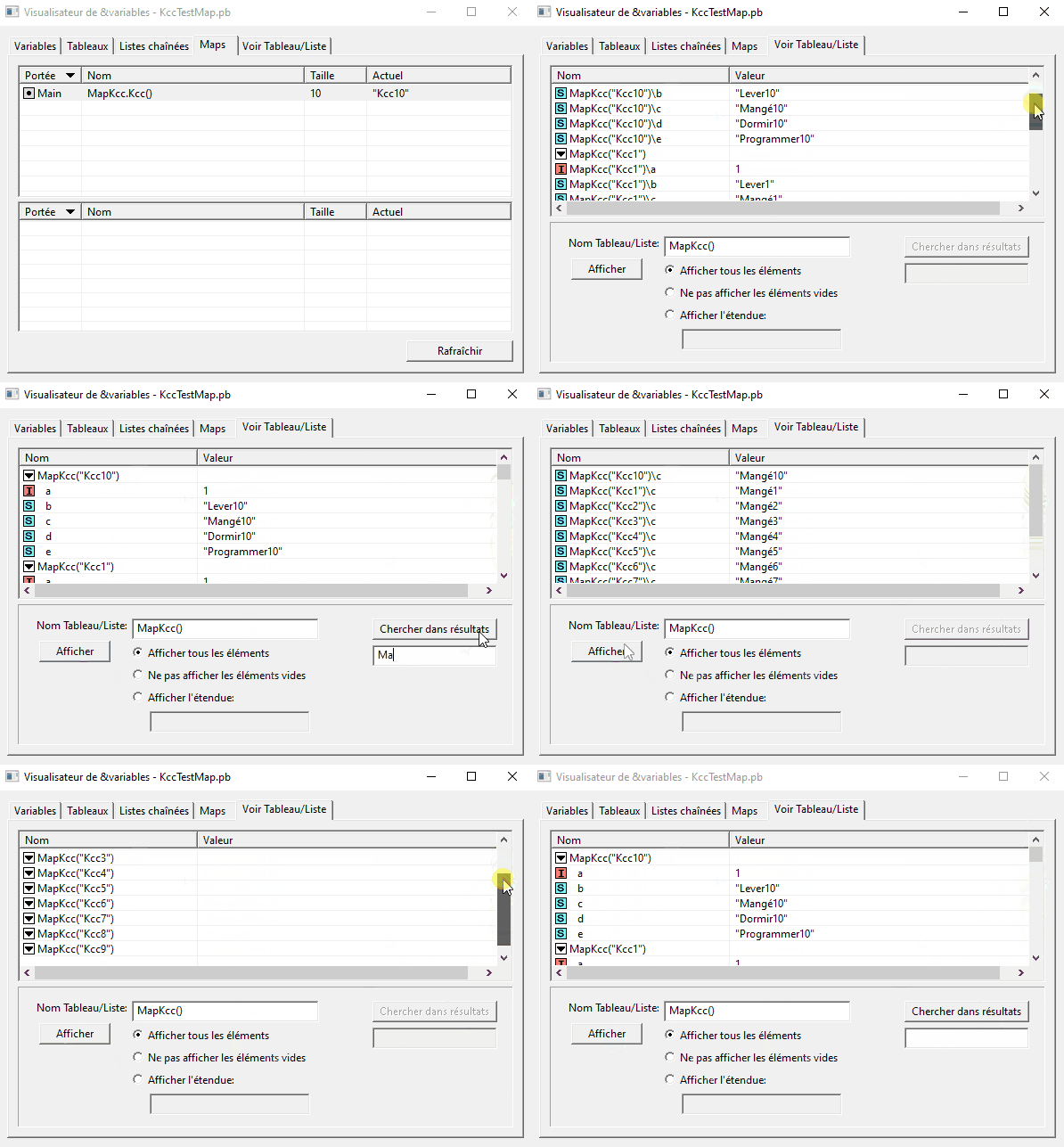
SEARCH TEXT IN VARIABLES RESULTS

I think I've done it, i still can't believe it. :shock:

Image[

Code used

Code: Select all

Structure Kcc
  a.i
  b.s
  c.s
  d.s
  e.s
EndStructure

NewMap MapKcc.Kcc()

For i = 1 To 10
  MapKcc("Kcc" + Trim(Str(i)))\a = 1
  MapKcc("Kcc" + Trim(Str(i)))\b = "Lever" + Trim(Str(i))
  MapKcc("Kcc" + Trim(Str(i)))\c = "Mangé" + Trim(Str(i))
  MapKcc("Kcc" + Trim(Str(i)))\d = "Dormir" + Trim(Str(i))
  MapKcc("Kcc" + Trim(Str(i)))\e = "Programmer" + Trim(Str(i))
Next

Repeat:Delay(300):ForEver
The search is case sensitive, for be more precise :wink:
Image

I also think this is one of the best days of my life. 8)
And also the prettiest GIF I've made :mrgreen:


I'm continuing my trials, for be sure. :?
With KCC...Anything can happen, you never know :oops:
But I was so happy that I wanted to share this happiness with you...well...those who are interested. :wink:

IDE adding

Posted: Mon Feb 02, 2026 3:50 pm
by Kwai chang caine
Adding number 2

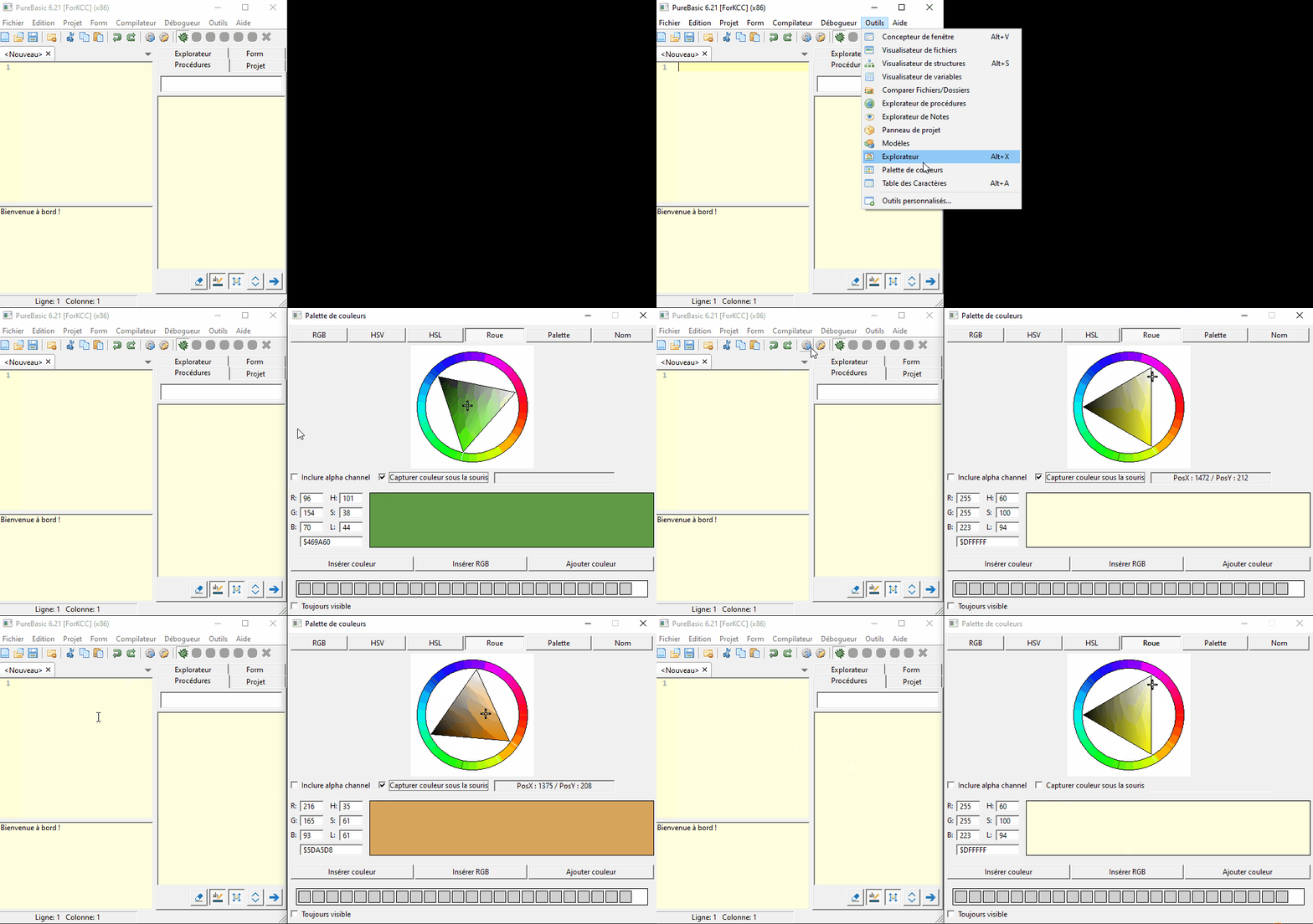
TAKE COLORS UNDER MOUSE

Often i needed this possibility, forcing to run another program for have it, and often too, the result is not in the PB format, and i haven't enough knowledge for translate the color :oops:
Then today, i have add a "Take color on mouse hover" in PB ColorPicker :idea:
in fact i don't know the english name :oops:

The color under the mouse pointer is taken each time you press SHIFT
Then you obtain the color and the position of the mouse on all the screen (Even out of the PB windows)
When you uncheck the CheckBox, the value stay like this

Image

Adding number 3

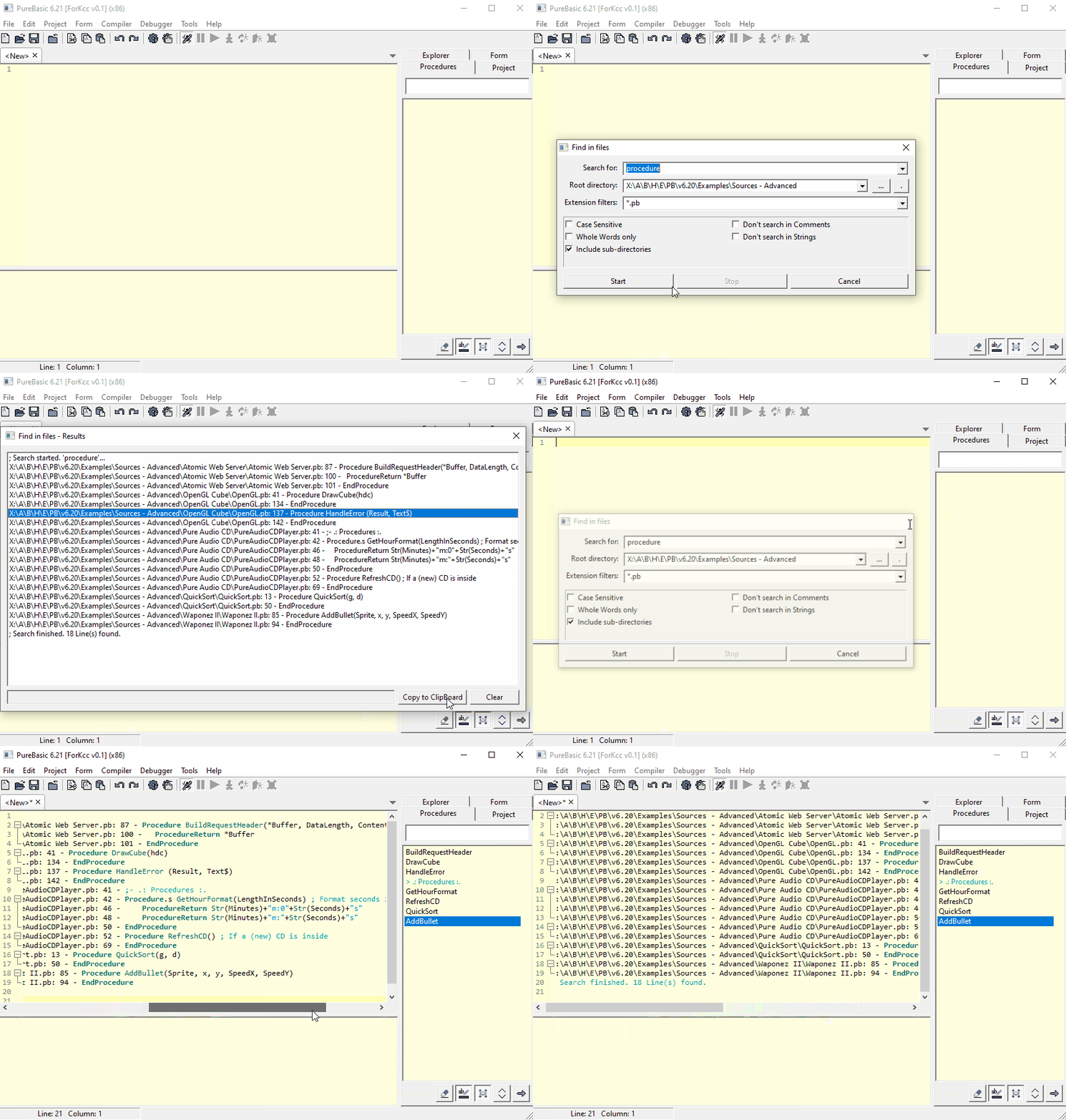
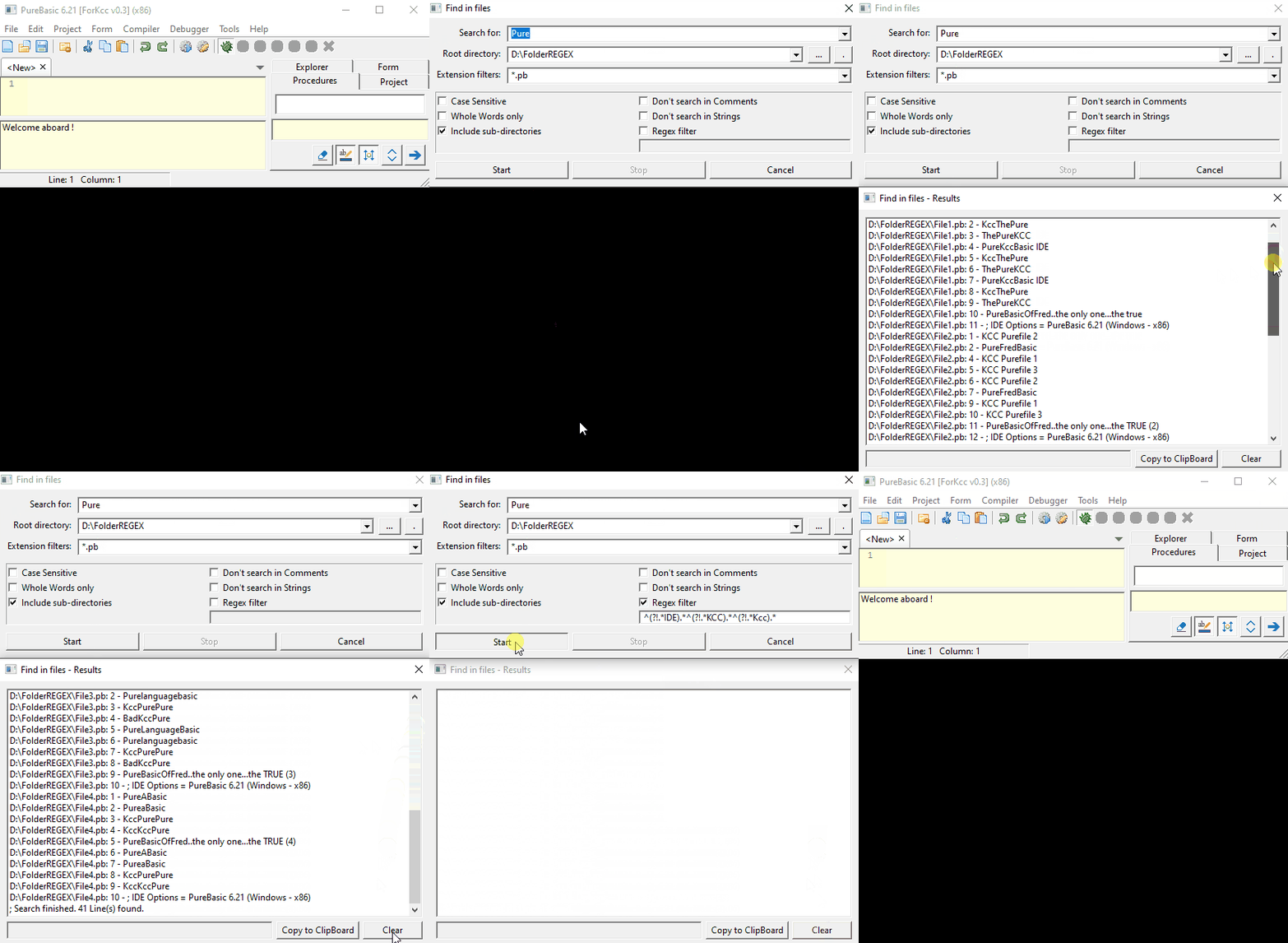
COPY RESULT OF FILE SEARCH TO CLIPBOARD

When you search into a folder a text inside files, with the nice tool of FRED
You obtain in this window, a list of links who are the "famous" text searched on each line
and you can acces on each line of code with a double-click in any scanned file 8)
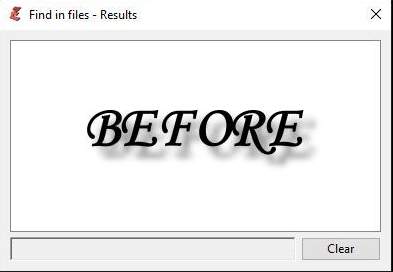
But unfortunately, you can only clear the list :|

Image

Furthermore, it's a ListIcon and impossible to keep a word or the full result :|
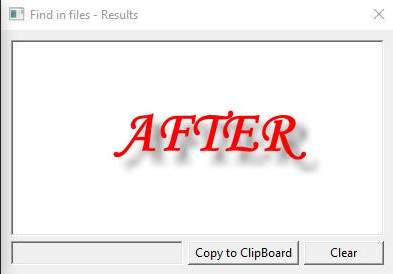
Now.... you have one more little button :mrgreen:

Image

Exemple

Image

Adding number 4

FILE SEARCH REGEX FILTER

This time, i adding a tool who help me a maximum for modify the PB IDE 8)
I want search the word "Pure" in four files, and i obtain the big number of 41 results :shock: (Often in my case is several hundreds :|)
And in this several lines, several "IDE" words, that not interesting me and also....what i see ??
That wretched KCC again, sticking his pig snout everywhere, especially where I don't want him to be. :twisted:

Weeeeell, gentlemeeeeen and gentlemeeeen !!!! ... :mrgreen:
You've dreamed it, and even in your wildest dreams you didn't dare... :oops:
Well yes, you might get it soon... I've just added the one and only one tool, that can completely eliminate KCC of your machine :shock: 8)

First, for that...check the magical REGEX filter CheckBox
Adding the REGEX

Code: Select all

^(?!.*IDE).*^(?!.*KCC).*^(?!.*Kcc).*
This REGEX is three time the same order "The sentence must no countain the word "IDE" for the first", "KCC" for the second, etc ..
(I'm warning everyone right now, I know nothing about REGEX, so there's no point in asking me questions about it, I barely understand what I'm writing.) :oops:

Run another time the same research, and thanks to this magical and undrinkable REGEX sentence function, finish BAD KCC..and no more "IDE" word...
Now i have only 14 lines, and somes good lines with only the serious PureBasic and Fred 8)

Image

Re: IDE adding

Posted: Mon Feb 02, 2026 3:51 pm
by Kwai chang caine
Adding number 5

RECENTS FILES MANAGEMENT

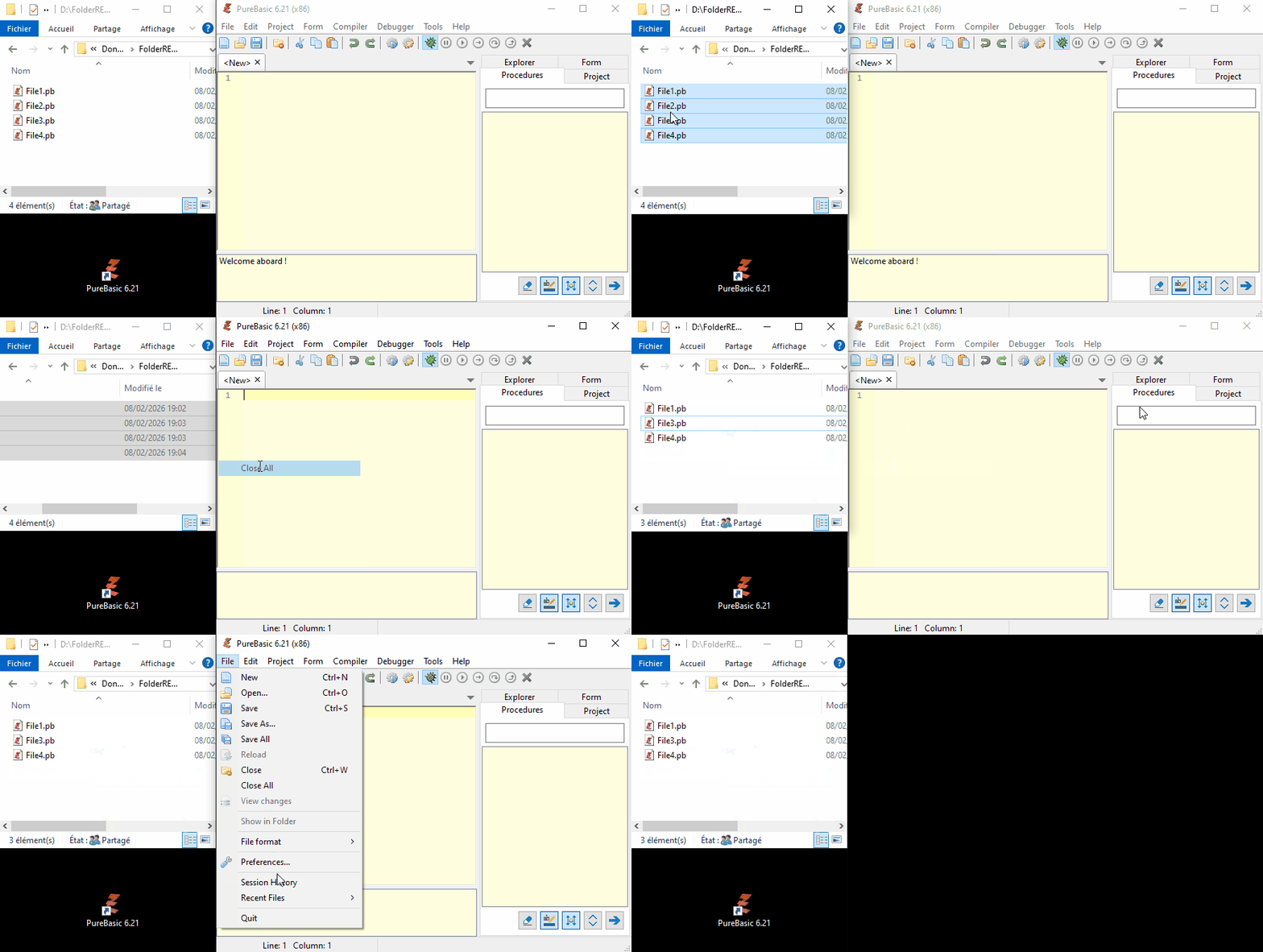
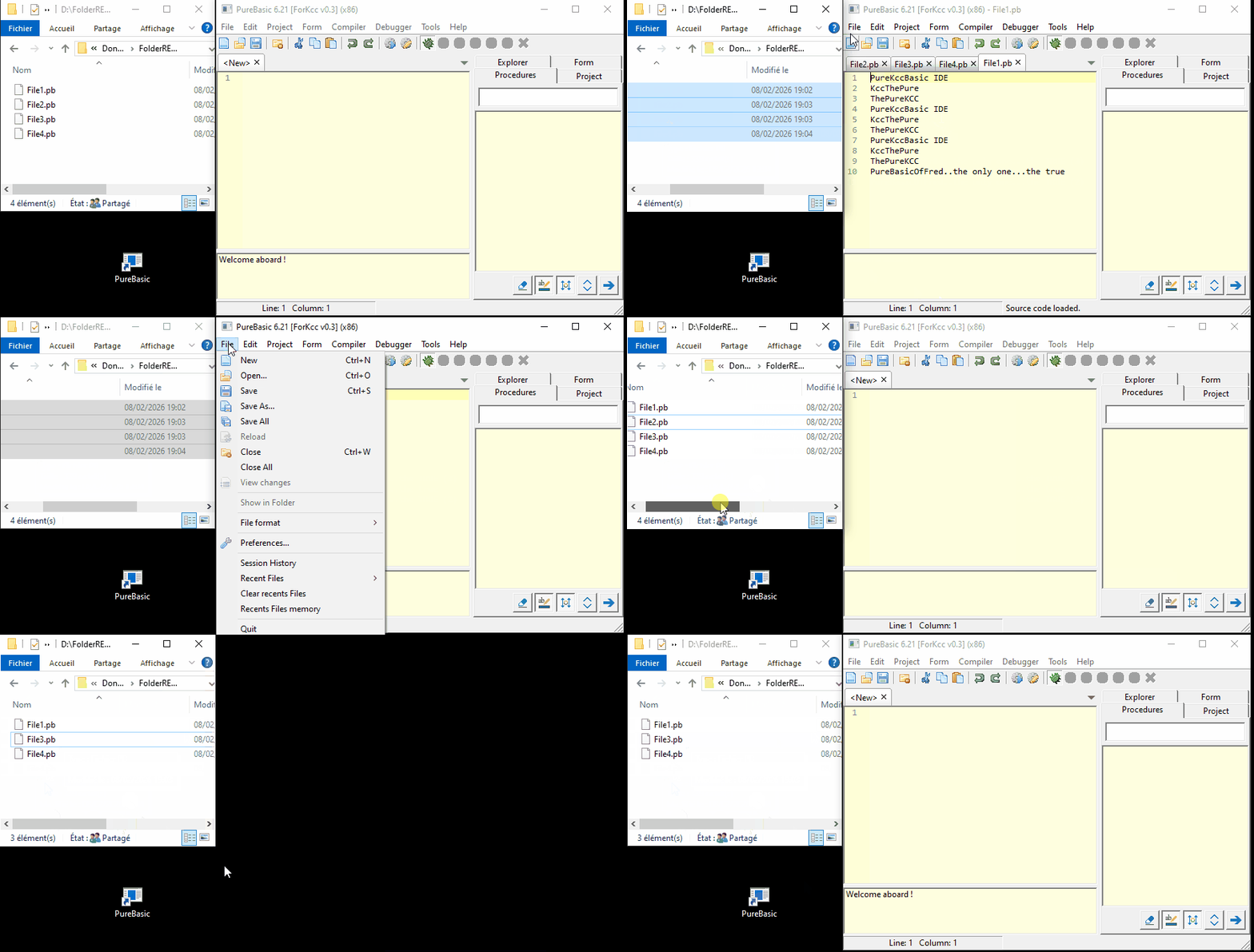
1/ CHECK THE RECENTS FILES WHEN STARTING

My favorite pastime is moving files from right to left with my mouse. If I gave the guy who invented drag and drop a penny per file move, I would have sold my house to pay him.
But actualy, the IDE not check when it open,if the recents files exist :| then... i have always numerous links who not working

Image

Now...it' not the case, only the links working is loading in the recents files submenus 8)

Image

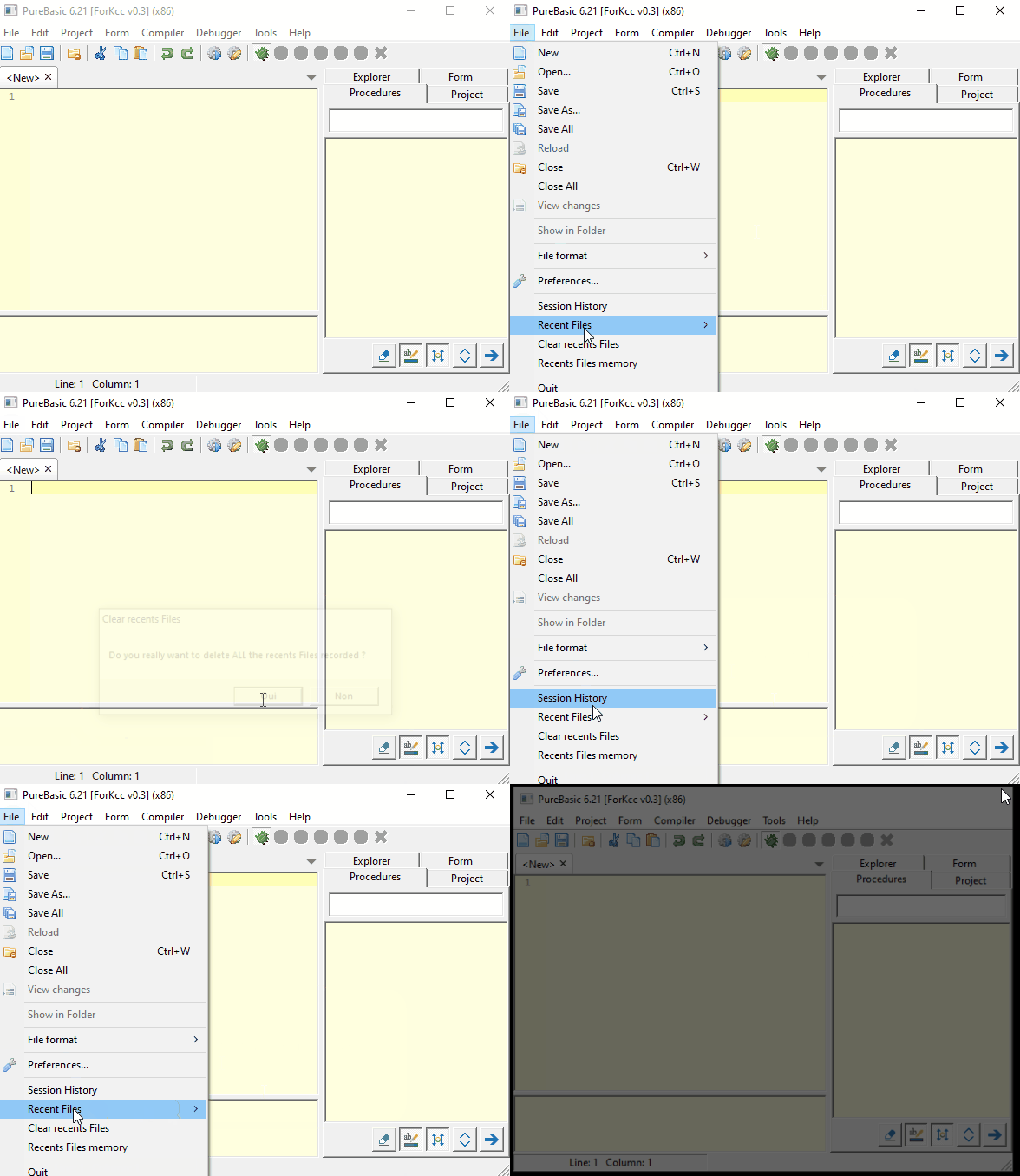
2/ CLEAR MANUALLY THE RECENTS FILES

I just added a function to delete recent files in case you no longer need them.

Image

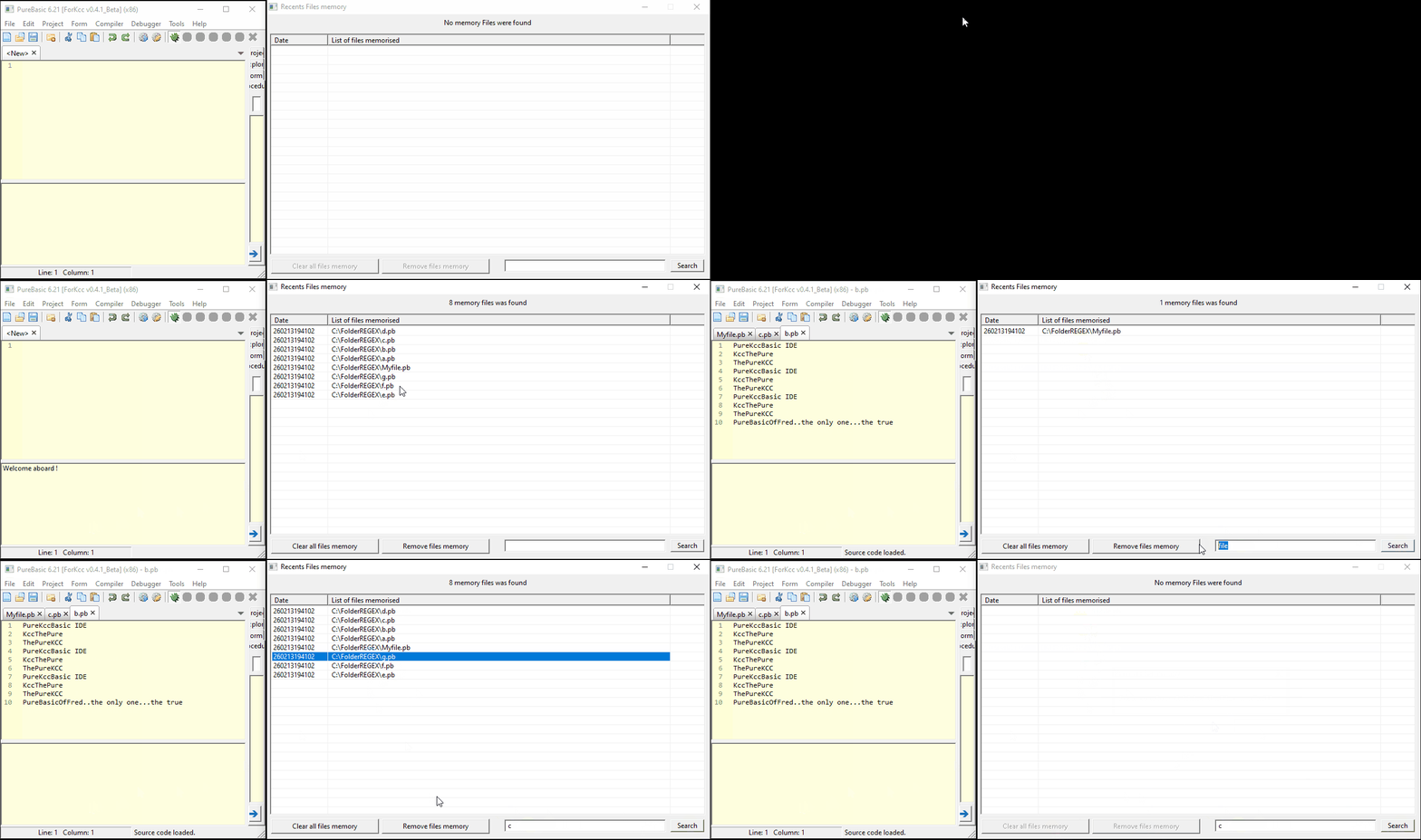
3/ RECENTS FILES MEMORY

I wouldn't want to live on my PC :oops: ... I've coded so many unfinished things over the past 20 years that I often can't find them anymore.

And yet, I'm sure I opened it a year ago, but of course, even with the splendid "Session History" tool (which has saved my life many times 8) ) that Fred was kind enough to program for us, I still lose those links. And since I can't remember the name I gave to the program, it sometimes takes me several days to find them. :? I even sometimes rewrite the same little program twice.
So... since I was looking through recent files, I had the idea of ​​adding this link saver (Named "Files memory") furthermore of the file history, a saver that never disappears...even if you clear all recents files submenus, unless if you move the file. (Because no need to keep it in this case) :wink:
This "Recent files" store, updates itself every time the IDE restarts, and it creates another backup alongside it, which is then overwritten on the next startup, etc ...
With these two backups and Fred's history ... maybe I'll finally be able to fix this... :?

In this exemple, i have deleting by "error" :mrgreen: , ALL the recents files ....it's a disaster for me :shock: :x :mrgreen:
Ouuuuf !!!! i have my new "Recent files memory" 8)

And you see, my "Recent files memory" is not impacted 8)
You can also see, it's possible to delete some links if you don't need it, or even all the list in one click
If you double click on a line, the file is loaded in the IDE

PS : And now, i have adding a filter for retrieve an old file in the numerous other (in fact...when i add it, it worked too much good :lol: , after several days, the list was already unreadable :mrgreen:)

Image

Adding number 6

WATCH LIST

1/ SORT NUMEROUS PROCEDURES

Since several weeks, i try to damage the jewel code of FRED, i'm forcing to use tools i have never used before, like the WatchList.
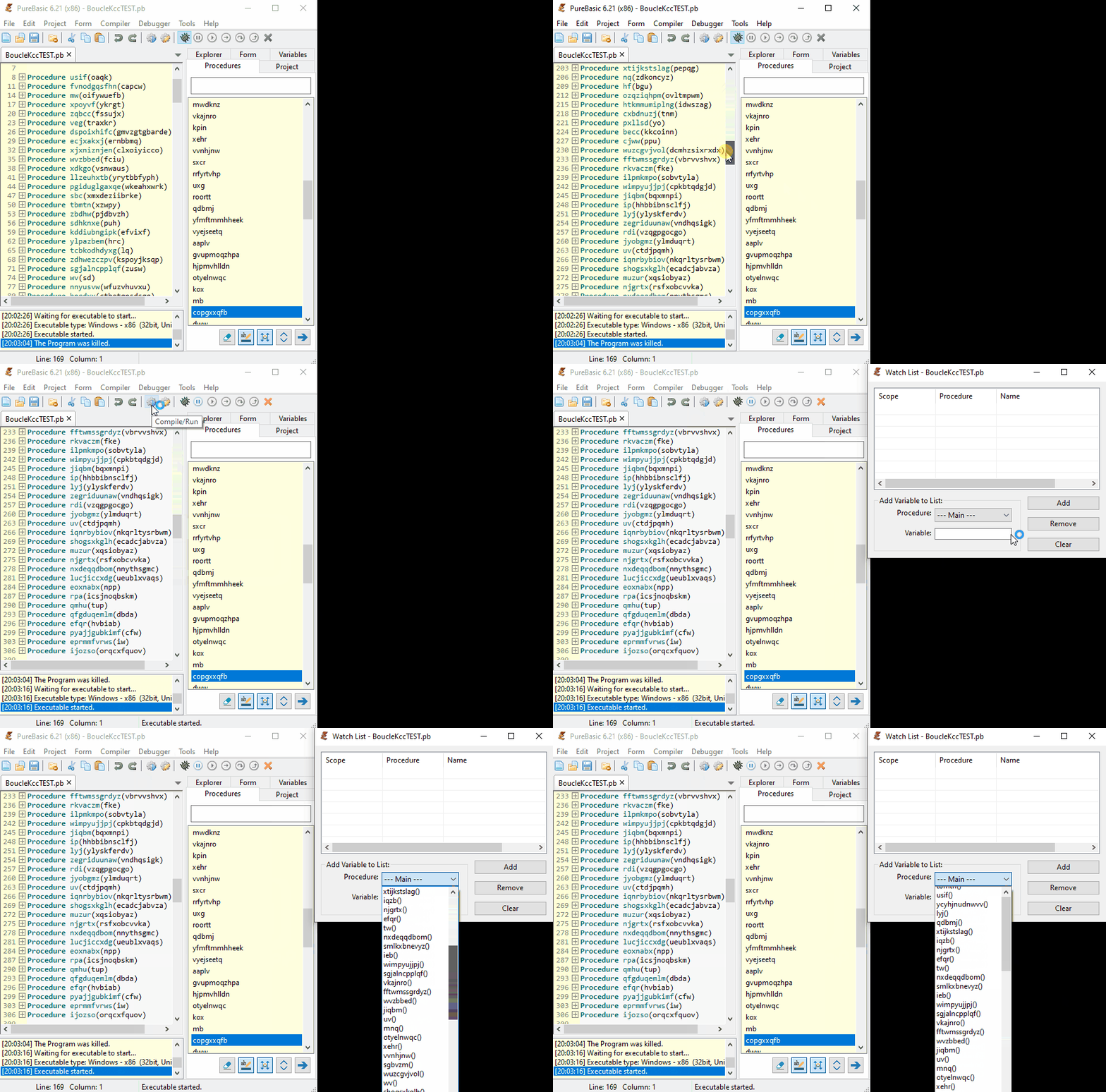
But when i have open the WatchList, I fell off my chair when I saw the monstrous amount of procedures :shock:
Each one almost as big as my entire programs :oops:
And when i have clicked on the "Procedure combo" see al this names not sorted, i see to me : "Kcc..it's the end for you"

Image

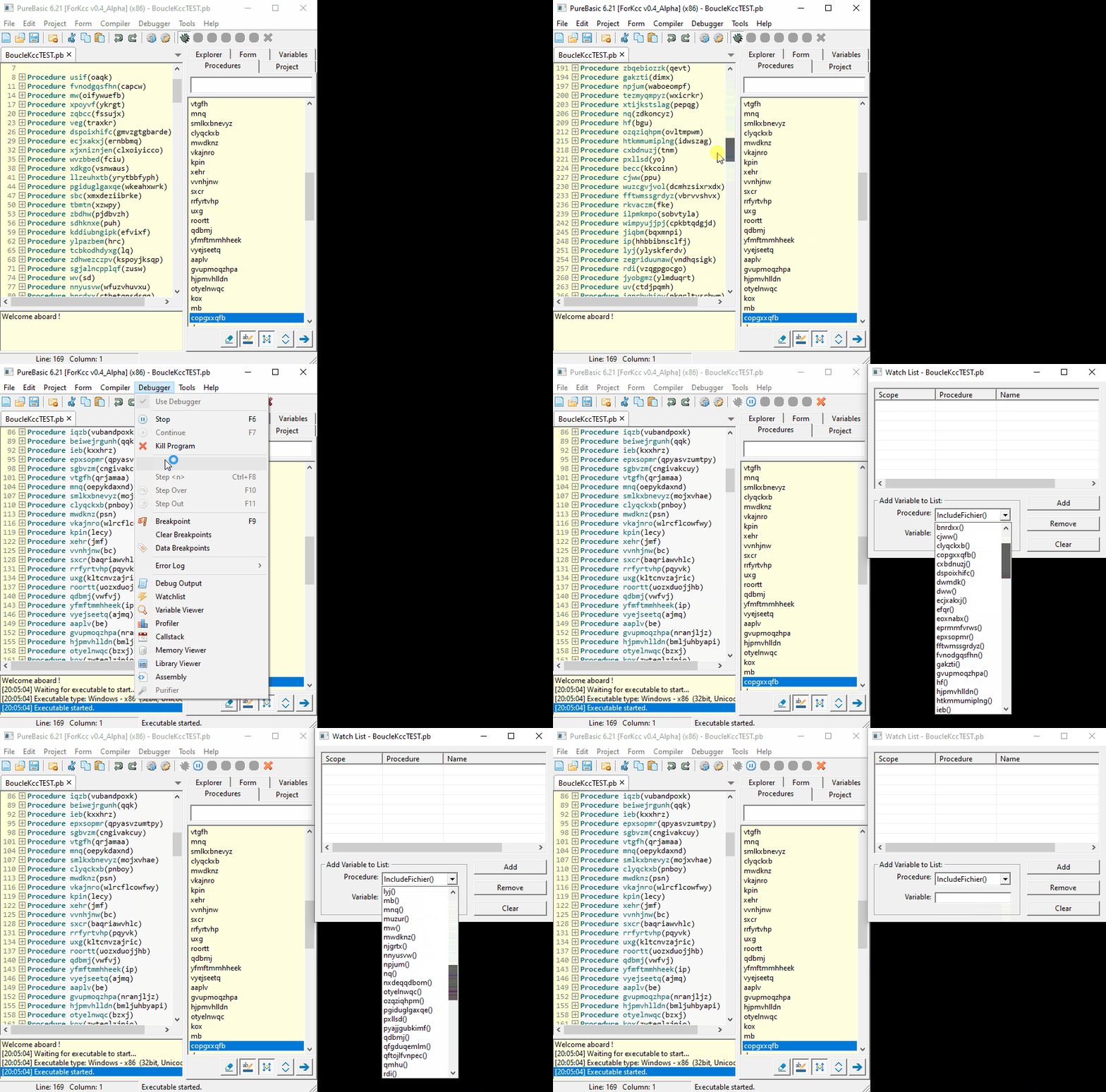
Then before continue, i have thinking to sort this undrinkable list :idea:
And this is the result 8)

Image

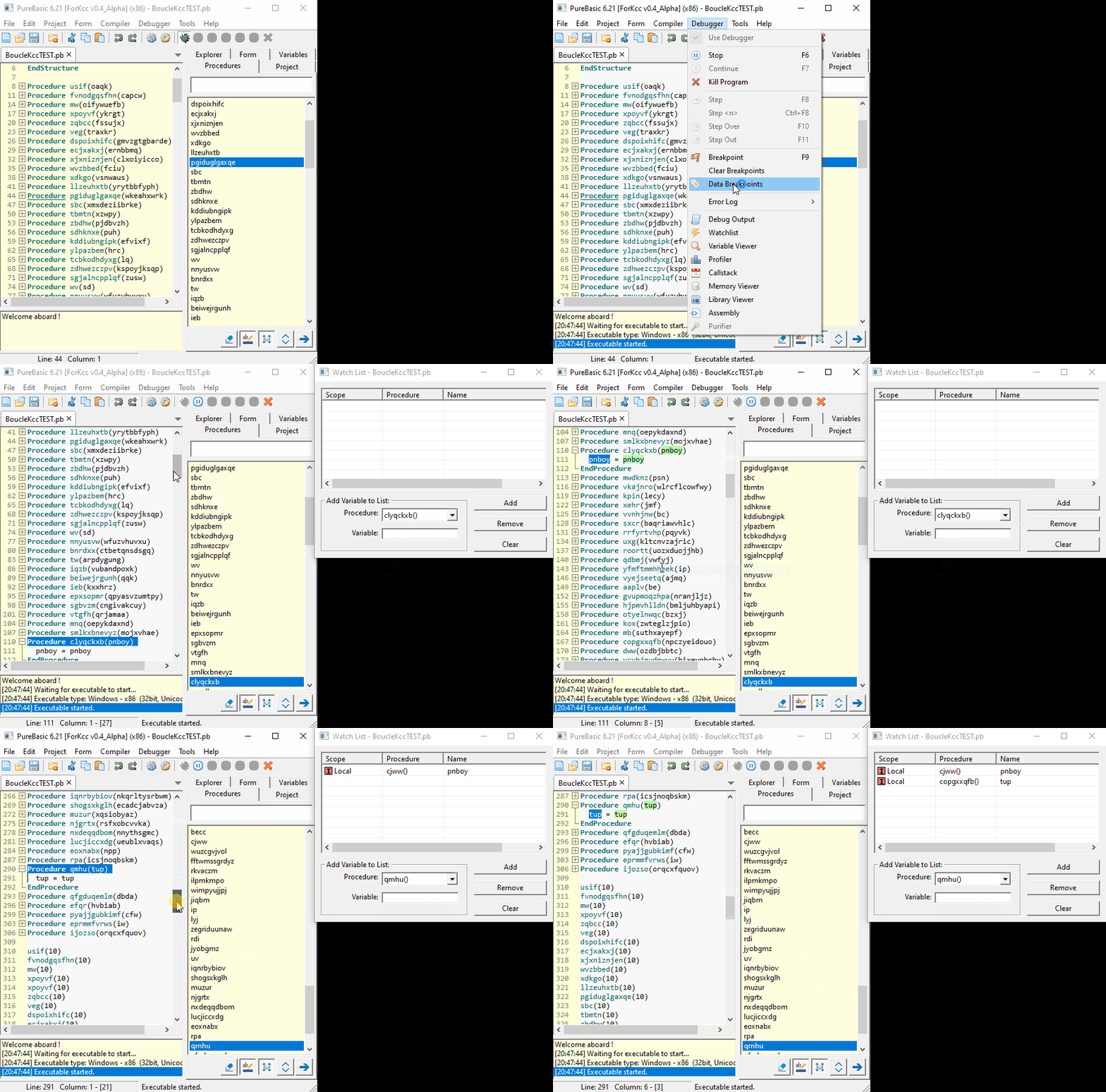
2/ ADDING VARIABLE BY SIMPLE CLICK

Well..after i say to me (Yes i know...i say to me, so much things, because i'm always alone :mrgreen:) Kcc
It would be really great if we could add the variables directly thanks to this awesome ranking you just created. :D 8)
In fact ...Kcc is never truly satisfied :oops:
Then... i have create this function

1/ Run the code
2/ Open WatchingList windows
3/ Choose you "sorted" :mrgreen: procedure in the comboBox
4/ Automaticaly, the IDE unfold and hightlight this procedure
5/ Fully select the name of the variable by sliding mouse or double click on it
6/ Right click and choose the menu "Selected Variable to WatchList" (This menu is disabled if the WatchList is closed)

And your Variable appears in the WatchList like magic 8)

Image

Adding number 7

VIEWVER STRUCTURE

1/ SEE FULL STRUCTURE ON MOUSE HOVER

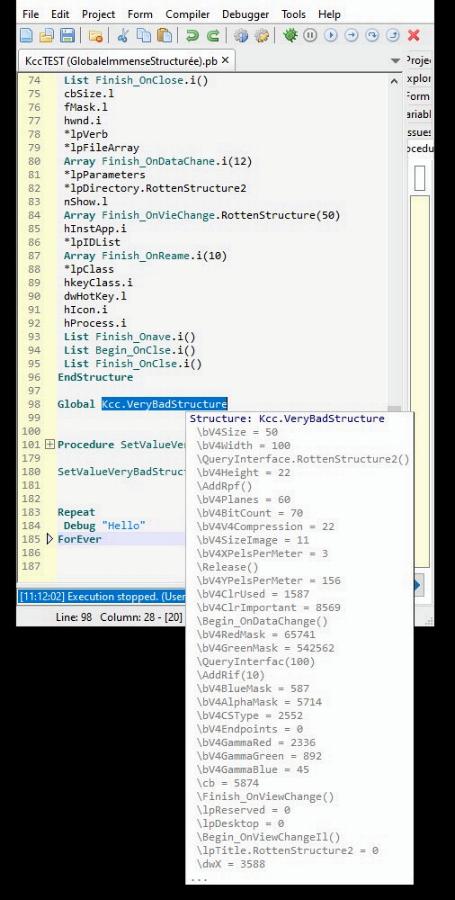
When i modify IDE splendid code, i found monstruous STRUCTURE, with inside other STRUCTURE, LIST, INTERFACE (I not even know what it is :mrgreen: ) and all the type of variable you can found in PB inside :shock:
Nearly like the nices 8) RUSSIANS dolls :lol:
Image
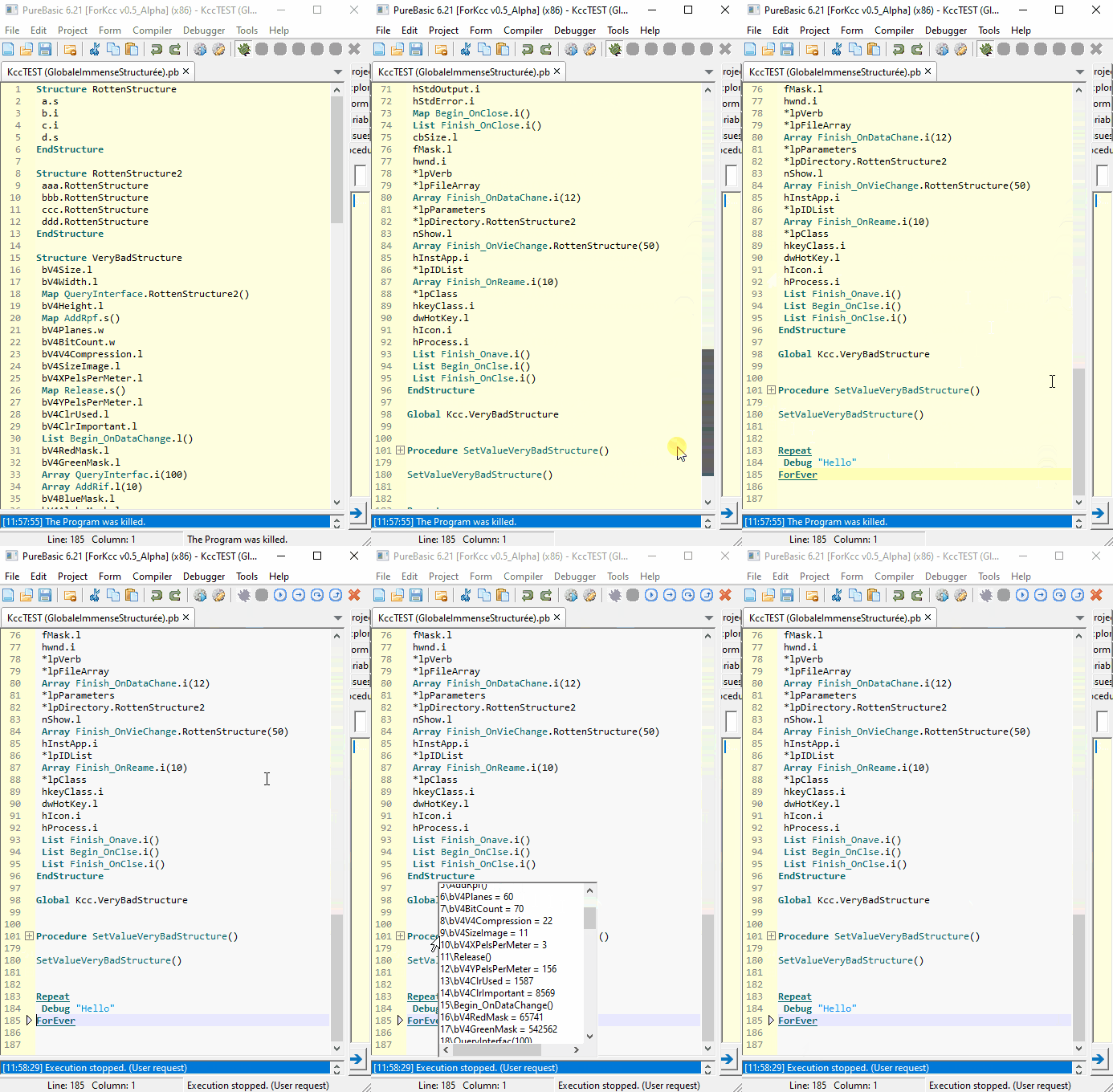
A day... i have searched inside this structure, a value, and see the nice and usefull viewver that FRED have coding is limited to X characters and after there are three points for say she is not full :|

Image

I have searched in the forum and USER_RUSSIAN confirm this by put the same screenshot than me :wink:
viewtopic.php?p=643383#p643383
And apparently there aren't a tool for see it, we are forcing to ask element by element the value :|

Then, i have replace the original Windows POPUP by a normal windows with readonly EDITOR, and apparently now we can see all the values of this structure mammoth :mrgreen: , i have created for this example
And I took the opportunity to add the number of structural elements and the number of each element so as not to get lost. :idea:

Image

Re: IDE adding

Posted: Mon Feb 02, 2026 3:51 pm
by Kwai chang caine
Planned

Re: IDE addings

Posted: Mon Feb 02, 2026 4:11 pm
by Kwai chang caine
Planned

Re: IDE addings

Posted: Mon Feb 02, 2026 4:45 pm
by AZJIO
You can try ColorMania.

Re: IDE addings

Posted: Mon Feb 02, 2026 6:15 pm
by Kwai chang caine
Hello AZJIO :D
It's a very nice and powerfull tool :shock:
Thanks for the link 8)

Re: IDE addings

Posted: Wed Feb 04, 2026 6:49 pm
by Michael Vogel
Well done, my friend!

Keep on coding. :wink:

Re: IDE addings

Posted: Wed Feb 04, 2026 8:23 pm
by Kwai chang caine
Heeeeyy !! hello my splendid favorite green friend duck !!! 8)

I really thought no one would be interested in adding a multitude of small, forgotten features that would make our lives much easier. :oops:
Thanks a lot for your encouragement, i need it because this code is splendid, but it's a bit like an airport concourse: you walk and walk and walk, and you can't see the end of it. :shock:
I can't believe how much work it took FRED and his team to create an IDE that seems simple compared to the big IDEs, but which is actually quite comprehensive (at least for me :oops: ).

The more I get my hands in engine sludge... the more I like it... At first, I just wanted to add this results filter, but now I wake up in the morning with one idea after another. :D At this rate, I'm not going to be able to continue MY program. :lol:

The problem is that I love this favorite yellow IDE so much, that I don't dare modify it with my clumsy hands. :oops:
So I try, as much as i can, to respect FRED's programming style, to use pointers, comments in English, to mark each line I add, not to delete any of FRED's sacred lines, just to comment them, to make an exhaustive list of all my modifications, so that if I want to, I can run an ANTIVIRUS and hey presto... we can completely eradicate the KCC disease. :mrgreen:

But it's so exciting to see all the functions we've used thousands of times from the inside. 8)
It's like when you're on a boat and you usually walk on the shore, the same places don't look the same at all from a different angle.

Today I coded the compiler for the source code “MakeWindow.cmd” in PB and it seems to work, at least with KCC....you always have to be careful. :mrgreen: :lol:

Re: IDE addings

Posted: Wed Feb 04, 2026 11:42 pm
by acreis
Great!

I don't have any idea how coud I possibily add something to IDE.

Re: IDE addings

Posted: Thu Feb 05, 2026 8:21 am
by Kwai chang caine
You know.. In the forum, there are a real proverb for decades :wink:
If KCC can do... Everybody too :mrgreen:

FRED have right (Fred have always right :?) when he say : "He give this IDE code also for learn" 8)
Yes, because contrary to me and several of us, he have learn at school the real good method of programing, and since several days, i believe to be at school me too, like when i was children :mrgreen: 8) and It's cool to learn with the FRED professor..It's a shame he's not here in person. :| but i have already his fingers and his brain :lol:

In fact, it's difficult (like all for Kcc) because the code is montruously big :shock:
I get lost in it, all the time, like in a maze, mainly when you know It's always difficult to modify the code of another person. :oops:
Then for help me, i do like "Little Thumb" (petit poucet in french), i put little stones everywhere i go :mrgreen:
But FRED have really do a splendid, and mainly simple and structured code, (in fact... like him) and It's also "simple" for that 8)
Except some choices i have not understand, (The ways of Lord god Fred are impenetrable :mrgreen: ) but one time that you create one function, the others is more "simple"

The worst in this history, it's i have recoding all my modifs several time, because i try to modify the minimum the sacred for me FRED code
So i have try inside the original, the more simple , and i say to me : "KCC perhaps you can be more 'discret" (i love to be discret :mrgreen:) and put all my adding lines, inside an external pbi, with kcc_procedure(), kcc_macro(), like this only one line of Kcc replace several, for soil a minimum the original code :idea: :oops:

That works, in the new version, but finally there are when even kcc lines of code everywhere, :?
Obvously, i must take each event, datas, declaration, etc... for incrust my cow pat code, inside white clean FRED code :oops:
And with this method, i'm forcing to take pointers, and several variables, for only one funtion :| furthermore i think It's not good for the speed :oops:

It's the reason why i have another idea, return to first simple method (the favourite FRED method 8)) and create an external exe patcher, who download the source code on github, depack it, run my own 'makewindow" in pb code, and patch each file with kcc cow pat lines :D and comment the original lines of FRED code, who must be modified or deleted

After, It's simple to have the kcc source version, run or compil the "Purebasic. Pb" in PureBasic. Exe
My patcher also create hitself the purebasic.exe like the "makewindow.com" but in another place that him, because i have lost much time to understand the original purebasic. exe is replaced quietly by the new created by makewindow in pb original folder of compiler :lol: sometime... Kcc are really a donkey :oops: everybody have understand... Except already the same :mrgreen:

Like this, with this exe..one button to have kccversion... One button for removing kcc adding and retrieve the amazing original FRED jewel :idea: 8)
I have again numerous ideas, for adding little other options.. and also in my patcher, i try to add a list of choices for the user, if someone not want this or other add, :idea:

And the more funny... It's after nearly 30 years of use, i see the purebasic IDE is totally standalone :shock:
Sure... It can't compile.. But if you take it alone... It works... FRED is really too strong, all the days he surprise me, and with my age, It's not so simple, It's also for that, between others, i love him 8)

Re: IDE addings

Posted: Thu Feb 05, 2026 9:03 am
by AZJIO
It became clearer, but why are there no links to your changes? What does the text "Planned" mean? Maybe my browser doesn't display images and I'm missing something.

Re: IDE addings

Posted: Thu Feb 05, 2026 9:26 am
by Kwai chang caine
Hello AZJIO :D

For the moment It's a begining project, and i don't know if that interest someone :oops:
Im already again surprising kcc can modify something in the GRAAL for him :oops:

The start is i create that for myself, because apparently nobody have a solution to my problem :cry:
viewtopic.php?p=650722#p650722
And it's when i coding, and see the two first adding works... i see too that all is possible with PB, and say to me perhaps i'm not alone to want this littles options, that the team not have time to adding :idea:
I continue to learn, to try, to create each function, and i'm not sure i can and have time for do all,

But il i see that interest members, i must also ask to FRED what i can or cannot do with the license
Because read all licenses, are again worst for me, than the pb code hitself :lol:
I have try to read... And after 20 lines.. I have nearly nothing understand :oops:

And i must proof to him, before , It's not another numerous kcc joke :lol: (It's true, than rarely.... but sometime..... KCC are not completely serious :mrgreen:)
Because I'm already pretty sure that when he finds out what I managed to do :shock: ,

Image

Ouarfff ouarffff ouarf ...impossible...not Kccccccccccc !!!! ouarffff ouarffff
he's going to wet himself laughing, in his pants. :lol: :lol:

In my opinion, I'm the last person he'd entrust with this mission. :oops: :twisted:

And never.. But never i want hurt or getting yelled at by Fred again, like after my many stupid mistakes over the last 30 years, and then he just let it go, because that's just how he is, kind and comprehensive 8)
But here. I touch to his works and breadwinner.. We not joke with this :? I respect so much the works of team who sometime save my life :shock: 8)

It's for all this reasons.. I present to you all my ideas.. And we'll see what the future holds. :wink:
In all case... Thanks for your interest 8)

Re: IDE addings

Posted: Thu Feb 05, 2026 10:33 am
by idle
those both look useful, well done.

Re: IDE addings

Posted: Thu Feb 05, 2026 10:52 am
by Kwai chang caine
Master wrote:those both look useful, well done.
Hello my friend of other side of the world :D
I admire so much you MASTER, since all this years and so proud to know a little bit you :shock:
Thanks a lot for this kinds words that warm my heart 8)