Page 1 of 1

Creating gadgets with CanvasGadget() + VectorDrawing

Posted: Mon Jan 12, 2026 10:08 am
by Jacobus
Hello everyone,
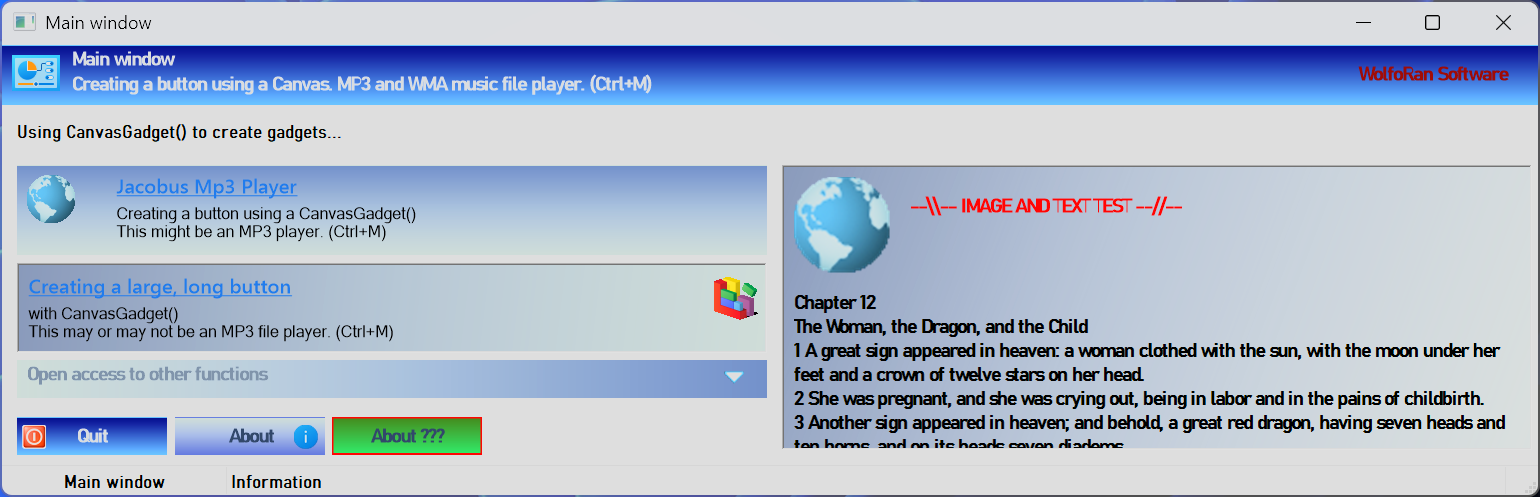
I propose a simple way To create gadgets using CanvasGadget() As a base And VectorDrawing functions To achieve a nice result. It's a simple way to create an eye-catching and user-friendly application interface.
You can easily modify the created functions To suit your needs And even create new ones. Everything is customizable since, ultimately, it's just drawing.
- Tested on Windows 11 Pro, 64-bit With PB 6.30b7 32-bit And 64-bit.
- The icons And images used are loaded from the system (Shell32.dll).
Image

+ Added a function to create standard buttons with text, image, outline, and gradient color, of course.

Corrections made on 01/14/2026
+ 3:30 PM: Following feedback from users whose text display was not perfectly aligned on the Canvas, I modified the responsible parameters in the procedures: VectorFont() and the positioning defined in MovePathCursor().
+ It is therefore necessary to pay attention to the font sizes used and their placement on the drawing surface. To ensure proper alignment, test with the DPI factor checked and then unchecked in the compilation options.
; + 10:50 PM: There's no point in testing #PB_Compiler_DPIAware because if the option isn't checked, the result will always be 1. Thanks, Hexor.
; + 10:50 PM: Thanks to minimy for reminding me that the necessary functions for changing the Canvas cursor already exist in PB. Especially since I recently used them to display my own cursors… :?

Code: Select all

;==============================================================
; Library functions:      + LargeGradientButton()  = Create large buttons with images and text in gradient colors.
;                         + ButtonMovementEffect() = Gives a movement effect to the buttons when the mouse hovers over them.
;                         + GradientTextArea()     = Creating a text and image area with gradient colors.
;                         + GradientHeaderBar()    = Create a window header bar with icons and text in different colors
;                         + GradientExpanderBar()  = Create a zone folding simulation bar
;                         + NormalGradientButton() = Create standard buttons with text, image, and gradient color
;
; Version:.................1.01
; Author:..................Jacobus
; Date:....................January 11, 2026
; Target OS:...............Microsoft Windows 10 & 11 (All ??)
; Target Compiler:.........PureBasic 6.30
; License:.................Free, unrestricted, no warranty

;==============================================================

; Corrections made on 01/14/2026
; + 3:30 PM: Following feedback from users whose text display was not perfectly aligned on the Canvas, I modified the responsible parameters in the procedures: VectorFont() and the positioning defined in MovePathCursor().
; + It is therefore necessary to pay attention to the font sizes used and their placement on the drawing surface. To ensure proper alignment, test with the DPI factor checked and then unchecked in the compilation options.
; + 10:50 PM: There's no point in testing #PB_Compiler_DPIAware because if the option isn't checked, the result will always be 1. Thanks, Hexor.
; + 10:50 PM: Thanks to minimy for reminding me that the necessary functions for changing the Canvas cursor already exist in PB. Especially since I recently used them to display my own cursors…
;==============================================================

;- CONSTANTES
Enumeration Fenetres
  #MAIN_WINDOW 
EndEnumeration

Enumeration Gadgets
  #CANVAS_HEADER
  #TEXT_CANVAS
  #CANVAS_BTN_ONE
  #CANVAS_BTN_TWO
  #CANVAS_TEXTAREA
  #CANVAS_EXPAND
  #CONTAINER_EXPAND
  #EDITORNOTES
  #BTN_QUIT
  #BTN_ABOUT
  #BTN_OTHER
  #STATUS
EndEnumeration

; if the option isn't checked, the result will always be 1.
Global dpix.d = DesktopResolutionX()
Global dpiy.d = DesktopResolutionY() 

;==============================================================


;-FONTS
Global Font0 = LoadFont(0, "Arial", 10, #PB_Font_Bold|#PB_Font_HighQuality) 
Global Font1 = LoadFont(1, "Segoe UI Semibold", 10, #PB_Font_HighQuality|#PB_Font_Underline)
Global Font2 = LoadFont(2, "Segoe UI Semibold", 9, #PB_Font_HighQuality)

;-TEXT
Global TEXTAREA$ ; extrait de l'Apocalypse selon St Jean.
;{
TEXTAREA$ = "Chapter 12"+#CRLF$
TEXTAREA$ + "The Woman, the Dragon, and the Child"+#CRLF$
TEXTAREA$ + "1 A great sign appeared in heaven: a woman clothed with the sun, with the moon under her feet and a crown of twelve stars on her head."+#CRLF$
TEXTAREA$ + "2 She was pregnant, and she was crying out, being in labor and in the pains of childbirth."+#CRLF$ 
TEXTAREA$ + "3 Another sign appeared in heaven; and behold, a great red dragon, having seven heads and ten horns, and on its heads seven diadems."+#CRLF$ 
TEXTAREA$ + "4 Its tail swept down a third of the stars from the sky and flung them to the earth. The dragon stood before the woman who was about to give birth, so that it might devour her child the moment it was born."+#CRLF$ 
TEXTAREA$ + "5 She gave birth to a son, who is to rule all nations with an iron rod. And her child was snatched up to God and to his throne."+#CRLF$ 
TEXTAREA$ + "6 And the woman fled into the desert, where she had a place prepared by God, so that she might be nourished there for 1,260 days."+#CRLF$ 
TEXTAREA$ + "7 And there was war in heaven. Michael and his angels fought against the dragon. And the dragon and his angels fought,"+#CRLF$ 
TEXTAREA$ + "8 But they were not the strongest, and their place was no longer found in heaven."+#CRLF$ 
TEXTAREA$ + "9 And the great dragon was hurled down—the ancient serpent called the devil, or Satan, who leads the whole world astray. He was hurled to the earth, and his angels with him."+#CRLF$ 
TEXTAREA$ + "10 And I heard a loud voice in heaven saying, “Now have come the salvation and the power and the kingdom of our God, and the authority of his Christ; for the accuser of our brothers, who accuses them before our God day and night, has been hurled down.”"+#CRLF$ 
; TEXTAREA$ + "11 They overcame him by the blood of the Lamb and by the word of their testimony; they did not love their lives so much as to shrink from death."+#CRLF$ 
; TEXTAREA$ + "12 Therefore rejoice, you heavens, and you who dwell in them! Woe to the earth and the sea! For the devil has come down to you, filled with great wrath, because he knows that his time is short."+#CRLF$ 
; TEXTAREA$ + "13 When the dragon saw that he had been hurled to the earth, he pursued the woman who had given birth to the male child."+#CRLF$ 
; TEXTAREA$ + "14 And the two wings of the great eagle were given to the woman, so that she might fly to the desert, to her place, where she is nourished for a time, times, and half a time, away from the face of the serpent."+#CRLF$ 
; TEXTAREA$ + "15 And from his mouth the serpent spewed water like a river after the woman, in order to sweep her away with the river."+#CRLF$ 
; TEXTAREA$ + "16 And the earth helped the woman, and the earth opened its mouth and swallowed the river that the dragon had spewed out of its mouth."+#CRLF$ 
; TEXTAREA$ + "17 And the dragon was enraged with the woman, and went to make war with the rest of her offspring, with those who keep the commandments of God and have the testimony of Jesus." 
;}

;-PROCEDURES
; With Vector Drawing, the colors are of the RGBA type (RGB + Alpha Channel) for better rendering.
; ex: RGBA(125, 141, 172, 253) or RGBA(213, 228, 223, 103)
Procedure GradientHeaderBar(canvasID, ColorZero, ColorOne, Title$, Text$, Enterprise$, ImageHeader, HV = 1)
  
  ; canvasID:...............CanvasGadget ID number() 
  ; ColorZero:..............Color of the beginning of the gradient, ex: RGBA(99, 184, 255, 255)
  ; ColorOne:...............End color of the gradient,   ex: RGBA(0, 0, 128, 255)
  ; Title$:.................Title displayed in the upper left corner of the window header bar. 
  ; Text$:..................Text displayed at the bottom left, below the title. 
  ; Enterprise$:............Text or name that will be displayed in the middle right corner of the window header bar.  
  ; ImageHeader:............Image that will be displayed to the left of the window header bar
  ; HV:.....................Option: HV = 1 vertical gradient (default) or HV = 0 horizontal gradient
  
  Protected wc = GadgetWidth(canvasID)
  Protected hc = GadgetHeight(canvasID)
  Protected outputc = CanvasVectorOutput(canvasID, #PB_Unit_Pixel)
  
  If StartVectorDrawing(outputc)    
    ; Choosing the direction of the color gradient
    If HV = 0  ; Horizontal gradient background (default)
      VectorSourceLinearGradient(0, 0, w*dpix, h*dpiy)
      VectorSourceGradientColor(ColorZero, 0.0)
      VectorSourceGradientColor(ColorOne, 1.0)
    ElseIf HV = 1 ; Vertical gradient background
      VectorSourceLinearGradient(1, hc*dpiy, 1, 1 )
      VectorSourceGradientColor(ColorZero, 0.0)
      VectorSourceGradientColor(ColorOne, 1.0)
    EndIf  
    FillVectorOutput() ; filling
    
    If ImageHeader <> 0
      MovePathCursor(10, 4)
      DrawVectorImage(ImageHeader, 255) 
    EndIf 
    
    If Title$ <> ""
      VectorFont(Font0)
      VectorSourceColor(RGBA(231, 234, 238, 255)) ; grey 
      MovePathCursor(70, 5)   
      DrawVectorText(Title$)
    EndIf 
    
    If Text$ <> ""
      ;VectorFont(Font2)
      ;VectorSourceColor(RGBA(231, 234, 238, 255))   
      MovePathCursor(70, 25)   
      DrawVectorText(Text$)
    EndIf 
    
    If Enterprise$ <> ""
      ; Change the color for the Enterprise$ text
      VectorSourceColor(RGBA(145, 0, 0, 255)) ; rouge foncé
      MovePathCursor((wc*dpix)-(VectorTextWidth(Enterprise$)+30), 20)  ; positioning to the right of the bar 
      DrawVectorText(Enterprise$)
    EndIf   
    
    StopVectorDrawing()
  EndIf   
EndProcedure

Procedure LargeGradientButton(canvasID, ColorZero, ColorOne, Title$, Text$, Image, PosImage = 0, HV = 1)
  
  ; canvasID:...............CanvasGadget ID number() 
  ; ColorZero:..............Color of the beginning of the gradient, ex: RGBA(105, 133, 187, 255)
  ; ColorOne:...............End color of the gradient,   ex: RGBA(213, 228, 223, 255)
  ; Title$:.................Title displayed in the top left corner of the button and to the right of the icon
  ; Text$:..................Text displayed at the bottom left, below the title.  
  ; Image:..................The image will be displayed on the button, to the left of the title and text, or on the right side of the button.
  ; PosImage:...............Icon position option: 0 = left, 1 = right
  ; HV:.....................Option: HV = 1 horizontal gradient (default) or HV = 0 vertical gradient
  
  Protected w = GadgetWidth(canvasID)
  Protected h = GadgetHeight(canvasID)
  Protected output = CanvasVectorOutput(canvasID, #PB_Unit_Pixel)
  
  If StartVectorDrawing(output) 
    
    ; Choosing the direction of the color gradient
    If HV = 1  ; Horizontal gradient background (default)
      VectorSourceLinearGradient(0, 0, w*dpix, h*dpiy)
      VectorSourceGradientColor(ColorZero, 0.0) ; 0,0 (le début du gradient)
      VectorSourceGradientColor(ColorOne, 1.0)  ; 1.0 (la fin du gradient). 
    ElseIf HV = 0 ; Vertical gradient background
      VectorSourceLinearGradient(1, h*dpiy, 1, 1 )
      VectorSourceGradientColor(ColorOne, 1.0)
      VectorSourceGradientColor(ColorZero, 0.0)
    EndIf   
    FillVectorOutput()
    
    If PosImage = 0      ; the image will be placed on the left 
      MovePathCursor(10, 10)     
      DrawVectorImage(Image, 255) 
      
      VectorSourceColor(RGBA(0, 0, 0, 255)) ; noir   
      MovePathCursor(70, 25)   
      DrawVectorText(Text$)
      
      VectorFont(Font1)
      VectorSourceColor(RGBA(28, 113, 218, 255)) ; bleu  
      MovePathCursor(70, 5)   
      DrawVectorText(Title$)
  
    ElseIf PosImage = 1  ; right-hand positioning
      MovePathCursor((w*dpix)-(48+10), 10) 
      DrawVectorImage(Image, 255)
      
      VectorSourceColor(RGBA(0, 0, 0, 255)) ; noir   
      MovePathCursor(10, 25)   
      DrawVectorText(Text$)
      
      VectorFont(Font1)
      VectorSourceColor(RGBA(28, 113, 218, 255)) ; bleu  
      MovePathCursor(10, 5)   
      DrawVectorText(Title$)   
    EndIf 

    StopVectorDrawing()
  EndIf   
    
EndProcedure

Procedure NormalGradientButton(canvasID, ColorZero, ColorOne, Text$, ColorTxt, Image, OutlineColor, Outline = 0, PosImage = 0, HV = 1)
  
  ; canvasID:...............CanvasGadget ID number() 
  ; ColorZero:..............Color of the beginning of the gradient, ex: RGBA(105, 133, 187, 255)
  ; ColorOne:...............End color of the gradient,   ex: RGBA(213, 228, 223, 255)
  ; Text$:..................Text displayed at the bottom left, below the title. 
  ; ColorTxt:...............Text color,   ex: RGBA(231, 234, 238, 255)
  ; Image:..................Image/icon 16x16 max (you can change this limit) that will be displayed on the button, to the left of the title and text, or on the right side of the button
  ; OutlineColor:...........Option to choose the outline color.
  ; Outline:................Option to draw an outline on the button.
  ; PosImage:...............Icon position option: 0 = left, 1 = right
  ; HV:.....................Option: HV = 1 horizontal gradient (default) or HV = 0 vertical gradient
  
  Protected w = GadgetWidth(canvasID)
  Protected h = GadgetHeight(canvasID)
  Protected output = CanvasVectorOutput(canvasID, #PB_Unit_Pixel)

  If StartVectorDrawing(output)
    
    ; Choosing the direction of the color gradient
    If HV = 1  ; Horizontal gradient background (default)
      VectorSourceLinearGradient(0, 0, w*dpix, h*dpiy)
      VectorSourceGradientColor(ColorZero, 0.0)
      VectorSourceGradientColor(ColorOne, 1.0) 
    ElseIf HV = 0  ; Vertical gradient background
      VectorSourceLinearGradient(1, h*dpiy, 1, 1 )
      VectorSourceGradientColor(ColorOne, 1.0)
      VectorSourceGradientColor(ColorZero, 0.0)
    EndIf   
    FillVectorOutput()
    
    ; image
    If Image <> 0
      If PosImage = 0      ; the image will be placed on the left
        MovePathCursor(5, 5*dpiy)
        DrawVectorImage(Image, 255, 16*dpix, 16*dpiy)
      ElseIf PosImage = 1  ; right-hand positioning
        MovePathCursor((w*dpix)-(21*dpix), 5*dpiy)
        DrawVectorImage(Image, 255, 16*dpix, 16*dpiy)
      EndIf 
    EndIf 
    
    ; centered text
    If Text$ <> ""
      Protected xt = (w*dpix/2)-(VectorTextWidth(Text$)/2)  ; to center the text horizontally
      Protected yt = (h*dpiy/2)-(VectorTextHeight(Text$)/2) ; to center the text vertically
      MovePathCursor(xt, yt) 
      VectorFont(Font0)
      VectorSourceColor(ColorTxt)
      DrawVectorText(Text$)
    EndIf 
    
    ; to mark an outline (do this last so it doesn't get covered)
    If Outline = 1
      MovePathCursor(0, 0)     
      AddPathBox(0, 0, w*dpix, h*dpiy)
      VectorSourceColor(OutlineColor)     
      StrokePath(3)   ;3 pixels thick
    EndIf 
    
    StopVectorDrawing()
  EndIf
  
EndProcedure

Procedure GradientTextArea(canvasID, ColorZero, ColorOne, Title$, Text$, Image, ImgWidth, ImgHeight, HV = 1)
   
  ; canvasID:...............CanvasGadget ID number() 
  ; ColorZero:..............Color of the beginning of the gradient, ex: RGBA(105, 133, 187, 255)
  ; ColorOne:...............End color of the gradient,   ex: RGBA(213, 228, 223, 255)
  ; Title$:.................Title displayed in the top left corner of the button and to the right of the icon
  ; Text$:..................Text displayed at the bottom left, below the title.  
  ; Image:..................The image will be displayed 
  ; ImgWidth:...............Image width
  ; ImgHeight:..............Image height
  ; HV:.....................Option: HV = 1 horizontal gradient (default) or HV = 0 vertical gradient
  
  Protected w = GadgetWidth(canvasID)
  Protected h = GadgetHeight(canvasID)
  Protected output = CanvasVectorOutput(canvasID, #PB_Unit_Pixel)
  
  If StartVectorDrawing(output)
    ; Choosing the direction of the color gradient
    If HV = 1  ; Horizontal gradient background (default)
      VectorSourceLinearGradient(0, 0, w*dpix, h*dpiy)
      VectorSourceGradientColor(ColorZero, 0.0) ; 0,0 (le début du gradient)
      VectorSourceGradientColor(ColorOne, 1.0)  ; 1.0 (la fin du gradient). 
    ElseIf HV = 0  ; Vertical gradient background
      VectorSourceLinearGradient(1, h*dpiy, 1, 1 )
      VectorSourceGradientColor(ColorOne, 1.0)
      VectorSourceGradientColor(ColorZero, 0.0)
    EndIf   
    FillVectorOutput()
    
    If Image <> 0
      If ImgWidth < 24 Or ImgHeight < 24
        ImgWidth = 24 : ImgHeight = 24 ; The image is given a minimum size of 24x24.
      EndIf 
      MovePathCursor(10, 10)
      DrawVectorImage(Image, 255, ImgWidth*dpix, ImgHeight*dpiy) 
    EndIf 
        
    If Title$ <> ""
      VectorFont(Font0)
      VectorSourceColor(RGBA(255, 0, 0, 255)) ; rouge   
      MovePathCursor((ImgWidth*dpix)+30, 30)   
      DrawVectorText(Title$)
    EndIf  
    
    If Text$ <> ""
      VectorSourceColor(RGBA(0,0,0,255)) ; texte en noir    
      MovePathCursor(10, (ImgHeight*dpiy)+30)
      ; The text can be long; it is placed in a paragraph with automatic line breaks.
      DrawVectorParagraph(Text$, (w*dpix)-20, h*dpiy)
    EndIf 
    
    StopVectorDrawing()
  EndIf 
  
EndProcedure

Procedure GradientExpanderBar(canvasIDexp, ColorZero, ColorOne, Title$, ImageExp, HV = 1)
  
  ; canvasID:...............CanvasGadget ID number() 
  ; ColorZero:..............Color of the beginning of the gradient, ex: RGBA(99, 184, 255, 255)
  ; ColorOne:...............End color of the gradient,   ex: RGBA(0, 0, 128, 255)
  ; Title$:.................Title displayed on the left. 
  ; Image:..................Image that will be displayed on the right side
  ; HV:.....................Option: HV = 1 horizontal gradient (default) or HV = 0 vertical gradient
  
  Protected wexp = GadgetWidth(canvasIDexp)
  Protected hexp = GadgetHeight(canvasIDexp)
  Protected outputexp = CanvasVectorOutput(canvasIDexp, #PB_Unit_Pixel)
  
  If StartVectorDrawing(outputexp)
    
    ; Choosing the direction of the color gradient
    If HV = 1  ; Horizontal gradient background (default)
      VectorSourceLinearGradient(0, 0, wexp*dpix, hcexp*dpiy)
      VectorSourceGradientColor(ColorZero, 0.0) ; 0,0 (le début du gradient)
      VectorSourceGradientColor(ColorOne, 1.0)  ; 1.0 (la fin du gradient). 
    ElseIf HV = 0 ; Vertical gradient background
      VectorSourceLinearGradient(1, h*dpiy, 1, 1 )
      VectorSourceGradientColor(ColorOne, 1.0)
      VectorSourceGradientColor(ColorZero, 0.0)
    EndIf   
    FillVectorOutput()
    
    VectorFont(Font0)
    VectorSourceColor(RGBA(117, 136, 157, 255)) ; grey  
    MovePathCursor(10, 5)   
    DrawVectorText(Title$)
    
    MovePathCursor((wexp-30)*dpix, 5)
    DrawVectorImage(ImageExp, 255, 24, 24) ; image resized to 24x24
    
    StopVectorDrawing()
  EndIf 

EndProcedure

Procedure ButtonMovementEffect(CanvasID, x1, y1)
; When the mouse hovers over the button, it moves from x1 to x2 and from y1 to y2.
; When the mouse leaves the button, it returns to its initial position, 
; giving the gadget a motion effect.
  
  Protected x2 = x1+2 
  Protected y2 = y1-2
  
  If EventType() = #PB_EventType_MouseEnter ;#CUSTOM_MSG_MOUSEENTER    
    ResizeGadget(CanvasID, x2, y2, #PB_Ignore, #PB_Ignore)    
  ElseIf EventType() = #PB_EventType_MouseLeave ;#CUSTOM_MSG_MOUSELEAVE    
    ResizeGadget(CanvasID, x1, y1, #PB_Ignore, #PB_Ignore)   
  EndIf
            
EndProcedure

Procedure Resize_MAIN_WINDOW()
  
  WinWidth  = WindowWidth(#MAIN_WINDOW,#PB_Window_InnerCoordinate)
  WinHeight = WindowHeight(#MAIN_WINDOW,#PB_Window_InnerCoordinate)
  
  ResizeGadget(#CANVAS_HEADER, #PB_Ignore, PB_Ignore, WinWidth, #PB_Ignore)
  GradientHeaderBar(#CANVAS_HEADER, RGBA(99, 184, 255, 255), RGBA(0, 0, 128, 255), "Main window", "Creating a button using a Canvas. MP3 and WMA music file player. (Ctrl+M)", "Jacobus Software", ExtractIcon_(GetModuleHandle_(#Null), "Shell32.dll",207))
  
  ResizeGadget(#CANVAS_TEXTAREA, #PB_Ignore, #PB_Ignore, WinWidth-524, WinHeight-110)
  GradientTextArea(#CANVAS_TEXTAREA, RGBA(125, 141, 172, 253), RGBA(213, 228, 223, 103),"--\\-- IMAGE AND TEXT TEST --//--", TEXTAREA$, ExtractIcon_(GetModuleHandle_(#Null), "Shell32.dll",13), 64, 64)
  
  ResizeGadget(#BTN_QUIT, #PB_Ignore, WinHeight-52, #PB_Ignore, #PB_Ignore)
  ResizeGadget(#BTN_ABOUT, #PB_Ignore, WinHeight-52, #PB_Ignore, #PB_Ignore)
  ResizeGadget(#BTN_OTHER, #PB_Ignore, WinHeight-52, #PB_Ignore, #PB_Ignore)
  
EndProcedure

;- Interface graphique
If OpenWindow(#MAIN_WINDOW, 0, 0, 1024, 300, "Main window", #PB_Window_SystemMenu | #PB_Window_ScreenCentered|#PB_Window_MaximizeGadget|#PB_Window_MinimizeGadget|#PB_Window_SizeGadget)
  WindowBounds(#MAIN_WINDOW, 1024, 300, 1280, 600)
  WidthWMain  = WindowWidth(#MAIN_WINDOW, #PB_Window_InnerCoordinate)
  HeightWMain = WindowHeight(#MAIN_WINDOW, #PB_Window_InnerCoordinate) 
  
  CanvasGadget(#CANVAS_HEADER, 0, 0, WidthWMain, 40)
  GradientHeaderBar(#CANVAS_HEADER, RGBA(99, 184, 255, 255), RGBA(0, 0, 128, 255), "Main window", "Creating a button using a Canvas. MP3 and WMA music file player. (Ctrl+M)", "WolfoRan Software", ExtractIcon_(GetModuleHandle_(#Null), "Shell32.dll",207))
  
  TextGadget(#TEXT_CANVAS, 10, 50, 500, 20, "Using CanvasGadget() to create gadgets...")
  SetGadgetFont(#TEXT_CANVAS, FontID(0))
  
  CanvasGadget(#CANVAS_BTN_ONE, 10, 80, 500, 60)  : GadgetToolTip(#CANVAS_BTN_ONE,"Jacobus Mp3 Player")
  LargeGradientButton(#CANVAS_BTN_ONE, RGBA(213, 228, 223, 255), RGBA(105, 133, 187, 255),"Jacobus Mp3 Player", "Creating a button using a CanvasGadget()"+#CRLF$+"This might be an MP3 player. (Ctrl+M)", ExtractIcon_(GetModuleHandle_(#Null), "Shell32.dll",13), 0, 0)
  
  CanvasGadget(#CANVAS_BTN_TWO, 10, 145, 500, 60, #PB_Canvas_Border)  : GadgetToolTip(#CANVAS_BTN_TWO,"Start DirAnalyser")
  LargeGradientButton(#CANVAS_BTN_TWO, RGBA(125, 141, 172, 255), RGBA(213, 228, 223, 255), "Creating a large, long button", "with CanvasGadget()"+#CRLF$+"This may or may not be an MP3 file player. (Ctrl+M)", ExtractIcon_(GetModuleHandle_(#Null), "Shell32.dll",80), 1, 1)
  
  CanvasGadget(#CANVAS_EXPAND, 10, 210, 500, 25, #PB_Canvas_DrawFocus)  : GadgetToolTip(#CANVAS_EXPAND,"Expand the editing section")
  GradientExpanderBar(#CANVAS_EXPAND, RGBA(213, 228, 223, 255), RGBA(105, 133, 187, 255), "Open access to other functions", ExtractIcon_(GetModuleHandle_(#Null), "Shell32.dll",247))
  ContainerGadget(#CONTAINER_EXPAND, 10, 235, 500, 300, #PB_Container_Single) ;{
  EditorGadget(#EDITORNOTES, 0, 0, 500, 300, #PB_Editor_WordWrap)
  SetGadgetColor(#EDITORNOTES, #PB_Gadget_BackColor, RGB(255, 250, 205))
  SetGadgetColor(#EDITORNOTES, #PB_Gadget_FrontColor, RGB(40, 56, 86))
  ;}
  CloseGadgetList()
  HideGadget(#CONTAINER_EXPAND, #True)
  
  CanvasGadget(#CANVAS_TEXTAREA, 520, 80, 500, HeightWMain-110, #PB_Canvas_Border|#PB_Canvas_DrawFocus)
  GradientTextArea(#CANVAS_TEXTAREA, RGBA(125, 141, 172, 253), RGBA(213, 228, 223, 103), "--\\-- IMAGE AND TEXT TEST --//--", TEXTAREA$, ExtractIcon_(GetModuleHandle_(#Null), "Shell32.dll",13), 64, 64)
 
  CanvasGadget(#BTN_QUIT, 10, HeightWMain-52, 100, 25)  : GadgetToolTip(#BTN_QUIT,"Close the window")
  NormalGradientButton(#BTN_QUIT, RGBA(99, 184, 255, 255), RGBA(0, 0, 128, 255), "Quit", RGBA(231, 234, 238, 255), ExtractIcon_(GetModuleHandle_(#Null), "Shell32.dll",27), RGBA(255, 0, 0, 255), 0, 0, 0)
  
  CanvasGadget(#BTN_ABOUT, 115, HeightWMain-52, 100, 25)  : GadgetToolTip(#BTN_ABOUT,"Regarding these functions")
  NormalGradientButton(#BTN_ABOUT, RGBA(92, 113, 206, 255), RGBA(213, 228, 223, 255), "About", RGBA(44, 65, 97, 255), ExtractIcon_(GetModuleHandle_(#Null), "Shell32.dll",221), RGBA(255, 0, 0, 255), 0, 1, 0)
  
  CanvasGadget(#BTN_OTHER, 220, HeightWMain-52, 100, 25)  : GadgetToolTip(#BTN_OTHER,"About ???")
  NormalGradientButton(#BTN_OTHER, RGBA(44, 218, 97, 255), RGBA(61, 128, 25, 255), "About ???", RGBA(44, 65, 97, 255), 0, RGBA(255, 0, 0, 255), 1, 0, 0)
  
  
  ;-Statusbar
  If CreateStatusBar(#STATUS, WindowID(#MAIN_WINDOW)) ;{
    AddStatusBarField(150)
    AddStatusBarField(#PB_Ignore)
    StatusBarText(#STATUS, 0, "Main window", #PB_StatusBar_Center|#PB_StatusBar_Raised)
    StatusBarText(#STATUS, 1, "Information", #PB_StatusBar_Raised)    
    SendMessage_(StatusBarID(#STATUS),#WM_SETFONT,FontID(0),0) ; modifie la police de caractère de la statusbar
    ;}
  EndIf
  
  ;Resize the window and gadgets
  BindEvent(#PB_Event_SizeWindow, @Resize_MAIN_WINDOW())

;- Main loop
  Repeat
    Select WaitWindowEvent()
      Case #PB_Event_Gadget
        Select EventGadget()
            
          Case #CANVAS_BTN_ONE ;{
            ButtonMovementEffect(#CANVAS_BTN_ONE, 10, 80)           
            If EventType() = #PB_EventType_MouseEnter ;#CUSTOM_MSG_MOUSEENTER
              SetGadgetAttribute(#CANVAS_BTN_ONE, #PB_Canvas_Cursor, #PB_Cursor_Hand)
              StatusBarText(#STATUS, 1, "Start the application for playing MP3s and other WMA audio files", #PB_StatusBar_Raised)
            ElseIf EventType() = #PB_EventType_MouseLeave ;#CUSTOM_MSG_MOUSELEAVE
              SetGadgetAttribute(#CANVAS_BTN_ONE, #PB_Canvas_Cursor, #PB_Cursor_Default)
              StatusBarText(#STATUS, 1, "Information area", #PB_StatusBar_Raised)
            ElseIf EventType() = #PB_EventType_LeftClick
              AddGadgetItem(#EDITORNOTES, -1, "The application for playing mp3s and other wma audio files has been launched.")
            EndIf        
            ;} 
            
          Case #CANVAS_BTN_TWO ;{
            ButtonMovementEffect(#CANVAS_BTN_TWO, 10, 145)
            If EventType() = #PB_EventType_MouseEnter
              SetGadgetAttribute(#CANVAS_BTN_TWO, #PB_Canvas_Cursor, #PB_Cursor_Hand)
              StatusBarText(#STATUS, 1, "Start DirAnalyser program, which inventories the files on your PC.", #PB_StatusBar_Raised)
            ElseIf EventType() = #PB_EventType_MouseLeave
              SetGadgetAttribute(#CANVAS_BTN_TWO, #PB_Canvas_Cursor, #PB_Cursor_Default)
              StatusBarText(#STATUS, 1, "Information area", #PB_StatusBar_Raised)
            ElseIf EventType() = #PB_EventType_LeftClick
              AddGadgetItem(#EDITORNOTES, -1, "DirAnalyser which inventories the files on your PC has been launched.")
            EndIf        
            ;} 
            
          Case #CANVAS_EXPAND ;{
            If EventType() = #PB_EventType_MouseEnter
              SetGadgetAttribute(#CANVAS_EXPAND, #PB_Canvas_Cursor, #PB_Cursor_Hand)
              StatusBarText(#STATUS, 1, "Window expansion and display of other available functions", #PB_StatusBar_Raised)
            ElseIf EventType() = #PB_EventType_MouseLeave
              SetGadgetAttribute(#CANVAS_EXPAND, #PB_Canvas_Cursor, #PB_Cursor_Default)
              StatusBarText(#STATUS, 1, "Information area", #PB_StatusBar_Raised)
            ElseIf EventType() = #PB_EventType_LeftClick
              If WindowHeight(#MAIN_WINDOW) = 300 
                GradientExpanderBar(#CANVAS_EXPAND, RGBA(213, 228, 223, 255), RGBA(105, 133, 187, 255), "Close access to other functions", ExtractIcon_(GetModuleHandle_(#Null), "Shell32.dll",246))
                ResizeWindow(#MAIN_WINDOW, #PB_Ignore, #PB_Ignore, #PB_Ignore, WindowHeight(#MAIN_WINDOW)+300)
                HideGadget(#CONTAINER_EXPAND, #False)
                AddGadgetItem(#EDITORNOTES, -1, "Opening the text editor.")
                GadgetToolTip(#CANVAS_EXPAND,"Collapse the editing section")
              ElseIf WindowHeight(#MAIN_WINDOW) > 300 And WindowHeight(#MAIN_WINDOW) <= 600 
                GradientExpanderBar(#CANVAS_EXPAND, RGBA(213, 228, 223, 255), RGBA(105, 133, 187, 255), "Open access to other functions", ExtractIcon_(GetModuleHandle_(#Null), "Shell32.dll",247))
                ResizeWindow(#MAIN_WINDOW, #PB_Ignore, #PB_Ignore, #PB_Ignore, 300)
                HideGadget(#CONTAINER_EXPAND, #True) 
                AddGadgetItem(#EDITORNOTES, -1, "Text editor closed.")
                GadgetToolTip(#CANVAS_EXPAND,"Expand the editing section")
              EndIf 
            EndIf        
            ;} 
            
          Case #BTN_QUIT ;{
            ButtonMovementEffect(#BTN_QUIT, 10, WindowHeight(#MAIN_WINDOW, #PB_Window_InnerCoordinate)-52)
            If EventType() = #PB_EventType_MouseEnter
              SetGadgetAttribute(#BTN_QUIT, #PB_Canvas_Cursor, #PB_Cursor_Hand)
              StatusBarText(#STATUS, 1, "Exit the application now", #PB_StatusBar_Raised)
            ElseIf EventType() = #PB_EventType_MouseLeave 
              SetGadgetAttribute(#BTN_QUIT, #PB_Canvas_Cursor, #PB_Cursor_Default)
              StatusBarText(#STATUS, 1, "Zone d'information", #PB_StatusBar_Raised)
            ElseIf EventType() = #PB_EventType_LeftClick
              Break
            EndIf
            ;}  
            
          Case #BTN_ABOUT ;{
            ButtonMovementEffect(#BTN_ABOUT, 115, WindowHeight(#MAIN_WINDOW, #PB_Window_InnerCoordinate)-52)
            If EventType() = #PB_EventType_MouseEnter 
              SetGadgetAttribute(#BTN_ABOUT, #PB_Canvas_Cursor, #PB_Cursor_Hand)
              StatusBarText(#STATUS, 1, "About these buttons", #PB_StatusBar_Raised)
            ElseIf EventType() = #PB_EventType_MouseLeave 
              SetGadgetAttribute(#BTN_ABOUT, #PB_Canvas_Cursor, #PB_Cursor_Default)
              StatusBarText(#STATUS, 1, "Zone d'information", #PB_StatusBar_Raised)
            ElseIf EventType() = #PB_EventType_LeftClick
              MessageRequester("Message", "C'est Cool!", #PB_MessageRequester_Ok|#PB_MessageRequester_Info)
            EndIf
            ;}
            
          Case #BTN_OTHER ;{
            ButtonMovementEffect(#BTN_OTHER, 220, WindowHeight(#MAIN_WINDOW, #PB_Window_InnerCoordinate)-52)
            If EventType() = #PB_EventType_MouseEnter 
              SetGadgetAttribute(#BTN_OTHER, #PB_Canvas_Cursor, #PB_Cursor_Hand)
              StatusBarText(#STATUS, 1, "About ???", #PB_StatusBar_Raised)
            ElseIf EventType() = #PB_EventType_MouseLeave 
              SetGadgetAttribute(#BTN_OTHER, #PB_Canvas_Cursor, #PB_Cursor_Default)
              StatusBarText(#STATUS, 1, "Zone d'information", #PB_StatusBar_Raised)
            ElseIf EventType() = #PB_EventType_LeftClick
              MessageRequester("Message", "C'est Cool aussi non ?", #PB_MessageRequester_Ok|#PB_MessageRequester_Info)
            EndIf
            ;}
            
        EndSelect
        
      Case #PB_Event_Menu  
        Select EventMenu()
            
        EndSelect
        
      Case #PB_Event_CloseWindow
        Break
        
    EndSelect
    
  ForEver
  
EndIf 

Re: Creating gadgets with CanvasGadget() + VectorDrawing

Posted: Tue Jan 13, 2026 9:50 pm
by Andre
Very cool, thank you :)

Re: Creating gadgets with CanvasGadget() + VectorDrawing

Posted: Wed Jan 14, 2026 4:01 pm
by Jacobus
Hello André, thank you.
Following feedback from users whose text display wasn't perfectly aligned on the Canvas, I modified the responsible parameters in the procedures: VectorFont() and the positioning defined in MovePathCursor().
:)

Re: Creating gadgets with CanvasGadget() + VectorDrawing

Posted: Wed Jan 14, 2026 4:37 pm
by Axolotl
Thanks for sharing. Screenshot looks nice.

Re: Creating gadgets with CanvasGadget() + VectorDrawing

Posted: Wed Jan 14, 2026 8:39 pm
by HeX0R
You can replace

Code: Select all

CompilerIf #PB_Compiler_DPIAware = 1
  Global dpix.d = DesktopResolutionX()
  Global dpiy.d = DesktopResolutionY() 
CompilerElse 
  Global dpix.d = 1
  Global dpiy.d = 1 
CompilerEndIf
with

Code: Select all

Global dpix.d = DesktopResolutionX()
Global dpiy.d = DesktopResolutionY() 
Beause when DPI awareness is off, both functions return 1.0 anyway

Re: Creating gadgets with CanvasGadget() + VectorDrawing

Posted: Wed Jan 14, 2026 8:52 pm
by minimy
Nice code Jacobus. I like create my own gadgets with canvas is very handle for any type of control. Thanks for share.
Can use this to change the cursor with PB instructions:

Code: Select all

If EventType()= #PB_EventType_MouseEnter
  SetGadgetAttribute(canvas,#PB_Canvas_Cursor,#PB_Cursor_Hand)
Nice for multi OS.

Re: Creating gadgets with CanvasGadget() + VectorDrawing

Posted: Wed Jan 14, 2026 11:37 pm
by Jacobus
Thank you both, I've modified the code accordingly in the first post. :D
Sometimes the obvious is staring us in the face... :?

Re: Creating gadgets with CanvasGadget() + VectorDrawing

Posted: Thu Jan 15, 2026 6:20 pm
by Jacobus
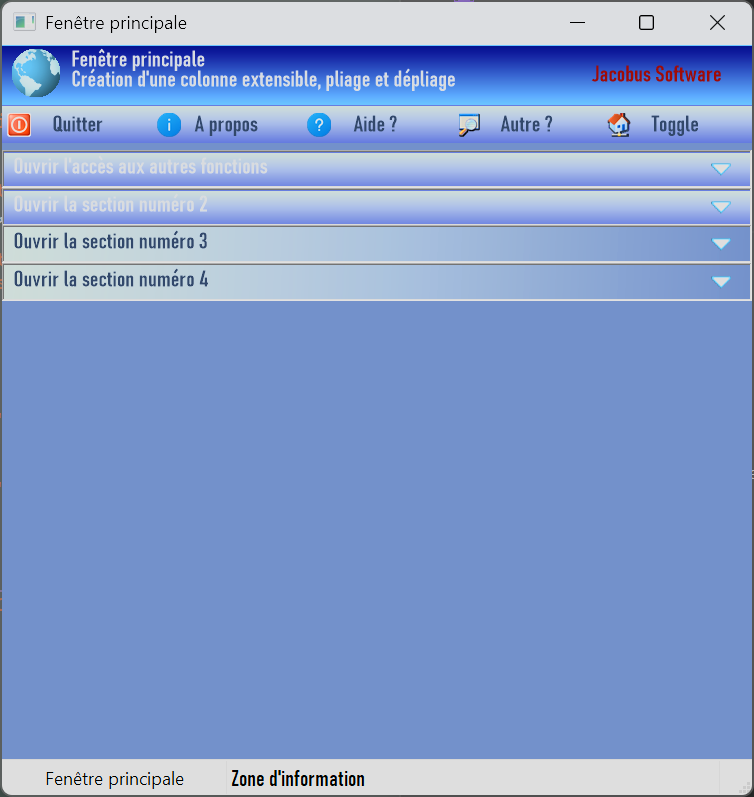
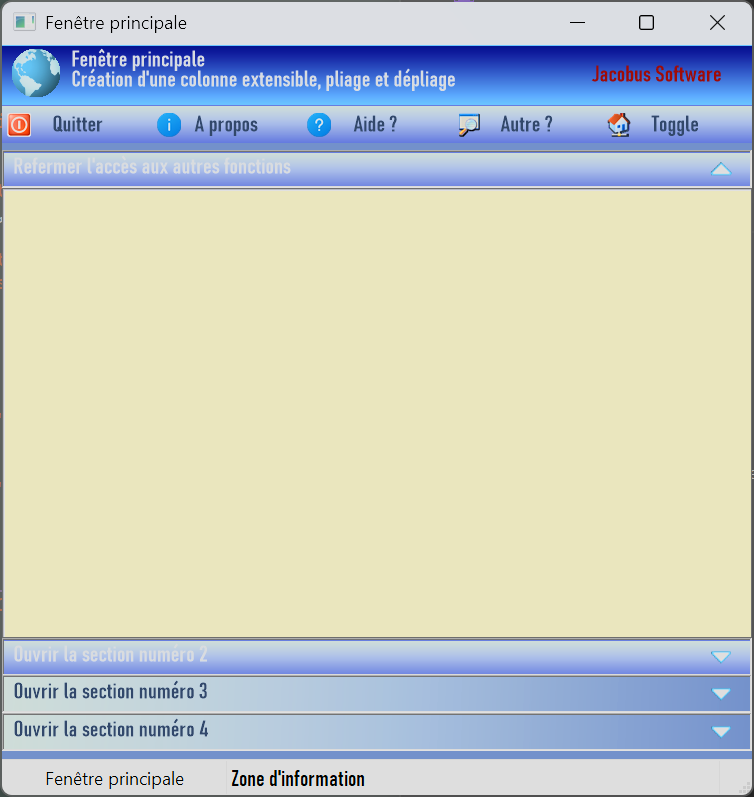
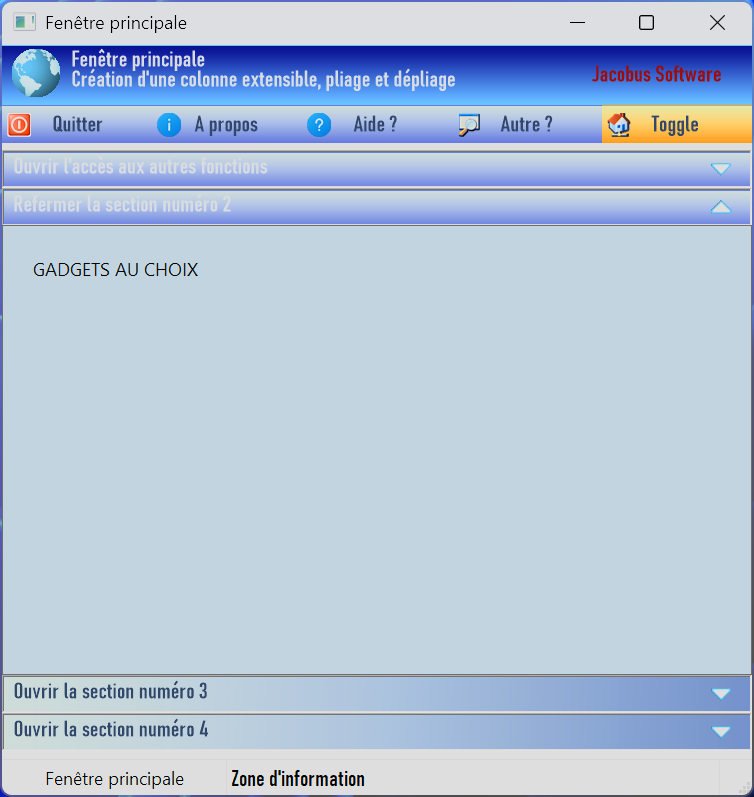
I was able to explore the possibilities of folding and prepare an example of multiple uses of the GradientExpanderBar() function, and as a bonus, the creation of a toggle button. I know it's a bit of a throwback to Windows XP, but I like this style. I think it looks good.

Image

Image

Image

The code adapted to this new example.

Code: Select all

;==============================================================
; Library functions:      + LargeGradientButton()  = Create large buttons with images and text in gradient colors.
;                         + ButtonMovementEffect() = Gives a movement effect to the buttons when the mouse hovers over them. / Added support for a ToggleButton effect
;                         + GradientTextArea()     = Creating a text and image area with gradient colors.
;                         + GradientHeaderBar()    = Create a window header bar with icons and text in different colors
;                         + GradientExpanderBar()  = Create a zone folding simulation bar
;                         + NormalGradientButton() = Create standard buttons with text, image, and gradient color
;                         + ExpandAndCollapse()    = Implementation of multiple GradientExpanderBar()
;
; Version:.................1.1
; Author:..................Jacobus
; Date:....................January 15, 2026
; Target OS:...............Microsoft Windows 10 & 11 (All ??)
; Target Compiler:.........PureBasic 6.30
; License:.................Free, unrestricted, no warranty

;==============================================================

;-DPI (consideration needed for large screens)
; CompilerIf #PB_Compiler_DPIAware = 1
  Global dpix.d = DesktopResolutionX()
  Global dpiy.d = DesktopResolutionY() 

;- CONSTANTES
Enumeration Fenetres
  #MAIN_WINDOW 
EndEnumeration

Enumeration Gadgets
  #CANVAS_HEADER
  
  #CANVAS_EXPAND_ONE
  #CONTAINER_EXPAND_ONE
  #EDITORNOTES
  
  #CANVAS_EXPAND_TWO
  #CONTAINER_EXPAND_TWO
  #TXT_EXPAND_TWO
  
  #CANVAS_EXPAND_THREE
  #CONTAINER_EXPAND_THREE
  #TXT_EXPAND_THREE
  
  #CANVAS_EXPAND_FOUR
  #CONTAINER_EXPAND_FOUR
  #TXT_EXPAND_FOUR
  
  #BTN_QUIT
  #BTN_ABOUT
  #BTN_HELP
  #BTN_OTHER 
  #BTN_TOGGLE
  
  #STATUS
EndEnumeration

;-FONTS
Global Font0 = LoadFont(0, "Bahnschrift Semibold Condensed", 11, #PB_Font_HighQuality)

;-VARIABLES
Global exp1, exp2, exp3, exp4
exp1 = 0 : exp2 = 0 : exp3 = 0 : exp4 = 0
Global ToggleState = 0

;-PROCEDURES
; Avec VectorDrawing, les couleurs sont de type RGBA (RGB + Canal Alpha) pour un meilleur rendu.
; ex: RGBA(125, 141, 172, 253) ou RGBA(213, 228, 223, 103)
Procedure GradientHeaderBar(canvasID, ColorZero, ColorOne, Title$, Text$, Enterprise$, ImageHeader, HV = 1)
  
  ; canvasID:...............CanvasGadget ID number() 
  ; ColorZero:..............Color of the beginning of the gradient, ex: RGBA(99, 184, 255, 255)
  ; ColorOne:...............End color of the gradient,   ex: RGBA(0, 0, 128, 255)
  ; Title$:.................Title displayed in the upper left corner of the window header bar. 
  ; Text$:..................Text displayed at the bottom left, below the title. 
  ; Enterprise$:............Text or name that will be displayed in the middle right corner of the window header bar.  
  ; ImageHeader:............Image that will be displayed to the left of the window header bar
  ; HV:.....................Option: HV = 1 vertical gradient (default) or HV = 0 horizontal gradient
  
  Protected wc = GadgetWidth(canvasID)
  Protected hc = GadgetHeight(canvasID)
  Protected outputc = CanvasVectorOutput(canvasID, #PB_Unit_Pixel)
  
  If StartVectorDrawing(outputc)    
    ; Choosing the direction of the color gradient
    If HV = 0  ; Horizontal gradient background (default)
      VectorSourceLinearGradient(0, 0, w*dpix, h*dpiy)
      VectorSourceGradientColor(ColorZero, 0.0)
      VectorSourceGradientColor(ColorOne, 1.0)
    ElseIf HV = 1 ; Vertical gradient background
      VectorSourceLinearGradient(1, hc*dpiy, 1, 1 )
      VectorSourceGradientColor(ColorZero, 0.0)
      VectorSourceGradientColor(ColorOne, 1.0)
    EndIf  
    FillVectorOutput() ; filling
    
    If ImageHeader <> 0
      MovePathCursor(10, 4)
      DrawVectorImage(ImageHeader, 255) 
    EndIf 
    
    If Title$ <> ""
      VectorFont(Font0)
      VectorSourceColor(RGBA(231, 234, 238, 255)) ; grey 
      MovePathCursor(70, 5)   
      DrawVectorText(Title$)
    EndIf 
    
    If Text$ <> ""
      ;VectorFont(Font2)
      ;VectorSourceColor(RGBA(231, 234, 238, 255))   
      MovePathCursor(70, 25)   
      DrawVectorText(Text$)
    EndIf 
    
    If Enterprise$ <> ""
      ; Change the color for the Enterprise$ text
      VectorSourceColor(RGBA(145, 0, 0, 255)) ; rouge foncé
      MovePathCursor((wc*dpix)-(VectorTextWidth(Enterprise$)+30), 20)  ; positioning to the right of the bar 
      DrawVectorText(Enterprise$)
    EndIf   
    
    StopVectorDrawing()
  EndIf   
EndProcedure

Procedure LargeGradientButton(canvasID, ColorZero, ColorOne, Title$, Text$, Image, PosImage = 0, HV = 1)
  
   ; canvasID:...............CanvasGadget ID number() 
  ; ColorZero:..............Color of the beginning of the gradient, ex: RGBA(105, 133, 187, 255)
  ; ColorOne:...............End color of the gradient,   ex: RGBA(213, 228, 223, 255)
  ; Title$:.................Title displayed in the top left corner of the button and to the right of the icon
  ; Text$:..................Text displayed at the bottom left, below the title.  
  ; Image:..................The image will be displayed on the button, to the left of the title and text, or on the right side of the button.
  ; PosImage:...............Icon position option: 0 = left, 1 = right
  ; HV:.....................Option: HV = 1 horizontal gradient (default) or HV = 0 vertical gradient
  
  Protected w = GadgetWidth(canvasID)
  Protected h = GadgetHeight(canvasID)
  Protected output = CanvasVectorOutput(canvasID, #PB_Unit_Pixel)
  
  If StartVectorDrawing(output) 
    
    ; Choosing the direction of the color gradient
    If HV = 1  ; Horizontal gradient background (default)
      VectorSourceLinearGradient(0, 0, w*dpix, h*dpiy)
      VectorSourceGradientColor(ColorZero, 0.0) ; 0,0 (le début du gradient)
      VectorSourceGradientColor(ColorOne, 1.0)  ; 1.0 (la fin du gradient). 
    ElseIf HV = 0 ; Vertical gradient background
      VectorSourceLinearGradient(1, h*dpiy, 1, 1 )
      VectorSourceGradientColor(ColorOne, 1.0)
      VectorSourceGradientColor(ColorZero, 0.0)
    EndIf   
    FillVectorOutput()
    
    If PosImage = 0      ; the image will be placed on the left 
      MovePathCursor(10, 10)     
      DrawVectorImage(Image, 255) 
      
      VectorSourceColor(RGBA(0, 0, 0, 255)) ; noir   
      MovePathCursor(70, 25)   
      DrawVectorText(Text$)
      
      VectorFont(Font0)
      VectorSourceColor(RGBA(28, 113, 218, 255)) ; bleu  
      MovePathCursor(70, 5)   
      DrawVectorText(Title$)
  
    ElseIf PosImage = 1  ; right-hand positioning
      MovePathCursor((w*dpix)-(48+10), 10) 
      DrawVectorImage(Image, 255)
      
      VectorSourceColor(RGBA(0, 0, 0, 255)) ; noir   
      MovePathCursor(10, 25)   
      DrawVectorText(Text$)
      
      VectorFont(Font0)
      VectorSourceColor(RGBA(28, 113, 218, 255)) ; bleu  
      MovePathCursor(10, 5)   
      DrawVectorText(Title$)   
    EndIf 

    StopVectorDrawing()
  EndIf   
    
EndProcedure

Procedure NormalGradientButton(canvasID, ColorZero, ColorOne, Text$, ColorTxt, Image, OutlineColor, Outline = 0, PosImage = 0, HV = 1)
  
  ; canvasID:...............CanvasGadget ID number() 
  ; ColorZero:..............Color of the beginning of the gradient, ex: RGBA(105, 133, 187, 255)
  ; ColorOne:...............End color of the gradient,   ex: RGBA(213, 228, 223, 255)
  ; Text$:..................Text displayed at the bottom left, below the title. 
  ; ColorTxt:...............Text color,   ex: RGBA(231, 234, 238, 255)
  ; Image:..................Image/icon 16x16 max (you can change this limit) that will be displayed on the button, to the left of the title and text, or on the right side of the button
  ; OutlineColor:...........Option to choose the outline color.
  ; Outline:................Option to draw an outline on the button.
  ; PosImage:...............Icon position option: 0 = left, 1 = right
  ; HV:.....................Option: HV = 1 horizontal gradient (default) or HV = 0 vertical gradient
  
  Protected w = GadgetWidth(canvasID)
  Protected h = GadgetHeight(canvasID)
  Protected output = CanvasVectorOutput(canvasID, #PB_Unit_Pixel)

  If StartVectorDrawing(output)
    
    ; Choosing the direction of the color gradient
    If HV = 1  ; Horizontal gradient background (default)
      VectorSourceLinearGradient(0, 0, w*dpix, h*dpiy)
      VectorSourceGradientColor(ColorZero, 0.0)
      VectorSourceGradientColor(ColorOne, 1.0) 
    ElseIf HV = 0  ; Vertical gradient background
      VectorSourceLinearGradient(1, h*dpiy, 1, 1 )
      VectorSourceGradientColor(ColorOne, 1.0)
      VectorSourceGradientColor(ColorZero, 0.0)
    EndIf   
    FillVectorOutput()
    
    ; image
    If Image <> 0
      If PosImage = 0      ; the image will be placed on the left
        MovePathCursor(5, 5*dpiy)
        DrawVectorImage(Image, 255, 16*dpix, 16*dpiy)
      ElseIf PosImage = 1  ; right-hand positioning
        MovePathCursor((w*dpix)-(21*dpix), 5*dpiy)
        DrawVectorImage(Image, 255, 16*dpix, 16*dpiy)
      EndIf 
    EndIf 
    
    ; centered text
    If Text$ <> ""
      Protected xt = (w*dpix/2)-(VectorTextWidth(Text$)/2)  ; to center the text horizontally
      Protected yt = (h*dpiy/2)-(VectorTextHeight(Text$)/2) ; to center the text vertically
      MovePathCursor(xt, yt) 
      VectorFont(Font0)
      VectorSourceColor(ColorTxt)
      DrawVectorText(Text$)
    EndIf 
    
    ; to mark an outline (do this last so it doesn't get covered)
    If Outline = 1
      MovePathCursor(0, 0)     
      AddPathBox(0, 0, w*dpix, h*dpiy)
      VectorSourceColor(OutlineColor)     
      StrokePath(3)   ;3 pixels thick
    EndIf 
    
    StopVectorDrawing()
  EndIf
  
EndProcedure

Procedure GradientTextArea(canvasID, ColorZero, ColorOne, Title$, Text$, Image, ImgWidth, ImgHeight, HV = 1)
   
  ; canvasID:...............CanvasGadget ID number() 
  ; ColorZero:..............Color of the beginning of the gradient, ex: RGBA(105, 133, 187, 255)
  ; ColorOne:...............End color of the gradient,   ex: RGBA(213, 228, 223, 255)
  ; Title$:.................Title displayed in the top left corner of the button and to the right of the icon
  ; Text$:..................Text displayed at the bottom left, below the title.  
  ; Image:..................The image will be displayed 
  ; ImgWidth:...............Image width
  ; ImgHeight:..............Image height
  ; HV:.....................Option: HV = 1 horizontal gradient (default) or HV = 0 vertical gradient
  
  Protected w = GadgetWidth(canvasID)
  Protected h = GadgetHeight(canvasID)
  Protected output = CanvasVectorOutput(canvasID, #PB_Unit_Pixel)
  
  If StartVectorDrawing(output)
    ; Choosing the direction of the color gradient
    If HV = 1  ; Horizontal gradient background (default)
      VectorSourceLinearGradient(0, 0, w*dpix, h*dpiy)
      VectorSourceGradientColor(ColorZero, 0.0) ; 0,0 (le début du gradient)
      VectorSourceGradientColor(ColorOne, 1.0)  ; 1.0 (la fin du gradient). 
    ElseIf HV = 0  ; Vertical gradient background
      VectorSourceLinearGradient(1, h*dpiy, 1, 1 )
      VectorSourceGradientColor(ColorOne, 1.0)
      VectorSourceGradientColor(ColorZero, 0.0)
    EndIf   
    FillVectorOutput()
    
    If Image <> 0
      If ImgWidth < 24 Or ImgHeight < 24
        ImgWidth = 24 : ImgHeight = 24 ; The image is given a minimum size of 24x24.
      EndIf 
      MovePathCursor(10, 10)
      DrawVectorImage(Image, 255, ImgWidth*dpix, ImgHeight*dpiy) 
    EndIf 
        
    If Title$ <> ""
      VectorFont(Font0)
      VectorSourceColor(RGBA(255, 0, 0, 255)) ; rouge   
      MovePathCursor((ImgWidth*dpix)+30, 30)   
      DrawVectorText(Title$)
    EndIf  
    
    If Text$ <> ""
      VectorSourceColor(RGBA(0,0,0,255)) ; texte en noir    
      MovePathCursor(10, (ImgHeight*dpiy)+30)
      ; The text can be long; it is placed in a paragraph with automatic line breaks.
      DrawVectorParagraph(Text$, (w*dpix)-20, h*dpiy)
    EndIf 
    
    StopVectorDrawing()
  EndIf 
  
EndProcedure

Procedure GradientExpanderBar(canvasIDexp, ColorZero, ColorOne, Title$, ColorTitle, ImageExp, HV = 1)
  
  ; canvasID:...............CanvasGadget ID number() 
  ; ColorZero:..............Color of the beginning of the gradient, ex: RGBA(99, 184, 255, 255)
  ; ColorOne:...............End color of the gradient,   ex: RGBA(0, 0, 128, 255)
  ; Title$:.................Title displayed on the left. 
  ; Image:..................Image that will be displayed on the right side
  ; HV:.....................Option: HV = 1 horizontal gradient (default) or HV = 0 vertical gradient
  
  Protected wexp = GadgetWidth(canvasIDexp)
  Protected hexp = GadgetHeight(canvasIDexp)
  Protected outputexp = CanvasVectorOutput(canvasIDexp, #PB_Unit_Pixel)
  
  If StartVectorDrawing(outputexp)
    
    ; Choosing the direction of the color gradient
    If HV = 1  ; Horizontal gradient background (default)
      VectorSourceLinearGradient(0, 0, wexp*dpix, hcexp*dpiy)
      VectorSourceGradientColor(ColorZero, 0.0) ; 0,0 (le début du gradient)
      VectorSourceGradientColor(ColorOne, 1.0)  ; 1.0 (la fin du gradient). 
    ElseIf HV = 0 ; Vertical gradient background
      VectorSourceLinearGradient(1, h*dpiy, 1, 1 )
      VectorSourceGradientColor(ColorOne, 1.0)
      VectorSourceGradientColor(ColorZero, 0.0)
    EndIf   
    FillVectorOutput()
    
    VectorFont(Font0)
    VectorSourceColor(RGBA(117, 136, 157, 255)) ; grey  
    MovePathCursor(10, 5)   
    DrawVectorText(Title$)
    
    MovePathCursor((wexp-30)*dpix, 5)
    DrawVectorImage(ImageExp, 255, 24, 24) ; image resized to 24x24
    
    StopVectorDrawing()
  EndIf 

EndProcedure

Procedure ButtonMovementEffect(CanvasID, x1, y1, Move = 0)
; When the mouse hovers over the button, it moves from x1 to x2 and from y1 to y2.
; When the mouse leaves the button, it returns to its initial position, 
; giving the gadget a motion effect.
  
  ; canvasID:...............CanvasGadget ID number() 
  ; x1:.....................Initial x position of the gadget
  ; y1:.....................Initial y position of the gadget
  ; Move:...................Desired direction of movement for the button or toggle mode if = 2
  
  Protected wt = GadgetWidth(canvasID)
  Protected ht = GadgetHeight(canvasID)
  Protected x2, y2
  
  If Move = 0
    x2 = x1+2 ; movement to the right
    y2 = y1-2 ; upward movement
    
  ElseIf Move = 1
    x2 = x1   ; does not change
    y2 = y1+1 ; downward movement
    
  ElseIf Move = 2 ; toggle
    x2 = x1   ; does not change  
    y2 = y1+1 ; downward movement

    If EventType() = #PB_EventType_LeftClick
      If ToggleState = 0 ; We change the colors (blue to orange)
        NormalGradientButton(#BTN_TOGGLE, RGBA(237, 146, 25, 255), RGBA(237, 236, 167, 255), "Toggle", RGBA(44, 65, 97, 255), ExtractIcon_(GetModuleHandle_(#Null), "Shell32.dll",150), RGBA(255, 0, 0, 255), 0, 0, 0) 
        ToggleState = 1
      ElseIf ToggleState = 1 ; We restore the original colors (orange to blue)
        NormalGradientButton(#BTN_TOGGLE, RGBA(92, 113, 206, 255), RGBA(213, 228, 223, 255), "Toggle", RGBA(44, 65, 97, 255), ExtractIcon_(GetModuleHandle_(#Null), "Shell32.dll",150), RGBA(255, 0, 0, 255), 0, 0, 0)
        ToggleState = 0
      EndIf 
    EndIf 
  EndIf 

  If EventType() = #PB_EventType_MouseEnter    
    ResizeGadget(CanvasID, x2, y2, #PB_Ignore, #PB_Ignore)    
  ElseIf EventType() = #PB_EventType_MouseLeave    
    ResizeGadget(CanvasID, x1, y1, #PB_Ignore, #PB_Ignore)   
  EndIf
            
EndProcedure

Procedure ExpandAndCollapse(CanvasID)
  
  Select CanvasID
      
    Case #CANVAS_EXPAND_ONE ;{
      If exp1 = 1
        GradientExpanderBar(#CANVAS_EXPAND_ONE, RGBA(92, 113, 206, 255), RGBA(213, 228, 223, 255), "Open access to other functions", RGBA(231, 234, 238, 255), ExtractIcon_(GetModuleHandle_(#Null), "Shell32.dll",247),0)
        GadgetToolTip(#CANVAS_EXPAND_ONE,"Expand the editing section")
        HideGadget(#CONTAINER_EXPAND_ONE, #True) ;caché           
        ResizeGadget(#CANVAS_EXPAND_ONE,   #PB_Ignore, 70, #PB_Ignore, #PB_Ignore)
        ResizeGadget(#CANVAS_EXPAND_TWO,   #PB_Ignore, 95, #PB_Ignore, #PB_Ignore)
        ResizeGadget(#CANVAS_EXPAND_THREE, #PB_Ignore, 120, #PB_Ignore, #PB_Ignore)
        ResizeGadget(#CANVAS_EXPAND_FOUR,  #PB_Ignore, 145, #PB_Ignore, #PB_Ignore)
        exp1 = 0
      ElseIf exp1 = 0
        GradientExpanderBar(#CANVAS_EXPAND_ONE, RGBA(92, 113, 206, 255), RGBA(213, 228, 223, 255), "Close access to other functions", RGBA(231, 234, 238, 255), ExtractIcon_(GetModuleHandle_(#Null), "Shell32.dll",246),0)
        GadgetToolTip(#CANVAS_EXPAND_ONE,"Collapse the editing section")      
        HideGadget(#CONTAINER_EXPAND_ONE, #False) ;affiché  
        ResizeGadget(#CANVAS_EXPAND_ONE,   #PB_Ignore, 70, #PB_Ignore, #PB_Ignore)  
        
        HideGadget(#CONTAINER_EXPAND_TWO, #True) 
        ResizeGadget(#CANVAS_EXPAND_TWO,  #PB_Ignore, 395, #PB_Ignore, #PB_Ignore)
        GradientExpanderBar(#CANVAS_EXPAND_TWO, RGBA(92, 113, 206, 255), RGBA(213, 228, 223, 255), "Open section number 2", RGBA(231, 234, 238, 255), ExtractIcon_(GetModuleHandle_(#Null), "Shell32.dll",247),0)
        GadgetToolTip(#CANVAS_EXPAND_TWO,"Expand section number 2")
        
        HideGadget(#CONTAINER_EXPAND_THREE, #True) 
        ResizeGadget(#CANVAS_EXPAND_THREE,  #PB_Ignore, 420, #PB_Ignore, #PB_Ignore)
        GradientExpanderBar(#CANVAS_EXPAND_THREE, RGBA(213, 228, 223, 255), RGBA(105, 133, 187, 255), "Open section number 3", RGBA(44, 65, 97, 255), ExtractIcon_(GetModuleHandle_(#Null), "Shell32.dll",247))
        GadgetToolTip(#CANVAS_EXPAND_THREE,"Expand section number 3")
        
        HideGadget(#CONTAINER_EXPAND_FOUR, #True) 
        ResizeGadget(#CANVAS_EXPAND_FOUR,  #PB_Ignore, 445, #PB_Ignore, #PB_Ignore)
        GradientExpanderBar(#CANVAS_EXPAND_FOUR, RGBA(213, 228, 223, 255), RGBA(105, 133, 187, 255), "Open section number 4", RGBA(44, 65, 97, 255), ExtractIcon_(GetModuleHandle_(#Null), "Shell32.dll",247))
        GadgetToolTip(#CANVAS_EXPAND_FOUR,"Expand section number 4")
        exp1 = 1
      EndIf
      ;}
    Case #CANVAS_EXPAND_TWO ;{     
      If exp2 = 1
        GradientExpanderBar(#CANVAS_EXPAND_TWO, RGBA(92, 113, 206, 255), RGBA(213, 228, 223, 255), "Open section number 2", RGBA(231, 234, 238, 255), ExtractIcon_(GetModuleHandle_(#Null), "Shell32.dll",247),0)
        GadgetToolTip(#CANVAS_EXPAND_TWO,"Expand the section number 2")
        HideGadget(#CONTAINER_EXPAND_TWO, #True) 
        ResizeGadget(#CANVAS_EXPAND_ONE,   #PB_Ignore, 70, #PB_Ignore, #PB_Ignore)
        ResizeGadget(#CANVAS_EXPAND_TWO,   #PB_Ignore, 95, #PB_Ignore, #PB_Ignore)
        ResizeGadget(#CANVAS_EXPAND_THREE, #PB_Ignore, 120, #PB_Ignore, #PB_Ignore)
        ResizeGadget(#CANVAS_EXPAND_FOUR,  #PB_Ignore, 145, #PB_Ignore, #PB_Ignore)
        
        exp2 = 0
      ElseIf exp2 = 0
        GradientExpanderBar(#CANVAS_EXPAND_TWO, RGBA(92, 113, 206, 255), RGBA(213, 228, 223, 255), "Close section number 2", RGBA(231, 234, 238, 255), ExtractIcon_(GetModuleHandle_(#Null), "Shell32.dll",246),0)
        GadgetToolTip(#CANVAS_EXPAND_TWO,"Collapse section number 2")        
        
        HideGadget(#CONTAINER_EXPAND_ONE, #True)          
        ResizeGadget(#CANVAS_EXPAND_ONE,   #PB_Ignore, 70, #PB_Ignore, #PB_Ignore)
        GradientExpanderBar(#CANVAS_EXPAND_ONE, RGBA(92, 113, 206, 255), RGBA(213, 228, 223, 255), "Open access to other functions", RGBA(231, 234, 238, 255), ExtractIcon_(GetModuleHandle_(#Null), "Shell32.dll",247),0)
        GadgetToolTip(#CANVAS_EXPAND_ONE,"Expand the editing section")
        
        HideGadget(#CONTAINER_EXPAND_TWO, #False) 
        ResizeGadget(#CANVAS_EXPAND_TWO,  #PB_Ignore, 95, #PB_Ignore, #PB_Ignore)
        
        HideGadget(#CONTAINER_EXPAND_THREE, #True) 
        ResizeGadget(#CANVAS_EXPAND_THREE,  #PB_Ignore, 420, #PB_Ignore, #PB_Ignore)
        GradientExpanderBar(#CANVAS_EXPAND_THREE, RGBA(213, 228, 223, 255), RGBA(105, 133, 187, 255), "Open section number 3", RGBA(44, 65, 97, 255), ExtractIcon_(GetModuleHandle_(#Null), "Shell32.dll",247))
        GadgetToolTip(#CANVAS_EXPAND_THREE,"Expand section number 3")
        
        HideGadget(#CONTAINER_EXPAND_FOUR, #True) 
        ResizeGadget(#CANVAS_EXPAND_FOUR,  #PB_Ignore, 445, #PB_Ignore, #PB_Ignore)
        GradientExpanderBar(#CANVAS_EXPAND_FOUR, RGBA(213, 228, 223, 255), RGBA(105, 133, 187, 255), "Open section number 4", RGBA(44, 65, 97, 255), ExtractIcon_(GetModuleHandle_(#Null), "Shell32.dll",247))
        GadgetToolTip(#CANVAS_EXPAND_FOUR,"Expand section number 4")
        
        exp2 = 1
      EndIf 
      ;}
    Case #CANVAS_EXPAND_THREE ;{
      If exp3 = 1
        GradientExpanderBar(#CANVAS_EXPAND_THREE, RGBA(213, 228, 223, 255), RGBA(105, 133, 187, 255), "Open section number 3", RGBA(44, 65, 97, 255), ExtractIcon_(GetModuleHandle_(#Null), "Shell32.dll",247))
        GadgetToolTip(#CANVAS_EXPAND_THREE,"Expand section number 3")
        HideGadget(#CONTAINER_EXPAND_THREE, #True) 
        ResizeGadget(#CANVAS_EXPAND_ONE,   #PB_Ignore, 70, #PB_Ignore, #PB_Ignore)
        ResizeGadget(#CANVAS_EXPAND_TWO,   #PB_Ignore, 95, #PB_Ignore, #PB_Ignore)
        ResizeGadget(#CANVAS_EXPAND_THREE, #PB_Ignore, 120, #PB_Ignore, #PB_Ignore)
        ResizeGadget(#CANVAS_EXPAND_FOUR,  #PB_Ignore, 145, #PB_Ignore, #PB_Ignore)
        exp3 = 0
      ElseIf exp3 = 0
        GradientExpanderBar(#CANVAS_EXPAND_THREE, RGBA(213, 228, 223, 255), RGBA(105, 133, 187, 255), "Close section number 3", RGBA(44, 65, 97, 255), ExtractIcon_(GetModuleHandle_(#Null), "Shell32.dll",246))              
        GadgetToolTip(#CANVAS_EXPAND_THREE,"Collapse section number 3")
        
        HideGadget(#CONTAINER_EXPAND_ONE, #True)          
        ResizeGadget(#CANVAS_EXPAND_ONE,   #PB_Ignore, 70, #PB_Ignore, #PB_Ignore)
        GradientExpanderBar(#CANVAS_EXPAND_ONE, RGBA(92, 113, 206, 255), RGBA(213, 228, 223, 255), "Open access to other functions", RGBA(231, 234, 238, 255), ExtractIcon_(GetModuleHandle_(#Null), "Shell32.dll",247),0)
        GadgetToolTip(#CANVAS_EXPAND_ONE,"Expand the editing section")
        
        HideGadget(#CONTAINER_EXPAND_TWO, #True) 
        ResizeGadget(#CANVAS_EXPAND_TWO,  #PB_Ignore, 95, #PB_Ignore, #PB_Ignore)
        GradientExpanderBar(#CANVAS_EXPAND_TWO, RGBA(92, 113, 206, 255), RGBA(213, 228, 223, 255), "Open section number 2", RGBA(231, 234, 238, 255), ExtractIcon_(GetModuleHandle_(#Null), "Shell32.dll",247),0)
        GadgetToolTip(#CANVAS_EXPAND_TWO,"Expand section number 2")
        
        HideGadget(#CONTAINER_EXPAND_THREE, #False) 
        ResizeGadget(#CANVAS_EXPAND_THREE,  #PB_Ignore, 120, #PB_Ignore, #PB_Ignore)
        
        HideGadget(#CONTAINER_EXPAND_FOUR, #True) 
        ResizeGadget(#CANVAS_EXPAND_FOUR,  #PB_Ignore, 445, #PB_Ignore, #PB_Ignore)
        GradientExpanderBar(#CANVAS_EXPAND_FOUR, RGBA(213, 228, 223, 255), RGBA(105, 133, 187, 255), "Open section number 4", RGBA(44, 65, 97, 255), ExtractIcon_(GetModuleHandle_(#Null), "Shell32.dll",247))
        GadgetToolTip(#CANVAS_EXPAND_FOUR,"Expand section number 4")
        
        exp3 = 1
      EndIf
      ;}
    Case #CANVAS_EXPAND_FOUR ;{
      If exp4 = 1
        GradientExpanderBar(#CANVAS_EXPAND_FOUR, RGBA(213, 228, 223, 255), RGBA(105, 133, 187, 255), "Open section number 4", RGBA(44, 65, 97, 255), ExtractIcon_(GetModuleHandle_(#Null), "Shell32.dll",247))
        GadgetToolTip(#CANVAS_EXPAND_FOUR,"Expand section number 4")
        HideGadget(#CONTAINER_EXPAND_FOUR, #True) 
        ResizeGadget(#CANVAS_EXPAND_ONE,   #PB_Ignore, 70, #PB_Ignore, #PB_Ignore)
        ResizeGadget(#CANVAS_EXPAND_TWO,   #PB_Ignore, 95, #PB_Ignore, #PB_Ignore)
        ResizeGadget(#CANVAS_EXPAND_THREE, #PB_Ignore, 120, #PB_Ignore, #PB_Ignore)
        ResizeGadget(#CANVAS_EXPAND_FOUR,  #PB_Ignore, 145, #PB_Ignore, #PB_Ignore)
        exp4 = 0
      ElseIf exp4 = 0
        GradientExpanderBar(#CANVAS_EXPAND_FOUR, RGBA(213, 228, 223, 255), RGBA(105, 133, 187, 255), "Close section number 4", RGBA(44, 65, 97, 255), ExtractIcon_(GetModuleHandle_(#Null), "Shell32.dll",246))              
        GadgetToolTip(#CANVAS_EXPAND_FOUR,"Collapse section number 4")
   
        HideGadget(#CONTAINER_EXPAND_ONE, #True)          
        ResizeGadget(#CANVAS_EXPAND_ONE,   #PB_Ignore, 70, #PB_Ignore, #PB_Ignore)
        GradientExpanderBar(#CANVAS_EXPAND_ONE, RGBA(92, 113, 206, 255), RGBA(213, 228, 223, 255), "Open access to other functions", RGBA(231, 234, 238, 255), ExtractIcon_(GetModuleHandle_(#Null), "Shell32.dll",247),0)
        GadgetToolTip(#CANVAS_EXPAND_ONE,"Expand the editing section")
        
        HideGadget(#CONTAINER_EXPAND_TWO, #True) 
        ResizeGadget(#CANVAS_EXPAND_TWO,  #PB_Ignore, 95, #PB_Ignore, #PB_Ignore)
        GradientExpanderBar(#CANVAS_EXPAND_TWO, RGBA(92, 113, 206, 255), RGBA(213, 228, 223, 255), "Open section number 2", RGBA(231, 234, 238, 255), ExtractIcon_(GetModuleHandle_(#Null), "Shell32.dll",247),0)
        GadgetToolTip(#CANVAS_EXPAND_TWO,"Expand section number 2")
        
        HideGadget(#CONTAINER_EXPAND_THREE, #True) 
        ResizeGadget(#CANVAS_EXPAND_THREE,  #PB_Ignore, 120, #PB_Ignore, #PB_Ignore)
        GradientExpanderBar(#CANVAS_EXPAND_THREE, RGBA(213, 228, 223, 255), RGBA(105, 133, 187, 255), "Open section number 3", RGBA(44, 65, 97, 255), ExtractIcon_(GetModuleHandle_(#Null), "Shell32.dll",247))
        GadgetToolTip(#CANVAS_EXPAND_THREE,"Expand section number 3")
        
        HideGadget(#CONTAINER_EXPAND_FOUR, #False) 
        ResizeGadget(#CANVAS_EXPAND_FOUR,  #PB_Ignore, 145, #PB_Ignore, #PB_Ignore)
        
        exp4 = 1
      EndIf 
      ;}
      
  EndSelect

EndProcedure


;- Interface graphique
If OpenWindow(#MAIN_WINDOW, 0, 0, 500, 500, "Main window", #PB_Window_SystemMenu | #PB_Window_ScreenCentered|#PB_Window_MaximizeGadget|#PB_Window_MinimizeGadget|#PB_Window_SizeGadget)
  WindowBounds(#MAIN_WINDOW, 500, 500, 500, 500)
  WidthWMain  = WindowWidth(#MAIN_WINDOW, #PB_Window_InnerCoordinate)
  HeightWMain = WindowHeight(#MAIN_WINDOW, #PB_Window_InnerCoordinate) 
  SetWindowColor(#MAIN_WINDOW, RGB(105, 133, 187))
  
  ;Entête
  CanvasGadget(#CANVAS_HEADER, 0, 0, WidthWMain, 40)
  GradientHeaderBar(#CANVAS_HEADER, RGBA(99, 184, 255, 255), RGBA(0, 0, 128, 255), "Main window", "Creating an extendable column, folding and unfolding", "Jacobus Software", ExtractIcon_(GetModuleHandle_(#Null), "Shell32.dll",13))
  
  ;Boutons
  CanvasGadget(#BTN_QUIT, 0, 40, 100, 25)  : GadgetToolTip(#BTN_QUIT,"Close the window and exit the program")
  NormalGradientButton(#BTN_QUIT, RGBA(92, 113, 206, 255), RGBA(213, 228, 223, 255), "Quit", RGBA(44, 65, 97, 255), ExtractIcon_(GetModuleHandle_(#Null), "Shell32.dll",27), RGBA(255, 0, 0, 255), 0, 0, 0)
  
  CanvasGadget(#BTN_ABOUT, 100, 40, 100, 25)  : GadgetToolTip(#BTN_ABOUT,"Regarding these functions")
  NormalGradientButton(#BTN_ABOUT, RGBA(92, 113, 206, 255), RGBA(213, 228, 223, 255), "About", RGBA(44, 65, 97, 255), ExtractIcon_(GetModuleHandle_(#Null), "Shell32.dll",221), RGBA(255, 0, 0, 255), 0, 0, 0)
  
  CanvasGadget(#BTN_HELP, 200, 40, 100, 25)  : GadgetToolTip(#BTN_HELP,"Need help?")
  NormalGradientButton(#BTN_HELP, RGBA(92, 113, 206, 255), RGBA(213, 228, 223, 255), "Help ?", RGBA(44, 65, 97, 255), ExtractIcon_(GetModuleHandle_(#Null), "Shell32.dll",23), RGBA(255, 0, 0, 255), 0, 0, 0)
  
  CanvasGadget(#BTN_OTHER, 300, 40, 100, 25)  : GadgetToolTip(#BTN_OTHER,"Anything else?")
  NormalGradientButton(#BTN_OTHER, RGBA(92, 113, 206, 255), RGBA(213, 228, 223, 255), "Other ?", RGBA(44, 65, 97, 255), ExtractIcon_(GetModuleHandle_(#Null), "Shell32.dll",171), RGBA(255, 0, 0, 255), 0, 0, 0)
  
  CanvasGadget(#BTN_TOGGLE, 400, 40, 100, 25)  : GadgetToolTip(#BTN_TOGGLE,"Toggle Button")
  NormalGradientButton(#BTN_TOGGLE, RGBA(92, 113, 206, 255), RGBA(213, 228, 223, 255), "Toggle", RGBA(44, 65, 97, 255), ExtractIcon_(GetModuleHandle_(#Null), "Shell32.dll",150), RGBA(255, 0, 0, 255), 0, 0, 0)
  
  
  ;Barres de pliage
  CanvasGadget(#CANVAS_EXPAND_ONE, 0, 70, 500, 25, #PB_Canvas_Border)  : GadgetToolTip(#CANVAS_EXPAND_ONE,"Expand the editing section")
  GradientExpanderBar(#CANVAS_EXPAND_ONE, RGBA(92, 113, 206, 255), RGBA(213, 228, 223, 255), "Open access to other functions", RGBA(231, 234, 238, 255), ExtractIcon_(GetModuleHandle_(#Null), "Shell32.dll",247),0)
  ContainerGadget(#CONTAINER_EXPAND_ONE, 0, 95, 500, 300, #PB_Container_Flat) ;{
  EditorGadget(#EDITORNOTES, 0, 0, 500, 300, #PB_Editor_WordWrap)
  SetGadgetColor(#EDITORNOTES, #PB_Gadget_BackColor, RGB(255, 250, 205))
  SetGadgetColor(#EDITORNOTES, #PB_Gadget_FrontColor, RGB(40, 56, 86))
  ;}
  CloseGadgetList()
  HideGadget(#CONTAINER_EXPAND_ONE, #True)
  
  CanvasGadget(#CANVAS_EXPAND_TWO, 0, 95, 500, 25, #PB_Canvas_Border)  : GadgetToolTip(#CANVAS_EXPAND_TWO,"Expand section number 2")
  GradientExpanderBar(#CANVAS_EXPAND_TWO, RGBA(92, 113, 206, 255), RGBA(213, 228, 223, 255), "Open section number 2", RGBA(231, 234, 238, 255), ExtractIcon_(GetModuleHandle_(#Null), "Shell32.dll",247),0)
  ContainerGadget(#CONTAINER_EXPAND_TWO, 0, 120, 500, 300, #PB_Container_Flat) ;{
  SetGadgetColor(#CONTAINER_EXPAND_TWO, #PB_Gadget_BackColor, RGB(189, 208, 220))
  
  TextGadget(#TXT_EXPAND_TWO, 20, 20, 200, 20, "GADGETS OF YOUR CHOICE")
  SetGadgetColor(#TXT_EXPAND_TWO, #PB_Gadget_BackColor, RGB(189, 208, 220))
    ; 
  ;}
  CloseGadgetList()
  HideGadget(#CONTAINER_EXPAND_TWO, #True)
  
  CanvasGadget(#CANVAS_EXPAND_THREE, 0, 120, 500, 25, #PB_Canvas_Border)  : GadgetToolTip(#CANVAS_EXPAND_THREE,"Expand section number 3")
  GradientExpanderBar(#CANVAS_EXPAND_THREE, RGBA(213, 228, 223, 255), RGBA(105, 133, 187, 255), "Open section number 3", RGBA(44, 65, 97, 255), ExtractIcon_(GetModuleHandle_(#Null), "Shell32.dll",247))
  ContainerGadget(#CONTAINER_EXPAND_THREE, 0, 145, 500, 300, #PB_Container_Flat) ;{
  SetGadgetColor(#CONTAINER_EXPAND_THREE, #PB_Gadget_BackColor, RGB(92, 146, 123))
  
  TextGadget(#TXT_EXPAND_THREE, 20, 20, 200, 20, "GADGETS OF YOUR CHOICE")
  SetGadgetColor(#TXT_EXPAND_THREE, #PB_Gadget_BackColor, RGB(92, 146, 123))
    ;
  ;}
  CloseGadgetList()
  HideGadget(#CONTAINER_EXPAND_THREE, #True)
  
  CanvasGadget(#CANVAS_EXPAND_FOUR, 0, 145, 500, 25, #PB_Canvas_Border)  : GadgetToolTip(#CANVAS_EXPAND_FOUR,"Expand section number 4")
  GradientExpanderBar(#CANVAS_EXPAND_FOUR, RGBA(213, 228, 223, 255), RGBA(105, 133, 187, 255), "Open section number 4", RGBA(44, 65, 97, 255), ExtractIcon_(GetModuleHandle_(#Null), "Shell32.dll",247))
  ContainerGadget(#CONTAINER_EXPAND_FOUR, 0, 170, 500, 300, #PB_Container_Flat) ;{
  SetGadgetColor(#CONTAINER_EXPAND_FOUR, #PB_Gadget_BackColor, RGB(199, 161, 54)) ;
  
  TextGadget(#TXT_EXPAND_FOUR, 20, 20, 200, 20, "GADGETS OF YOUR CHOICE")
  SetGadgetColor(#TXT_EXPAND_FOUR, #PB_Gadget_BackColor, RGB(199, 161, 54))
    ;
  ;}
  CloseGadgetList()
  HideGadget(#CONTAINER_EXPAND_FOUR, #True)
  
   ;-Statusbar
  If CreateStatusBar(#STATUS, WindowID(#MAIN_WINDOW)) ;{
    AddStatusBarField(150)
    AddStatusBarField(#PB_Ignore)
    StatusBarText(#STATUS, 0, "Fenêtre principale", #PB_StatusBar_Center|#PB_StatusBar_Raised)
    StatusBarText(#STATUS, 1, "Information", #PB_StatusBar_Raised)    
    SendMessage_(StatusBarID(#STATUS),#WM_SETFONT,FontID(0),0) ; modifie la police de caractère de la statusbar
    ;}
  EndIf
  

  ;- Boucle principale
  Repeat
    Select WaitWindowEvent()
      Case #PB_Event_Gadget
        Select EventGadget()
     ;-Extensions                 
          Case #CANVAS_EXPAND_ONE ;{
            If EventType() = #PB_EventType_MouseEnter
              SetGadgetAttribute(#CANVAS_EXPAND_ONE, #PB_Canvas_Cursor, #PB_Cursor_Hand)
              StatusBarText(#STATUS, 1, "Window expansion and display of other available functions", #PB_StatusBar_Raised)
            ElseIf EventType() = #PB_EventType_MouseLeave
              SetGadgetAttribute(#CANVAS_EXPAND_ONE, #PB_Canvas_Cursor, #PB_Cursor_Default)
              StatusBarText(#STATUS, 1, "Zone d'information", #PB_StatusBar_Raised)
            ElseIf EventType() = #PB_EventType_LeftClick
              ExpandAndCollapse(#CANVAS_EXPAND_ONE)
            EndIf        
            ;}  
            
          Case #CANVAS_EXPAND_TWO ;{
            If EventType() = #PB_EventType_MouseEnter
              SetGadgetAttribute(#CANVAS_EXPAND_TWO, #PB_Canvas_Cursor, #PB_Cursor_Hand)
              StatusBarText(#STATUS, 1, "Window expansion and display of other available functions", #PB_StatusBar_Raised)
            ElseIf EventType() = #PB_EventType_MouseLeave
              SetGadgetAttribute(#CANVAS_EXPAND_TWO, #PB_Canvas_Cursor, #PB_Cursor_Default)
              StatusBarText(#STATUS, 1, "Zone d'information", #PB_StatusBar_Raised)
            ElseIf EventType() = #PB_EventType_LeftClick
             ExpandAndCollapse(#CANVAS_EXPAND_TWO)
            EndIf        
            ;} 
            
          Case #CANVAS_EXPAND_THREE ;{
            If EventType() = #PB_EventType_MouseEnter
              SetGadgetAttribute(#CANVAS_EXPAND_THREE, #PB_Canvas_Cursor, #PB_Cursor_Hand)
              StatusBarText(#STATUS, 1, "Window expansion and display of other available functions", #PB_StatusBar_Raised)
            ElseIf EventType() = #PB_EventType_MouseLeave
              SetGadgetAttribute(#CANVAS_EXPAND_THREE, #PB_Canvas_Cursor, #PB_Cursor_Default)
              StatusBarText(#STATUS, 1, "Zone d'information", #PB_StatusBar_Raised)
            ElseIf EventType() = #PB_EventType_LeftClick
              ExpandAndCollapse(#CANVAS_EXPAND_THREE)
            EndIf        
            ;} 
            
          Case #CANVAS_EXPAND_FOUR ;{
            If EventType() = #PB_EventType_MouseEnter
              SetGadgetAttribute(#CANVAS_EXPAND_FOUR, #PB_Canvas_Cursor, #PB_Cursor_Hand)
              StatusBarText(#STATUS, 1, "Window expansion and display of other available functions", #PB_StatusBar_Raised)
            ElseIf EventType() = #PB_EventType_MouseLeave
              SetGadgetAttribute(#CANVAS_EXPAND_FOUR, #PB_Canvas_Cursor, #PB_Cursor_Default)
              StatusBarText(#STATUS, 1, "Zone d'information", #PB_StatusBar_Raised)
            ElseIf EventType() = #PB_EventType_LeftClick
              ExpandAndCollapse(#CANVAS_EXPAND_FOUR)
            EndIf        
            ;} 
            
     ;-Boutons       
          Case #BTN_QUIT ;{
            ButtonMovementEffect(#BTN_QUIT, 0, 40, 1)
            If EventType() = #PB_EventType_MouseEnter 
              SetGadgetAttribute(#BTN_QUIT, #PB_Canvas_Cursor, #PB_Cursor_Hand)
              StatusBarText(#STATUS, 1, "Exit the application now", #PB_StatusBar_Raised)
            ElseIf EventType() = #PB_EventType_MouseLeave 
              SetGadgetAttribute(#BTN_QUIT, #PB_Canvas_Cursor, #PB_Cursor_Default)
              StatusBarText(#STATUS, 1, "Zone d'information", #PB_StatusBar_Raised)
            ElseIf EventType() = #PB_EventType_LeftClick
              Break
            EndIf
            ;}             
          Case #BTN_ABOUT ;{
            ButtonMovementEffect(#BTN_ABOUT, 100, 40, 1)
            If EventType() = #PB_EventType_MouseEnter 
              SetGadgetAttribute(#BTN_ABOUT, #PB_Canvas_Cursor, #PB_Cursor_Hand)
              StatusBarText(#STATUS, 1, "About these buttons", #PB_StatusBar_Raised)
            ElseIf EventType() = #PB_EventType_MouseLeave
              SetGadgetAttribute(#BTN_ABOUT, #PB_Canvas_Cursor, #PB_Cursor_Default)
              StatusBarText(#STATUS, 1, "Zone d'information", #PB_StatusBar_Raised)
            ElseIf EventType() = #PB_EventType_LeftClick
              MessageRequester("Message", "C'est Cool!", #PB_MessageRequester_Ok|#PB_MessageRequester_Info)
            EndIf
            ;}           
          Case #BTN_HELP ;{
            ButtonMovementEffect(#BTN_HELP, 200, 40, 1)
            If EventType() = #PB_EventType_MouseEnter 
              SetGadgetAttribute(#BTN_HELP, #PB_Canvas_Cursor, #PB_Cursor_Hand)
              StatusBarText(#STATUS, 1, "A propos de ???", #PB_StatusBar_Raised)
            ElseIf EventType() = #PB_EventType_MouseLeave 
              SetGadgetAttribute(#BTN_HELP, #PB_Canvas_Cursor, #PB_Cursor_Default)
              StatusBarText(#STATUS, 1, "Zone d'information", #PB_StatusBar_Raised)
            ElseIf EventType() = #PB_EventType_LeftClick
              MessageRequester("Message", "C'est Cool aussi non ?", #PB_MessageRequester_Ok|#PB_MessageRequester_Info)
            EndIf
            ;}          
          Case #BTN_OTHER ;{
            ButtonMovementEffect(#BTN_OTHER, 300, 40, 1)
            If EventType() = #PB_EventType_MouseEnter 
              SetGadgetAttribute(#BTN_OTHER, #PB_Canvas_Cursor, #PB_Cursor_Hand)
              StatusBarText(#STATUS, 1, "Autre chose ?", #PB_StatusBar_Raised)
            ElseIf EventType() = #PB_EventType_MouseLeave 
              SetGadgetAttribute(#BTN_OTHER, #PB_Canvas_Cursor, #PB_Cursor_Default)
              StatusBarText(#STATUS, 1, "Zone d'information", #PB_StatusBar_Raised)
            ElseIf EventType() = #PB_EventType_LeftClick
              MessageRequester("Message", "Autre chose ?", #PB_MessageRequester_Ok|#PB_MessageRequester_Info)
            EndIf
            ;}
          Case #BTN_TOGGLE ;{
            ButtonMovementEffect(#BTN_TOGGLE, 400, 40, 2) ; 2 = toggle
            If EventType() = #PB_EventType_MouseEnter 
              SetGadgetAttribute(#BTN_TOGGLE, #PB_Canvas_Cursor, #PB_Cursor_Hand)
              StatusBarText(#STATUS, 1, "Bouton Toggle", #PB_StatusBar_Raised)
            ElseIf EventType() = #PB_EventType_MouseLeave 
              SetGadgetAttribute(#BTN_TOGGLE, #PB_Canvas_Cursor, #PB_Cursor_Default)
              StatusBarText(#STATUS, 1, "Zone d'information", #PB_StatusBar_Raised)
            ElseIf EventType() = #PB_EventType_LeftClick              
              MessageRequester("Message", "Bouton Toggle", #PB_MessageRequester_Ok|#PB_MessageRequester_Info)
            EndIf
            ;}
            
        EndSelect        
        
      Case #PB_Event_CloseWindow
        Break
        
    EndSelect   
  ForEver 
EndIf