Page 1 of 1
Tips and best practices for compiling for multiple/lower Linux versions?
Posted: Mon Jan 05, 2026 5:46 pm
by Nudgy
I understand that the "best practice" for ensuring broad compatibility on Linux machines is to compile on the lowest Linux distro that still allows your application to compile and run. But what do you recommend in terms of...
-
Method: Virtual machines, Docker, Apptainer, maybe something else?
-
Linux distro: If only selecting a few, which main Linux versions are then recommended to provide broad compatibility of compiled applications? And which PB versions for these?
-
Ease of use: Preferably something that doesn't require me to remember too many terminal commands each time

VMs are quite easy to create, and would be an obvious solution, but it doesn't seem very efficient to create a number of 15-20 GB VM containers with different Linux distros/versions, simply for compiling PureBasic apps. And maybe there are some good light-weight distros that don't take too many GBs.
So what do you do?
Re: Tips and best practices for compiling for multiple/lower Linux versions?
Posted: Tue Jan 06, 2026 1:48 pm
by deeproot
As an alternative to VMs you could try keeping a number of relevant Linux versions, with appropriate PureBasic installs, on bootable USB memory sticks with save persistence. Very cheap, takes no machine space and quite easy to set-up. Then you can simply plug-in on any available PC, boot up, if necessary copy in your latest source files and compile on that Linux version. Also good for testing.
If you haven't tried it before, you might be surprised how well a complete Linux system runs from a USB stick! I use MX Linux for this, which happens to be my favourite day-to-day distro - but I think there are a number of other distros that would work well.
I also keep an old small-size PC (Lenovo M58) which is triple-booted with previous Linux versions. Combined with a few flash-drives that covers everything.
Re: Tips and best practices for compiling for multiple/lower Linux versions?
Posted: Tue Jan 06, 2026 9:22 pm
by Nudgy
deeproot wrote: Tue Jan 06, 2026 1:48 pm
As an alternative to VMs you could try keeping a number of relevant Linux versions, with appropriate PureBasic installs, on bootable USB memory sticks with save persistence.
Thanks. I might try that out.
Meanwhile, I think I managed to get AppTainer working - kind of. I installed PB 6.04 and Ubuntu 18.04 files in an AppTainer container (less than 400 MB in total) and managed to run it, after much trial and error. It seems I could compile with the PB v6.04 compiler this way. But AppTainer containers are apparently not fully sandboxed/isolated. So no matter what I tried, the PureBasic C backend compiler option in the AppTainer container wanted to use the C backend from my main PureBasic installation on the
host system (v6.21). I
think - although I am not sure - that the standard PB compiler in the AppTainer container only used the Ubuntu 18 stuff from the container (since I could run the PB v6.04 compiled application in an Ubuntu 18 VM, but not the one I compiled in PB v6.21).
Anyway - I guess it is not a big issue to just use for example Ubuntu 18.04 VM and PB v6.04 for compiling applications that are compatible with (many) older Linux versions.
Re: Tips and best practices for compiling for multiple/lower Linux versions?
Posted: Wed Jan 07, 2026 10:31 pm
by Nudgy
After a lot of experimentation, it seems that AppTainer indeed is very efficient way to compile on Linux without using VMs. I have tested some simple compiled apps in a couple of VMs of older distros, and they work as intended, both GUI, console and C backend executables.
I can now compile my PB apps/sources to many different Linux versions and it takes much less disk space and time than having separate VMs or multi-boot PCs. For example, using just 3.4 GB for the necessary files, I can compile my PureBasic v6.21 source code for Debian 10, Debian 12, Ubuntu 18, 20, 22 and 24. So I can warmly recommend this method!
The pros of AppTainer compiling:
- Takes much less space than using Virtual Machines
- Much less time and effort than running VMs to compile
- Easy to automate bulk compiling (compile for 6 platforms in about 20-30 seconds)
The cons:
- To be 100% sure it works, its good to test in a VM (but so far I had no issues)
- Compiling with C backend does not work in the containerized PB IDE (but is possible via terminal commands or bash scripting)
- Creating the required .def files can be very time consuming (since you have to identify relevant packages and settings), but its a one-time task
- Anything else that I missed?
Re: Tips and best practices for compiling for multiple/lower Linux versions?
Posted: Thu Jan 08, 2026 10:01 am
by Fred
Could you put some step to package a PB app using apptainer ?
Re: Tips and best practices for compiling for multiple/lower Linux versions?
Posted: Thu Jan 08, 2026 11:30 am
by Nudgy
Sure, on a very high level, the process is:
1. Download and install AppTainer from the AppTainer site (I couldn't find it in apt)
2. Create a ".def" file for each Linux distro to compile for. This is the tricky part, since the .def file is a script that defines all the packages that need to be installed in the container and how the container works (and the distros are slightly different).
3. Use AppTainer to build a ".sif" file (container) based on (1) the relevant .def file for the target Linux distro and (2) using the relevant PB .tgz file for that distro. For example, if I want to build for Ubuntu 18 I would use a .sif file packaged using an Ubuntu 18 .def file and the Ubuntu 18 PB .tgz file.
4. Launch the .sif file. The .sif file can be set to for example launch the "containerized" PB IDE automatically when it is launched, but also accepts use of the pbcompiler via terminal commands, meaning that it can automated via bash.
I put together .def files for multiple distros and a helper .sh script. But it's a bit messy, so I will try to clean it up and post it here.
Re: Tips and best practices for compiling for multiple/lower Linux versions?
Posted: Thu Jan 08, 2026 5:18 pm
by Nudgy
Voilà!
PureBasic AppTainer Helper (PAT) v1.0.0 (Beta) - compile for multiple Linux distros in seconds
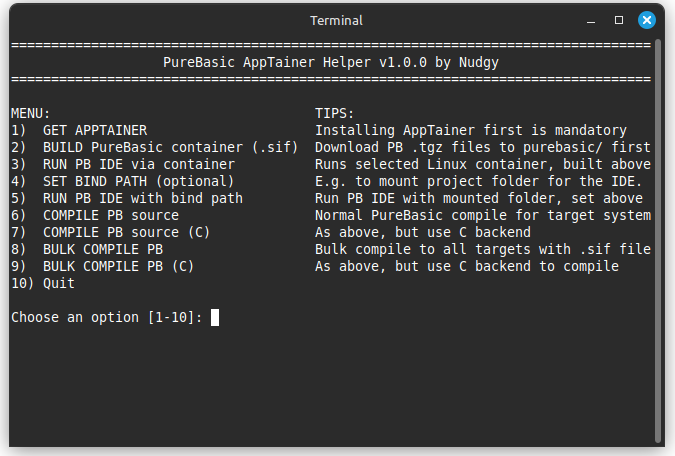 What is PureBasic AppTainer Helper (PAT)?
I've uploaded the .def files including a helper script called "PAT" to allow compiling PureBasic to multiple Linux distros without the user of Virtual Machines. I regard this as a
beta version (use it at your own risk). I have tested the script and .defs only on my own PC with Linux Mint and compiling some basic PB console and GUI apps. It works well for me, but only for x64.
PAT needs AppTainer to work. AppTainer is an open source application that can create "containerized" Linux distributions, containing only the necessary files needed to make specific Linux applications launch. This makes it possible to run applications that were designed for specific versions and distros of Linux.
PAT leverages this by making it possible to compile PureBasic source code for many different Linux distributions without needing to install Linux on other PCs or in Virtual Machines. PAT includes a bulk compile option, which can produce compiled applications for many Linux distros in a matter of seconds. Before compiling, you must build a "container" (.sif) for each distro that you want to compile for. Each container will likely take up about 450 - 750 MB of space.
Feel free to edit and improve upon the concept, suggest more .def files etc.
Basic usage:
- AppTainer must first be installed: https://github.com/apptainer/apptainer/releases
- The Official PureBasic (.tgz) archives (compiler and IDE) must be downloaded corresponding to the distros you want to compile to (i.e. PB Ubuntu 18 release if compiling for Ubuntu 18). You must put these archives in the "purebasic/" subfolder of PAT. Rename them to something useful, e.g. PBv621-x64-Ubuntu18.
- Run "PAT.sh" to get started (you may need to set execute rights)
- You must first create an AppTainer container for *each* target Linux distro that you want to compile for (use option 2 "BUILD PureBasic container"
- After successfully creating the AppTainer container(s), you can use menu option 6 or 7 to compile for a single distro, or use option 8 or 9 to bulk compile to ALL distros that you created AppTainer containers for in step 4 above.
For more comprehensive help, see the included Readme.
Supported Linux distributions for compiling (x64 only)
PAT contains PureBasic .def files for:
- Debian 10 (use PureBasic for Ubuntu 18)
- Debian 12 (use PureBasic for Ubuntu 20-22)
- Ubuntu 18
- Ubuntu 20
- Ubuntu 22
- Ubuntu 24
Download
- Download
here.
- MD5 checksum: d50689283aed4e9ce7fdda748656f05d