Page 1 of 1

Windows real dark theme.

Posted: Thu Nov 27, 2025 9:44 pm
by minimy
In PB it is possible to change the theme of the editing area.
But in my opinion it would be very interesting to have the PB environment integrated with the Windows (Dark) theme.
I think for night work (when change between apps is realy annoying for eyes) and even battery saving (because screen light) would be good. Would be fantastic!! :D

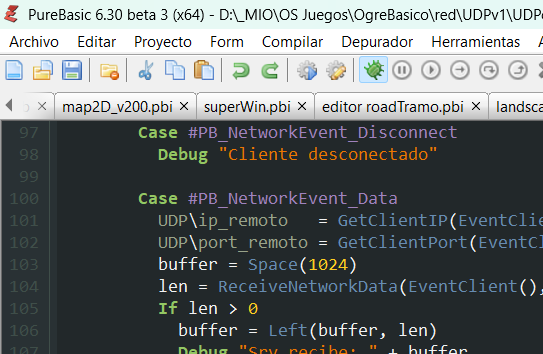
This is the dark theme in PB windows:
Image

Is not a real dark theme, all in my windows (and linux/mac) is in dark theme but in windows PB continue in white.

If any say anything about this post is duplicated, i remove my last post 'PLEASE REAL DARK THEME' with the record of 0 visits. And this have a photo, what more you want? :lol:

The IDE was created with PB?, I think I've read something about it, or was it something from Dawn Brown? :mrgreen:

It's just an idea. I know is not an easy thing. Thanks.

Re: Windows real dark theme.

Posted: Thu Nov 27, 2025 10:51 pm
by skywalk
Ha!
I also had to modify the Dark theme colors. I felt it was too blurry.
I also use Cascadia Mono regular font. It replaced Consolas.
Very nice on the eyes.
Try importing below as colors only.

Code: Select all

; PureBasic IDE Exported Preferences
; 
[Sections]
IncludeColors = 1
; 
; Color settings
; 
[Colors]
ASMKeywordColor = RGB(255, 125, 120)
ASMKeywordColor_Used = 1
BackgroundColor = RGB(0, 0, 0)
BackgroundColor_Used = 1
BasicKeywordColor = RGB(232, 81, 96)
BasicKeywordColor_Used = 1
CommentColor = RGB(0, 255, 128)
CommentColor_Used = 1
ConstantColor = RGB(160, 130, 189)
ConstantColor_Used = 1
LabelColor = RGB(153, 163, 138)
LabelColor_Used = 1
NormalTextColor = RGB(128, 128, 255)
NormalTextColor_Used = 1
NumberColor = RGB(255, 128, 0)
NumberColor_Used = 1
OperatorColor = RGB(241, 242, 243)
OperatorColor_Used = 1
PointerColor = RGB(255, 255, 0)
PointerColor_Used = 1
PureKeywordColor = RGB(0, 128, 255)
PureKeywordColor_Used = 1
SeparatorColor = RGB(241, 242, 243)
SeparatorColor_Used = 1
StringColor = RGB(0, 244, 244)
StringColor_Used = 1
StructureColor = RGB(255, 255, 181)
StructureColor_Used = 1
LineNumberColor = RGB(255, 255, 255)
LineNumberColor_Used = 1
LineNumberBackColor = RGB(41, 49, 52)
LineNumberBackColor_Used = 1
MarkerColor = RGB(0, 170, 170)
MarkerColor_Used = 1
CurrentLineColor = RGB(34, 40, 42)
CurrentLineColor_Used = 1
SelectionColor = RGB(79, 97, 100)
SelectionColor_Used = 1
SelectionFrontColor = RGB(255, 255, 255)
SelectionFrontColor_Used = 1
CursorColor = RGB(255, 255, 255)
CursorColor_Used = 1
Debugger_LineColor = RGB(58, 58, 58)
Debugger_LineColor_Used = 1
Debugger_LineSymbolColor = RGB(232, 232, 255)
Debugger_LineSymbolColor_Used = 1
Debugger_ErrorColor = RGB(255, 0, 0)
Debugger_ErrorColor_Used = 1
Debugger_ErrorSymbolColor = RGB(255, 0, 0)
Debugger_ErrorSymbolColor_Used = 1
Debugger_BreakPointColor = RGB(170, 0, 0)
Debugger_BreakPointColor_Used = 1
Debugger_BreakpoinSymbolColor = RGB(170, 0, 0)
Debugger_BreakpoinSymbolColor_Used = 1
DisabledBackColor = RGB(0, 0, 0)
DisabledBackColor_Used = 1
GoodBraceColor = RGB(0, 102, 102)
GoodBraceColor_Used = 1
BadBraceColor = RGB(255, 0, 0)
BadBraceColor_Used = 1
ProcedureBackColor = RGB(0, 0, 0)
ProcedureBackColor_Used = 1
CustomKeywordColor = RGB(147, 199, 99)
CustomKeywordColor_Used = 1
Debugger_WarningColor = RGB(236, 118, 0)
Debugger_WarningColor_Used = 1
Debugger_WarningSymbolColor = RGB(236, 118, 0)
Debugger_WarningSymbolColor_Used = 1
IndentColor = RGB(0, 170, 170)
IndentColor_Used = 1
ModuleColor = RGB(0, 128, 192)
ModuleColor_Used = 1
SelectionRepeatColor = RGB(70, 70, 89)
SelectionRepeatColor_Used = 1
PlainBackground = RGB(0, 0, 0)
PlainBackground_Used = 1
ToolsPanel_FrontColor = RGB(250, 156, 105)
ToolsPanel_BackColor = RGB(0, 0, 0)

Re: Windows real dark theme.

Posted: Fri Nov 28, 2025 9:54 am
by mk-soft
I know when I added the DarkMode in the PureBasic IDE, it didn't quite hit.
Maybe you can customise something on GitHub.

Re: Windows real dark theme.

Posted: Fri Nov 28, 2025 5:01 pm
by skywalk
Nice, I didn't know you made the dark theme.
It was easy to edit a few of the colors for more focus.
The debug line background was hiding the text for me.
And the edit background was slightly blurry.
These are subjective terms, so anyone can modify according to their eyeballs. ;)

Re: Windows real dark theme.

Posted: Sat Nov 29, 2025 1:14 am
by minimy
Ha!
I also had to modify the Dark theme colors. I felt it was too blurry.
I also use Cascadia Mono regular font. It replaced Consolas.
Very nice on the eyes.
Try importing below as colors only.
Very nice your theme, thanks skywalk for share!

But it is not the point. I'm talking about the environment, icons, menus, etc., everything you see grayed out in the image. When you put a theme in MSwindows, all the windows use that theme, but purebasic windows don't. I'm not talking about the new windows design, I'm just talking about the colors. In linux or mac with dark theme PB is dark too. In MSwindows is gray like my hair :lol:

Re: Windows real dark theme.

Posted: Sat Nov 29, 2025 2:07 am
by kenmo
Thread about this from August. In short, MS has made it a nightmare to add dark mode to Win32 or "legacy" software, without rewriting them in newer frameworks. And even then, Windows 11 itself still doesn't fully implement dark mode everywhere :?
viewtopic.php?t=86943

Here are some of my own comments
viewtopic.php?p=644337#p644337

Re: Windows real dark theme.

Posted: Sat Nov 29, 2025 2:22 pm
by minimy
kenmo wrote: Sat Nov 29, 2025 2:07 am Thread about this from August. In short, MS has made it a nightmare to add dark mode to Win32 or "legacy" software, without rewriting them in newer frameworks. And even then, Windows 11 itself still doesn't fully implement dark mode everywhere :?
viewtopic.php?t=86943

Here are some of my own comments
viewtopic.php?p=644337#p644337
Hi kenmo! very nice work. Thanks for information and links. I know windows is a soup of codes. I just say for new versions of PB, but i know is not easy.