Page 1 of 1
TextGadget & spaces
Posted: Tue Feb 11, 2025 11:41 am
by Psychophanta
With previous versions of PB (5.xx) it works as expected but now is this correct the behaviour, or is it a bug?:
Code: Select all
OpenWindow(0,0,0,400,300,"Inc",#PB_Window_SystemMenu|#PB_Window_ScreenCentered)
TrackBarGadget(10,310,0,40,260,0,2E2,#PB_TrackBar_Vertical|#PB_TrackBar_Ticks)
TextGadget(11,240,280,120,20,"purepure:zbasicbasic")
SetGadgetState(10,lat*2E2/180+1E2)
Repeat
  evento.i=WaitWindowEvent(20)
  If evento=#PB_Event_Gadget
    Select EventGadget()
    Case 10
      If GetGadgetState(10)<50:SetGadgetText(11,"purepure: z basicbasic"); with space, then no correct; text is truncated
      ElseIf GetGadgetState(10)<100:SetGadgetText(11,"purepure: basicbasic"); with space, then no correct; text is truncated
      Else:SetGadgetText(11,"purepure:zbasicbasic"); <- correct
      EndIf
    EndSelect
  EndIf
Until evento=#PB_Event_CloseWindow
Re: TextGadget & spaces
Posted: Tue Feb 11, 2025 12:36 pm
by Caronte3D
I don't see any truncate text (Win10)

Re: TextGadget & spaces
Posted: Tue Feb 11, 2025 1:05 pm
by Psychophanta
Really?

Here win8.1 x64 with PB6.20B4(x86)
Re: TextGadget & spaces
Posted: Tue Feb 11, 2025 1:43 pm
by Caronte3D
Maybe the Zoom of your Windows?
Re: TextGadget & spaces
Posted: Tue Feb 11, 2025 3:11 pm
by AZJIO
Use #SS_LEFTNOWORDWRAP so that the text does not wrap to a new line.
Code: Select all
TextGadget(11,240,280,120,20,"purepure:zbasicbasic", #SS_LEFTNOWORDWRAP)
Re: TextGadget & spaces
Posted: Wed Feb 12, 2025 8:13 am
by Psychophanta
@AZJIO
It works

But it is not documented
Re: TextGadget & spaces
Posted: Wed Feb 12, 2025 1:52 pm
by Caronte3D
Psychophanta wrote: Wed Feb 12, 2025 8:13 am
But it is not documented
It's a Windows only flag (all #SS_...)
Re: TextGadget & spaces
Posted: Wed Feb 12, 2025 7:28 pm
by Psychophanta
Since 'space' is a character like any other, this post should be moved to bug reports.
Re: TextGadget & spaces
Posted: Wed Feb 12, 2025 10:09 pm
by AZJIO
Psychophanta wrote: Wed Feb 12, 2025 7:28 pm
Since 'space' is a character like any other, this post should be moved to bug reports.
It's not a mistake. This is Windows behavior for strings that don't fit in the gadget. The word is moved to a new line, not cut off. If you make a gadget two lines high, you will see how the word will be in the second line.
Re: TextGadget & spaces
Posted: Thu Feb 13, 2025 11:21 pm
by Piero
Use 200?
Code: Select all
TextGadget(11,240,280,200,20,"purepure:zbasicbasic")
PS: with my mac font a good value would be 160
Edit: font has nothing to do with it; it's just 400-240 (instead of 400-280

)
Re: TextGadget & spaces
Posted: Fri Feb 14, 2025 12:49 am
by Piero
160 should be good for win too… this is TextGadget(11,240,280,160,20,"purepure:zbasicbasic"):
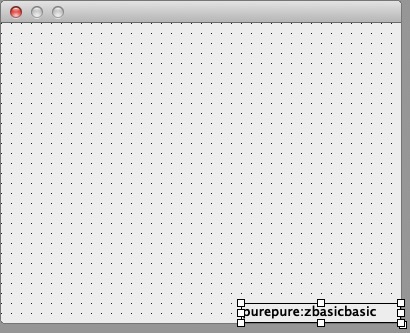
PS: I just discovered that if you create a window in form designer with the Mac display in HiDPI mode, in code view you get the width and height halved

Re: TextGadget & spaces
Posted: Fri Feb 14, 2025 7:42 am
by AZJIO
Piero wrote: Fri Feb 14, 2025 12:49 am
160 should be good for win too…
I have a large font, so if a programmer uses the width of the gadget for a font of 8.5, then with a font of 10 or 11 it will definitely go beyond the limits. If a flag prohibiting line breaks is used, then I will lose a couple of letters and understand the meaning of the word, otherwise the whole word will be moved and I will lose the meaning.
If the gadget's text in TextGadget consists of more than one word, then I try to use the #SS_LEFTNOWORDWRAP flag.
Re: TextGadget & spaces
Posted: Fri Feb 14, 2025 4:57 pm
by Piero
Well, I thought it could be the font too, but in this case "160" is just the "physical" limit of the window
P.S.
Posted: Sat Feb 15, 2025 12:32 pm
by Piero