Page 1 of 1
PB 6.20 Colors in IDE
Posted: Wed Jan 29, 2025 8:41 pm
by User_Russian
In PB 6.20 the IDE part is white and you can't change this color in the settings.
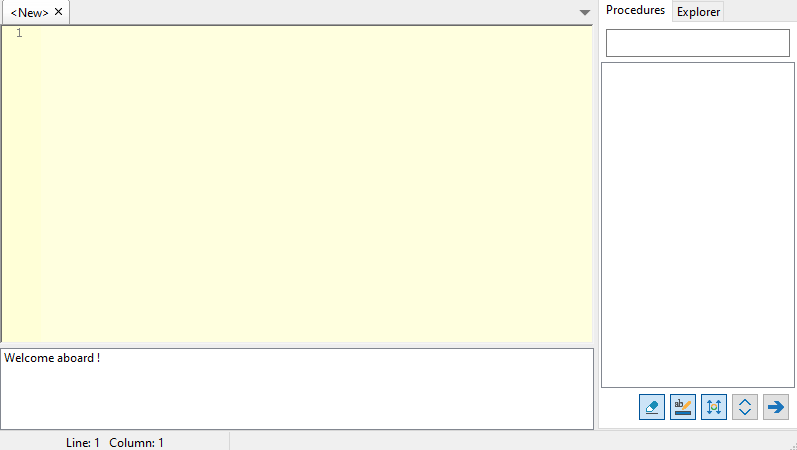
And I think that on the "Procedures" tab, it is necessary to move bottom the input box for searching procedures. It is not needed at the top, because it is not often used.
Re: PB 6.20 Colors in IDE
Posted: Thu Jan 30, 2025 9:06 am
by Fred
Seems to work here, can anybody else confirm ?
Re: PB 6.20 Colors in IDE
Posted: Thu Jan 30, 2025 9:41 am
by Marc56us
Not confirmed. I can change the panel colors as before.
Code: Select all
Preferences > Editor > Coloring > Background
Preferences > ToolsPanel > Options > Use Custom colors
(Sometimes I have to check and uncheck both options, but it works).
P.S
My beta version (6.20 x64 Win) is installed in a different directory, but uses the same preferences file as version 6.12 x64 Win.
Re: PB 6.20 Colors in IDE
Posted: Thu Jan 30, 2025 3:08 pm
by User_Russian
Yes, this is not a bug.
After downloading the beta version, in the settings Editor > Coloring accidentally applied a different color scheme, and when I adjusted the colors back, I didn’t find where the color of the panels changed.
I completely forgot about ToolsPanel > Options > Use Custom colors. Thanks.
Re: PB 6.20 Colors in IDE
Posted: Thu Jan 30, 2025 9:48 pm
by AZJIO
User_Russian wrote: Wed Jan 29, 2025 8:41 pm
And I think that on the "Procedures" tab, it is necessary to move bottom the input box for searching procedures. It is not needed at the top, because it is not often used.
It would be convenient in the settings to add a box “hide the buttons and the search field”, since in most cases this is configured once.