Editor Panel Button / Dark Theme!
Posted: Wed Oct 09, 2024 8:32 pm
The light Panel Buttons look weird with a dark theme:
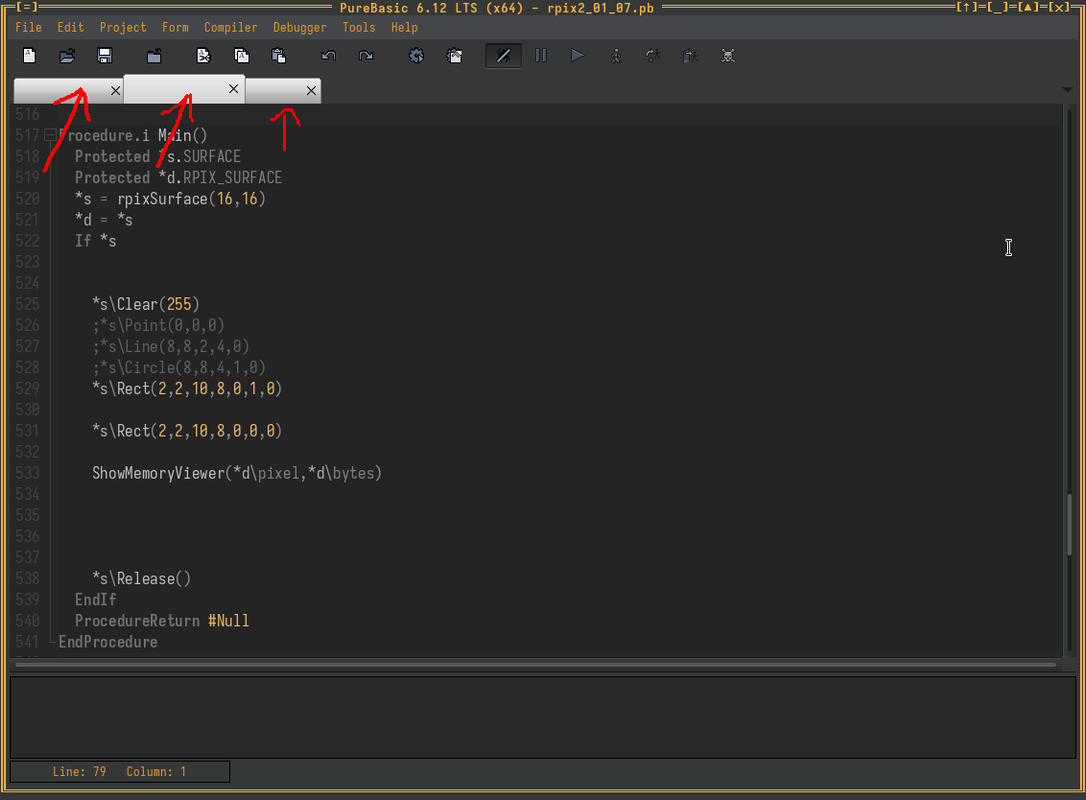
A dark option would be nice
A dark option would be nice
http://www.purebasic.com
https://www.purebasic.fr/english/
Code: Select all
; Default colors
#TabBarGadgetColor_TabBarDefault = $D0D0D0
#TabBarGadgetColor_BorderDefault = $808080
#TabBarGadgetColor_FaceDefault   = $D0D0D0
#TabBarGadgetColor_TextDefault = $000000Code: Select all
CompilerSelect #PB_Compiler_OS
	CompilerCase #PB_OS_Windows
		\TabBarColor   = $FF<<24 | GetSysColor_(#COLOR_BTNFACE)
		\BorderColor   = $FF<<24 | GetSysColor_(#COLOR_3DSHADOW)
		\FaceColor     = $FF<<24 | GetSysColor_(#COLOR_BTNFACE)
		\TextColor     = $FF<<24 | GetSysColor_(#COLOR_BTNTEXT)
	CompilerDefault
		\TabBarColor   = $FF3F3F3F ; forced black for Linux
		\BorderColor   = $FF666666
		\FaceColor     = $FF444444
		\TextColor     = $FFCCCCCC
CompilerEndSelect