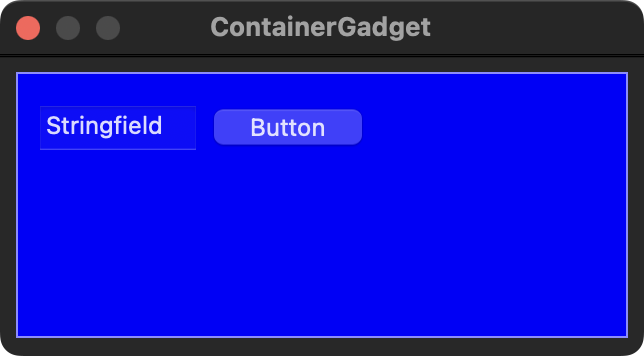
Since macOS v12.0 or v13.0 the controls are transparent with alpha value.
Code: Select all
;-TOP

; Comment : Workaround Darkmode CanvasGadget PB v5.7x
; Version : v1.02
; Create  : 19.04.2019
; Update  : 12.08.2019
; OS      : macOS

Procedure CanvasSetGadgetBackgoundColor(Gadget, BackColor = #PB_Ignore)
  CompilerIf #PB_Compiler_OS = #PB_OS_MacOS
    Protected sv, container, cnt, index, obj, NSBackColor
    Protected Alpha.CGFloat, Blue.CGFloat, Green.CGFloat, Red.CGFloat

    If BackColor <> #PB_Ignore
      Red = Red(BackColor) / 255
      Green = Green(BackColor) / 255
      Blue = Blue(BackColor) / 255
      Alpha = 1.0
      NSBackColor = CocoaMessage(0, 0, "NSColor colorWithDeviceRed:@", @Red, "green:@", @Green, "blue:@", @Blue, "alpha:@", @Alpha)
    Else
      NSBackColor = CocoaMessage(0, 0, "NSColor windowBackgroundColor")
    EndIf

    sv = CocoaMessage(0, GadgetID(Gadget), "subviews")
    If CocoaMessage(0, sv, "count")
      container = CocoaMessage(0, sv, "objectAtIndex:", 0)
      If container
        sv = CocoaMessage(0, container, "subviews")
        cnt = CocoaMessage(0, sv, "count") - 1
        For index = 0 To cnt
          obj = CocoaMessage(0, sv, "objectAtIndex:@", @index)
          CocoaMessage(0, obj, "setBackgroundColor:", NSBackColor)
        Next
      EndIf
    EndIf
  CompilerEndIf
EndProcedure

Procedure IsDarkmode()
  CompilerSelect #PB_Compiler_OS
    CompilerCase #PB_OS_MacOS
      Protected UserDefaults, NSString, String.s
      UserDefaults = CocoaMessage(0, 0, "NSUserDefaults standardUserDefaults")
      NSString = CocoaMessage(0, UserDefaults, "stringForKey:$", @"AppleInterfaceStyle")
      If NSString
        String = PeekS(CocoaMessage(0, NSString, "UTF8String"), -1, #PB_UTF8)
        If String = "Dark"
          ProcedureReturn 1
        Else
          ProcedureReturn 0
        EndIf
      Else
        ProcedureReturn 0
      EndIf

    CompilerCase #PB_OS_Windows
      ProcedureReturn 0
    CompilerCase #PB_OS_Linux
      ProcedureReturn 0

  CompilerEndSelect

EndProcedure

; *******************************************************************************

CompilerIf #PB_Compiler_IsMainFile

  Procedure RedrawCanvas0()
    ResizeGadget(0, #PB_Ignore, #PB_Ignore, #PB_Ignore, #PB_Ignore)
    StartDrawing(CanvasOutput(0))
    Box(0, 0, GadgetWidth(0), GadgetHeight(0), $FF0000)
    Box(2, 2, GadgetWidth(0) - 4, GadgetHeight(0) - 4, $B48246)
    StopDrawing()
  EndProcedure

  Procedure RedrawCanvas3()
    ResizeGadget(5, #PB_Ignore, #PB_Ignore, #PB_Ignore, #PB_Ignore)
  EndProcedure

  Procedure SizeWindow()
    ResizeGadget(4, 10, 10, WindowWidth(0) - 20, WindowHeight(0) - 20)
  EndProcedure

  ; ---------------------------------------------------------------------------

  Define Event

  ; ---------------------------------------------------------------------------

  If OpenWindow(0, 0, 0, 220, 220, "Canvas Container Workaround", #PB_Window_SystemMenu | #PB_Window_ScreenCentered | #PB_Window_SizeGadget)

    CanvasGadget(0, 0, 0, 200, 200, #PB_Canvas_Container)
    ButtonGadget(1, 10, 10, 80, 30, "Button 1")
    CloseGadgetList()

    ScrollAreaGadget(2, 0, 0, 400, 400, 400, 400); #PB_Container_BorderLess)
    CanvasGadget(3, 0, 0, 400, 400, #PB_Canvas_Container)
    ButtonGadget(5, 10, 10, 80, 30, "Button 5")
    StringGadget(6, 10, 50, 200, 25, "Texte")
    TextGadget(7, 10, 90, 200, 60, "Hello World!")
    CloseGadgetList()
    CloseGadgetList()

    CanvasSetGadgetBackgoundColor(3)
    CanvasSetGadgetBackgoundColor(0, #Red)

    StartDrawing(CanvasOutput(3))
    Define x, y
    y = 0
    For x = 0 To 195 Step 10
      Box(x, y, 400-2*x, 400-2*y, RGB(Random(255), Random(255), Random(255)))
      y + 10        ; the same as y = y + 10
    Next x
    StopDrawing()

    SplitterGadget(4, 10, 10, 200, 200, 2, 0);, #PB_Splitter_Separator)

    RedrawCanvas0()

    BindEvent(#PB_Event_SizeWindow, @SizeWindow(), 0)

    BindGadgetEvent(0, @RedrawCanvas0(), #PB_EventType_Resize)
    BindGadgetEvent(2, @RedrawCanvas3(), #PB_EventType_Resize)

    Repeat
      Event = WaitWindowEvent()

    Until Event = #PB_Event_CloseWindow

  EndIf

CompilerEndIf
; IDE Options = PureBasic 5.72 (MacOS X - x64)
; CursorPosition = 52
; FirstLine = 52
; Folding = --
; EnableXP