Page 1 of 1
[SOLVED] Zoom 100%
Posted: Thu Jun 29, 2023 11:38 am
by boddhi
Would it be possible to have a menu item (in menu Edition ?) like 'Zoom/View or Display 100%' to return to a normal display size when this has been modified?
It would be quicker and easier than playing with the mouse wheel.
 UNNECESSARY REQUEST !!!
Go to File menu/Settings/General/Shortcuts/Zoom default
Re: Zoom 100%
Posted: Thu Jun 29, 2023 12:32 pm
by Marc56us
boddhi wrote: Thu Jun 29, 2023 11:38 am
Would it be possible to have a menu item (in menu Edition ?) like 'Zoom/View or Display 100%' to return to a normal display size when this has been modified?
It would be quicker and easier than playing with the mouse wheel.
Faster to use keyboard

CTRL + / (slash in numpad) = normal zoom
CTRL + or - = Zoom + or -
(like many browsers, except normal zoom = CTRL + 0)
Re: Zoom 100%
Posted: Thu Jun 29, 2023 2:51 pm
by boddhi
Salut Marc,
You're right. I also use CTRL +/-, but more in situations where both hands are already on the keyboard, which saves me a lot of unnecessary mouse movements (yes, I'm an old boomer who's known computers without mouses and 'la frappe au kilomètre', so the less I use them the better I feel!
).
Nevertheless, in certain situations, you already have the mouse in your hand and it's actually quicker to use CTRL + Mouse wheel.
In short, if the PB team don't think my suggestion is silly, it would be cool to give us the option of reverting to a normal display size. Then, free to us to configure the call as we want : button, keyboard shortcut, etc.
PB Team, thanks in advance

Re: Zoom 100%
Posted: Thu Jun 29, 2023 4:24 pm
by Marc56us
I think, this is a Scintilla function, so maybe PB IDE coders can (easily?) add this
SCI_SETZOOM(0) ?
https://www.scintilla.org/ScintillaDoc.html#Zooming

Re: Zoom 100%
Posted: Thu Jun 29, 2023 4:39 pm
by AZJIO
Re: Zoom 100%
Posted: Thu Jun 29, 2023 8:57 pm
by boddhi
Thanks to all.
While waiting for an official version (because it's not multi-OS and Windows only) :
Code: Select all
; Start code
SendMessage_(Val(GetEnvironmentVariable("PB_TOOL_Scintilla")),#SCI_SETZOOM,0,0)
; End code
Create executable and then, menu Tools/Configure tools...
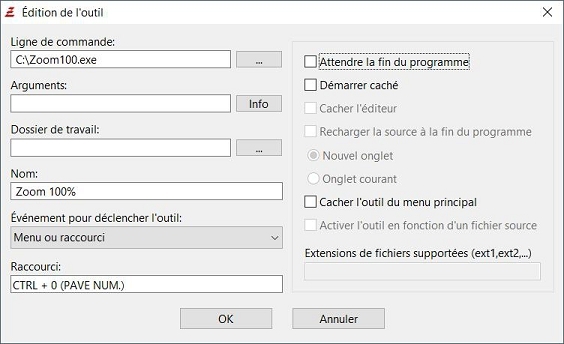
Note : After this, we can also create a toolbar button via Menu File/Settings/Toolbar
Re: Zoom 100%
Posted: Fri Jun 30, 2023 12:26 am
by BarryG
boddhi wrote: Thu Jun 29, 2023 2:51 pmboth hands are already on the keyboard
So just press Ctrl+0 and it's back to 100%. (Like Marc56us said).
Re: Zoom 100%
Posted: Fri Jun 30, 2023 12:39 am
by boddhi
BarryG wrote:
So just press Ctrl+0 and it's back to 100%. (Like Marc56us said).
If it's a question, yes !
But, of course, you can choose any other shortcut you want
Note : First '0' in SendMessage (wParam) is the scale (in points) to zoom. It's recommended to use a value between '-10' and '20'
Re: Zoom 100%
Posted: Fri Jun 30, 2023 12:48 am
by BarryG
I'm not talking about using a tool. The IDE already natively goes back to 100% when you press Ctrl+0. No tools or SendMessages or Scintilla hacks needed.
Re: Zoom 100%
Posted: Fri Jun 30, 2023 1:10 am
by boddhi
Oupps, you're right !!!! I didn't seen it in Settings/Shortcuts.


I had tested CTRL +
NUMPAD + 0 which had no effect ! And for good reason, it wasn't the good '0'.
And as there's no equivalent menu item, I thought this function didn't exist!
Re: [SOLVED] Zoom 100%
Posted: Fri Jun 30, 2023 1:33 am
by boddhi
Interesting fact : On my 102-key azerty keyboard, zoom in works with both '+' keys but not zoom out, which only works with the '-' key on the numeric keypad.
Re: [SOLVED] Zoom 100%
Posted: Fri Jun 30, 2023 4:54 pm
by Marc56us
I had tested CTRL + NUMPAD + 0 which had no effect
CTRL + /
(The slash ('/') on numpad on my keyboard 105)
Re: [SOLVED] Zoom 100%
Posted: Fri Jun 30, 2023 9:22 pm
by boddhi
Thanks Marc, it works for me too !