Page 1 of 1
Icons with a resolution of 256*256 don't work
Posted: Thu Sep 29, 2022 12:21 am
by jacdelad
Hi,
it seems that icons with a resolution of 256*256 don't work. Am I missing something?
Code: Select all
OpenWindow(0,0,0,300,300,"Test",#PB_Window_ScreenCentered)
CanvasGadget(0,0,0,300,300)
LoadImage(0,"C:\MyIcon.ico")
StartDrawing(CanvasOutput(0))
DrawImage(ImageID(0),0,0)
StopDrawing()

Repeat
Until WaitWindowEvent()=#PB_Event_CloseWindow
Try it with an icon containing only one image at the resolution of 256*256, e.g. from
https://iconarchive.com/. The icon which loads is significant smaller.
Trying a different icon at 128*128 loads it at full resolution.
Tested with Windows 10.
Re: Icons with a resolution of 256*256 don't work
Posted: Thu Sep 29, 2022 2:54 am
by BarryG
Interesting. I recently tried to use a 256x256 icon with my exe but it looked horrible, so I abandoned the idea. I assumed I created the icon incorrectly, but jacdelad's post has made me now think I did it right but PureBasic is the problem.
Re: Icons with a resolution of 256*256 don't work
Posted: Thu Sep 29, 2022 3:02 am
by idle
Re: Icons with a resolution of 256*256 don't work
Posted: Thu Sep 29, 2022 3:26 am
by jacdelad
You're using APIs and a lot of code, that's cheating. Sure, it works, but I think it should work using internal functions too. Or at least a warning in the help file.
Re: Icons with a resolution of 256*256 don't work
Posted: Thu Sep 29, 2022 4:48 am
by Tawbie
Hi jacdelad,
Your code appears to correctly display a 256x256 icon if the ico test file is uncompressed.
Tawbie
Re: Icons with a resolution of 256*256 don't work
Posted: Thu Sep 29, 2022 5:15 am
by jacdelad
Hi Tawbie,
I don't really understand. Icons are always uncompressed, I'm talking about *.ico files. Can you please provide the file? I'd like to test it (though I'm going to sleep right now, I'll answer later).
Re: Icons with a resolution of 256*256 don't work
Posted: Thu Sep 29, 2022 5:17 am
by BarryG
jacdelad wrote: Thu Sep 29, 2022 5:15 amIcons are always uncompressed
Not always. I discovered this when reading about adding a 256x256 ".ico" file to my exe. They can certainly be compressed.
Re: Icons with a resolution of 256*256 don't work
Posted: Thu Sep 29, 2022 5:45 am
by RASHAD
Hi jacdelad
Sleep well

It seems that PB has a problem with Loadimage() and Catchimage() with Icon format 256x256
For time been next is a Windows API solution
Code: Select all
OpenWindow(0,0,0,300,300,"Test",#PB_Window_ScreenCentered)
CanvasGadget(0,0,0,300,300)
;LoadImage(0,GetTemporaryDirectory()+"5WmWaBg1.ico")
imgid = LoadImage_(0,GetTemporaryDirectory()+"5WmWaBg1.ico",#IMAGE_ICON	,256,256,#LR_LOADFROMFILE	)
StartDrawing(CanvasOutput(0))
DrawImage(imgid,22,22)
StopDrawing()

Repeat
Until WaitWindowEvent()=#PB_Event_CloseWindow
Re: Icons with a resolution of 256*256 don't work
Posted: Thu Sep 29, 2022 6:35 am
by Denis
jacdelad wrote: Thu Sep 29, 2022 5:15 am
Hi Tawbie,
I don't really understand. Icons are always uncompressed, I'm talking about *.ico files. Can you please provide the file? I'd like to test it (though I'm going to sleep right now, I'll answer later).
Normally, 256x256 icons are compressed (since MS Vista).
The format is png. They may not be compressed but the file is larger.
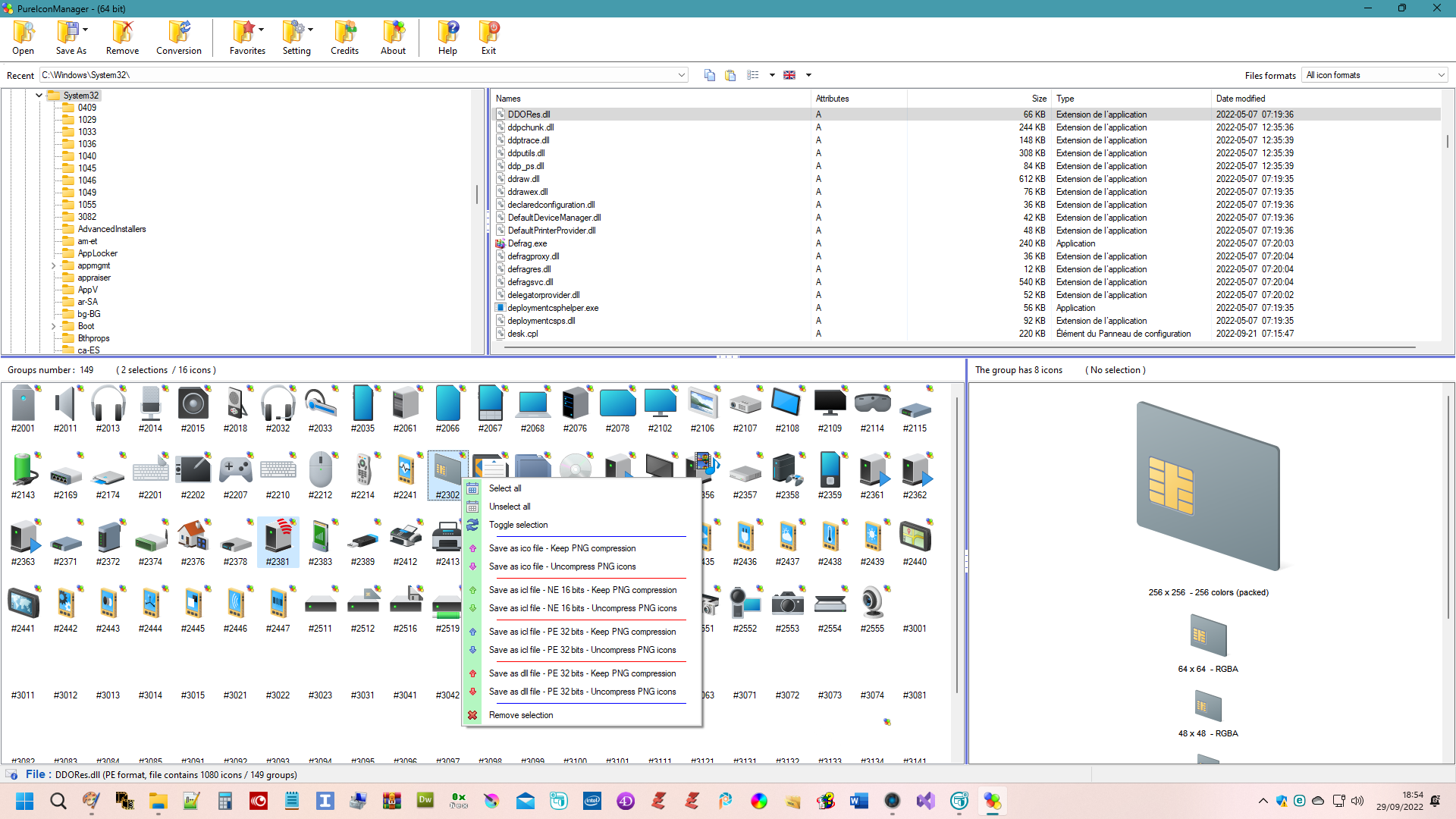
You can use my PureIconManager tool to see the contents of ico, exe, dll, Ne etc. files (with PureIconManager , you can extract one or more icons and create a dll, an ico or ne file, keeping compression or not).
PureIconManager
PureIconManager allows you to see if icons are compressed or not, see the preview below.
The red arrow on the left indicates that there is at least one compressed icon in the group.
On the right, the icons in the group are displayed, the arrow show how to see if icon is compressed or not.
For MS icon format see explanations here
https://www.axialis.com/docs/iw/Add_ima ... E_icon.htm
and
https://www.axialis.com/docs/iw/What_is_an_Icon.htm
$ Which image formats should I include in my icons?

Re: Icons with a resolution of 256*256 don't work
Posted: Thu Sep 29, 2022 7:47 am
by Tawbie
jacdelad wrote: Thu Sep 29, 2022 5:15 am
. ... Can you please provide the file? ...
You can convert an image to an uncompressed ico file using Gimp.
RASHAD wrote: Thu Sep 29, 2022 5:45 am
It seems that PB has a problem with Loadimage() and Catchimage() with Icon format 256x256
As a point of interest, LoadImage() appears to work fine with uncompressed 256x256 ico files. In fact, I just tried a 600x600 pixel uncompressed ico file and it displayed correctly using jacdelad's PB code (with appropriate window and canvas gadget size changes).
Re: Icons with a resolution of 256*256 don't work
Posted: Thu Sep 29, 2022 3:08 pm
by jacdelad
Oh wow, thanks to everyone. I definitely didn't know that. I was adamant that icons are always uncompressed.
While I can load it via API, it would be best to be able to load it natively, also for the support of the other OSes.
I just woke up, and slept well, does it work when I use a UsePNGDecoder() in the code? Someone mentioned it's PNG-compreessed, maybe this works.
Re: Icons with a resolution of 256*256 don't work
Posted: Thu Sep 29, 2022 6:13 pm
by Denis
Tawbie wrote: Thu Sep 29, 2022 7:47 am
jacdelad wrote: Thu Sep 29, 2022 5:15 am
. ... Can you please provide the file? ...
You can convert an image to an uncompressed ico file using Gimp.
with PureIconManager, you can create for example an ico file from a displayed file, regardless of the format of displayed file.
on the right (displayed content of selected group - selected group is on the left), with mouse select on or more icon, if more than one use CTRL key pushed, then (leave CTRL key) click right mouse button an then a menu will appear.
Select the format you want by clicking the menu item, the file will be created.

it is also possible to save one or more groups
on the left, select one or more group with mouse (the first group selected is always the only one displayed on the right),
the same with CTRL key and then a menu will appear.
Select the format you want by clicking le menu item, the file will be created.
the contents of all selected groups will be added to the created file.
be very very very careful with deleting icons, especially with system files, most of the time this is not possible (Microsoft limitation)
Re: Icons with a resolution of 256*256 don't work
Posted: Thu Sep 29, 2022 6:56 pm
by ChrisR
It looks very nice your
PureIconManager Denis.
Still in beta 2, why no final version ?
It would be nice if you could have a https secure address. The images are not displayed here on Chrome and to see them I have to open them in a new tab. It seems possible on free.fr!
Edit: I see that you have just removed the images.
Re: Icons with a resolution of 256*256 don't work
Posted: Fri Sep 30, 2022 5:10 am
by Denis
ChrisR wrote: Thu Sep 29, 2022 6:56 pm
It looks very nice your
PureIconManager Denis.
Still in beta 2, why no final version ?
It would be nice if you could have a https secure address. The images are not displayed here on Chrome and to see them I have to open them in a new tab. It seems possible on free.fr!
Edit: I see that you have just removed the images.
Hi Chris and Thanks.
I work on different projects and I stopped the development of PureIconManager a bit. I use an improved but not complete version (support for images, Png, Jpg etc.), added background colorization because some icons do not appear on a white background (see screen capture).
The development takes a lot of time, I'm not a programmer, only an amateur. The development allowed me to know a little what an icon is, several years before obtaining a good result (interface in French or English without restarting).
There's hardly any explanation on the icons and it's a lot of tries to get a result.
I don't understand, I didn't remove any images, they appear on my computer.
