Page 1 of 2
Inputify
Posted: Fri Nov 26, 2021 3:51 pm
by ❤x1
 Inputify
Hello!
I was screen sharing to teach a friend when I realized I used keyboard shortcuts without even noticing it.
Rather than working on my teaching skills, I decided to write a tool to alleviate the problem, and here it is : Inputify is a small program displaying your keyboard inputs on the screen.
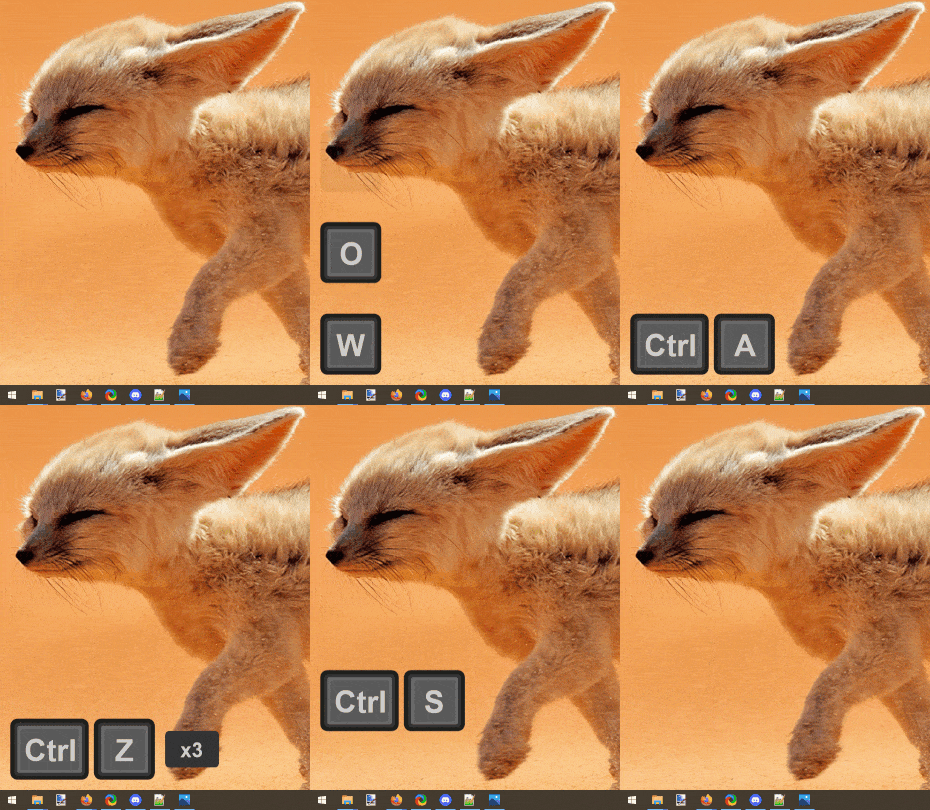
It's built with the almighty new C backend and comes with a few options : mouse input, light and dark mode and scaling.

My PureBasic knowledge is rather limited, so there is probably much to optimize or clean up and,
what a coincidence, it's open source and hosted on GitHub :
https://github.com/LastLifeLeft/Inputify
I'll accept pull requests, bug reports and suggestions!
Oh, and a word of advice : don't forget Inputify on when you type a password while screen sharing. Not that I'd be clumsy enough to do that.

Re: Inputify
Posted: Fri Nov 26, 2021 4:04 pm
by Tenaja
Thanks for sharing! That looks like a handy tool.
Re: Inputify
Posted: Fri Nov 26, 2021 4:37 pm
by NicTheQuick
Is there a Linux version available?
Re: Inputify
Posted: Fri Nov 26, 2021 5:02 pm
by ❤x1
NicTheQuick wrote: Fri Nov 26, 2021 4:37 pm
Is there a Linux version available?
I was waiting for the release of PB 6.00 for Mac and Linux to throw an eye on port, but it's rather API heavy and I can't guaranty anything.
Re: Inputify
Posted: Fri Nov 26, 2021 7:37 pm
by ChrisR
It is very nice, thank you for sharing

It could be good with the keys written horizontally following the typing delay, as done for hotkeys like Ctrl+, Alt+...
Re: Inputify
Posted: Fri Nov 26, 2021 9:52 pm
by Kwai chang caine
Very pro and nice work

Thanks for sharing

Re: Inputify
Posted: Sat Nov 27, 2021 12:33 am
by BarryG
I was going to For/Next all the key definitions, but noticed some have different offsets. If they were all the same offsets (like the numbers 0-9), then those definitions can be shrunken down to just a few lines like this:
Code: Select all
; Numbers
For c='0' To '9' ; 48 to 57
  VKeyData(c)\Text = Chr(c)
  VKeyData(c)\Width = 60
  VKeyData(c)\Offset = 32
Next
Compare that to your existing definitions for numbers:
Code: Select all
;{ Numbers ( 48 to 57)
VKeyData(48)\Text = "0"
VKeyData(48)\Width = 60
VKeyData(48)\Offset = 32
VKeyData(49)\Text = "1"
VKeyData(49)\Width = 60
VKeyData(49)\Offset = 32
VKeyData(50)\Text = "2"
VKeyData(50)\Width = 60
VKeyData(50)\Offset = 32
VKeyData(51)\Text = "3"
VKeyData(51)\Width = 60
VKeyData(51)\Offset = 32
VKeyData(52)\Text = "4"
VKeyData(52)\Width = 60
VKeyData(52)\Offset = 32
VKeyData(53)\Text = "5"
VKeyData(53)\Width = 60
VKeyData(53)\Offset = 32
VKeyData(54)\Text = "6"
VKeyData(54)\Width = 60
VKeyData(54)\Offset = 32
VKeyData(55)\Text = "7"
VKeyData(55)\Width = 60
VKeyData(55)\Offset = 32
VKeyData(56)\Text = "8"
VKeyData(56)\Width = 60
VKeyData(56)\Offset = 32
VKeyData(57)\Text = "9"
VKeyData(57)\Width = 60
VKeyData(57)\Offset = 32
;}
Re: Inputify
Posted: Sat Nov 27, 2021 3:32 am
by ❤x1
BarryG wrote: Sat Nov 27, 2021 12:33 amthose definitions can be shrunken down to just a few lines
All those definitions got generated automatically, so I did not even read them... And damn! Applied wherever it was possible,
that's about 150 lines saved!
Many thanks.

Re: Inputify
Posted: Sat Nov 27, 2021 9:15 am
by BarryG
No problem; glad I could help. Not sure if you're aware that wrapping a single character in apostrophes will make PureBasic convert that character to its Asc() code at compile time? It makes your source more readable, like the below, and you also don't need to remember the Asc() numbers for the loop.
Both lines do exactly the same thing when compiled, but the "Better" way makes it more obvious with no comments needed.
Original: For n = 48 To 57
Better: For n = '0' To '9'
Original: For l = 65 To 90
Better: For l = 'A' To 'Z'
Re: Inputify
Posted: Sat Nov 27, 2021 10:56 am
by ❤x1
BarryG wrote: Sat Nov 27, 2021 9:15 am
Not sure if you're aware that wrapping a single character in apostrophes will make PureBasic convert that character to its Asc() code at compile time?
I definitively didn't know that. Thanks again!
ChrisR wrote: Fri Nov 26, 2021 7:37 pm
It could be good with the keys written horizontally following the typing delay, as done for hotkeys like Ctrl+, Alt+...
I gave it a try, and it adds some readability issues : we need more space between each input window to get a clear separation, and more movement doesn't help either. So, I won't implement it, sorry.
Re: Inputify
Posted: Sat Nov 27, 2021 2:54 pm
by ChrisR
❤x1 wrote: Sat Nov 27, 2021 10:56 am
I gave it a try, and it adds some readability issues : we need more space between each input window to get a clear separation, and more movement doesn't help either. So, I won't implement it, sorry.
It was just a suggestion, it's beautiful the way it is, especially if you've already tried it.
It can be helpful, to show the shortcuts used CtrL+C, Ctrl+V,... when connecting to remote computers, training, demo,...
Re: Inputify
Posted: Sat Nov 27, 2021 7:45 pm
by Sicro
Thanks for the very useful tool!
❤x1 wrote: Fri Nov 26, 2021 3:51 pmhosted on GitHub
Yeah, very nice!
Yes, Linux version would be very good. When I have enough time, I will try if it works with Wine under Linux, but a native Linux version would of course be better. Maybe helpers can be found.
Re: Inputify
Posted: Sun Nov 28, 2021 7:41 am
by Mr.L
Hi, ❤x1!
Inputify looks very nice, thanks for sharing!
Re: Inputify
Posted: Wed Dec 01, 2021 4:32 am
by OgreVorbis
What are you using for the UI? If I saw that, I would have guessed it was an embedded web app.
Are those just image gadgets that toggle or are they animated controls?
Re: Inputify
Posted: Wed Dec 01, 2021 7:58 pm
by ❤x1
OgreVorbis wrote: Wed Dec 01, 2021 4:32 am
Are those just image gadgets that toggle or are they animated controls?
Plain and simple vector drawn canvas, sorry.
I thought of using a webview, but the one available within PB seems ancient (gave me a lot of js error) and importing a modern one was way out of scope for such a small project.

