PixelToy
Posted: Tue Nov 16, 2021 2:58 pm
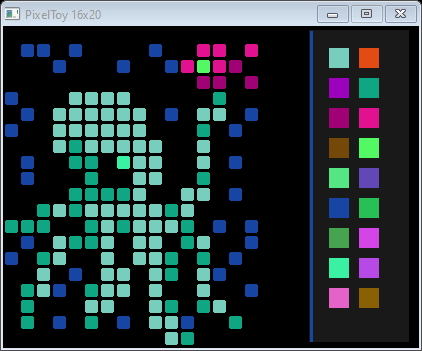
Just a toy. With pixels. Have fun and post your masterpieces!!!

Notes:
- There are no special commands or settings. Just use your mouse to select colors and draw!
- Color palette is randomly generated
- Example in the screenshot was found on twitter but I can't find the author's name
- Uses some helper code by griz
Notes:
- There are no special commands or settings. Just use your mouse to select colors and draw!
- Color palette is randomly generated
- Example in the screenshot was found on twitter but I can't find the author's name
- Uses some helper code by griz
Code: Select all
Procedure GetMouseX(gadget)    ;;  by griz
  GetCursorPos_(mouse.POINT)
  MapWindowPoints_(0,GadgetID(gadget),mouse,1)
  ProcedureReturn mouse\x
EndProcedure

Procedure GetMouseY(gadget)
  GetCursorPos_(mouse.POINT)
  MapWindowPoints_(0,GadgetID(gadget),mouse,1)
  ProcedureReturn mouse\y
EndProcedure


#CELLSIZE = 16
#XXX = 16
#YYY = 20

AreaX  = #CELLSIZE * #XXX
AreaY  = #CELLSIZE * #YYY


OpenWindow( 0,0,0,AreaX+160,AreaY+2,"PixelToy " + #XXX + "x" + #YYY ,#PB_Window_SystemMenu|#PB_Window_MinimizeGadget|#PB_Window_ScreenCentered)
SetWindowColor (0,0)

hImg = CreateImage(0,AreaX,AreaY) ; ,24,#White)

ImageGadget(2,2,2,AreaX,AreaY,hImg)

;; init palette
CanvasGadget(3,AreaX + 50 , 4, 100 ,AreaY - 8)
StartDrawing(CanvasOutput(3))

Box(0,0, 100 , AreaY , $191919)

For gg = 0 To 8
  R = Random(255)
  G = Random(255)
  B = Random(255)
  color = (RGB(R, G, B))
  Box(20, 18 + gg*30 , 20, 20, color)
Next

For gg = 0 To 8
  R = Random(255)
  G = Random(255)
  B = Random(255)
  color = (RGB(R, G, B))
  Box(50, 18 + gg*30 , 20, 20, color)
Next

selectedColor = color
Box(1, 1, 3, WindowHeight(0), selectedColor)

StopDrawing()

;; init palette end

Procedure DrawPixel(selectedColor)
  mx=GetMouseX(2) : my=GetMouseY(2)
  mxx=(mx/#CELLSIZE) * #CELLSIZE : myy=(my/#CELLSIZE) * #CELLSIZE
  StartDrawing(ImageOutput(0))
  RoundBox(mxx,myy, #CELLSIZE - 3 ,#CELLSIZE - 3,2,2, selectedColor)
  StopDrawing()
  SetGadgetState(2, ImageID(0))
EndProcedure

Repeat
  Select WaitWindowEvent():
    Case #PB_Event_CloseWindow: End

    Case #WM_LBUTTONDOWN
      DrawPixel(selectedColor)

    Case #WM_RBUTTONDOWN
      delmode=1
      DrawPixel(0)

    Case #WM_RBUTTONUP
      delmode=0

    Case #WM_MOUSEMOVE
      If (GetAsyncKeyState_(#VK_LBUTTON)  & $10000)  Or (GetAsyncKeyState_(#VK_RBUTTON)  & $10000)  ;; (mouse button is down)
        mx=GetMouseX(2) : my=GetMouseY(2)
        mxx=(mx/#CELLSIZE) * #CELLSIZE : myy=(my/#CELLSIZE) * #CELLSIZE

        StartDrawing(ImageOutput(0))
        If delmode
          RoundBox(mxx,myy, #CELLSIZE - 3, #CELLSIZE - 3,2,2, 0)
        Else
          RoundBox(mxx,myy, #CELLSIZE - 3, #CELLSIZE - 3,2,2, selectedColor)
        EndIf

        StopDrawing()
        SetGadgetState(2, ImageID(0))
      EndIf

    Case #PB_Event_Gadget
      Select EventGadget()
        Case 3
          If EventType() = #PB_EventType_LeftClick
            StartDrawing(CanvasOutput(3))
            selectedColor = Point(GetMouseX(3), GetMouseY(3))
            Box(1, 1, 3, WindowHeight(0), selectedColor)
            StopDrawing()
          EndIf
        Case 5
          End
      EndSelect
  EndSelect
ForEver