Page 1 of 2

[Module] LED - Gadget (all OS)

Posted: Thu Apr 02, 2020 10:53 am
by Thorsten1867
LED Gadget - Module (all OS / 64Bit / DPI)

Image

Code: Select all

; LED::AttachPopupMenu()    - adds a popup menu
; LED::Gadget()             - new LED gadget
; LED::GetData()            - similar to 'GetGadgetData()'
; LED::GetID()              - similar to 'GetGadgetData()', but string
; LED::Hide()               - similar to 'HideGadget()'
; LED::SetAutoResizeFlags() - [#MoveX|#MoveY|#Width|#Height]
; LED::SetAttribute()       - similar to 'SetGadgetAttribute()'
; LED::SetColor()           - similar to 'SetGadgetColor()'
; LED::SetData()            - similar to 'SetGadgetData()'
; LED::SetID()              - similar to 'SetGadgetData()', but string
; LED::SetState()           - similar to 'SetGadgetState()'
Download: LEDGadgetModule.pbi

Re: [Module] LED - Gadget (all OS)

Posted: Thu Apr 02, 2020 3:33 pm
by hoerbie
Thanks, exactly what I needed, but with 5.72 on macOS 10.15 the example looks like this:
Image

Re: [Module] LED - Gadget (all OS)

Posted: Thu Apr 02, 2020 3:43 pm
by StarBootics
hoerbie wrote:Thanks, exactly what I needed, but with 5.72 on macOS 10.15 the example looks like this:
Image
Same thing on Ubuntu operating system.

Best regards
StarBootics

Re: [Module] LED - Gadget (all OS)

Posted: Thu Apr 02, 2020 5:11 pm
by Thorsten1867
Please try it again.

Re: [Module] LED - Gadget (all OS)

Posted: Thu Apr 02, 2020 5:25 pm
by StarBootics
Working now

Best regards
StarBootics

Re: [Module] LED - Gadget (all OS)

Posted: Thu Apr 02, 2020 5:35 pm
by Shardik
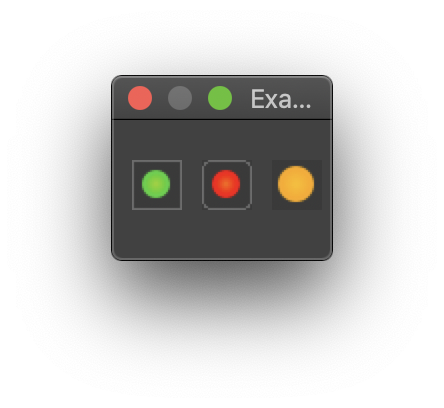
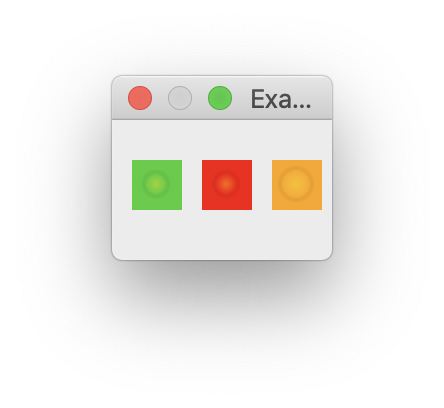
It's a bit nitpicking but on MacOS 10.14.6 'Mojave' in Dark Mode and Light Mode the 3rd orange LED doesn't have the same background color as the window background has (like in the Windows snapshot above).

Image

Image

Re: [Module] LED - Gadget (all OS)

Posted: Thu Apr 02, 2020 7:40 pm
by hoerbie
Yes, thanks, it works now on macOS.

Nitpicking, I have the same problem with the not 100% identical background color, but this is a general problem of getting the real background color, I also tried a lot there, the problem seems to be in the function OSX_NSColorToRGB(NSColor) used in

Code: Select all

LED()\Color\Gadget = OSX_NSColorToRGB(CocoaMessage(0, 0, "NSColor windowBackgroundColor"))

Re: [Module] LED - Gadget (all OS)

Posted: Thu Apr 02, 2020 10:35 pm
by mk-soft

Code: Select all

CompilerIf #PB_Compiler_OS = #PB_OS_MacOS
    Procedure NSColorByNameToRGB(NSColorName.s)
      Protected.cgfloat red, green, blue
      Protected nscolorspace, rgb
      nscolorspace = CocoaMessage(0, CocoaMessage(0, 0, "NSColor " + NSColorName), "colorUsingColorSpaceName:$", @"NSCalibratedRGBColorSpace")
      If nscolorspace
        CocoaMessage(@red, nscolorspace, "redComponent")
        CocoaMessage(@green, nscolorspace, "greenComponent")
        CocoaMessage(@blue, nscolorspace, "blueComponent")
        rgb = RGB(red * 255.0, green * 255.0, blue * 255.0)
        ProcedureReturn rgb
      EndIf
    EndProcedure
  CompilerEndIf
  
  Procedure.i BlendColor(Color1.i, Color2.i, Scale.i = 50) ; Thanks to Thorsten
    Protected.f R1, G1, B1, R2, G2, B2
    Protected.f Blend1 = Scale / 100
    Protected.f Blend2 = 1.0 - Blend1
    R1 = Red(Color1): G1 = Green(Color1): B1 = Blue(Color1)
    R2 = Red(Color2): G2 = Green(Color2): B2 = Blue(Color2)
    ProcedureReturn RGB(R1*Blend1 + R2 * Blend2, G1*Blend1 + G2 * Blend2, B1*Blend1 + B2 * Blend2)
  EndProcedure
  
  Procedure GetSystemColor(Type)
    CompilerSelect #PB_Compiler_OS
      CompilerCase #PB_OS_Windows
        Select Type
          Case #PB_Gadget_FrontColor
            ProcedureReturn GetSysColor_(#COLOR_WINDOWTEXT)
          Case #PB_Gadget_BackColor
            ProcedureReturn GetSysColor_(#COLOR_3DFACE)
          Case #PB_Gadget_LineColor
            ProcedureReturn #Gray
        EndSelect
      CompilerCase #PB_OS_Linux
        Select Type
          Case #PB_Gadget_FrontColor
            ProcedureReturn #Black
          Case #PB_Gadget_BackColor
            ProcedureReturn $F8F8F8
          Case #PB_Gadget_LineColor
            ProcedureReturn #Gray
        EndSelect
      CompilerCase #PB_OS_MacOS
        Protected UserDefaults, NSString
        Select Type
          Case #PB_Gadget_FrontColor
            ProcedureReturn NSColorByNameToRGB("controlTextColor")
          Case #PB_Gadget_BackColor
            UserDefaults = CocoaMessage(0, 0, "NSUserDefaults standardUserDefaults")
            NSString = CocoaMessage(0, UserDefaults, "stringForKey:$", @"AppleInterfaceStyle")
            If NSString And PeekS(CocoaMessage(0, NSString, "UTF8String"), -1, #PB_UTF8) = "Dark"
              ProcedureReturn BlendColor(NSColorByNameToRGB("controlBackgroundColor"), #White, 85)
            Else
              ProcedureReturn BlendColor(NSColorByNameToRGB("windowBackgroundColor"), #White, 85)
            EndIf  
          Case #PB_Gadget_LineColor
            ProcedureReturn #Gray
        EndSelect
    CompilerEndSelect
  EndProcedure

Re: [Module] LED - Gadget (all OS)

Posted: Fri Apr 03, 2020 7:46 pm
by Thorsten1867
Please try it again!

Re: [Module] LED - Gadget (all OS)

Posted: Fri Apr 03, 2020 8:00 pm
by Shardik
Thorsten1867 wrote:Please try it again!
Error wrote:Zeile 220: BlendColor() is not a function, array, list, map or macro.
In module LED the procedure BlendColor_() is defined after the call of BlendColor(). In BlendColor() the trailing underscore is missing.

Re: [Module] LED - Gadget (all OS)

Posted: Fri Apr 03, 2020 8:06 pm
by mk-soft
Fixed part macOS... :wink:

Code: Select all

  CompilerIf #PB_Compiler_OS = #PB_OS_MacOS
    
    ; Addition of mk-soft
    
    Procedure OSX_NSColorToRGBA(NSColor)
      Protected.cgfloat red, green, blue, alpha
      Protected nscolorspace, rgba
      nscolorspace = CocoaMessage(0, nscolor, "colorUsingColorSpaceName:$", @"NSCalibratedRGBColorSpace")
      If nscolorspace
        CocoaMessage(@red, nscolorspace, "redComponent")
        CocoaMessage(@green, nscolorspace, "greenComponent")
        CocoaMessage(@blue, nscolorspace, "blueComponent")
        CocoaMessage(@alpha, nscolorspace, "alphaComponent")
        rgba = RGBA(red * 255.9, green * 255.9, blue * 255.9, alpha * 255.)
        ProcedureReturn rgba
      EndIf
    EndProcedure
    
    Procedure OSX_NSColorToRGB(NSColor)
      Protected.cgfloat red, green, blue
      Protected r, g, b, a
      Protected nscolorspace, rgb
      nscolorspace = CocoaMessage(0, nscolor, "colorUsingColorSpaceName:$", @"NSCalibratedRGBColorSpace")
      If nscolorspace
        CocoaMessage(@red, nscolorspace, "redComponent")
        CocoaMessage(@green, nscolorspace, "greenComponent")
        CocoaMessage(@blue, nscolorspace, "blueComponent")
        rgb = RGB(red * 255.0, green * 255.0, blue * 255.0)
        ProcedureReturn rgb
      EndIf
    EndProcedure
    
    Procedure OSX_NSColorByNameToRGB(NSColorName.s)
      Protected.cgfloat red, green, blue
      Protected nscolorspace, rgb
      nscolorspace = CocoaMessage(0, CocoaMessage(0, 0, "NSColor " + NSColorName), "colorUsingColorSpaceName:$", @"NSCalibratedRGBColorSpace")
      If nscolorspace
        CocoaMessage(@red, nscolorspace, "redComponent")
        CocoaMessage(@green, nscolorspace, "greenComponent")
        CocoaMessage(@blue, nscolorspace, "blueComponent")
        rgb = RGB(red * 255.0, green * 255.0, blue * 255.0)
        ProcedureReturn rgb
      EndIf
    EndProcedure
    
    Procedure.i OSX_BlendColor(Color1.i, Color2.i, Scale.i = 50) ; Thanks to Thorsten
      Protected.f R1, G1, B1, R2, G2, B2
      Protected.f Blend1 = Scale / 100
      Protected.f Blend2 = 1.0 - Blend1
      R1 = Red(Color1): G1 = Green(Color1): B1 = Blue(Color1)
      R2 = Red(Color2): G2 = Green(Color2): B2 = Blue(Color2)
      ProcedureReturn RGB(R1*Blend1 + R2 * Blend2, G1*Blend1 + G2 * Blend2, B1*Blend1 + B2 * Blend2)
    EndProcedure
    
    Procedure OSX_GadgetColor(Type = #PB_Gadget_BackColor)
      Protected UserDefaults, NSString
      Select Type
        Case #PB_Gadget_FrontColor
          ProcedureReturn OSX_NSColorByNameToRGB("controlTextColor")
        Case #PB_Gadget_BackColor
          UserDefaults = CocoaMessage(0, 0, "NSUserDefaults standardUserDefaults")
          NSString = CocoaMessage(0, UserDefaults, "stringForKey:$", @"AppleInterfaceStyle")
          If NSString And PeekS(CocoaMessage(0, NSString, "UTF8String"), -1, #PB_UTF8) = "Dark"
            ProcedureReturn OSX_BlendColor(OSX_NSColorByNameToRGB("controlBackgroundColor"), #White, 87)
          Else
            ProcedureReturn OSX_BlendColor(OSX_NSColorByNameToRGB("windowBackgroundColor"), #White, 87)
          EndIf  
        Case #PB_Gadget_LineColor
          ProcedureReturn #Gray
      EndSelect
    EndProcedure
    
  CompilerEndIf

Re: [Module] LED - Gadget (all OS)

Posted: Sat Apr 04, 2020 11:26 am
by Thorsten1867
Tried to fix the MacOS problems, but without Mac this is always a bit difficult ;-)

Re: [Module] LED - Gadget (all OS)

Posted: Sat Apr 04, 2020 3:29 pm
by Andre
Another nice gadget, thank you! :D

Re: [Module] LED - Gadget (all OS)

Posted: Mon Apr 06, 2020 12:13 pm
by hoerbie
Thank you Thorsten1867 and mk-soft, now the background color looks fine on macOS 10.15 in normal mode, in dark mode the background ist still to dark.
Image

Re: [Module] LED - Gadget (all OS)

Posted: Mon Apr 06, 2020 2:05 pm
by mk-soft
Adjust OSX_GadgetColor -> BendColor (85%)