Page 1 of 1
Color oddity
Posted: Fri Mar 27, 2020 2:01 am
by wombats
Hi,
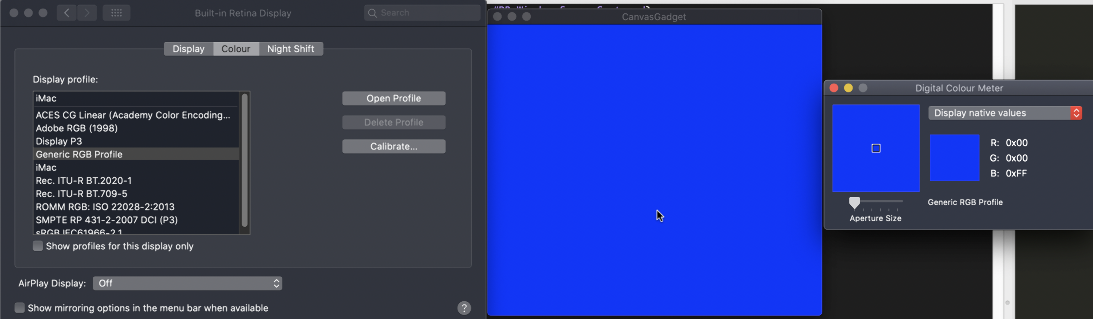
When I run this, the blue isn't 0, 0, 255. It's 28, 64, 242. Does anyone know what's going on?
Code: Select all
If OpenWindow(0, 0, 0, 460, 400, "CanvasGadget", #PB_Window_SystemMenu | #PB_Window_ScreenCentered)
  CanvasGadget(0, 0, 0, 460, 400)
  StartDrawing(CanvasOutput(0))
  Box(0, 0, 460, 400, RGB(0, 0, 255))
  StopDrawing()
EndIf
Repeat : Until WaitWindowEvent() = #PB_Event_CloseWindow
Re: Color oddity
Posted: Fri Mar 27, 2020 4:10 am
by IdeasVacuum
Re: Color oddity
Posted: Fri Mar 27, 2020 4:15 am
by IdeasVacuum
Is your Monitor made by Apple? That's a potential compatibility issue for RGB apparently.
What happens if you use a Hex value instead?
Re: Color oddity
Posted: Fri Mar 27, 2020 3:27 pm
by mk-soft
The color is full blue (255),
but even for me, Mac mini, all apps are displayed on the external monitor with color balance and shafts. Especially in "dark mode".
If you make a screenshot, the colors are correct again.
Code: Select all
If OpenWindow(0, 0, 0, 460, 400, "CanvasGadget", #PB_Window_SystemMenu | #PB_Window_ScreenCentered)
  CanvasGadget(0, 0, 0, 460, 400)
  StartDrawing(CanvasOutput(0))
  Box(0, 0, 460, 400, RGB(0, 0, 255))
  Debug Hex(Point(10, 10))
  StopDrawing()
EndIf
Repeat : Until WaitWindowEvent() = #PB_Event_CloseWindow
Re: Color oddity
Posted: Fri Mar 27, 2020 3:35 pm
by wombats
IdeasVacuum wrote:Is your Monitor made by Apple? That's a potential compatibility issue for RGB apparently.
What happens if you use a Hex value instead?
I'm using a MacBook Air. I get the same result if I use a Hex value.
mk-soft wrote:The color is full blue (255),
but even for me, Mac mini, all apps are displayed on the external monitor with color balance and shafts. Especially in "dark mode".
If you make a screenshot, the colors are correct again.
Code: Select all
If OpenWindow(0, 0, 0, 460, 400, "CanvasGadget", #PB_Window_SystemMenu | #PB_Window_ScreenCentered)
  CanvasGadget(0, 0, 0, 460, 400)
  StartDrawing(CanvasOutput(0))
  Box(0, 0, 460, 400, RGB(0, 0, 255))
  Debug Hex(Point(10, 10))
  StopDrawing()
EndIf
Repeat : Until WaitWindowEvent() = #PB_Event_CloseWindow
I made a video of what happens for me:
https://imgur.com/jIRkCOG. PureBasic says it's blue, but the system color requester says it's a different shade of blue.
Re: Color oddity
Posted: Fri Mar 27, 2020 11:43 pm
by IdeasVacuum
If I verify the colour in your video on my Windows 7 Screen, the result is RGB(034,052,235)
It's blue, but not Primary Blue, and not the same as verified on your Mac either. A conundrum.
Re: Color oddity
Posted: Fri Mar 27, 2020 11:48 pm
by IdeasVacuum
Hi again
.... I think it could be the calibration of your screen. Turns out my my daughter has a similar issue on an MSI Windows 10 Laptop!
Try testing a range of colours - if it is the calibration, they should mostly all be a bit off.
Re: Color oddity
Posted: Sat Mar 28, 2020 5:09 pm
by IdeasVacuum
Re: Color oddity
Posted: Sat Apr 04, 2020 11:09 pm
by deseven
You can select "Generic RGB Profile" if you want to disable color correction. It will be pure blue then: