Page 1 of 1

[3D Mesh] Create Vertex Meshes, Crashed!

Posted: Wed Jun 27, 2018 7:44 pm
by JamieVanCadsand
Hey Programmers...

I am learn pure basic and i am an noob in this programming languale.
So i try to create an vertex face, just create an mesh without loading any model.

Just this is my code, written in 'pure basic 5.x', using the 3d library, they are
build in itself, my code looks like this, an simple test to learn 3d programming:

Code: Select all

;Init Engine
InitEngine3D() 
InitSprite() 

;Open an Window
OpenWindow(0, 0, 0, 640, 480, "Cube example", #PB_Window_SystemMenu | #PB_Window_ScreenCentered)
OpenWindowedScreen(WindowID(0), 0, 0, 640, 480, 0, 0, 0)

; Create an light
CreateLight(#PB_Any, RGB(25, 25, 180), 86, 120, 50, #PB_Light_Point)

; Create an Camera
CreateCamera(0, 0, 0, 100, 100)
MoveCamera(0, 100, 120, 100, #PB_Absolute | #PB_Local)
CameraLookAt(0, 0, 0, 0)

; Create an vertex face
If CreateMesh(0, #PB_Mesh_TriangleFan, #PB_Mesh_Static)
  MeshFace(1, 1, 1)
  MeshFace(1, 1, -1)
  MeshFace(1, -1, 1)
  MeshFace(-1, 1, 1)
  MeshFace(1, -1, -1)
  MeshFace(-1, 1, -1)
  MeshFace(-1, -1, 1)
  MeshFace(-1, -1, -1)
EndIf

Repeat
  RenderWorld()
  FlipBuffers()
Until WaitWindowEvent(1) = #PB_Event_CloseWindow
If i run this script, my 3d program will crashing yet...

So my question is how i can create 3d meshes, called vertex faces..
Can anyone give my simple examples, about 3d vertex meshes ?,
just i want to understand creating vertex meshes and also how
vertex triangles / faces technical works yet...

Can anyone help my to understand this, and even give my examples
for create 3d meshes into pure basic, just tell my also how vertexes works ?..

Thanks for help, Jamie

Re: [3D Mesh] Create Vertex Meshes, Crashed!

Posted: Wed Jun 27, 2018 8:08 pm
by NicTheQuick
You first need to create vertices with MeshVertexPosition(x, y, z). Then you can add Faces with MeshFace(Vertex1, Vertex2, Vertex3) where Vertex1, Vertex2 and Vertex3 are indices to the vertices you added before.

Re: [3D Mesh] Create Vertex Meshes, Crashed!

Posted: Thu Jun 28, 2018 9:28 am
by JamieVanCadsand
Yet... just i am an noob with purebasic and i program now only an month with it...

Ok than..., can you correct my code, just i can see how i must use create_mesh() just use
the vertex_face(vertex1, vertex2, vertex3) pleace ?...

If you correct my code, just i can see how i must use vertex_face(...), than i hope to
understand more with 3d meshes... if you let me see to use the vertex position function,
used in my code i posted, maby i can expiriment with it...

Thanks for correct my code, Jamie.

Re: [3D Mesh] Create Vertex Meshes, Crashed!

Posted: Thu Jun 28, 2018 9:37 am
by NicTheQuick
I never did something with 3D in Purebasic. I just read the documentation. :-D
Maybe there is an other user who can make you an example.

Re: [3D Mesh] Create Vertex Meshes, Crashed!

Posted: Thu Jun 28, 2018 6:06 pm
by Comtois
Here an example (create a plane). And you can have a look at MeshManual.pb examples

Code: Select all

IncludeFile #PB_Compiler_Home + "examples/3d/Screen3DRequester.pb"

Define.f KeyX, KeyY, MouseX, MouseY

If InitEngine3D()
  
  Add3DArchive(#PB_Compiler_Home + "examples/3d/Data/Textures", #PB_3DArchive_FileSystem)
  
  InitSprite()
  InitKeyboard()
  InitMouse()
  
  If Screen3DRequester()
    
    ; Create a plane manually
    ; 
    
    ; Define all the vertices and their attributes
    CreateMesh(0)
    MeshVertexPosition(-100, 100, -100)
    MeshVertexNormal(-#SQRT13,#SQRT13,-#SQRT13)
    ;MeshVertexColor(RGB(255, 0, 0))
    
    MeshVertexPosition(100, 100, -100)
    MeshVertexNormal(#SQRT13,#SQRT13,-#SQRT13)
    ;MeshVertexColor(RGB(255, 0, 0))
    
    MeshVertexPosition(100, -100, -100)
    MeshVertexNormal(#SQRT13,-#SQRT13,-#SQRT13)
    ;MeshVertexColor(RGB(255, 0, 0))
    
    MeshVertexPosition(-100, -100, -100)
    MeshVertexNormal(-#SQRT13,-#SQRT13,-#SQRT13)
    ;MeshVertexColor(RGB(255, 0, 255))
  
    
    ; Define all the faces, based on the vertex index
    ;
    MeshFace(3, 2, 0)
    MeshFace(2, 1, 0)
    
    FinishMesh(1)
    
    CreateMaterial(0, LoadTexture(0, "clouds.jpg"))
    ;SetMaterialColor(0, #PB_Material_AmbientColor, #PB_Material_AmbientColors)
    
    
    CreateEntity(0, MeshID(0), MaterialID(0))
    
    CreateCamera(0, 0, 0, 100, 100)
    MoveCamera(0, 0, 0, 1000, #PB_Absolute)
    ;CameraRenderMode(0,#PB_Camera_Wireframe)
    
    Repeat
      Screen3DEvents()
      
      ExamineKeyboard()
              
      RenderWorld()
      Screen3DStats()      
      FlipBuffers()
    Until KeyboardPushed(#PB_Key_Escape) Or Quit = 1
  EndIf
  
Else
  MessageRequester("Error", "The 3D Engine can't be initialized", 0)
EndIf

End

Re: [3D Mesh] Create Vertex Meshes, Crashed!

Posted: Fri Jun 29, 2018 10:17 am
by applePi
just another example
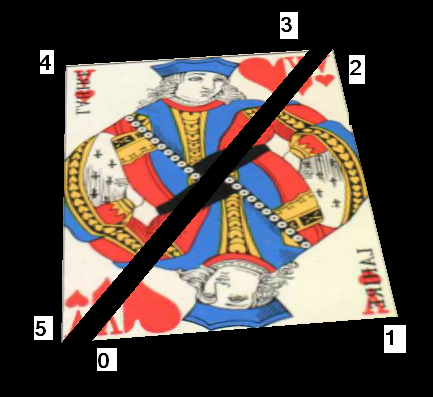
when we execute the first MeshVertexPosition then the vertex is given an index number = 0 this index is used when we want to weave the mesh
execute it again and the vertex is given another index number = 1 even if it is overlapping over the first vertex. and so on... to index 2,3,4....
the numbers in the picture is the index of the nearby vertex:
Image

now meshface(indx1, indx2, indx3) will weave a triangle between the points (vertices) having indx1, indx2, indx3 whatevert their value is such as meshface(0,1,2)
there is another method to weave a triangle
instead of meshface(0,1,2), write
MeshIndex(0)
MeshIndex(1)
MeshIndex(2)
look meshManual2.pb it is comprehensive and have many examples in one

Code: Select all

    Declare CreateMatrix()

    #CameraSpeed = 1

    InitEngine3D()
    InitSprite()
    InitKeyboard()
    InitMouse()

    OpenWindow(0,0,0,500,500,"press 'W' for WireFrame",#PB_Window_SystemMenu | #PB_Window_ScreenCentered)
    OpenWindowedScreen(WindowID(0),0,0,500,500,1,0,0,#PB_Screen_WaitSynchronization)

    Add3DArchive(".", #PB_3DArchive_FileSystem)
    Add3DArchive(#PB_Compiler_Home + "examples/3d/Data/Textures", #PB_3DArchive_FileSystem)

    KeyboardMode(#PB_Keyboard_AllowSystemKeys)
    
    CreateLight(0,RGB(245,245,205),19,13,0)

    ;Create Camera
    CreateCamera(0,0,0,100,100)
    ;MoveCamera(0,0,12,-35,#PB_Absolute)
    MoveCamera(0,0,12,-15,#PB_Absolute)
    CameraLookAt(0, 0, -13, 0)

    AmbientColor(RGB(100,100,100))

    CreateMaterial(0, LoadTexture(0, "ValetCoeur.jpg"))
    MaterialCullingMode(0, #PB_Material_NoCulling)
        
    CreateMesh(0, #PB_Mesh_TriangleList, #PB_Mesh_Dynamic)
    
    ;points of first triangle
    MeshVertexPosition(-5, 0, 6) ; vertex 0
    MeshVertexNormal(0,1,0)
    MeshVertexTextureCoordinate(0, 0)
 
    MeshVertexPosition(5, 0, 6)  ; vertex 1
    MeshVertexNormal(0,1,0)
    MeshVertexTextureCoordinate(1, 0)
 
    MeshVertexPosition(5, 0, -6) ; vertex 2
    MeshVertexNormal(0,1,0)
    MeshVertexTextureCoordinate(1, 1)
    
    ;points of second triangle
    MeshVertexPosition(4, 0, -6) ; vertex 3
    MeshVertexNormal(0,1,0)
    MeshVertexTextureCoordinate(1, 1)
 
    MeshVertexPosition(-6, 0, -6) ;vertex 4
    MeshVertexNormal(0,1,0)
    MeshVertexTextureCoordinate(0, 1)
 
    MeshVertexPosition(-6, 0, 6)  ;vertex 5
    MeshVertexNormal(0,1,0)
    MeshVertexTextureCoordinate(0, 0)
    
    MeshFace(0, 1, 2)
    MeshFace(3, 4, 5)
    
    FinishMesh(#True)
    NormalizeMesh(0)
     
    SetMeshMaterial(0, MaterialID(0))
    CreateEntity(0, MeshID(0), MaterialID(0),0,-10,0)
        
    wireFrame = 1
    Repeat
    Repeat
      event = WindowEvent()
      If event = #PB_Event_CloseWindow: quit = 1: EndIf
    Until Event=0
    
     
           ExamineKeyboard()
                
            If KeyboardReleased(#PB_Key_W)
              If wireFrame
                MaterialShadingMode(0, #PB_Material_Wireframe)
              wireFrame ! 1
            Else
                MaterialShadingMode(0, #PB_Material_Solid)
              wireFrame ! 1
            EndIf
            EndIf
        
      RotateEntity(0, 0, 0.2, 0,#PB_Relative)
     
      
      RenderWorld()
     
      FlipBuffers()

    Until KeyboardPushed(#PB_Key_Escape) Or quit = 1