Page 1 of 1
InitEngine3D() failed on my Win7 x64 w.Intel HD 520 Graphics
Posted: Sat Feb 03, 2018 1:46 pm
by Kurzer
Hello,
after switching to a new computer, I tried one of the 3D examples of PureBasic for the first time today.
But every PureBasic 3D example failed with the InitEngine3D () function. It is always returned #False.
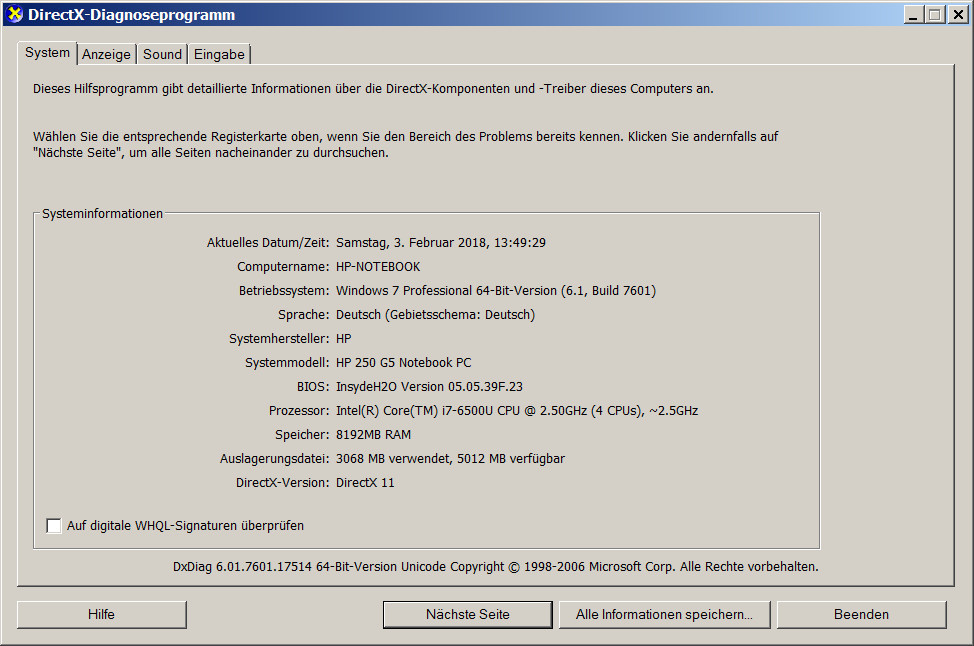
My computer is a Windows 7 x64 computer with Intel i7 CPU and integrated HD 520 graphics controller. I have no problems with other programs like GPU acceleration.
I use PureBasic in portable mode. What could be the problem here? Is anybody experienced with that?
Many thanks in advance.
Kurzer
PS: These are my DirectX Settings.
Re: InitEngine3D() failed on my Win7 x64 w.Intel HD 520 Grap
Posted: Sat Feb 03, 2018 2:53 pm
by DK_PETER
Try using 'OpenGL' as library subsystem in Compiler options.
Re: InitEngine3D() failed on my Win7 x64 w.Intel HD 520 Grap
Posted: Sat Feb 03, 2018 3:00 pm
by Kurzer
Thanks DK_PETER, this is working.
But I wonder why it doesn't work when I enter DirectX11 as a subsystem (or why it doesn't work out of the box). The subsystem DirectX11 is located in the PureBasic directory, right next to the OpenGL directory.
Re: InitEngine3D() failed on my Win7 x64 w.Intel HD 520 Grap
Posted: Sat Feb 03, 2018 3:19 pm
by DK_PETER
Hi kurzer
The DirectX11 Subsystem is not for the 3D engine, That requires opengl or dx9c installed.
Dx11 is for sprites only.
Re: InitEngine3D() failed on my Win7 x64 w.Intel HD 520 Grap
Posted: Sat Feb 03, 2018 3:33 pm
by Kurzer
Thank you for clarify this.
Do you know if I can install DirectX9 parallel to the existing DirectX 11? Are there any side effects?
If only a certain DirectX 9 DLL is needed, I could install DirectX 9 in a virtual machine and copy the desired DLL to the Purbasics directory of my host computer.
Re: InitEngine3D() failed on my Win7 x64 w.Intel HD 520 Grap
Posted: Sat Feb 03, 2018 4:15 pm
by DK_PETER
Just install dx9c, there are no side effects.

Re: InitEngine3D() failed on my Win7 x64 w.Intel HD 520 Grap
Posted: Sat Feb 03, 2018 5:34 pm
by Kurzer
Thanks again, DK_PETER.

I'll do so, if it's really needed. I was just wondering why it didn't work out.
I'm one of the "keep my system as clean as possible" paranoids. With your help I can compile the 3D examples with OpenGL and I know what's the reason why it does't work with DirectX (11). That's enough for now.
Tak.
Re: InitEngine3D() failed on my Win7 x64 w.Intel HD 520 Grap
Posted: Tue Oct 30, 2018 9:20 pm
by JamieVanCadsand
Its even so, thad i think maby you must put Engine3d.dll into our project map where you
put our .pb source codes, or put this into our Windows dll's...
I am momental not usin the 3d engine, I am still an hobby student, now I am
programming bouncing ball in 2d... Just I must rondup programming level 1,
Than I must still start to learn the second step with programming.
Just I don't get time to help you with the 3d engine... Sorry for thad...
Jamie.