Page 1 of 2

50 Sinbads on a circle

Posted: Thu Mar 10, 2016 11:33 am
by applePi
seems this week is the 3D demos week with great demos from Hades, DK_PETER, mrw, and others. here is a little play. press space to let the ball hit one sinbad to cause it falling over other sinbad and so on
change the Radius to 30 to get the sinbads more closer. change it to 20 to have the right sinbads collide with the left sinbads
to know how to orient the sinbads in a suitable way look this thread about Calculus Lesson, Tangents to curves:
http://purebasic.fr/english/viewtopic.php?f=36&t=61469

Image
tested PB 5.42LTS on winxp32, win7 x64, ubuntu 14.x x64

Code: Select all

Define.f KeyX, KeyY, MouseX, MouseY

Enumeration

  #Window
  #SinbadMat
  #SinbadMesh
  #Sinbad
  #PlaneMesh
  #Plane
  #Camera
  #Light1
  #Light2
EndEnumeration

If InitEngine3D() ;#PB_Engine3D_DebugLog
  
Add3DArchive(".", #PB_3DArchive_FileSystem)
Add3DArchive(#PB_Compiler_Home + "examples/3d/Data/Textures", #PB_3DArchive_FileSystem)
Add3DArchive(#PB_Compiler_Home + "examples/3d/Data/Packs/desert.zip", #PB_3DArchive_Zip)
Add3DArchive(#PB_Compiler_Home+"examples/3d/Data/Packs/Sinbad.zip", #PB_3DArchive_Zip)


  Parse3DScripts()
  
  InitSprite()
  InitKeyboard()
  InitMouse()
  
ExamineDesktops()
DesktopW = DesktopWidth(0)
DesktopH = DesktopHeight(0)


If OpenWindow(#Window, 0, 0, DesktopW, DesktopH, "press 'Space' to push the Ball ... move/rotate camera with arrow keys and mouse ")
  If OpenWindowedScreen(WindowID(#Window), 0, 0, DesktopW, DesktopH, 0, 0, 0)
     
    ;Ground
    Material = CreateMaterial(#PB_Any, TextureID(LoadTexture(#PB_Any, "snow_1024.jpg")))
    Plane = CreateEntity(#PB_Any, MeshID(CreatePlane(#PB_Any, 1000, 1000, 100, 100, 10, 10)), MaterialID(Material))
    CreateEntityBody(Plane, #PB_Entity_StaticBody, 1, 0.5, 10)

    LoadMesh(#SinbadMesh, "Sinbad.mesh")
    Total=50 
    angle.f = #PI*2/Total
    Radius.f = 50
    For EN=1 To Total
      angle + #PI*2/50
      x.f=Cos(angle)*Radius
      z.f=Sin(angle)*Radius
    
      slope.f= -z/x ; the derivative
      slope = Degree(ATan(slope)) 

      If en=36
        CreateSphere(10, 0.5)
        CreateMaterial(1, LoadTexture(1, "Geebee2.bmp"))
        CreateEntity(10, MeshID(10), MaterialID(1),   x-2, 1,z) 
        CreateEntityBody(10, #PB_Entity_ConvexHullBody ) 
      EndIf
      
      sinbad=CreateEntity(#PB_Any, MeshID(#SinbadMesh), #PB_Material_None)
      MoveEntity(Sinbad,x,5, z,   #PB_Absolute)
      RotateEntity(Sinbad, 0,slope,0)
      
      ScaleEntity(Sinbad,1,1,0.01)
      CreateEntityBody(Sinbad, #PB_Entity_ConvexHullBody ) 
      StartEntityAnimation(Sinbad, "IdleTop")
      
    Next
    
    CreateCamera(#Camera, 0, 0, 100, 100)
    MoveCamera(#Camera, 0, 50, 100, #PB_Absolute)
    CameraLookAt(#Camera,0,0,0)

    CreateLight(#Light1, RGB(255, 255, 255), -20, 40, 20)
    CreateLight(#Light2, RGB(250, 250, 250), 20, 40, 20)
        
    AmbientColor(RGB(200, 200, 200))

  EndIf
EndIf

Repeat
  Repeat
    event = WindowEvent()
  Until event = 0
  
      
      If ExamineMouse()
        MouseX = -MouseDeltaX()/20 
        MouseY = -MouseDeltaY()/20
      EndIf
      
          
      If ExamineKeyboard()
      
        If KeyboardPushed(#PB_Key_Left)
          KeyX = -1
        ElseIf KeyboardPushed(#PB_Key_Right)
          KeyX = 1
        Else
          KeyX = 0
        EndIf
        
        If KeyboardPushed(#PB_Key_Up)
          KeyY = -1
        ElseIf KeyboardPushed(#PB_Key_Down)
          KeyY = 1
        Else
          KeyY = 0
        EndIf
        
        If KeyboardReleased(#PB_Key_Space)
          ApplyEntityImpulse(10, 8, 0, 0 );[, PositionX, PositionY, PositionZ])
         EndIf
            
      EndIf
  
      RotateCamera(#Camera, MouseY, MouseX, 0, #PB_Relative)
      MoveCamera(#Camera, KeyX, 0, KeyY)
      
      RenderWorld()
      
      
      FlipBuffers()
    Until KeyboardPushed(#PB_Key_Escape) Or Quit = 1
    
Else
  MessageRequester("Error", "The 3D Engine can't be initialized",0)
EndIf
  
End

Re: 50 Sinbads on a circle

Posted: Thu Mar 10, 2016 12:26 pm
by IdeasVacuum
Brilliant ApplePi - needs a sound effect :D

Re: 50 Sinbads on a circle

Posted: Thu Mar 10, 2016 12:44 pm
by DK_PETER
Hehe..
Sininoes or domibads?
I like. :D

Re: 50 Sinbads on a circle

Posted: Thu Mar 10, 2016 1:52 pm
by Kwai chang caine
Marvelous !!! :lol:
Your simbads have not eaten too much in recent months, but i love all your ideas :D
Thanks a lot for all these visuals recreations and obviously for sharing it with us 8)

Re: 50 Sinbads on a circle

Posted: Thu Mar 10, 2016 2:07 pm
by HanPBF
130 lines of code; PB needs really lots of source to do the simplest things... :wink:

Thanks a lot for sharing!

Re: 50 Sinbads on a circle

Posted: Thu Mar 10, 2016 2:34 pm
by davido
@applePi,
Very nice. :)

Re: 50 Sinbads on a circle

Posted: Thu Mar 10, 2016 5:23 pm
by applePi
Thank you all for the nice words . here is a scaled cubes over a Sine curve. (i have tried with Sinbads but with sinbads its behavior in the circle are much better so using here a scaled cubes. several experiments until i get it to work
Image
press space key once, once the first few rectangles pass the test (you will see what i mean) the remaining rectangles will behave as expected.

Code: Select all

Define.f KeyX, KeyY, MouseX, MouseY

Enumeration

  #Window
  #SinbadMat
  #SinbadMesh
  #Sinbad
  #PlaneMesh
  #Plane
  #Camera
  #Light1
  #Light2
EndEnumeration

If InitEngine3D() ;#PB_Engine3D_DebugLog
  
Add3DArchive(".", #PB_3DArchive_FileSystem)
Add3DArchive(#PB_Compiler_Home + "examples/3d/Data/Textures", #PB_3DArchive_FileSystem)
Add3DArchive(#PB_Compiler_Home + "examples/3d/Data/Packs/desert.zip", #PB_3DArchive_Zip)
Add3DArchive(#PB_Compiler_Home+"examples/3d/Data/Packs/Sinbad.zip", #PB_3DArchive_Zip)


  Parse3DScripts()
  
  InitSprite()
  InitKeyboard()
  InitMouse()
  
ExamineDesktops()
DesktopW = DesktopWidth(0)
DesktopH = DesktopHeight(0)


If OpenWindow(#Window, 0, 0, DesktopW, DesktopH, "press 'Space' to push the Ball ... move/rotate camera with arrow keys and mouse ")
  If OpenWindowedScreen(WindowID(#Window), 0, 0, DesktopW, DesktopH, 0, 0, 0)
     
    ;Ground
    Material = CreateMaterial(#PB_Any, TextureID(LoadTexture(#PB_Any, "snow_1024.jpg")))
    Plane = CreateEntity(#PB_Any, MeshID(CreatePlane(#PB_Any, 1000, 1000, 100, 100, 10, 10)), MaterialID(Material))
    CreateEntityBody(Plane, #PB_Entity_StaticBody, 1, 0.5, 10)

    ;LoadMesh(#SinbadMesh, "Sinbad.mesh")
    CreateCube(#SinbadMesh, 10)
  
    Global xMin.f = -2*#PI
    Global xMax.f =  2*#PI
    Global stepx.f = (xMax - xMin) / 100 ; the increment of x every loop
    
    Total=70 
    angle.f = #PI*2/Total
    ;Debug angle
    
    While x.f <= 2*#PI
      Ent+1
      
      x.f + angle.f
      z.f=Sin(x)
    
      slope.f= -Cos(x); the derivative
      slope = Degree(ATan(slope)) 

      If Ent=1
        CreateSphere(10, 1)
        CreateMaterial(1, LoadTexture(1, "Geebee2.bmp"))
        CreateEntity(10, MeshID(10), MaterialID(1),   x-1, 1, z) 
        CreateEntityBody(10, #PB_Entity_ConvexHullBody ) 
      EndIf
      
      sinbad=CreateEntity(#PB_Any, MeshID(#SinbadMesh), MaterialID(1))
      MoveEntity(Sinbad,x*70,5, z*70,   #PB_Absolute)
      RotateEntity(Sinbad, 0,slope+90,0)
      
      ScaleEntity(Sinbad,1,1,0.1)
      CreateEntityBody(Sinbad, #PB_Entity_BoxBody) 
      StartEntityAnimation(Sinbad, "IdleTop")
      
    Wend
        
    CreateCamera(#Camera, 0, 0, 100, 100)
    MoveCamera(#Camera, 0, 50, 100, #PB_Absolute)
    CameraLookAt(#Camera,0,0,0)

    CreateLight(#Light1, RGB(255, 255, 255), -20, 40, 20)
    CreateLight(#Light2, RGB(250, 250, 250), 20, 40, 20)
        
    AmbientColor(RGB(200, 200, 200))

  EndIf
EndIf

x.f = xMin
start = 0

Repeat
  Repeat
    event = WindowEvent()
  Until event = 0
  
      
      If ExamineMouse()
        MouseX = -MouseDeltaX()/20 
        MouseY = -MouseDeltaY()/20
      EndIf
      
          
      If ExamineKeyboard()
      
        If KeyboardPushed(#PB_Key_Left)
          KeyX = -2
        ElseIf KeyboardPushed(#PB_Key_Right)
          KeyX = 2
        Else
          KeyX = 0
        EndIf
        
        If KeyboardPushed(#PB_Key_Up)
          KeyY = -2
        ElseIf KeyboardPushed(#PB_Key_Down)
          KeyY = 2
        Else
          KeyY = 0
        EndIf
        
        If KeyboardReleased(#PB_Key_Space)
          ApplyEntityImpulse(10, 5,8, 5 );[, PositionX, PositionY, PositionZ])
         EndIf
            
      EndIf
  
      RotateCamera(#Camera, MouseY, MouseX, 0, #PB_Relative)
      MoveCamera(#Camera, KeyX, 0, KeyY)
      
      RenderWorld()
      
      
      FlipBuffers()
    Until KeyboardPushed(#PB_Key_Escape) Or Quit = 1
    
Else
  MessageRequester("Error", "The 3D Engine can't be initialized",0)
EndIf
  
End
Edit:
the rectangles now are thicker so it is less sensible to unknown random effects, and the sphere push the first rectangle from the middle
i have changed these 2 lines to get better demo:
line 74 to: ScaleEntity(Sinbad,1,1,0.1)
line 126 to: ApplyEntityImpulse(10, 5, 8, 5 )


in line 71:
MoveEntity(Sinbad,x*70,5, z*70, #PB_Absolute) ; the sinbad is the rectangle
the x,z multiplied by 70 to amplify the positions since the real period is very small from -2*Pi to 2*Pi

Re: 50 Sinbads on a circle

Posted: Fri Mar 11, 2016 10:17 am
by Bananenfreak
Nice :)

I like those flat sinbads in circle falling down :mrgreen:

Re: 50 Sinbads on a circle

Posted: Mon Mar 14, 2016 12:25 pm
by Kwai chang caine
Works great like always, thanks for sharing 8)

Re: 50 Sinbads on a circle

Posted: Mon Mar 14, 2016 1:08 pm
by Dude
These are both so slow on my PC... can they be made to fall faster, or is just my PC?

Re: 50 Sinbads on a circle

Posted: Mon Mar 14, 2016 2:50 pm
by applePi
@Dude , it depends on the Graphics card, add this line before Until KeyboardPushed(#PB_Key_Escape):

Code: Select all

SetWindowTitle(#Window, "press 'Space' To push the Ball ... move/rotate camera With arrow keys And mouse  ... FPS= "+ StrF(Engine3DStatus(#PB_Engine3D_Current),2))
i got in sinbads example about 30 FPS while in the rectangles over a sine curve 60 FPS, the number of sinbads 50 while the rectangles 70 and the rectangles is simpler than the model sinbad (sinbad.mesh inside the Sinbad.zip in Packs folder)

another example: look user: tft he got 360 FPS for displaying 300000 cubes (since he have super card GTX Titan) http://www.purebasic.fr/english/viewtop ... 94#p426964
while IdeasVacuum got 9 FPS. i got also 10 fps

Edit2:@Dude , i think now i know what you mean, you want the plates to fall like the practical demonstrations:
i remember Comtois said once that when things slow adjust the dimensions of the world, i i have make it miniature universe and the plates fall fast. there is sometime random effects but it show the case.

Code: Select all

Define.f KeyX, KeyY, MouseX, MouseY

Enumeration

  #Window
  #SinbadMat
  #SinbadMesh
  #Sinbad
  #PlaneMesh
  #Plane
  #Camera
  #Light1
  #Light2
EndEnumeration

If InitEngine3D() ;#PB_Engine3D_DebugLog
  
Add3DArchive(".", #PB_3DArchive_FileSystem)
Add3DArchive(#PB_Compiler_Home + "examples/3d/Data/Textures", #PB_3DArchive_FileSystem)
Add3DArchive(#PB_Compiler_Home + "examples/3d/Data/Packs/desert.zip", #PB_3DArchive_Zip)
Add3DArchive(#PB_Compiler_Home+"examples/3d/Data/Packs/Sinbad.zip", #PB_3DArchive_Zip)
Add3DArchive(#PB_Compiler_Home + "examples/3d/Data/Models", #PB_3DArchive_FileSystem)
Add3DArchive(#PB_Compiler_Home + "examples/3d/Data/Scripts",#PB_3DArchive_FileSystem)
  
  Parse3DScripts()
  
  InitSprite()
  InitKeyboard()
  InitMouse()
  
ExamineDesktops()
DesktopW = DesktopWidth(0)
DesktopH = DesktopHeight(0)


If OpenWindow(#Window, 0, 0, DesktopW, DesktopH, "press 'Space' to push the Ball ... move/rotate camera with arrow keys and mouse ")
  If OpenWindowedScreen(WindowID(#Window), 0, 0, DesktopW, DesktopH, 0, 0, 0)
     
    ;Ground
    Material = CreateMaterial(#PB_Any, TextureID(LoadTexture(#PB_Any, "snow_1024.jpg")))
    Plane = CreateEntity(#PB_Any, MeshID(CreatePlane(#PB_Any, 200, 200, 10, 10, 10, 10)), MaterialID(Material))
    CreateEntityBody(Plane, #PB_Entity_StaticBody, 1, 0.5, 10)

    ;LoadMesh(#SinbadMesh, "Sinbad.mesh")
    CreateCube(#SinbadMesh, 10)
  
    Global xMin.f = -2*#PI
    Global xMax.f =  2*#PI
    Global stepx.f = (xMax - xMin) / 100 ; the increment of x every loop
    
    Total=400 
    angle.f = #PI*4/Total
    ;Debug angle
    
    While x.f <= 4*#PI
      Ent+1
      
      x.f + angle.f
      z.f=Sin(x)
    
      slope.f= -Cos(x); the derivative
      slope = Degree(ATan(slope)) 

      If Ent=1
        CreateSphere(10, 0.5)
        CreateMaterial(1, LoadTexture(1, "Geebee2.bmp"))
        CreateEntity(10, MeshID(10), MaterialID(1),   x-21, 1, z) 
        CreateEntityBody(10, #PB_Entity_ConvexHullBody ) 
      EndIf
      
      sinbad=CreateEntity(#PB_Any, MeshID(#SinbadMesh), MaterialID(1))
      MoveEntity(Sinbad,x*7-20,1, z*7,   #PB_Absolute)
      RotateEntity(Sinbad, 0,slope+90,0)
      
      ScaleEntity(Sinbad,0.2,0.2,0.01)
      CreateEntityBody(Sinbad, #PB_Entity_BoxBody, 1) 
      ;StartEntityAnimation(Sinbad, "IdleTop")
      
    Wend
    ;Debug Ent    
    CreateCamera(#Camera, 0, 0, 100, 100)
    MoveCamera(#Camera, 0, 20, 30, #PB_Absolute)
    CameraLookAt(#Camera,-5,0,0)

    CreateLight(#Light1, RGB(255, 255, 255), -20, 40, 20)
    CreateLight(#Light2, RGB(250, 250, 250), 20, 40, 20)
        
    AmbientColor(RGB(200, 200, 200))

  EndIf
EndIf

x.f = xMin
start = 0

Repeat
  Repeat
    event = WindowEvent()
  Until event = 0
  
      
      If ExamineMouse()
        MouseX = -MouseDeltaX()/20 
        MouseY = -MouseDeltaY()/20
      EndIf
      
          
      If ExamineKeyboard()
      
        If KeyboardPushed(#PB_Key_Left)
          KeyX = -1
        ElseIf KeyboardPushed(#PB_Key_Right)
          KeyX = 1
        Else
          KeyX = 0
        EndIf
        
        If KeyboardPushed(#PB_Key_Up)
          KeyY = -1
        ElseIf KeyboardPushed(#PB_Key_Down)
          KeyY = 1
        Else
          KeyY = 0
        EndIf
        
        If KeyboardReleased(#PB_Key_Space)
          ApplyEntityImpulse(10, 4,3, 0 );[, PositionX, PositionY, PositionZ])
         EndIf
            
      EndIf
  
      RotateCamera(#Camera, MouseY, MouseX, 0, #PB_Relative)
      MoveCamera(#Camera, KeyX, 0, KeyY)
      
      RenderWorld()
      
      
      FlipBuffers()
      SetWindowTitle(#Window, "press 'Space' To push the Ball ... move/rotate camera With arrow keys And mouse  ... FPS= "+ StrF(Engine3DStatus(#PB_Engine3D_Current),2))
    Until KeyboardPushed(#PB_Key_Escape) Or Quit = 1
    
Else
  MessageRequester("Error", "The 3D Engine can't be initialized",0)
EndIf
  
End

Re: 50 Sinbads on a circle

Posted: Tue Mar 15, 2016 8:49 am
by Dude
applePi wrote:it depends on the Graphics card
Yeah, I think my PC is just rubbish. It reports 40 FPS on average but it takes about 10-15 seconds for every 10 tiles to fall over. Way too slow; it's like they're in slow-motion.

The modified example with lots more tiles moves a bit faster, but lags after half of them have fallen.

Don't sweat it; I blame my PC. :) I just need a new one.

Re: 50 Sinbads on a circle

Posted: Tue Mar 15, 2016 6:02 pm
by PureLust
@applePI: Very nice Idea. Image

About the general fall-over speed:

The fall-over of the stones look way slower than one knows it from real domino-stones.
The reason for this is the size of the stones, which are 2m high, compared to 3.5cm of a real domino-stone.
Relating to the gravity-law, a 2m stone will fall over much slower than a 3.5cm stone (~7.56 x slower).

To get a more realistic result, I've tried to shrink down the stones to real size (2cm x 3.5xm x 0.5cm).
But the Ogre-Physics doesn't seems to be able to handle such small objects right (the objects starts to jitter a lot).

Another way to get a nearly realistic looking result with large 2m stones would be to tremendously increase the Gravity (to around -380).
But with such a high gravity, even the 2m stones starts to jitter a lot.

So, after a lot of tests my estimation is, that it's not possible to simulate a realistic looking domino-game with the build in Ogre-Physics.
But maybe someone else has a better approach to get it done?


@Dude: Relating to the speed on your machine:

Maybe you could test if the ogre-physic is working right on your machine with the following code.
It let fall down a ball from random heights an reports the engine-time and the time it should take in the real world.
You may notice a tolerable difference of ~0.05-0.1 seconds because of measuring inaccuracy.
If you get higher differences, something seems to be wrong on your machine.

Code: Select all

EnableExplicit
DisableDebugger

Define.f MouseX, MouseY

Enumeration
	#Window
	#Camera
	#Light1
	#Light2
	#Texture_Ground
	#Texture_Ball
	#Material_Ground
	#Material_Ball
	#Obj_Ground
	#Obj_Ball
EndEnumeration

If InitEngine3D() ;#PB_Engine3D_DebugLog
	
	Add3DArchive(".", #PB_3DArchive_FileSystem)
	Add3DArchive(#PB_Compiler_Home + "examples/3d/Data/Textures", #PB_3DArchive_FileSystem)
	
	Parse3DScripts()
	
	InitSprite()
	InitKeyboard()
	InitMouse()
	
	ExamineDesktops()
	Define	DesktopW = DesktopWidth(0)
	Define	DesktopH = DesktopHeight(0)
	
	If OpenWindow(#Window, 0, 0, DesktopW, DesktopH, "")
		If OpenWindowedScreen(WindowID(#Window), 0, 0, DesktopW, DesktopH, 0, 0, 0)
			
			; WorldGravity(-370)
			
			; --- Building Ground-Box at y: 0
			
			CreateTexture(#Texture_Ground,32,32)
			If StartDrawing(TextureOutput(#Texture_Ground)) : Box(0,0,32,32,$ff4444) : StopDrawing() : EndIf
			CreateMaterial(#Material_Ground, TextureID(#Texture_Ground))
			CreateEntity(#Obj_Ground, MeshID(CreateCube(#PB_Any, 4)), MaterialID(#Material_Ground),0,-20,0)
			ScaleEntity(#Obj_Ground, 1, 10, 1)
			CreateEntityBody(#Obj_Ground, #PB_Entity_StaticBody, 0, 0.001, 1000)
			
			; --- creating Ball
			
			CreateTexture(#Texture_Ball,32,32)
			If StartDrawing(TextureOutput(#Texture_Ball)) : Box(0,0,32,32,$4444ff) : StopDrawing() : EndIf
			CreateMaterial(#Material_Ball, TextureID(#Texture_Ball))
			CreateSphere(#Obj_Ball, 1,18,18)
			CreateEntity(#Obj_Ball, MeshID(#Obj_Ball), MaterialID(#Material_Ball), 0, 51, 0) 
			CreateEntityBody(#Obj_Ball, #PB_Entity_SphereBody , 100,1,1) 
			
			; --- setup camera and Light
			
			CreateCamera(#Camera, 0, 0, 100, 100)
			MoveCamera(#Camera, 0, -5, 7, #PB_Absolute)
			CameraLookAt(#Camera,0,9,0)
			
			CreateLight(#Light1, RGB(255, 255, 255), -20, 40, 20)
			CreateLight(#Light2, RGB(250, 250, 250), 20, 40, 20)
			
			AmbientColor(RGB(200, 200, 200))
			
		EndIf
	EndIf
	
	Restart_Fall:		; --- set Ball at random height
	
	Define	BallHeight = Random(98)+2
	Define	EstimatedFallDuration.f = Sqr(BallHeight/5)
	
	SetWindowTitle(#Window, "Ball is falling from "+Str(BallHeight)+"m above ground .... please wait ~"+StrF(EstimatedFallDuration,2)+"s.")
	MoveEntity(#Obj_Ball, 0, BallHeight+1, 0, #PB_Absolute)
	
	ApplyEntityImpulse(#Obj_Ball, 0, 0, 0)
	
	Define	start = ElapsedMilliseconds()
	Define	HitGround = #False
	
	Repeat
		Repeat
			Define	event = WindowEvent()
		Until event = 0
		
		
		If ExamineMouse()			; Camera-Rotation via Mouse-Move
			MouseX = -MouseDeltaX()/20 
			MouseY = -MouseDeltaY()/20
			RotateCamera(#Camera, MouseY, MouseX, 0, #PB_Relative)
		EndIf
		
		If ExamineKeyboard()		; Restart with Space
			If KeyboardReleased(#PB_Key_Space)
				Goto Restart_Fall
			EndIf
		EndIf
		
		RenderWorld()
		FlipBuffers()
		
		If And ExamineWorldCollisions(#True) And HitGround = #False
			SetWindowTitle(#Window, "Fall-Duration for "+Str(BallHeight)+"m: "+StrF((ElapsedMilliseconds()-start)/1000,2)+"s  (should be "+StrF(EstimatedFallDuration,2)+"s)  ...  Press [SPACE] to restart  ... FPS= "+ StrF(Engine3DStatus(#PB_Engine3D_Current),2))
			HitGround = #True
		EndIf
		
	Until KeyboardPushed(#PB_Key_Escape)
	
Else
	MessageRequester("Error", "The 3D Engine can't be initialized",0)
EndIf

End

Re: 50 Sinbads on a circle

Posted: Wed Mar 16, 2016 1:42 am
by PureLust
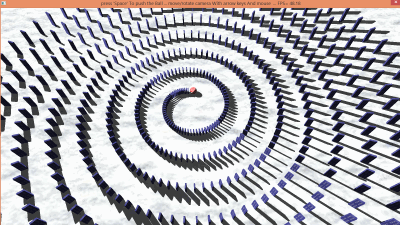
A Spiral-Domino Version:

Image

Press Space to hit the Ball.

Code: Select all

DisableDebugger

Define.f KeyX, KeyY, KexZ, KeyHeight, MouseX, MouseY

Enumeration
	#Window
	#SinbadMat
	#SinbadMesh
	#Sinbad
	#PlaneMesh
	#Plane
	#Camera
	#Light1
	#Light2
	#Texture_Ball
	#Texture_Stone
	#Material_Ball
	#Material_Stone
EndEnumeration

If InitEngine3D() ;#PB_Engine3D_DebugLog
	
	Add3DArchive(".", #PB_3DArchive_FileSystem)
	Add3DArchive(#PB_Compiler_Home + "examples/3d/Data/Textures", #PB_3DArchive_FileSystem)
	
	Parse3DScripts()
	
	InitSprite()
	InitKeyboard()
	InitMouse()
	
	ExamineDesktops()
	DesktopW = DesktopWidth(0)
	DesktopH = DesktopHeight(0)
	
	EntityAngleStep	= 5
	SpiralAngle			= 2880
	ActAngle				= 0
	SpiralGrow			= 15
	CenterRadius		= 10
	AutoCameraMove		= #False
	
	#StoneHeight		= 3.5	; 3.5 cm
	#StoneWidth			= 2	; 2.0 cm
	#StoneDepth			= 0.5	; 0.5 cm
	
	If OpenWindow(#Window, 0, 0, DesktopW, DesktopH, "press 'Space' to push the Ball ... move/rotate camera with arrow keys and mouse ")
		If OpenWindowedScreen(WindowID(#Window), 0, 0, DesktopW, DesktopH, 0, 0, 0)
			
			EnableWorldPhysics(#True) 
			;   	WorldGravity(-19.6)
			WorldShadows(#PB_Shadow_Modulative)
			
			;Ground
			Material = CreateMaterial(#PB_Any, TextureID(LoadTexture(#PB_Any, "snow_1024.jpg")))
			Plane = CreateEntity(#PB_Any, MeshID(CreateCube(#PB_Any, 1)), MaterialID(Material),0,-5,0)
			ScaleEntity(Plane,500,10,500,#PB_Absolute)
			CreateEntityBody(Plane, #PB_Entity_StaticBody, 10, 0.00001, 1000)
			CreateCube(#SinbadMesh, 1)	; 1m Cube
			
			CreateTexture(#Texture_Ball,256, 128)
			If StartDrawing(TextureOutput(#Texture_Ball))
				Box(0,0,256,256,$ffffff)
				For n = 0 To 255 Step 32
					For m = 0 To 255 Step 32
						Box(n,m,16,16,$0000ff)
						Box(n+16,m+16,16,16,$4444ff)
					Next
				Next
				
				StopDrawing()
			EndIf
			
			CreateMaterial(#Material_Ball, TextureID(#Texture_Ball))
			
			CreateTexture(#Texture_Stone, 256,512)
			If StartDrawing(TextureOutput(#Texture_Stone))
				Box(0,0,512,512,$994444)
				For n = 40 To 500 Step 70
					For m = 75 To 250 Step 100
						If n <> 250
							Circle(m,n,20,$cccccc)
						EndIf
					Next
				Next
				StopDrawing()
			EndIf
			
			CreateMaterial(#Material_Stone, TextureID(#Texture_Stone))
			
			Repeat
				
				Ent+1
				
				x.f = -Sin(Radian(ActAngle))*((SpiralGrow*ActAngle/360) + CenterRadius)
				z.f = -Cos(Radian(ActAngle))*((SpiralGrow*ActAngle/360) + CenterRadius)
				
				slope.f= -Cos(x); the derivative
				slope = Degree(ATan(slope)) 
				
				If Ent=1
					CreateSphere(10, #StoneWidth ,36,36)
					CreateEntity(10, MeshID(10), MaterialID(#Material_Ball),   x+3, 2 , z) 
					CreateEntityBody(10, #PB_Entity_SphereBody , 1 , 0.5 , 2 ) 
				EndIf
				
				sinbad=CreateEntity(#PB_Any, MeshID(#SinbadMesh), MaterialID(#Material_Stone))
				MoveEntity(Sinbad,x,(#StoneHeight+#StoneHeight*ActAngle*2.1/SpiralAngle) / 2, z,   #PB_Absolute)
				RotateEntity(Sinbad, 0,ActAngle+90,0)
				
				ScaleEntity(Sinbad,#StoneWidth + #StoneWidth*ActAngle/SpiralAngle, #StoneHeight+#StoneHeight*ActAngle*2.1/SpiralAngle, #StoneDepth+#StoneDepth*ActAngle/SpiralAngle)
				CreateEntityBody(Sinbad, #PB_Entity_BoxBody, 1, 0.00000001, 0.1) 
				
				ActAngle + EntityAngleStep
				
			Until ActAngle > SpiralAngle
			
			CreateCamera(#Camera, 0, 0, 100, 100)
			MoveCamera(#Camera, 0, 40, 30, #PB_Absolute)
			CameraLookAt(#Camera,0,0,5)
			
			CreateLight(#Light1, RGB(255, 255, 255), -120, 120, -90)
			
			AmbientColor(RGB(200, 200, 200))
			
		EndIf
	EndIf
	
	Repeat
		While WindowEvent() : Wend
		
		If ExamineMouse()
			MouseX = -MouseDeltaX()/20 
			MouseY = -MouseDeltaY()/20
		EndIf
		
		
		If ExamineKeyboard()
			
			If KeyboardPushed(#PB_Key_Left) Or KeyboardPushed(#PB_Key_A)
				KeyX = -1
			ElseIf KeyboardPushed(#PB_Key_Right) Or KeyboardPushed(#PB_Key_D)
				KeyX = 1
			Else
				KeyX = 0
			EndIf
			
			If KeyboardPushed(#PB_Key_Up)
				KeyHeight = 1
			ElseIf KeyboardPushed(#PB_Key_Down)
				KeyHeight = -1
			Else
				KeyHeight = 0
			EndIf
			
			If KeyboardPushed(#PB_Key_W)
				KeyZ = 1
			ElseIf KeyboardPushed(#PB_Key_S)
				KeyZ = -1
			Else
				KeyZ = 0
			EndIf
			
			KeyY = - MouseWheel() * 5
			
			If KeyboardReleased(#PB_Key_Space)
				;            ApplyEntityImpulse(10, -Sin(Radian(CameraYaw(#Camera)))*100, 10, -Cos(Radian(CameraYaw(#Camera)))*100);[, PositionX, PositionY, PositionZ])
				ApplyEntityImpulse(10, -16, 4, 0)
				AutoCameraMove = #True
			EndIf
			
			If AutoCameraMove And CameraY(#Camera) < 260
				MoveCamera(#Camera, 0, 0.4, 0.22, #PB_World )
				CameraLookAt(#Camera,0,0,5+CameraY(#Camera)/10)
			Else
				AutoCameraMove = #False
			EndIf
			
			
		EndIf
		
		RotateCamera(#Camera, MouseY, MouseX, 0, #PB_Relative)
		MoveCamera(#Camera, KeyX, 0, KeyY)
		MoveCamera(#Camera, 0, KeyHeight, 0, #PB_World )
		If KeyZ
			MoveCamera(#Camera, -Sin(Radian(CameraYaw(#Camera)))*KeyZ,0, -Cos(Radian(CameraYaw(#Camera)))*KeyZ, #PB_Parent )
		EndIf
		RenderWorld(160)
		
		FlipBuffers()
		SetWindowTitle(#Window, "Press 'Space' to push the ball ... move/rotate camera with a.s.d.w, arrow keys and mouse  ... FPS= "+ StrF(Engine3DStatus(#PB_Engine3D_Current),2))
	Until KeyboardPushed(#PB_Key_Escape) Or Quit = 1
	
Else
	MessageRequester("Error", "The 3D Engine can't be initialized",0)
EndIf

End

Re: 50 Sinbads on a circle

Posted: Wed Mar 16, 2016 8:54 am
by applePi
@PureLust, thanks for the Spiral-Domino Version it is very impressive, also your optimizations, it is very speedy, like in the videos in youtube, the FPS is about 55 on my old geforce 520 GT Graphics card. so it is very good .
i have watched this Largest Toppling Dominoes falling slowly https://www.youtube.com/watch?v=APoL-Gw9jMQ&t=2m56s , the initial push is not sufficient for the big blocks to tilted rapidly to go after that under gravity acceleration which is the same for all bodies. while other very small dominoes falling fast. i never saw a Domino falling demonstration in reality.
regards