Page 1 of 1
Publisher Settings
Posted: Mon Feb 22, 2016 7:12 am
by akee
When you check Request Administrator mode for Windows Vista and above in Compiler Options, you get a dialog box that shows the Publisher as unknown. How do we change this? What are the steps involved? Thanks.
Re: Publisher Settings
Posted: Mon Feb 22, 2016 9:45 am
by bbanelli
akee wrote:When you check Request Administrator mode for Windows Vista and above in Compiler Options, you get a dialog box that shows the Publisher as unknown. How do we change this? What are the steps involved? Thanks.
You need to have code signing certificate.
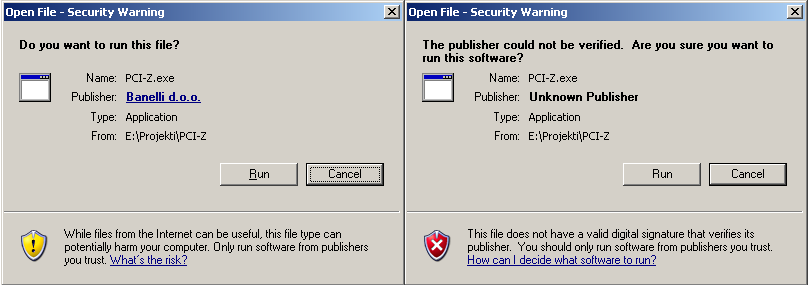
I'd recommend
http://codesigning.ksoftware.net/ since they have most affordable prices, IMO.
Re: Publisher Settings
Posted: Mon Feb 22, 2016 1:39 pm
by akee
Thanks bbanelli...
Re: Publisher Settings
Posted: Mon Feb 22, 2016 1:54 pm
by IdeasVacuum
Take a look at Ascertia too (€17 per year)
https://www.ascertia.com/onlineCA/default
Re: Publisher Settings
Posted: Mon Feb 22, 2016 1:57 pm
by akee
Ya... will do...
BTW, I found this...
https://www.sslpoint.com/
Re: Publisher Settings
Posted: Mon Feb 22, 2016 2:00 pm
by IdeasVacuum
of course, depends on who your customers are - home users are the admin of their machine and so it is not necessary to request admin.
Re: Publisher Settings
Posted: Wed Feb 24, 2016 3:30 pm
by akee
I have a question. How do you enable the certificate when compiling?
Re: Publisher Settings
Posted: Wed Feb 24, 2016 3:58 pm
by bbanelli
akee wrote:I have a question. How do you enable the certificate when compiling?
Only if you add some "post-compile" script. Or simply use some of the many available tools for signing, most of them are free.
Re: Publisher Settings
Posted: Fri Mar 04, 2016 11:13 am
by IdeasVacuum
Re: Publisher Settings
Posted: Fri Mar 04, 2016 1:18 pm
by Julian
Note Ascertia Root Certificate Authority is not embedded within Windows or the common browsers but can be downloaded from here and easily added.
I would suggest not wasting money on this cert