Page 1 of 2

sunflower: filling the space tightly with seeds

Posted: Mon Jul 13, 2015 10:47 am
by applePi
i have stumbled over a good algorithm to plot a sun flower seeds arrangement here http://www.thinbasic.com/community/show ... L-geometry
the sunflower arranges its seeds in that it is generated by the "golden angle" = 137.508 = 2.3999 radians , change the golden angle a little and you will not get a space filling spheres, try it. increase the number of spheres to 20000 to be sure the spheres are still compact or not.
thinbasic is an interpreter which is using a kind of opengl wrapper for graphics, i remake it here with staticGeometry to draw more spheres .
i get FPS = 60 until 20000 spheres, with 30000 the fps = 50 , with 50000 the fps degrade to 30. note that the spheres are 5X5 (Segments, Rings). the camera are following a blue sphere so gives an illusion that the sun_flower spheres are waving
Image

Code: Select all

#sphere = 3

Structure coor
 x.f
 y.f
 z.f
EndStructure 

Global z.coor

#golden_angle = 137.508 
Global golden.f = Radian(#golden_angle); = 2.3999 also = golden_angle*PI/180 

Procedure floret(n.i) 
  r.f : ang.f : xc.f : yc.f
  r =(5.3 * Sqr(n*golden))
  ang = (n*golden)
  xc = r*Cos(ang)/100
  yc = r*Sin(ang)/100
  z\x=xc : z\y=yc 
EndProcedure
 

If InitEngine3D()
   InitMouse()
   InitKeyboard()
   InitSprite()
   ExamineDesktops()
If OpenWindow(0, 0, 0, DesktopWidth(0), DesktopHeight(0), "Up/Down  to zoom in/out", #PB_Window_SystemMenu | #PB_Window_ScreenCentered)

If OpenWindowedScreen(WindowID(0), 0, 0, DesktopWidth(0), DesktopHeight(0), 0, 0, 0)
         Add3DArchive(".",#PB_3DArchive_FileSystem)
         Add3DArchive(#PB_Compiler_Home+"Examples\3D\Data\Textures\",#PB_3DArchive_FileSystem)
         Add3DArchive(#PB_Compiler_Home+"Examples\3D\Data\GUI",#PB_3DArchive_FileSystem)
         Add3DArchive(#PB_Compiler_Home + "Examples/3D/Data/Packs/desert.zip", #PB_3DArchive_Zip)
         Parse3DScripts()
         
         Global monitor=CreateSprite(#PB_Any,120,40)
         
         CreateCamera(0,0,0,100,100)
         CameraBackColor(0,RGB(0, 0, 0))
         MoveCamera(0,0,0,10)
         
         CreateLight(0,RGB(255, 255, 95),-50,50,100)
         CreateMaterial(0,TextureID(LoadTexture(#PB_Any,"ground_diffuse.png")))
         CreateMaterial(1,TextureID(LoadTexture(#PB_Any,"Geebee2.bmp")))
                  
         CreateSphere(1,0.08, 5,5)
         CreateEntity(1,MeshID(1),MaterialID(1))
         CreateStaticGeometry(23,10000,10000,10000,#False)
         
         For i=1 To 2000  ; number of objects
           floret(i)
           
           AddStaticGeometryEntity(23,EntityID(1), z\x, z\y, 0, 1,1,1)
          
         Next
          
          BuildStaticGeometry(23)
          FreeEntity(1)
                      
         CreateSphere(#sphere, 0.07) ;the guide of the CameraFollow
         CreateEntity(#sphere, MeshID(#sphere), MaterialID(0))
         MoveEntity(#sphere,0,0,0)

        CreateLight(0,RGB(255,255,255),-50,40,30)
        AmbientColor(RGB(100,100,100))
   
;SkyBox("desert07.jpg")                        

Global Height.f = 0
Global dist.f = 10
;ShowCursor_(1)
Repeat
       ExamineKeyboard()
            
       If KeyboardPushed(#PB_Key_Up)
         dist - 0.03
         ElseIf KeyboardPushed(#PB_Key_Down)
         dist + 0.03
       EndIf  
       
          MoveEntity(#sphere, 0.03, 0, 0.0, #PB_Local)
          RotateEntity(#sphere, 0, 0, 0.6, #PB_Relative)
          
          
          CameraFixedYawAxis(0, 1, 0,1,0 )
          ;CameraFollow(#Camera, ObjectID, Angle, Height, Distance, RotationPercent, PositionPercent [, Mode])
          CameraFollow(0, EntityID(#sphere) , 0, Height ,dist, 1, 1, #True  )   
          ;CameraLookAt(0, EntityX(#sphere), EntityY(#sphere), EntityZ(#sphere))
          CameraLookAt(0, 0,0,0)
          RenderWorld()
              
      StartDrawing(SpriteOutput(monitor))
        DrawText(5,5,"FPS : "+Str(Engine3DStatus(#PB_Engine3D_CurrentFPS )))
        DrawText(5,20,"Tris : "+StrF(Engine3DStatus(#PB_Engine3D_NbRenderedTriangles))) 
      
      
      StopDrawing()
      DisplaySprite(monitor,0,0)
      
         FlipBuffers()
         
         Until WindowEvent()=#PB_Event_CloseWindow Or KeyboardPushed(#PB_Key_Escape)
         
      EndIf
   EndIf
EndIf

Re: sunflower: filling the space tightly with seeds

Posted: Mon Jul 13, 2015 11:03 am
by VB6_to_PBx
applePi ,
thank you for this Post !

it can also be used as a great Screen Saver :)

Hide the Mouse and Windows Menu+Border,
i just Zoomed in a little , and the way it tilts from side-to-side motion,
it covers all parts of Screen .

i don't really need a ScreenSaver with a LED Monitor,
but i'm going to use your Code as one :)

3D seed effects are great !!!

Re: sunflower: filling the space tightly with seeds

Posted: Mon Jul 13, 2015 4:05 pm
by Keya
Very beautiful!!! it makes me wonder about the "programming" that DNA must do, and the algorithms it must use to create such beautiful complex effects ... (and how natural selection played its part in only letting the plants with A's in maths proceed).

Your code before translation to assembly looks like this:

Code: Select all

#golden_angle = 137.508
Global golden.f = Radian(#golden_angle); = 2.3999 also = golden_angle*PI/180 
Procedure floret(n.i)
  r.f : ang.f : xc.f : yc.f
  r =(5.3 * Sqr(n*golden))
  ang = (n*golden)
  xc = r*Cos(ang)/100
  yc = r*Sin(ang)/100
  z\x=xc : z\y=yc
EndProcedure
If we can dissect a Sunflower plant enough down to that level I wonder what the Sunflower plants "code" would look like (and remember our primitive binary coding only works with 0's and 1's... DNA works with A, T, C, G within the double-helix!) ... would it be a type of "assembly language", and could nature's programming language be the most beautiful of them all? can we crowdfund a kickstarter to teach David Attenborough some reverse engineering? :P

Mother Nature's algorithm in her Sunflower Earth Edition code can't be toooo different to yours! (and wouldn't it be beautiful if they were the same?). I'm not sure if hers was a stable or experimental release ...
Image

Re: sunflower: filling the space tightly with seeds

Posted: Mon Jul 13, 2015 7:21 pm
by Little John
Keya wrote:Very beautiful!!! it makes me wonder about the "programming" that DNA must do, and the algorithms it must use to create such beautiful complex effects ...
The effect that applePi's program demonstrates is well known.
You'll get more information when you search for terms such as "phyllotaxis", "golden ratio", "fibonacci numbers".

Re: sunflower: filling the space tightly with seeds

Posted: Mon Jul 13, 2015 7:36 pm
by Keya
yes you and I know the Fibonacci sequences have a lot to do with it, that's easy enough with our brains, but how did a plant come to have this? :)
Perhaps Mother Nature is trying infinite possibilities... and if you play lotto enough times you win!

Re: sunflower: filling the space tightly with seeds

Posted: Mon Jul 13, 2015 7:41 pm
by Little John
Keya wrote:but how did a plant come to have this? :)
I don't have the time to write it down for you, that's why I wrote
You'll get more information when you search for terms such as "phyllotaxis", "golden ratio", "fibonacci numbers".
:-)

Re: sunflower: filling the space tightly with seeds

Posted: Mon Jul 13, 2015 9:25 pm
by davido
@applePi,
Another fine example; thank you for sharing. :D

I had to emend the following lines, slightly, to get it to work on my MacBook:

Code: Select all

         Add3DArchive(#PB_Compiler_Home + "examples/3d/Data/Textures",#PB_3DArchive_FileSystem)
         Add3DArchive(#PB_Compiler_Home + "examples/3d/Data/GUI",#PB_3DArchive_FileSystem)
         Add3DArchive(#PB_Compiler_Home + "examples/3d/Data/Packs/desert.zip", #PB_3DArchive_Zip)
Fortunately it still works on Windows.

Re: sunflower: filling the space tightly with seeds

Posted: Mon Jul 13, 2015 10:08 pm
by applePi
Thank you Friends, i have collected a huge amount of docs and books about golden ratio and golden angle. i will read some.
since the original code are in opengl wrapper syntax so here is the OpenGL version (with OpenGLGadget) which is almost in parallel with the original source , the bulk of spheres are stored in List seeds. i have used a mechanical Fan demo posted before as a template http://purebasic.fr/english/viewtopic.p ... 15#p387848, the code in fact are too short but since while testing i have replaced the fan motor and blades code with spheres list and looking at the result it seems more interesting to keep the fan stand and base and the spheres list are rotating like a Fan .
note 1: the essential code is:

Code: Select all

#golden_angle = 137.508 
Global golden.f = Radian(#golden_angle); = 2.3999 also = golden_angle*PI/180 
Procedure floret(n.i) 
  r.f : ang.f : xc.f : yc.f
  r =(5.3 * Sqr(n*golden))
  ang = (n*golden)
  xc = r*Cos(ang)/100
  yc = r*Sin(ang)/100
  z\x=xc : z\y=yc 
EndProcedure

; beginning of code to make a list of spheres (seeds)
seeds = glGenLists_(1) 
glNewList_(seeds, #GL_COMPILE_AND_EXECUTE)
  
  For i=1 To 500 ; number of spheres
     floret(i) ; calling the procedure to calculate the one sphere (seed) position 
     glColor3f_(200, 200, 20)  
     glPushMatrix_()
     glTranslatef_(z\x , z\y , 0) ; positioning that sphere in a specific place
     gluSphere_(qobj, 0.08, 8, 8);
     glPopMatrix_()
  Next
 
  glEndList_()

;;then we only call the List: glCallList_(seeds) ; call the sunFlower list (seeds)
note 2: the spheres distance and the camera in line 181-182 :

Code: Select all

glTranslatef_(0.0, 0.0, -dist); 
gluLookAt_(2,0,5,  0,-1.0,0,  0,1,0); (eye, object, vector)
Image
hope it will work also on linux and macBook, hope davido try this version also on Mac , thanks .

Code: Select all

#sphere = 3

Structure coor
 x.f
 y.f
 z.f
EndStructure 

Global z.coor
Global seeds = 1
Global dist.f = 6

Global running.b = 0;
Global angle_step.f = 0.3
Global angle_direction.f
lngh.f : width.f : depth.f


#golden_angle = 137.508 
Global golden.f = Radian(#golden_angle); = 2.3999 also = golden_angle*PI/180 

Procedure floret(n.i) 
  r.f : ang.f : xc.f : yc.f
  r =(5.3 * Sqr(n*golden))
  ang = (n*golden)
  xc = r*Cos(ang)/100
  yc = r*Sin(ang)/100
  z\x=xc : z\y=yc 
EndProcedure


Define event, quit

InitKeyboard()

OpenWindow(0, 0, 0, 800, 600, "OpenGL demo .. 'Space' key to begin/stop rotation... Up/Down keys to zoom in out")
SetWindowColor(0, RGB(200,220,200))
OpenGLGadget(0, 20, 10, WindowWidth(0)-40 , WindowHeight(0)-20, #PB_OpenGL_Keyboard )

Global Dim LightPos.f(4) ;Light Position
 LightPos(0)= 0.0 : LightPos(1)= 5.0 : LightPos(2)=-4.0 : LightPos(3)= 1.0
Global Dim LightAmb.f(4) ;Ambient Light Values
 LightAmb(0)= 0.2 : LightAmb(1)= 0.2 : LightAmb(2)= 0.2 : LightAmb(3)= 1.0
Global Dim LightDif.f(4) ;Diffuse Light Values
 LightDif(0)= 0.6 : LightDif(1)= 0.6 : LightDif(2)= 0.6 : LightDif(3)= 1.0
Global Dim LightSpc.f(4) ;Specular Light Values
LightSpc(0)=-0.2 : LightSpc(1)=-0.2 : LightSpc(2)=-0.2 : LightSpc(3)= 1.0

Global Dim MatAmb.f(4) ;Material - Ambient Values
 MatAmb(0)= 0.4 : MatAmb(1)= 0.4 : MatAmb(2)= 0.4 : MatAmb(3)= 1.0
Global Dim MatDif.f(4) ;Material - Diffuse Values
 MatDif(0)= 1.2 : MatDif(1)= 0.6 : MatDif(2)= 0.0 : MatDif(3)= 1.0
Global Dim MatSpc.f(4) ;Material - Specular Values
 MatSpc(0)= 0.0 : MatSpc(1)= 0.0 : MatSpc(2)= 0.0 : MatSpc(3)= 1.0
Global Dim MatShn.f(1) ;Material - Shininess
MatShn(0)= 0.0


glClearColor_ (0.0, 0.0, 0.0, 0.0);
glShadeModel_ (#GL_SMOOTH)

glEnable_(#GL_LIGHTING);
glEnable_(#GL_LIGHT0);
glEnable_(#GL_DEPTH_TEST);

glLightfv_(#GL_LIGHT1,#GL_POSITION,LightPos()) ;Set Light1 Position
glLightfv_(#GL_LIGHT1,#GL_AMBIENT,LightAmb()) ;Set Light1 Ambience
glLightfv_(#GL_LIGHT1,#GL_DIFFUSE,LightDif()) ;Set Light1 Diffuse
glLightfv_(#GL_LIGHT1,#GL_SPECULAR,LightSpc()) ;Set Light1 Specular
glEnable_(#GL_LIGHT1) ;Enable Light1
glEnable_(#GL_LIGHTING) ;Enable Lighting
 
glMaterialfv_(#GL_FRONT,#GL_AMBIENT,MatAmb()) ;Set Material Ambience
glMaterialfv_(#GL_FRONT,#GL_DIFFUSE,MatDif()) ;Set Material Diffuse
glMaterialfv_(#GL_FRONT,#GL_SPECULAR,MatSpc()) ;Set Material Specular
glMaterialfv_(#GL_FRONT,#GL_SHININESS,MatShn());Set Material Shininess

glPushMatrix_();
Global qobj = gluNewQuadric_();
gluQuadricDrawStyle_(qobj, #GL_FILL); /* smooth shaded */
gluQuadricNormals_(qobj, #GL_SMOOTH);
      ;glScalef_( 1 , 1 , 1 );
glEnable_(#GL_NORMALIZE);
;Sphere With radius 0.08 then scaled
gluSphere_(qobj, 0.08, 5, 5);
glPopMatrix_()  
 
; beginning of code to make a list of sphere (seeds)
seeds = glGenLists_(1) 
glNewList_(seeds, #GL_COMPILE_AND_EXECUTE)
  
  For i=1 To 500
     floret(i) ; calling the procedure to find the one sphere (seed) position 
     glColor3f_(200, 200, 20)  
     glPushMatrix_()
     glTranslatef_(z\x , z\y , 0) ; position that sphere in specific place
     gluSphere_(qobj, 0.08, 8, 8);
     glPopMatrix_()
  Next
 
  glEndList_()


Procedure.l Fan_Render(spin.f)
  glPushMatrix_();
  ;Fan
  glPushMatrix_();
  ;Fan Base:
      qobj = gluNewQuadric_();
      gluQuadricDrawStyle_(qobj, #GL_FILL); /* smooth shaded */
      gluQuadricNormals_(qobj, #GL_SMOOTH);
      glScalef_( 4 , 0.5 , 4 );
      glEnable_(#GL_NORMALIZE);
      ;Sphere With radius 0.25 then scaled
      glTranslatef_(0.0, -6.0, 0.0);
      gluSphere_(qobj, 0.25, 20, 20);
      glPopMatrix_();
   ;Fan stand:  
    glPushMatrix_();
      gluQuadricDrawStyle_(qobj, #GL_FILL); /* flat shaded */
      gluQuadricNormals_(qobj, #GL_FLAT);
      glRotatef_(-90, 1.0, 0.0, 0.0)    ;
      glTranslatef_(0.0, 0.0, -3.0);
      ;gluCylinder(GLUquadric* quad, 	GLdouble base, GLdouble	top, GLdouble height, GLint slices, GLint stacks)
      gluCylinder_(qobj, 0.125, 0.125, 3, 16, 10);
    
    glPopMatrix_();
    ;Fan Motor: replace by sunflower seeds list
    glRotatef_(angle_direction, 0.0, 1.0, 0.0) ;0000000000000000000000000 rotation direction
    glPushMatrix_();
     gluQuadricDrawStyle_(qobj, #GL_FILL); /* smooth shaded */
      gluQuadricNormals_(qobj, #GL_SMOOTH);
      glTranslatef_(0.0, 0.0, 0.0);
      ;glScalef_( 0.5, 0.5, 1);
      glEnable_(#GL_NORMALIZE);
      glRotatef_(spin, 0.0, 0.0, 1.0 );                        ;gluSphere_(qobj, 1 , 20 , 20 ); 
      glCallList_(seeds) ; call the sunFlower list (seeds)
      
      glPopMatrix_()                ;
      
;**********************************************
   
glPopMatrix_();
glPopMatrix_();
glPopMatrix_();

EndProcedure

Procedure.f Fan_Physics() ; fan rotation
   Static spin.f
   Static speed.f
   If running = 1
     speed = speed + 1
     angle_direction = angle_direction + angle_step
    If angle_direction > 110 
      angle_step = -0.3
      ElseIf angle_direction < 0 
           angle_step = 0.3
    EndIf  
   EndIf
   If speed > 360.0: speed = 360.0: EndIf
   If running = 0 :speed = speed - 1.8: EndIf
  If speed < 0: speed = 0: EndIf
  spin = spin + speed/200
  ProcedureReturn spin
  
EndProcedure


  Procedure.l Fan_Run()
  glViewport_(0, 0, WindowWidth(0), WindowHeight(0))
  glMatrixMode_(#GL_PROJECTION)
  glLoadIdentity_()
  gluPerspective_(30.0, Abs(WindowWidth(0) / WindowHeight(0)), 0.1, 500.0)
  glMatrixMode_(#GL_MODELVIEW)
  glLoadIdentity_()
  glClear_(#GL_COLOR_BUFFER_BIT | #GL_DEPTH_BUFFER_BIT)
   glLoadIdentity_ ()
   ;viewing transformation  
   glTranslatef_(0.0, 0.0, -dist); 
   gluLookAt_(2,0,5, 0,-1.0,0, 0,1,0); (eye, object, vector)
   
   spin.f =  Fan_Physics();
   
   Fan_Render(spin);
  
EndProcedure

;AddWindowTimer(0, 1, 16) ; about 60 fps
SetActiveGadget(0) 

Repeat
      
  Event = WindowEvent()
  
  
  If Event = #PB_Event_Gadget And EventGadget() = 0 
   If EventType() = #PB_EventType_KeyDown
      
            key = GetGadgetAttribute(0,#PB_OpenGL_Key )
            
            If key = #PB_Shortcut_Up
              
               dist.f + 0.5
               ElseIf key = #PB_Shortcut_Down ; Down arrow key  
               dist.f - 0.5
               ElseIf key = #PB_Shortcut_Space ; to stop and begins rotation
                 running ! 1
               
              ElseIf key = #PB_Shortcut_Escape ;  Esc key to exit

             quit = 1
            EndIf  
     EndIf
   EndIf
   
Fan_Run()
SetGadgetAttribute(0, #PB_OpenGL_FlipBuffers, #True)  
Until Event = #PB_Event_CloseWindow Or quit = 1
 

Re: sunflower: filling the space tightly with seeds

Posted: Tue Jul 14, 2015 2:45 am
by heartbone
applePi I can't wait to see this, I have a real fascination for the math behind nature.

Right now I'm running UBUNTU 14.04 LTS x86 and PB 5.22 LTS
and I get [COMPILER] Line 38: OpenGLGadget() is not a function, array, list, map or macro
when running the version in your last post.
____________________________________________

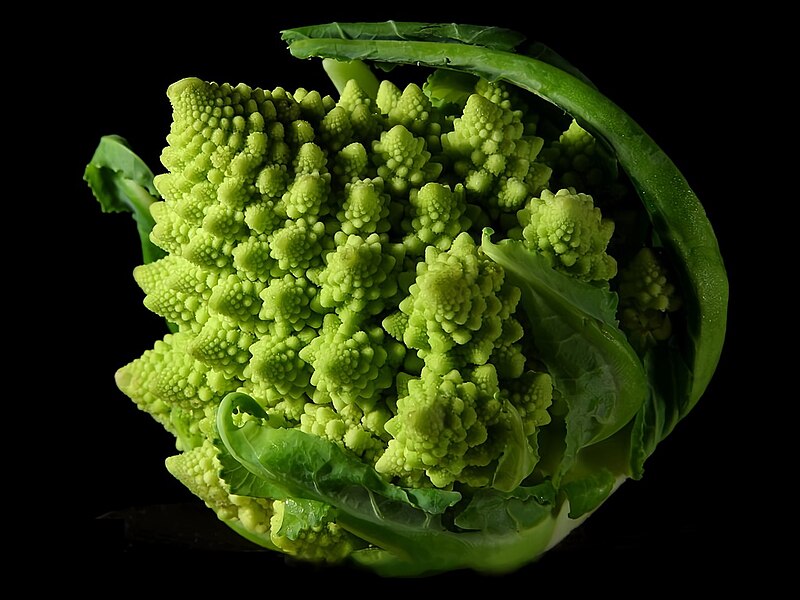
Somewhat related, and entirely fascinating, is a variety of Brassica Oleracea named Romanesco broccoli.

Image


Besides being extremely good for you, I find this species, Brassica Oleracea, to be extremely interesting
because so many of the veggies that I truly like are all cultivars of this same species.

Cabbage, kohlrabi, broccoli, cauliflower, kale, Brussels sprouts, collard greens, savoy, red cabbage and kai-lan (Chinese broccoli)... they are all the same species of plant!

When I first started researching the Brassicas,
I learned that many researchers claimed that these cultivars were first created by man
from the wild cabbage plant about 3800 years ago.
Over time, much like dog breeds, many strains have been developed.

At first blush their theory seems reasonable, but considering these cultivars have only been around a few thousand years...
I must ask the question how did men learn how to breed fractal math into the DNA of wild cabbage plants?

Of course all that I usually get in response to my question is crickets chirping.
I have hope that it will be a better discussion here. ;)

Re: sunflower: filling the space tightly with seeds

Posted: Tue Jul 14, 2015 9:18 am
by applePi
thanks heartbone for the notes, the OpenGLGadget found from v5.30 and up but not v5.22LTS
too cool the Romanesco Broccoli picture, i saw in reality the usual broccoli but not the Romanesco, someone said "Romanesco so visually stunning, that it might actually pain you to boil it" there is also other
http://www.odditycentral.com/pics/fibon ... table.html

there is 3D fractals computer simulations here http://www.skytopia.com/project/fractal/mandelbulb.html in plotting these 3d colored point clouds we should focus only to plot the outside envelop to reduce the millions of points .
this page https://plus.maths.org/content/os/lates ... index?nl=1
may assist in writing a purebasic code to plot these marvels.
plotting 3D points are easy to do, it is just needed the necessary equations to generate these fractal marvels, a primary attempt in my post : MandelBrot set 3D Demo:
http://purebasic.fr/english/viewtopic.php?f=36&t=53558
and also look DK_PETER post here http://purebasic.fr/english/viewtopic.php?f=36&t=60270
a recent magic are posted here http://www.purebasic.fr/french/viewtopi ... 13&t=15308 by Guillot but it is a triangulated shapes, and these fractal marvels should be plotted only with points, can't imagine triangulate millions of points even on a supercomputer

Re: sunflower: filling the space tightly with seeds

Posted: Tue Jul 14, 2015 5:08 pm
by Samuel
Nice example, applePi. :)
About a year ago I played around with 3D fractals too, but sadly I never got very far with them.
applePi wrote: there is 3D fractals computer simulations here http://www.skytopia.com/project/fractal/mandelbulb.html in plotting these 3d colored point clouds we should focus only to plot the outside envelop to reduce the millions of points .
........
a recent magic are posted here http://www.purebasic.fr/french/viewtopi ... 13&t=15308 by Guillot but it is a triangulated shapes, and these fractal marvels should be plotted only with points, can't imagine triangulate millions of points even on a supercomputer
I have heard of people generating 3D fractals in realtime, but in most cases they are slower and not great quality because of the complexity of some 3D fractals.
The ones from skytopia are generated using ray tracing (or a similar method) which can give very realistic results, but depending on the complexity (and your computer) can sometimes take several hours just to render a single image.
In my opinion it's worth the wait because some of those results are simply amazing.

Re: sunflower: filling the space tightly with seeds

Posted: Tue Jul 14, 2015 9:52 pm
by davido
@applePi,

The 'Fan' works fine on the MacBook.
The way the fan slows down is a neat feature.
Thanks.

Re: sunflower: filling the space tightly with seeds

Posted: Wed Jul 15, 2015 2:33 am
by heartbone
applePi wrote:the OpenGLGadget found from v5.30 and up but not v5.22LTS
Thanks. This is good to know.
Keya wrote:Very beautiful!!! it makes me wonder about the "programming" that DNA must do, and the algorithms it must use to create such beautiful complex effects ... (and how natural selection played its part in only letting the plants with A's in maths proceed).

If we can dissect a Sunflower plant enough down to that level I wonder what the Sunflower plants "code" would look like (and remember our primitive binary coding only works with 0's and 1's... DNA works with A, T, C, G within the double-helix!) ... would it be a type of "assembly language", and could nature's programming language be the most beautiful of them all? can we crowdfund a kickstarter to teach David Attenborough some reverse engineering? :P

Mother Nature's algorithm in her Sunflower Earth Edition code can't be toooo different to yours! (and wouldn't it be beautiful if they were the same?). I'm not sure if hers was a stable or experimental release ...
Keya, I am not expecting any definitive answer to my extremely sane question.
More like informed speculation.
You seemed like the most likely candidate.
My biggest hope.
After first reading this wonderful treatise on the Romanesco from the most venerable John Walker
perhaps a possible theory or two to explain the plant's existence may come to you.

Perhaps I need to kick start the speculation/discussion, with the one possibility that I think most likely.

Another intelligent race other than man, one capable of encoding math into DNA, accomplished the task.
Whether planetary visitors or hidden residents, I have no idea.
But I do know that the fibrocc (my name) plant exists, having seen it with my own eyes...
and as far as I am allowed to know, homo sapiens did not have this technology hundreds of years ago.

If you say Mother Nature did it, that's OK.
But it would be the end of discussion because in keeping with the thread's topic,
I'm focusing on the (DNA) programming aspects of fibrocc's characteristics.

Re: sunflower: filling the space tightly with seeds

Posted: Wed Jul 15, 2015 4:25 am
by Keya
well, when we think brute forcing millions of combinations on a computer to find one that works it obviously takes a long time... Mother Nature has had several billion years to roll quite a lot of dice... and I guess thanks to natural selection those that succeed only go on and become stronger, more complex ... once you've rolled the dice and it turns out the Fibonacci sequence is good, you keep going? :)

Natural Selection - weeding out nature's maths failures :P

A fascinating day to ponder DNA programming, as humans ventures further into the universe and for the first time gets a close-up look at Pluto ..... where I can't help but get the feeling that I'm seeing something that no human should have any right to see heehee. Just amazing :)

Re: sunflower: filling the space tightly with seeds

Posted: Thu Sep 10, 2015 10:59 pm
by IdeasVacuum
Hi applePi

In the Sunflower example, Procedure floret(), a magic number is used:

r =(5.3 * Sqr(n*golden))

How is that 5.3 value derived? When the radius of the spheres (sunflower seeds) is 0.08, a good-looking pattern is produced, but if that rad is increased, collisions become the norm.