Page 1 of 1

I need help using the zLib file commands

Posted: Sun Feb 03, 2013 3:31 pm
by Kurzer
I want to use the file commands of the zlib (zip packer library shipped with PureBasic), but I stuck at the point where the file structure gzFile_s is needed.

Is someone out there who has used successfully this file commands in PureBasic? (Gnozal? PureZIP library?)
I would be glad for some helpful hints.

Thanks in advance.
Kurzer

Here is my testcode. It produce a "Invalid memory access" error.

Code: Select all

EnableExplicit

; I don't know how to convert this C structure to PB

; zlib.h
; struct gzFile_s {
;      unsigned have;
;      unsigned char *Next;
;      z_off64_t pos;
; };

;  zconf.h
;  #  Define z_off64_t z_off_t
;  #  Define z_off_t long


; This seems to be wrong
Structure gzFile_s
  have.i
  *Next
  pos.l
EndStructure

Global sOutFile.s, sFileMode.s, sText.s
Global *InBuffer, *Filehandle.gzFile_s

Import "zlib.lib"
  gzclose(a.i) As "_gzclose"
  gzopen(a.i, b.i) As "_gzopen"
  gzwrite(a.i, b.i, c.i) As "_gzwrite"
EndImport

sOutFile = "F:\Out.txt"
sFileMode = "wb9"
sText = "01234567890123456789"

*InBuffer = @sText

; I want to write 10 Byte of the String sText into the compressed gzFile "Out.txt"
*Filehandle = gzopen(@sOutFile, @sFileMode)
Debug *Filehandle
If *Filehandle <> 0
	; The following Instructuion stop with an "Invalid memory access"
	Debug Str(gzwrite(*Filehandle, *InBuffer, 10))
	gzclose(*Filehandle) 
EndIf
Re: I need help using the zLib file commands

Posted: Sun Feb 03, 2013 8:32 pm
by idle
Pos is a native c type of long which is a integer in PB
a good reference to the types are here
http://en.wikipedia.org/wiki/C_data_types

You may need to change your imports to ImportC also

Code: Select all

ImportC "zlib.lib"  ; or for linux -lz
  gzclose(a.i) 
  gzopen(a.i, b.i) 
  gzwrite(a.i, b.i, c.i)
EndImport

Structure gzFile_s
  have.i
  *Next
  pos.i
EndStructure

Re: I need help using the zLib file commands

Posted: Sun Feb 03, 2013 9:13 pm
by Kurzer
Thank you Idle.

I solved the problem already.
It was the Str() around the "gzwrite(*Filehandle, *InBuffer, 10)" command which caused the error.

My current testcode looks like shown below.

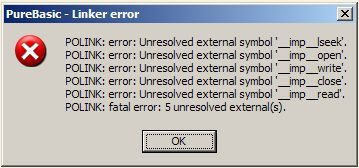
But now there is another problem. If I compile this code with PB 4.31 then all runs without error. But if I compile it with another, higer PB Version I'll get this compiler error:

Image

And I have no idea why.

By the way @PB user at Mac and Linux: Would you guys please test this code on Mac and Linux?
I plan to write a multiplatform application using this zLib functions and I cannot test this for myself on Mac and Linux due to lack of this systems. Thank you very much.

This code compress the string sTextIn into a file in your systems temp directory, reopen this file and decompress the text into sTextOut and print out this string in the Debugwindow of PB. So please run it with debugger enabled.

Code: Select all

; PB 4.31 code
EnableExplicit

; I don't know how to convert this C structure to PB whether it is even necessary (see below -> *Filehandle.l works also)

; zlib.h
; struct gzFile_s {
;      unsigned have;
;      unsigned char *Next;
;      z_off64_t pos;
; };

;  zconf.h
;  #  Define z_off64_t z_off_t
;  #  Define z_off_t long

; Will be created in your system temp directory
#Tmpfile = "Tempfile.txt"

Structure gzFile_s
  have.i
  Next.i
  pos.i
EndStructure

Global sOutFile.s, sTextIn.s, sTextOut.s
Global *InBuffer
Global *Filehandle.gzFile_s ; but works also with *Filehandle.l - what's right and what's wrong? :-/

CompilerSelect #PB_Compiler_OS
  CompilerCase #PB_OS_Linux
    #ZLIB_LIB$ = #PB_Compiler_Home + "purelibraries/linux/libraries/zlib.a"
  CompilerCase #PB_OS_MacOS
    #ZLIB_LIB$ = "/usr/lib/libz.dylib"
  CompilerCase #PB_OS_Windows
    #ZLIB_LIB$ = "zlib.lib"
  CompilerDefault
    CompilerError "OS is not supported!"
    End
CompilerEndSelect

ImportC #ZLIB_LIB$
  gzopen.i(a.s, b.s) As "_gzopen"
  gzclose.i(a.l) As "_gzclose"
  gzread.i(a.l, b.l, c.l) As "_gzread"
  gzwrite.i(a.l, b.l, c.l) As "_gzwrite"
EndImport

sTextIn = "01234567890123456789 sdmöoivgsmöoijgvmeug,04i5e0c04u049cvu04u04u,v04u,v04v,uh04vu,40"
sTextOut = Space(1024)

*InBuffer = @sTextIn
*Filehandle = gzopen(GetTemporaryDirectory() + #Tmpfile, "wb9")

If *Filehandle <> 0
	Debug gzwrite(*Filehandle, *InBuffer, Len(sTextIn))
	gzclose(*Filehandle)
EndIf

*InBuffer = @sTextOut
*Filehandle = gzopen(GetTemporaryDirectory() + #Tmpfile, "rb")

If *Filehandle <> 0
	Debug gzread (*Filehandle, *InBuffer, Len(sTextIn));
	gzclose(*Filehandle)
	Debug sTextOut
EndIf 	

Re: I need help using the zLib file commands

Posted: Sun Feb 03, 2013 10:48 pm
by idle
for linux your imports are

Code: Select all

ImportC #ZLIB_LIB$
  gzopen.i(a.s, b.s) 
  gzclose.i(a.l)
  gzread.i(a.l, b.l, c.l)
  gzwrite.i(a.l, b.l, c.l)
EndImport
As for the unresolved symbols I think they're from the c runtime but I don't think there's a way to tell polink to ignore
unresolved symbols.

I tried adding references but then it fails.

Code: Select all

!extrn __imp__lseek 
 !public __imp__lseek
 !extrn __imp__open 
 !public __imp__open
 !extrn __imp__close 
 !public __imp__close
 !extrn __imp__read 
 !public __imp__read
 !extrn __imp__write 
 !public __imp__write

Re: I need help using the zLib file commands

Posted: Sun Feb 03, 2013 11:01 pm
by ts-soft
Better use:

Code: Select all

ImportC "oldnames.lib" : EndImport
:wink:

Re: I need help using the zLib file commands

Posted: Sun Feb 03, 2013 11:11 pm
by idle
I have never heard of that lib Thomas

work with these imports kurzer

Code: Select all

ImportC "oldnames.lib" : EndImport 

ImportC #ZLIB_LIB$
  gzopen.i(a.s, b.s) As "_gzopen"
  gzclose.i(a.l) As "_gzclose"
  gzread.i(a.l, b.l, c.l) As "_gzread"
  gzwrite.i(a.l, b.l, c.l) As "_gzwrite"
 
EndImport

Re: I need help using the zLib file commands

Posted: Mon Feb 04, 2013 1:31 pm
by Kurzer
*sigh* My heros. :)

Thanks, ts-soft and Idle. Image

Re: I need help using the zLib file commands

Posted: Thu Oct 22, 2015 6:08 pm
by Keya
this is excellent!!! :) but on 5.40 LTS Win-x86, using the "oldnames.lib" fixes all but one:

Code: Select all

POLINK: error: Unresolved external symbol '__imp__vsnprintf'.
POLINK: fatal error: 1 unresolved external(s).
how to fix this? i also tried with 5.31's zlib.lib but same problem