Page 1 of 1
some suggestion
Posted: Mon Jul 02, 2012 11:55 am
by SeregaZ
i dont know how to correct make search request in this my suggestion:
in 4.61 nice highlighting if else operators, but i see better in l2ph programm:
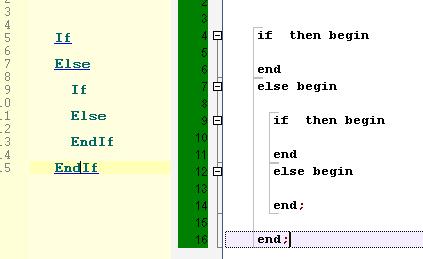
in the body of editor i see lines, that shows border of if and else operators and at any time you can minimize or maximize this if else, not use comment ;{ ;}
Re: some suggestion
Posted: Mon Jul 02, 2012 12:03 pm
by MachineCode
It's already there... enable "Show indentation guides" in the Prefs.
Re: some suggestion
Posted: Mon Jul 02, 2012 12:50 pm
by SeregaZ
no... it is not what i am talking about...
and the second one:
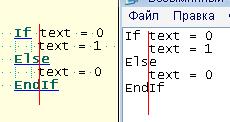
how to make whole letters the same size like notepad? i try to change font like in notepad, but he is still after "If" is change free space.
Re: some suggestion
Posted: Mon Jul 02, 2012 1:48 pm
by Demivec
SeregaZ wrote:and the second one:
how to make whole letters the same size like notepad? i try to change font like in notepad, but he is still after "If" is change free space.
Change the preferences for Editing by unchecking 'Enable bolding of Keywords'.
Re: some suggestion
Posted: Mon Jul 02, 2012 2:06 pm
by Sirius-2337
SeregaZ wrote:and the second one:
how to make whole letters the same size like notepad? i try to change font like in notepad, but he is still after "If" is change free space.
Im using "Courier New" and 'Enable bolding of Keywords' and all letters have the same size (as in Notepad).
Re: some suggestion
Posted: Mon Jul 02, 2012 2:11 pm
by SeregaZ
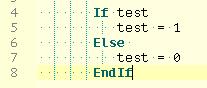
Courier New or PT Mono is nice

thanks.
Re: some suggestion
Posted: Mon Aug 13, 2012 1:32 am
by Zach
Yes, I had this issue at first too.
You have to make sure, in most cases, that you are using a
monospaced font. Where all characters are the same size. Bolding and other styles can affect this.
http://en.wikipedia.org/wiki/Monospaced_font
I use the Font "Consolas", Style "Normal", size "9"
I also am able leave "Enable Bolding of Keywords" activated.