Page 1 of 1
Mac - 3D Engine Color
Posted: Thu Feb 17, 2011 7:05 am
by J. Baker
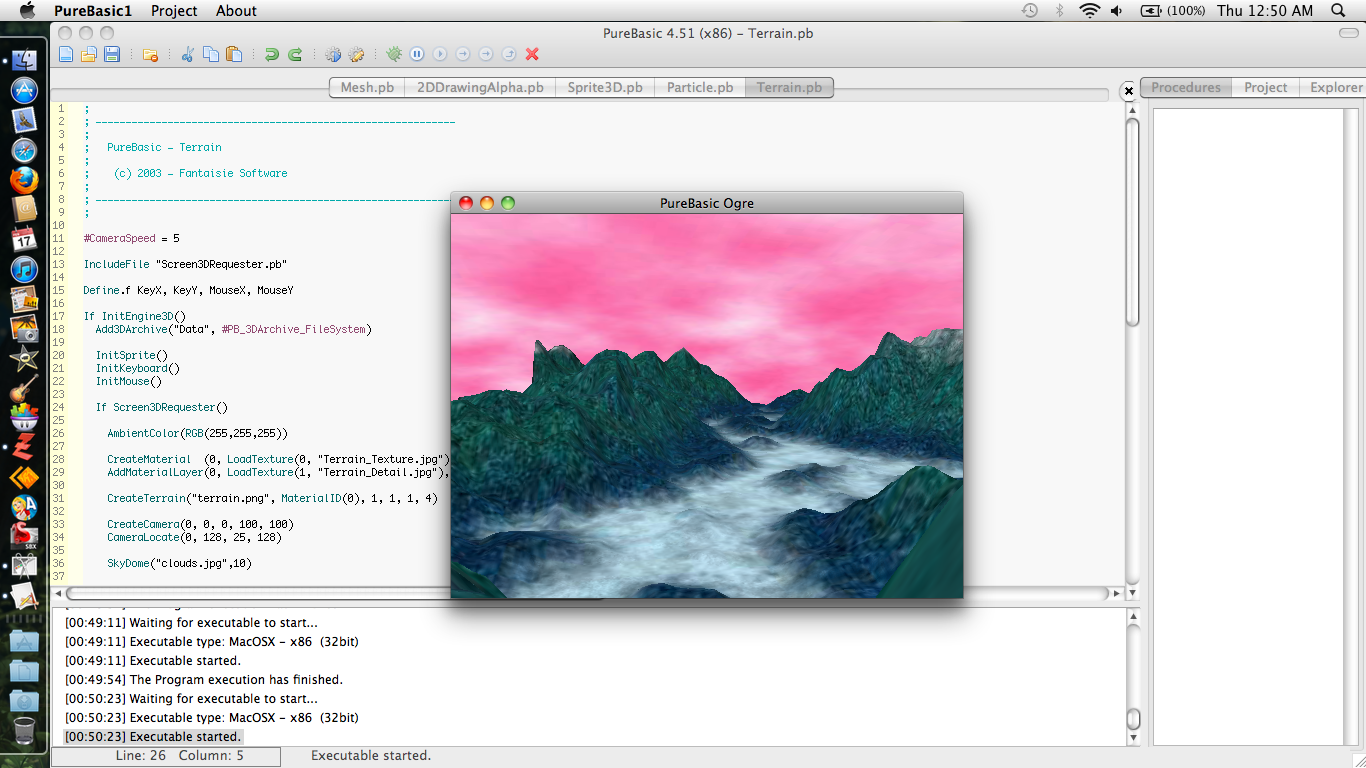
Below is a link to a screen shot of a color error I'm getting in the 3d engine, on mac only. Anyone know anything that could help or is this a bug?
view screen shot
Re: Mac - 3D Engine Color
Posted: Thu Feb 17, 2011 10:35 am
by DarkDragon
RGB <-> BGR.
Re: Mac - 3D Engine Color
Posted: Fri Feb 18, 2011 1:03 am
by J. Baker
DarkDragon wrote:RGB <-> BGR.
The only color values in that code is in AmbientColor() and they are RGB(255, 255, 255)?
Re: Mac - 3D Engine Color
Posted: Mon Feb 21, 2011 7:26 am
by DarkDragon
J. Baker wrote:DarkDragon wrote:RGB <-> BGR.
The only color values in that code is in AmbientColor() and they are RGB(255, 255, 255)?
Sure, but PB OGRE should wrap the RGB to BGR inside the textures

on your Mac. That seems to be a bug. Does it also happen with PB sprites? Do the textures on the filesystem look okay?
Here is your screenshot with RGB => BGR:
http://www.bradan.eu/files/rgb2bgr.jpg
Code: Select all
GetClipboardImage(0, 24)

StartDrawing(ImageOutput(0))
For x = 0 To ImageWidth(0) - 1
  For y = 0 To ImageHeight(0) - 1
    c = Point(x, y)
    Plot(x, y, RGB(Blue(c), Green(c), Red(c)))
  Next y
Next x
StopDrawing()

SetClipboardImage(0)
Re: Mac - 3D Engine Color
Posted: Mon Feb 21, 2011 9:07 am
by J. Baker
Thanks, I understand now. So far everything else looks fine.
Re: Mac - 3D Engine Color
Posted: Fri Apr 13, 2012 1:38 pm
by Fred
Already fixed in 4.61beta1
Re: Mac - 3D Engine Color
Posted: Fri Apr 13, 2012 1:44 pm
by J. Baker
Fred wrote:Already fixed in 4.61beta1
Sweet! Thanks Fred!
Re: [Done] Mac - 3D Engine Color
Posted: Fri Apr 13, 2012 1:46 pm
by Fred
May be you can check it to confirm ? (just don't use the terrain example as it is broken for now)
Re: [Done] Mac - 3D Engine Color
Posted: Fri Apr 13, 2012 1:56 pm
by J. Baker
Fred wrote:May be you can check it to confirm ? (just don't use the terrain example as it is broken for now)
It works!