Page 1 of 3
Would you use this IDE?
Posted: Fri Apr 10, 2009 9:43 am
by lexvictory
This is designed primary for x64 users, but works in x86 too.
After wanting
this and experiencing multiple PB IDE crashes (that are unreproducible as there is no OnError information) primarily during TailBite development, I started looking around for another IDE.
I've never liked JaPBe, and still don't really. I would have modified that, but it still seems to be coded in PB 3.94!
So after seeing
kawasaki's topic about designing another IDE, ideas just hit me.
Plus it's fun to experiment with something I've never done before.
It's still in the early stages of development - so I mainly want you to judge if you would use it from the menu items I have so far.
It will probably in the end closely mimic the standard PB IDE (eg. toolspanel at the right, compiler messages at the bottom), as I'm quite used to it.
Keep in mind with this that the Syntax Highlighting may freeze if you decide to type PB code, its unlikely though. (please let me know if it does so I can fix it)
Compile menu works with any PBCompiler supporting the pipe interface (though there are no checks for incompatible compile options):
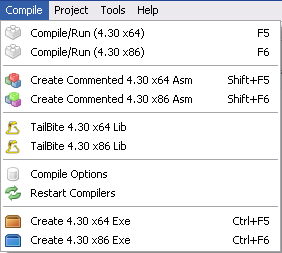
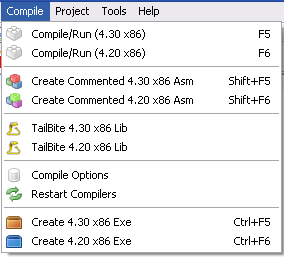
I think the location of the version string should change for some items, but I need opinions on it first.
TailBite functionality will be fully integrated (as a DLL for easy updating), requiring no real configuration (PB dirs handled by IDE)
Download:
http://duplicapbe.svn.sourceforge.net/v ... z?view=tar
Posted: Fri Apr 10, 2009 10:34 am
by Mistrel
I would be more interested in seeing language schema support for existing editors like Notepad++, UltraEdit, and Programmer's Notepad.
Posted: Fri Apr 10, 2009 2:59 pm
by pdwyer
I'll always take a look at a third part IDE but I'm on 64bit and I've never had the IDE crash. I use the 32bit ide most of the time though
Posted: Fri Apr 10, 2009 5:11 pm
by garretthylltun
I've always found the PB IDE a bit ummmm... Cheesy and cheap looking, but! I've never had any issues with it crashing or anything else. It's been pretty faithful to me.
I'd give you comments on yours here, but obviously it has a very long way to go. One thing though, i do not like programs that automatically maximize upon starting, especially when there is just no need for it.
Would I use yours over the PB IDE? Probably not since yours sounds like it'll be a clone of the PB IDE.
I'd suggest offering up something different.
Posted: Fri Apr 10, 2009 7:05 pm
by luis
It's a good start !
From my point of view, the PB IDE is not bad at all, even if with the 4.30 I had some ide crash me too. Something that was never happened with 4.20, but I don't know how to reproduce it when it happen and as you say the ide doesn't do a "core dump" of some kind to send to the developers.
To have the ability to launch both 32 and 64 bit compilers would be nice.
One thing I would like would be the ability to save and recall a complete project, instead of a single file.
Hope you will continue

Posted: Fri Apr 10, 2009 9:38 pm
by freak
Of all the alternative IDEs that where announced at this stage of development, guess how many made it to a usable product...

Posted: Sat Apr 11, 2009 1:26 am
by lexvictory
freak wrote:Of all the alternative IDEs that where announced at this stage of development, guess how many made it to a usable product...
Oh, I know that one (well maybe not specific to editors). My PB codes folders are filled with unfinished projects (though not too many on this computer)
@garretthylltun: Don't worry, it won't auto maximise when I actually get the code done that responds to a WM_Size message. (Just that I always have the IDE maximised, so during development I made this do the same.)
While I'm developing it I also make it use my 2nd monitor, so I can see the code at the same time.
It won't be a complete clone of the standard IDE, it just may look it as that's what I'm used to - just look at JaPBe, the main window will probably be about the same similarity to the standard one; code top left, compiler messages bottom left, panel at right.
After all, of the IDE panels I only use Procedures, Ascii Table, and sometimes Templates. So I might add some nifty new ones.
@luis: I really want projects too, which is one of the main reasons I'm making this. So you can be sure once I have the IDE able to compile itself, Projects will probably be the main priority. I have some big plans for them. (perhaps eventually having an option to run a custom command / pb file after/to build)
Since I posted this yesterday, I implemented auto indent, auto indent on keywords such as if, else (will add option to disable in preferences - and it won't indent if you use the : character), tabs for multiple documents (still need to implement loading (again) and saving)
I think that's pretty good considering that was only a day's work! (and I don't have any previous experience with scintilla)
Posted: Sat Apr 11, 2009 3:38 am
by pdwyer
garretthylltun wrote:I've always found the PB IDE a bit ummmm... Cheesy and cheap looking...
I found it lost that cheesy cheap look when I changed the colours and got rid of the yellow

Posted: Sat Apr 11, 2009 11:59 am
by srod
I like the PB IDE; always have done. Simple and uncluttered - just like me!
I'll have a look at other IDE's, but they would have to be something really special for me to consider switching.
Posted: Sat Apr 11, 2009 12:35 pm
by lexvictory
srod wrote:but they would have to be something really special for me to consider switching.
What would you define 'really special' as?
Coding for you?

Posted: Sat Apr 11, 2009 12:42 pm
by srod
lexvictory wrote:srod wrote:but they would have to be something really special for me to consider switching.
What would you define 'really special' as?
Better than the PB IDE!
Posted: Mon Apr 13, 2009 2:50 pm
by lexvictory
Have updated it a bit now, its semi-usable; what works:
- both compilers (compile/run and create exe)
- restart compilers
- new, save, open
- compiler options (reads by default from end of file, then moves on to filename.pb.cfg then project.cfg if it can't find the options)
I updated the link in the first post if anyone is interested. (it should be [mostly] vista compatible, I did a quick test in Windows 7 before posting this)
By the way: it still auto maximises, I might get around to the sizing code soon... No prefs file yet either.
Any feedback is appreciated.
Posted: Mon Apr 13, 2009 3:17 pm
by pdwyer
if you support a split code screen then I'm very interested. In Powerbasic I used to use a thirdparty IDE (as the powerbasic IDE REALLY sucked) called Jellyfish Pro. You could put a horrizontal splitter in the code window and have the same source file split in two so the the top say third showed the top of your code with structures etc and the bottom 2 thirds would be where you were typing code.
I loved that as it saved me scrolling around and losing my place
Hope I don't start a trend of "if it has this then I might..."
Posted: Mon Apr 13, 2009 4:32 pm
by Demivec
pdwyer wrote:if you support a split code screen then I'm very interested. In Powerbasic I used to use a thirdparty IDE (as the powerbasic IDE REALLY sucked) called Jellyfish Pro. You could put a horrizontal splitter in the code window and have the same source file split in two so the the top say third showed the top of your code with structures etc and the bottom 2 thirds would be where you were typing code.
I loved that as it saved me scrolling around and losing my place
Hope I don't start a trend of "if it has this then I might..."
This same kind of feature is useful in JaPBe, though it splits the screen vertically instead. By the way, this isn't a plug for JaPBe (which I use), it's a plug for the feature.
Posted: Mon Apr 13, 2009 11:55 pm
by Rook Zimbabwe
But I LIKE the yellow!!!