Creating a custom control from scratch
Posted: Tue Jun 12, 2007 2:48 am
Ok the time has come for me to attempt to make a custom control because I really need a specialised grid-gadget. I have looked at all the examples of grid gadgets in the forums, and they aren't what I need.
My goal is to make it look and function similar to this.
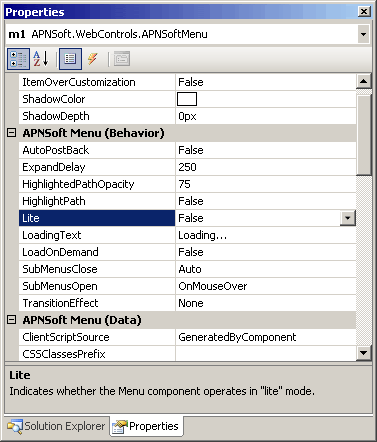
As you notice, it looks a lot like the grid controls that are already available. I also want to create simple PB functions for this control to access the data within it.
I know this seems like a huge task, and some may even be scared away by it, but I feel that I understand API enough to give it a try.
The only problem is this: (and this is where you come in) I don't understand the concept of creating a custom control. That may make you think that I don't know API at all, but I have a set of questions below that would make you understand what I mean:
1: What do I have to do to set up a Window Class so my control will receive messages?
2: What are the list of structures that I would need in order to make my control work properly? I am quite sure it would have to remain consistent with other existing controls.
3: How would I set this control up in Pure Basic? Would everything have to be done in a Window Callback, or can I use procedures as well?
4: Would I be able to use the standard Pure Basic drawing functions such as Line, Plot, Circle, box, etc, or do I have to use all API functions?
5: To make my job easier, do you think I should subclass other controls in the new control? If, so, can you provide an example on how this is accomplished?
6: When I want to test the control, what would I have to do to get PB to display it? Would I have to use LoadLibrary?
These are all the questions I have for now. I am sure I would have more questions in the future. I am not asking anyone to provide a lot of code for me. I just need to know the foundation on how a control is set up, and then I can get to work.
oh, by the way, I don't want to use a listview gadget because I think that is somewhat tacky. Thats forcing a control to do something it wasn't really designed to do. I want to make something that is designed to do just that. I think it would be called a PropertyView Control.
Thanks in advance!
My goal is to make it look and function similar to this.
As you notice, it looks a lot like the grid controls that are already available. I also want to create simple PB functions for this control to access the data within it.
I know this seems like a huge task, and some may even be scared away by it, but I feel that I understand API enough to give it a try.
The only problem is this: (and this is where you come in) I don't understand the concept of creating a custom control. That may make you think that I don't know API at all, but I have a set of questions below that would make you understand what I mean:
1: What do I have to do to set up a Window Class so my control will receive messages?
2: What are the list of structures that I would need in order to make my control work properly? I am quite sure it would have to remain consistent with other existing controls.
3: How would I set this control up in Pure Basic? Would everything have to be done in a Window Callback, or can I use procedures as well?
4: Would I be able to use the standard Pure Basic drawing functions such as Line, Plot, Circle, box, etc, or do I have to use all API functions?
5: To make my job easier, do you think I should subclass other controls in the new control? If, so, can you provide an example on how this is accomplished?
6: When I want to test the control, what would I have to do to get PB to display it? Would I have to use LoadLibrary?
These are all the questions I have for now. I am sure I would have more questions in the future. I am not asking anyone to provide a lot of code for me. I just need to know the foundation on how a control is set up, and then I can get to work.
oh, by the way, I don't want to use a listview gadget because I think that is somewhat tacky. Thats forcing a control to do something it wasn't really designed to do. I want to make something that is designed to do just that. I think it would be called a PropertyView Control.
Thanks in advance!


 Of course all OS's from XP onward have this installed by default anyhow, but it's still a hell of a pre-requisite!
 Here it is:

