Page 1 of 2
Anaglyph Creator
Posted: Mon Feb 20, 2006 12:45 am
by Paul
Cool little app to quickly and easily create anaglyphs. (Red/Blue 3D Images)
http://www.reelmedia.org/cgi-bin/PurePr ... ub=General
Believe it or not, I actually needed this for a much larger commercial project.
You can get the Red/Blue glass from cerial boxes, SpyKids DVD movie, comic books, magazines, etc.
Posted: Mon Feb 20, 2006 1:04 am
by Paul
You can use this app to create your own Anaglyph images using a standard digital camera.
Line up a subject and take a picture of it, move the camera about 2 inches to the right and take another picture.
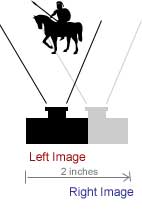
Transfer these images to your computer.
Start Anaglyph Creator and load the first (left) image into the left window and the second (right) image into the right window. Press the Create button.
View cool 3D image with Red/Blue glasses.
Posted: Mon Feb 20, 2006 1:14 am
by NoahPhense
Very nice.. tight exe..
- np
Re: Anaglyph Creator
Posted: Mon Feb 20, 2006 1:56 pm
by Phoenix
Very nice! A suggestion: allow the user to drag/drop an image onto the left and right panels. And a bug: if you have loaded both images, but then click a panel to load a new one but then cancel, the Create button does nothing even though the original image is still shown in the panel that was cancelled.
Posted: Mon Feb 20, 2006 4:55 pm
by Paul
Added and fixed

Posted: Tue Feb 21, 2006 2:01 am
by dobro
my prg date of the 13/01/2006
on the French forum:
http://purebasic.hmt-forum.com/viewtopi ... t=anaglyph
allows the rotation and displacment of the images for the misalignment!!
available here:
http://michel.dobro.free.fr/bidouilles/ ... glyphe.zip

Posted: Tue Feb 21, 2006 3:47 am
by Paul
Did you know your program crashes when you tell it to select an image then press cancel?
I think I'll stick with my version... it's only 49kb and it's FAST
Posted: Tue Feb 21, 2006 8:35 am
by dige
hi Paul, your Anaglyph tool looks realy good so far. But red-cyan is not the
only one ;-)
you should provide more different anaglyph types like red-blue, red-green,
lcd-shutter and interlace stereo glasses users.
I've created some examples for you with one of your 3d images :)
 click here
to visit the website
Posted: Tue Feb 21, 2006 3:38 pm
by Paul
Hi dige,
I know there are many different types of 3D images that can be created. Around here you can only get the Red/Blue glasses so that is the only format I support.
Re:
Posted: Mon Mar 08, 2010 10:49 am
by UserOfPure
Paul, would you ever care to share the source? Or at least tell us the theory behind making an image all red and all blue? I have no idea how to strip all colors except for red/blue in an image.
Re: Re:
Posted: Tue Mar 09, 2010 11:50 pm
by dobro
UserOfPure wrote:Paul, would you ever care to share the source? Or at least tell us the theory behind making an image all red and all blue? I have no idea how to strip all colors except for red/blue in an image.
hum
Code: Select all
r= rgb(red(point(x,y)),0,0)
vb= rgb(0,green(point(x,y),blue(point(x,y)))
Re: Re:
Posted: Thu Mar 11, 2010 8:29 pm
by UserOfPure
Okay, I think I understand. Will experiment. Thanks!
[Edit] Okay, that's helped, but does anyone know how I can mix the resulting red pixel from the left image with the blue pixel from the right image? Or a general math formula to mix two given color values? I'm hopeless at maths.

Re: Anaglyph Creator
Posted: Thu Mar 11, 2010 8:38 pm
by dobro
Code: Select all
          r=red(left_picture(ix,iy) )
        v=Green(right_picture(ix,iy))
        b=Blue(right_picture(ix,iy))

        Plot(x,y, RGB(r,v,b))

Re: Anaglyph Creator
Posted: Sun Mar 14, 2010 1:16 pm
by UserOfPure
Thanks again dobro, but I decided against that method and just mixed the two pics together as a new third. Was much easier, and faster.
Re: Anaglyph Creator
Posted: Sun Mar 14, 2010 5:46 pm
by dobro
how to mix 2 pictures without using point() plot()?
You can save the mix?
