Hi guys, just a quick update.
The event handler engine can now handle adding window specific events to a widget (and not just a window object) with the AddEventHandler(Object, EventType, *Callback, *UserData = #Null) command, for example:
AddEventHandler(mySuperCoolWidget, #PG_Event_WindowMinimize, @WidgetMinimizeEventHandler())
This works regardless of what window the widget is currently in so the LayoutInsertWidget(Layout, Widget, Index = #PG_Last, Flags = #Null) command works automatically depending on what window the layout is in (if any). Makes it dead easy to handle events like #PG_Event_WindowActivate / #PG_Event_WindowDeactivate where you would probably do a WidgetSetSkinState(Widget, State.s = "", Component.s = "") command inside the event callback (as is the case with the window TitleBar widget!).
The full window skinning TitleBar widget is coming along nicely with the system command hover and active button CSS styles now fully respecting the OS settings for accent color and "Title bars and window borders" option with new global CSS variables "var(color-titlebar-active)", "var(color-titlebar-active-button-hover)", "var(color-titlebar-active-button-active)". It's been a pain reversing how Windows calculates these different shades as there is no API.
Code: Select all
SkinSetValue("titlebar", "", "", "background", "var(color-titlebar-active)")
SkinSetValue("titlebar", "", "", "color", "white")
SkinSetValue("titlebar", "", "", "text-align", "center")
SkinSetValue("titlebar", "", "", "vertical-align", "center")

; minimize button
SkinSetValue("titlebarMinimize", "", "", "background", "url('Icons/Window/96_minDark_n.png')")
SkinSetValue("titlebarMinimize", "", "", "background-repeat", "no-repeat")
SkinSetValue("titlebarMinimize", "", "", "background-position", "center")
SkinSetValue("titlebarMinimize", "hover", "", "background", "url('Icons/Window/96_minDark_n.png'), var(color-titlebar-active-button-hover)")
SkinSetValue("titlebarMinimize", "active", "", "background", "url('Icons/Window/96_minDark_n.png'), var(color-titlebar-active-button-active)")
SkinSetValue("titlebarMinimize", "hover-active", "", "background", "url('Icons/Window/96_minDark_n.png'), #5E5C5B00") ;- !! is this needed?
SkinSetValue("titlebarMinimize", "", "", "transition", "background .3s, border .3s")
SkinSetValue("titlebarMinimize", "hover", "", "transition", "background 0s, border 0s")
SkinSetValue("titlebarMinimize", "hover-active", "", "transition", "background 0s, border 0s")

; maximize button
SkinSetValue("titlebarMaximize", "", "", "background", "url('Icons/Window/96_maxDark_n.png')")
SkinSetValue("titlebarMaximize", "", "", "background-repeat", "no-repeat")
SkinSetValue("titlebarMaximize", "", "", "background-position", "center")
SkinSetValue("titlebarMaximize", "hover", "", "background", "url('Icons/Window/96_maxDark_n.png'), var(color-titlebar-active-button-hover)")
SkinSetValue("titlebarMaximize", "active", "", "background", "url('Icons/Window/96_maxDark_n.png'), var(color-titlebar-active-button-active)")
SkinSetValue("titlebarMaximize", "hover-active", "", "background", "url('Icons/Window/96_maxDark_n.png'), #5E5C5B00")
SkinSetValue("titlebarMaximize", "", "", "transition", "background .3s, border .3s")
SkinSetValue("titlebarMaximize", "hover", "", "transition", "background 0s, border 0s")
SkinSetValue("titlebarMaximize", "hover-active", "", "transition", "background 0s, border 0s")

; close button
SkinSetValue("titlebarClose", "", "", "background", "url('Icons/Window/96_close_n.png'), #E8112300")
SkinSetValue("titlebarClose", "", "", "background-repeat", "no-repeat")
SkinSetValue("titlebarClose", "", "", "background-position", "center")
SkinSetValue("titlebarClose", "hover", "", "background", "url('Icons/Window/96_close_n.png'), #E81123")
SkinSetValue("titlebarClose", "active", "", "background", "url('Icons/Window/96_close_n.png'), #A92831")
SkinSetValue("titlebarClose", "hover-active", "", "background", "url('Icons/Window/96_close_n.png'), #E8112300")
SkinSetValue("titlebarClose", "", "", "transition", "background .3s, border .3s")
SkinSetValue("titlebarClose", "hover", "", "transition", "background 0s, border 0s")
SkinSetValue("titlebarClose", "hover-active", "", "transition", "background 0s, border 0s")
Cheers! Chris.
 is a thing now.


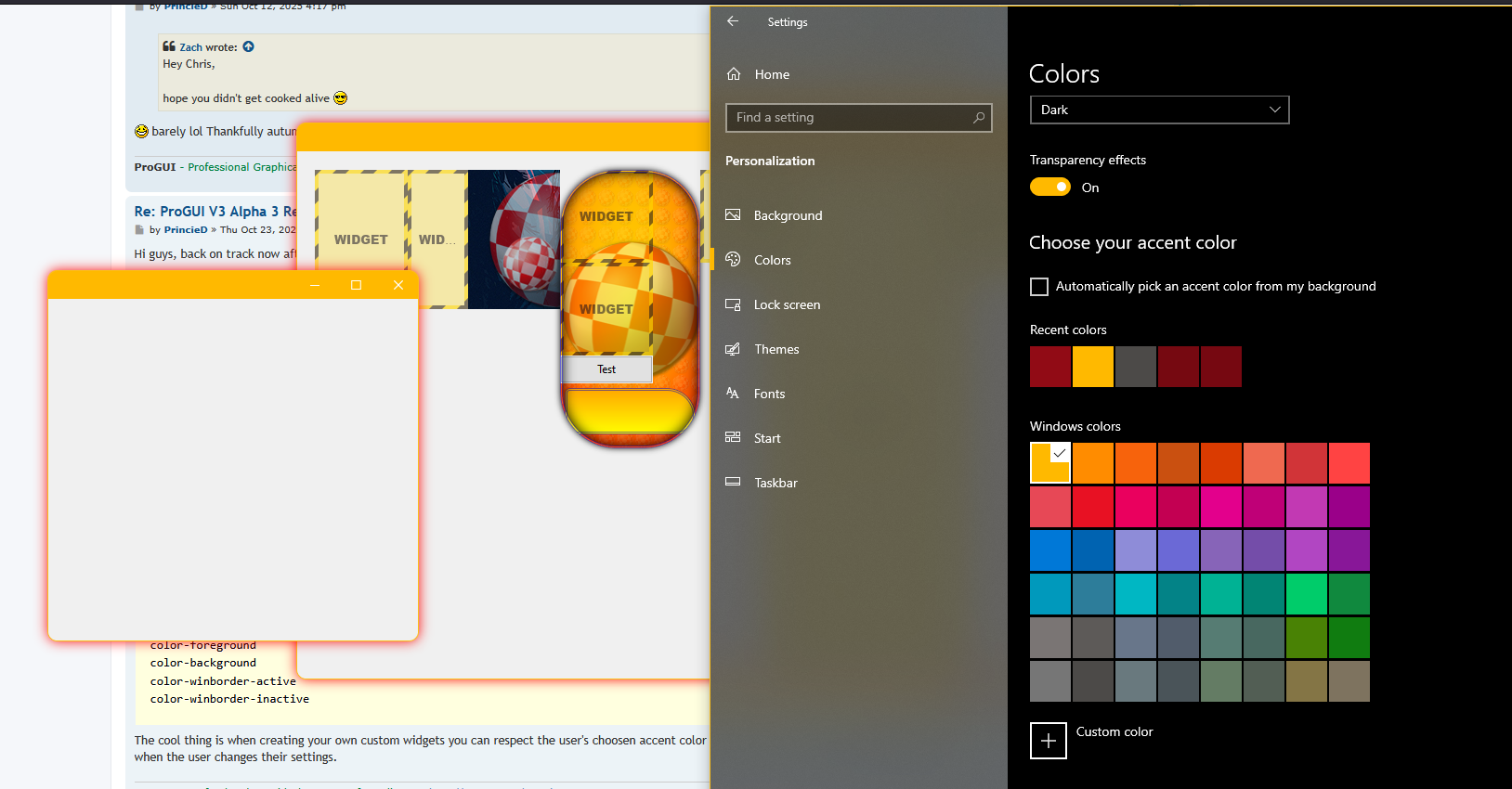

 - spot the difference (using cleartype)
