Page 2 of 3

Posted: Tue Apr 11, 2006 6:48 am
by dagcrack
For that sake then don't use euler rotations please.. You'll kill yourself if you get into gimbal lock :lol: :lol:

It's pretty easy (once you understand) to convert quaternions into a rot matrix for opengl and then send the matrix to opengl.

Posted: Tue Apr 11, 2006 12:06 pm
by dell_jockey
@ Dare2:
thanks for the thumbs-up. Your nick tells me, we're likely similar in many ways... :)

@Dagcrack:
thanks for the pointers, yet more stuff to study! As to gimbal lock-up: a real-life system would use an "ahrs" (you appear to know about avionics... :mrgreen: ), there's no gyro spinning, so there'll be no gimbal that could lock-up either.

Posted: Tue Apr 11, 2006 4:54 pm
by va!n
you can simplify draw only the red line ;-) (so no 3d or any other 2d rotatated sprites are needed ;-)

Posted: Thu Apr 13, 2006 8:11 am
by dell_jockey
after having experimented quite a bit last night, I have come to the conclusion that Sprite3D is not suitable for my project because the bitmaps that need to be rotated and shifted in space are larger than 256x256. When using CreateSprite3D(), the 2D sprite used to texture de 3D sprite may not be anly larger...

2D sprites themselves can be larger, so now I'm looking for a way to render those rotations/shifts directly onto 2D sprites. If that fails, I go the OpenGL route... Stay tuned...

Posted: Thu Apr 13, 2006 8:25 am
by netmaestro
You can ZoomSprite3D() them to a much larger size and if you use Sprite3DQuality(1) they will look quite nice. How much bigger do you need them?

Posted: Thu Apr 13, 2006 10:15 am
by dell_jockey
netmaestro wrote:You can ZoomSprite3D() them to a much larger size and if you use Sprite3DQuality(1) they will look quite nice. How much bigger do you need them?
Hi Netmaestro,

the displayed part of the single largest sprite object will not be much larger than 256x256, it would probably fit within this box size.
The problem is, that it needs to be quite a bit larger, because with each iteration it will get rotated as well as shifted in space. (if you know your way around avionics: it's the rear-face object of an artificial horizon, the object that shows air/ground and horizon line.) The 256x256 viewport would be a rectangle, within which that sprite object gets clipped.

Posted: Thu Apr 13, 2006 8:10 pm
by dagcrack
You must have your image as a power of 2 if you'll go the 3D way.

Most engines will interpolate (via supersampling) your image to the nearest power of 2 if not, this means wasted memory; blurred graphics depending on various situations.

What you gain on using 3D acceleration, you gain speed and you're out of limitations, instantly.

For a gauge I'd use images with alpha channel for every layer of the gauge itself I mean. Assign them to separate quads (each with a little offset on the Z axis, so they stick-out a little: no overlapping that is).

Rotating a quad is a matter of 1 gl call if you'll be using eulers..
If you want to go simple, use: glRotatef();

And if you need help just PM me, since I've been working with OGL for quite a while, it wouldnt be a trouble to help (plus, anything if its for avionics!).

:lol:

If you ask me, I'd go the accelerated way, because even if OGL is on software fallback, speed-wise you'll be getting similar results than doing all the rotations yourself in 2D, etc. On most implementations.

Plus, it's really nice to work with, once you understood OGL everything goes on rails.

Posted: Tue Apr 18, 2006 5:13 pm
by dell_jockey
Dagcrack,

thanks for the offer, I sent you a PM...

Re: Any idea on how to rotate sprites?

Posted: Tue Mar 12, 2013 1:25 pm
by SeregaZ
anybody knows how to make some group of sprites?

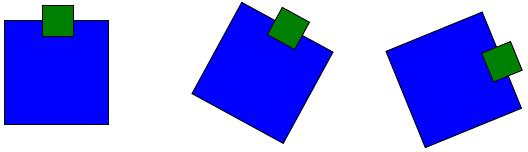
i have 2 images. one is body, second is some item over this body. centres of this images is not the same:
Image

how to correctly rotate both of them?

Re: Any idea on how to rotate sprites?

Posted: Wed Mar 13, 2013 8:45 am
by Danilo
SeregaZ wrote:anybody knows how to make some group of sprites?

i have 2 images. one is body, second is some item over this body. centres of this images is not the same:
Image

how to correctly rotate both of them?
Maybe this is enough :?:

Code: Select all

;
; modified PB Sprite3D example
;
If InitSprite() = 0 Or InitKeyboard() = 0
  MessageRequester("Error", "Sprite system can't be initialized", 0)
  End
EndIf

If InitSprite3D() = 0
  MessageRequester("Error", "Sprite3D system can't be initialized correctly", 0)
  End
EndIf

Procedure DisplaySprite3DRotatedAround(sprite3D,centerX,centerY,angle.f,translate=0)
    RotateSprite3D(sprite3D,angle,#PB_Absolute)
    DisplaySprite3D(sprite3D,
                     Sin(Radian(angle))*translate + centerX - SpriteWidth (sprite3D)*0.5,
                    -Cos(Radian(angle))*translate + centerY - SpriteHeight(sprite3D)*0.5)
EndProcedure


If OpenWindow(0, 0, 0, 800, 600, "Rotate Sprite3D",#PB_Window_SystemMenu|#PB_Window_ScreenCentered)
  If OpenWindowedScreen(WindowID(0),0,0,800,600)

      CreateSprite(0, 128,128, #PB_Sprite_Texture)
      If StartDrawing(SpriteOutput(0))
        Box(0,0,SpriteWidth(0),SpriteHeight(0),RGB(0,0,255))
        StopDrawing()
      EndIf
      CreateSprite3D(0, 0)
    
      CreateSprite(1, 32,32, #PB_Sprite_Texture)
      If StartDrawing(SpriteOutput(1))
        Box(0,0,SpriteWidth(1),SpriteHeight(1),RGB(0,128,0))
        StopDrawing()
      EndIf
      CreateSprite3D(1, 1)
    
      CreateSprite(2, 32,32, #PB_Sprite_Texture)
      If StartDrawing(SpriteOutput(2))
        Box(0,0,SpriteWidth(2),SpriteHeight(2),RGB(255,255,0))
        StopDrawing()
      EndIf
      CreateSprite3D(2, 2)
    
      
      Sprite3DQuality(#PB_Sprite3D_BilinearFiltering)
      
      Define angle.f
      
      Repeat
        Repeat
            Event = WindowEvent()
            If Event = #PB_Event_CloseWindow
                Quit = #True
            EndIf
        Until Event = 0
        
        FlipBuffers()
        
        ClearScreen(RGB(0,50,128))
        
        ; Draw our sprites
        ;
        If Start3D()
            DisplaySprite3DRotatedAround(0,400,300,angle)        ; rotate blue   box around middle of screen
            DisplaySprite3DRotatedAround(1,400,300,angle,64)     ; rotate green  box around middle of screen + offset 64
            DisplaySprite3DRotatedAround(1,400,300,angle,150)    ; rotate green  box around middle of screen + offset 150
            DisplaySprite3DRotatedAround(2,400,300,angle,-64)    ; rotate yellow box around middle of screen - offset 64
    
            DisplaySprite3DRotatedAround(2,400,300,-angle   ,115) ; rotate yellow box around middle of screen + offset 115, negative angle
            DisplaySprite3DRotatedAround(2,400,300,-angle+20,115) ; rotate yellow box around middle of screen + offset 115, negative angle + 20 degree
            DisplaySprite3DRotatedAround(2,400,300,-angle+40,115) ; rotate yellow box around middle of screen + offset 115, negative angle + 40 degree
            DisplaySprite3DRotatedAround(2,400,300,-angle+60,115) ; rotate yellow box around middle of screen + offset 115, negative angle + 60 degree

            DisplaySprite3DRotatedAround(0,150,150,angle)        ; rotate blue   box around 150,150
            DisplaySprite3DRotatedAround(2,150,150,angle    ,64) ; rotate yellow box around 150,150 + offset 64
            DisplaySprite3DRotatedAround(2,150,150,angle+ 90,64) ; rotate yellow box around 150,150 + offset 64 + 90 degree
            DisplaySprite3DRotatedAround(2,150,150,angle+180,64) ; rotate yellow box around 150,150 + offset 64 +180 degree
            DisplaySprite3DRotatedAround(2,150,150,angle+270,64) ; rotate yellow box around 150,150 + offset 64 +270 degree
    
            Stop3D()
        EndIf
        
        ExamineKeyboard()
    
        If KeyboardPushed(#PB_Key_Escape)
            Quit = #True
        EndIf
        
        angle + 1
      Until Quit = #True
  
    Else
        MessageRequester("Error", "Can't open screen !", 0)
    EndIf
EndIf

Re: Any idea on how to rotate sprites?

Posted: Wed Mar 13, 2013 10:50 am
by SeregaZ
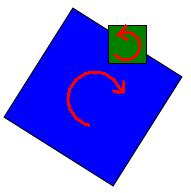
code is awesome! but it means center of this two images must be the same (coordinates)? in my case centres of images is individual. how to use this code for rotation blue object to right and green object to left?
Image

Re: Any idea on how to rotate sprites?

Posted: Wed Mar 13, 2013 12:14 pm
by Danilo
SeregaZ wrote:code is awesome! but it means center of this two images must be the same (coordinates)? in my case centres of images is individual. how to use this code for rotation blue object to right and green object to left?
Image
Ahh, OK. You want to get middle point of the green box after blue box got rotated. Use GetRotatedPointX() and GetRotatedPointY():

Code: Select all

;
; modified PB Sprite3D example
;
If InitSprite() = 0 Or InitKeyboard() = 0
  MessageRequester("Error", "Sprite system can't be initialized", 0)
  End
EndIf

If InitSprite3D() = 0
  MessageRequester("Error", "Sprite3D system can't be initialized correctly", 0)
  End
EndIf

Procedure DisplaySprite3DRotatedAround(sprite3D,centerX,centerY,angle.f,translate=0, transparency=255)
    RotateSprite3D(sprite3D,angle,#PB_Absolute)
    DisplaySprite3D(sprite3D,
                     Sin(Radian(angle))*translate + centerX - SpriteWidth (sprite3D)*0.5,
                    -Cos(Radian(angle))*translate + centerY - SpriteHeight(sprite3D)*0.5,
                    transparency)
EndProcedure

Procedure DisplaySprite3DAround(sprite3D, centerX, centerY, Transparency=255)
    DisplaySprite3D(sprite3D, centerX - SpriteWidth (sprite3D)*0.5, centerY - SpriteHeight(sprite3D)*0.5, Transparency)
EndProcedure

Macro GetRotatedPoint(centerX, centerY, angle, translateX, translateY)
    (centerX + (translateX)*Cos(Radian(angle)) - (translateY) * Sin(Radian(angle))),
    (centerY + (translateX)*Sin(Radian(angle)) + (translateY) * Cos(Radian(angle)))
EndMacro

Procedure GetRotatedPointX(centerX, centerY, angle.f, translateX, translateY)
    ProcedureReturn centerX + (translateX)*Cos(Radian(angle)) - (translateY) * Sin(Radian(angle))
EndProcedure

Procedure GetRotatedPointY(centerX, centerY, angle.f, translateX, translateY)
    ProcedureReturn centerY + (translateX)*Sin(Radian(angle)) + (translateY) * Cos(Radian(angle))
EndProcedure
 

If OpenWindow(0, 0, 0, 800, 600, "Rotate Sprite3D",#PB_Window_SystemMenu|#PB_Window_ScreenCentered)
  If OpenWindowedScreen(WindowID(0),0,0,800,600)

      CreateSprite(0, 128,128, #PB_Sprite_Texture)
      If StartDrawing(SpriteOutput(0))
        Box(0,0,SpriteWidth(0),SpriteHeight(0),RGB(0,0,255))
        StopDrawing()
      EndIf
      CreateSprite3D(0, 0)
   
      CreateSprite(1, 32,32, #PB_Sprite_Texture)
      If StartDrawing(SpriteOutput(1))
        Box(0,0,SpriteWidth(1),SpriteHeight(1),RGB(0,128,0))
        StopDrawing()
      EndIf
      CreateSprite3D(1, 1)
   
      CreateSprite(2, 32,32, #PB_Sprite_Texture)
      If StartDrawing(SpriteOutput(2))
        Box(0,0,SpriteWidth(2),SpriteHeight(2),RGB(255,255,0))
        StopDrawing()
      EndIf
      CreateSprite3D(2, 2)
     
      Sprite3DQuality(#PB_Sprite3D_BilinearFiltering)
     
      Define angle.f
     
      Repeat
        Repeat
            Event = WindowEvent()
            If Event = #PB_Event_CloseWindow
                Quit = #True
            EndIf
        Until Event = 0
       
        FlipBuffers()
       
        ClearScreen(RGB(0,50,128))
       
        ; Draw our sprites
        ;
        If Start3D()
            DisplaySprite3DRotatedAround(0,400,300,angle)        ; rotate blue   box around middle of screen
            DisplaySprite3DRotatedAround(1,400,300,angle,64)     ; rotate green  box around middle of screen + offset 64
            DisplaySprite3DRotatedAround(1,400,300,angle,150)    ; rotate green  box around middle of screen + offset 150
            DisplaySprite3DRotatedAround(2,400,300,angle,-64)    ; rotate yellow box around middle of screen - offset 64
   
            DisplaySprite3DRotatedAround(2,400,300,-angle   ,115) ; rotate yellow box around middle of screen + offset 115, negative angle
            DisplaySprite3DRotatedAround(2,400,300,-angle+20,115) ; rotate yellow box around middle of screen + offset 115, negative angle + 20 degree
            DisplaySprite3DRotatedAround(2,400,300,-angle+40,115) ; rotate yellow box around middle of screen + offset 115, negative angle + 40 degree
            DisplaySprite3DRotatedAround(2,400,300,-angle+60,115) ; rotate yellow box around middle of screen + offset 115, negative angle + 60 degree

            DisplaySprite3DRotatedAround(0,150,150,angle)        ; rotate blue   box around 150,150
            DisplaySprite3DRotatedAround(2,150,150,angle    ,64) ; rotate yellow box around 150,150 + offset 64
            DisplaySprite3DRotatedAround(2,150,150,angle+ 90,64) ; rotate yellow box around 150,150 + offset 64 + 90 degree
            DisplaySprite3DRotatedAround(2,150,150,angle+180,64) ; rotate yellow box around 150,150 + offset 64 +180 degree
            DisplaySprite3DRotatedAround(2,150,150,angle+270,64) ; rotate yellow box around 150,150 + offset 64 +270 degree


            DisplaySprite3DRotatedAround(0,650,450,angle)        ; blue box ...

            x = GetRotatedPointX(650,450,angle,0,-64)            ; and some small boxes at the border of blue box
            y = GetRotatedPointY(650,450,angle,0,-64)
            DisplaySprite3DRotatedAround(1,x,y,-angle*2)

            x = GetRotatedPointX(650,450,angle,0, 64)
            y = GetRotatedPointY(650,450,angle,0, 64)
            DisplaySprite3DRotatedAround(1,x,y, angle*2)

            x = GetRotatedPointX(650,450,angle,-64,0)
            y = GetRotatedPointY(650,450,angle,-64,0)
            DisplaySprite3DRotatedAround(1,x,y,angle,0,128)

            x = GetRotatedPointX(650,450,angle,64,0)
            y = GetRotatedPointY(650,450,angle,64,0)
            DisplaySprite3DRotatedAround(1,x,y,angle,0,128)

            DisplaySprite3DRotatedAround(2,GetRotatedPoint(650,450,angle, 64,-64), angle*2.5,0,128)
            DisplaySprite3DRotatedAround(2,GetRotatedPoint(650,450,angle,-64, 64),-angle*0.5,0,128)

            RotateSprite3D(2,0,#PB_Absolute)
            DisplaySprite3DAround(2,GetRotatedPoint(650,450,angle, 64, 64))
            DisplaySprite3DAround(2,GetRotatedPoint(650,450,angle,-64,-64))

            ;DisplaySprite3DRotatedAround(0,650,450,angle,0,64)
           
            Stop3D()
        EndIf


        ExamineKeyboard()
   
        If KeyboardPushed(#PB_Key_Escape)
            Quit = #True
        EndIf
       
        angle + 1
      Until Quit = #True
 
    Else
        MessageRequester("Error", "Can't open screen !", 0)
    EndIf
EndIf

GetRotatedPointX(centerX, centerY, angle.f, translateX, translateY)
centerX + centerY = Center
translateX + translateY = Point to rotate, relative to Center

Re: Any idea on how to rotate sprites?

Posted: Wed Mar 13, 2013 1:06 pm
by SeregaZ
thanks a lot. many not understand code for me, but i will study this :)
trigonometry is great mistery...

before you consultation i try to fix this problem by tables of offset in X and Y for each angle :) in result my object is a little twitching.

Re: Any idea on how to rotate sprites?

Posted: Tue Jan 28, 2014 6:01 pm
by barryem
I realize this is an old thread but I keep getting the message that InitSprite3D() isn't a recognized function. I get it i these and many other sprite demos. I'm new with PureBasic as of this week and I'm using version 5.21. Is there something I'm not doing or is there a work-around for this or do I need to install an older version to learn how to do this stuff? And if I do, can I eventually do it in this version?

Thanks for any ideas or tips.

Barry

Re: Any idea on how to rotate sprites?

Posted: Tue Jan 28, 2014 6:41 pm
by Danilo
@Barry:
Sprite3D was a separate library before. It was joined with the Sprite lib, so all sprites
can now be rotated, zoomed, etc.

RotateSprite3D() is now RotateSprite(), Start3D() and InitSprite3D() got removed, and much more...

Last example from above, quickly updated for new sprite lib:

Code: Select all

;
; modified PB Sprite3D example
;
If InitSprite() = 0 Or InitKeyboard() = 0
  MessageRequester("Error", "Sprite system can't be initialized", 0)
  End
EndIf

;If InitSprite3D() = 0
;  MessageRequester("Error", "Sprite3D system can't be initialized correctly", 0)
;  End
;EndIf

Procedure DisplaySprite3DRotatedAround(sprite3D,centerX,centerY,angle.f,translate=0, transparency=255)
    RotateSprite(sprite3D,angle,#PB_Absolute)
    DisplayTransparentSprite(sprite3D,
                     Sin(Radian(angle))*translate + centerX - SpriteWidth (sprite3D)*0.5,
                    -Cos(Radian(angle))*translate + centerY - SpriteHeight(sprite3D)*0.5,
                    transparency)
EndProcedure

Procedure DisplaySprite3DAround(sprite3D, centerX, centerY, Transparency=255)
    DisplayTransparentSprite(sprite3D, centerX - SpriteWidth (sprite3D)*0.5, centerY - SpriteHeight(sprite3D)*0.5, Transparency)
EndProcedure

Macro GetRotatedPoint(centerX, centerY, angle, translateX, translateY)
    (centerX + (translateX)*Cos(Radian(angle)) - (translateY) * Sin(Radian(angle))),
    (centerY + (translateX)*Sin(Radian(angle)) + (translateY) * Cos(Radian(angle)))
EndMacro

Procedure GetRotatedPointX(centerX, centerY, angle.f, translateX, translateY)
    ProcedureReturn centerX + (translateX)*Cos(Radian(angle)) - (translateY) * Sin(Radian(angle))
EndProcedure

Procedure GetRotatedPointY(centerX, centerY, angle.f, translateX, translateY)
    ProcedureReturn centerY + (translateX)*Sin(Radian(angle)) + (translateY) * Cos(Radian(angle))
EndProcedure
 

If OpenWindow(0, 0, 0, 800, 600, "Rotate Sprite3D",#PB_Window_SystemMenu|#PB_Window_ScreenCentered)
  If OpenWindowedScreen(WindowID(0),0,0,800,600)

      CreateSprite(0, 128,128, #PB_Sprite_AlphaBlending)
      If StartDrawing(SpriteOutput(0))
        DrawingMode(#PB_2DDrawing_AllChannels)
        Box(0,0,SpriteWidth(0),SpriteHeight(0),RGBA(0,0,255,255))
        StopDrawing()
      EndIf
      ;CreateSprite3D(0, 0)
   
      CreateSprite(1, 32,32, #PB_Sprite_AlphaBlending)
      If StartDrawing(SpriteOutput(1))
        DrawingMode(#PB_2DDrawing_AllChannels)
        Box(0,0,SpriteWidth(1),SpriteHeight(1),RGBA(0,128,0,255))
        StopDrawing()
      EndIf
      ;CreateSprite3D(1, 1)
   
      CreateSprite(2, 32,32, #PB_Sprite_AlphaBlending)
      If StartDrawing(SpriteOutput(2))
        DrawingMode(#PB_2DDrawing_AllChannels)
        Box(0,0,SpriteWidth(2),SpriteHeight(2),RGBA(255,255,0,255))
        StopDrawing()
      EndIf
      ;CreateSprite3D(2, 2)
     
      ;Sprite3DQuality(#PB_Sprite3D_BilinearFiltering)
      SpriteQuality(#PB_Sprite_BilinearFiltering)
     
      Define angle.f
     
      Repeat
        Repeat
            Event = WindowEvent()
            If Event = #PB_Event_CloseWindow
                Quit = #True
            EndIf
        Until Event = 0
       
        FlipBuffers()
       
        ClearScreen(RGB(0,50,128))
       
        ; Draw our sprites
        ;
        ;If Start3D()
            DisplaySprite3DRotatedAround(0,400,300,angle)        ; rotate blue   box around middle of screen
            DisplaySprite3DRotatedAround(1,400,300,angle,64)     ; rotate green  box around middle of screen + offset 64
            DisplaySprite3DRotatedAround(1,400,300,angle,150)    ; rotate green  box around middle of screen + offset 150
            DisplaySprite3DRotatedAround(2,400,300,angle,-64)    ; rotate yellow box around middle of screen - offset 64
   
            DisplaySprite3DRotatedAround(2,400,300,-angle   ,115) ; rotate yellow box around middle of screen + offset 115, negative angle
            DisplaySprite3DRotatedAround(2,400,300,-angle+20,115) ; rotate yellow box around middle of screen + offset 115, negative angle + 20 degree
            DisplaySprite3DRotatedAround(2,400,300,-angle+40,115) ; rotate yellow box around middle of screen + offset 115, negative angle + 40 degree
            DisplaySprite3DRotatedAround(2,400,300,-angle+60,115) ; rotate yellow box around middle of screen + offset 115, negative angle + 60 degree

            DisplaySprite3DRotatedAround(0,150,150,angle)        ; rotate blue   box around 150,150
            DisplaySprite3DRotatedAround(2,150,150,angle    ,64) ; rotate yellow box around 150,150 + offset 64
            DisplaySprite3DRotatedAround(2,150,150,angle+ 90,64) ; rotate yellow box around 150,150 + offset 64 + 90 degree
            DisplaySprite3DRotatedAround(2,150,150,angle+180,64) ; rotate yellow box around 150,150 + offset 64 +180 degree
            DisplaySprite3DRotatedAround(2,150,150,angle+270,64) ; rotate yellow box around 150,150 + offset 64 +270 degree


            DisplaySprite3DRotatedAround(0,650,450,angle)        ; blue box ...

            x = GetRotatedPointX(650,450,angle,0,-64)            ; and some small boxes at the border of blue box
            y = GetRotatedPointY(650,450,angle,0,-64)
            DisplaySprite3DRotatedAround(1,x,y,-angle*2)

            x = GetRotatedPointX(650,450,angle,0, 64)
            y = GetRotatedPointY(650,450,angle,0, 64)
            DisplaySprite3DRotatedAround(1,x,y, angle*2)

            x = GetRotatedPointX(650,450,angle,-64,0)
            y = GetRotatedPointY(650,450,angle,-64,0)
            DisplaySprite3DRotatedAround(1,x,y,angle,0,128)

            x = GetRotatedPointX(650,450,angle,64,0)
            y = GetRotatedPointY(650,450,angle,64,0)
            DisplaySprite3DRotatedAround(1,x,y,angle,0,128)

            DisplaySprite3DRotatedAround(2,GetRotatedPoint(650,450,angle, 64,-64), angle*2.5,0,128)
            DisplaySprite3DRotatedAround(2,GetRotatedPoint(650,450,angle,-64, 64),-angle*0.5,0,128)

            RotateSprite(2,0,#PB_Absolute)
            DisplaySprite3DAround(2,GetRotatedPoint(650,450,angle, 64, 64))
            DisplaySprite3DAround(2,GetRotatedPoint(650,450,angle,-64,-64))

            ;DisplaySprite3DRotatedAround(0,650,450,angle,0,64)
           
            ;Stop3D()
        ;EndIf


        ExamineKeyboard()
   
        If KeyboardPushed(#PB_Key_Escape)
            Quit = #True
        EndIf
       
        angle + 1
      Until Quit = #True
 
    Else
        MessageRequester("Error", "Can't open screen !", 0)
    EndIf
EndIf