Page 10 of 10
Re: PBMap - OSM, Here, Geoserver maps in a Canvas gadget
Posted: Sat Jul 13, 2019 1:58 pm
by Andre
I'm using the PBMap regularly too (in my internal GeoWorldEditor, showed before), so thanks again to djes and team!

I know the crashes too. They happen from time to time, even if I regularly clear the cache (by standard at program end).
But I can't find any specific reason or a way to reproduce.... probably it has something to do with high traffic on the OSM servers (it's only a thought, because the crash happens during day/evening but not later in the night).
Re: PBMap - OSM, Here, Geoserver maps in a Canvas gadget
Posted: Mon Jul 15, 2019 10:17 pm
by djes
Thank you Andre. It shouldn't crash anyway. I'll take a look.
Re: PBMap - OSM, Here, Geoserver maps in a Canvas gadget
Posted: Thu Jul 18, 2019 3:30 pm
by djes
I've corrected some parts of the code there in the 'djes' branch :
https://github.com/djes/PBMap/blob/djes/PBMap.pb
Sadly, I think there's a PB bug in the PB's internal PNG image library, leading to a crash when a malformed PNG file is loaded. I've already had something similar in the past. I've sent a bug report, I'm waiting for a fix. It should be possible to use another image library, but I think it easier to wait.
By now, could you test the updated code ? Thank you !
Re: PBMap - OSM, Here, Geoserver maps in a Canvas gadget
Posted: Thu Jul 18, 2019 11:06 pm
by idle
haven't tested it on a range of pngs but workaround for now, check to see if IEND tag is set in the image
Code: Select all
Procedure _LoadImage(ImageNumber,File.s)
  Protected fn,pat,pos
  pat = $444E4549
  fn= ReadFile(#PB_Any,file)
  If fn
    pos = Lof(fn)
    FileSeek(fn,pos-8)
    res = ReadLong(fn)
    CloseFile(fn)
    If res = pat
      ProcedureReturn LoadImage(ImageNumber,file)
    EndIf
  EndIf
EndProcedure
Re: PBMap - OSM, Here, Geoserver maps in a Canvas gadget
Posted: Fri Jul 19, 2019 9:01 am
by djes
Thank you Idle ! It could do the trick and be faster than pngcheck. I'll test today. I've also added a function to delete incomplete file, even if we don't have by now the possibility without another request to know size of downloaded file.
Re: PBMap - OSM, Here, Geoserver maps in a Canvas gadget
Posted: Fri Jul 19, 2019 10:16 am
by djes
Code updated with idle's trick. Merged into master.
Re: PBMap - OSM, Here, Geoserver maps in a Canvas gadget
Posted: Fri Jul 19, 2019 9:18 pm
by Andre
Thank you very much idle and djes! (and thanks too for the credits in your Readme

- you're the ones, who deserve them - later in my project
)
I've included the updated PBMap.pb code into my GeoWorldEditor.
It runs fine.... if it helps in the long term to avoid the randomly crashes we will see... but your approach to make tests for valid map tiles before loading them as image sounds like a good idea
Re: PBMap - OSM, Here, Geoserver maps in a Canvas gadget
Posted: Thu Jan 14, 2021 10:31 am
by l1marik
Has somebody implemented OpenWeather(or any other) precipitation map layers in PBMap?
Lukas
Re: PBMap - OSM, Here, Geoserver maps in a Canvas gadget
Posted: Sun Jan 17, 2021 11:42 am
by djes
Did you try to change the demo application ?
Edit : BTW, I just found that including the demo in the module can be difficult to understand. And the demo code is maybe a bit confusing with too many options... I just separated the basic demo, and if I have time I'll do a very basic demo.
Could you test by altering the demo.pb code at the line 300 :
Code: Select all
PBMap::AddOSMServerLayer(#Map, "OpenSeaMap", 3, "http://t1.openseamap.org/seamark/") ; Add a special osm overlay map on layer nb 3
Change the URL as explained in
https://openweathermap.org/current api.openweathermap.org/data/2.5/weather?lat={lat}&lon={lon}&appid={API key}
Don't include lat and long as it's PBMap's job. So you should have
Code: Select all
PBMap::AddOSMServerLayer(#Map, "OpenWeatherMap", 3, "http://api.openweathermap.org/data/2.5/weather?appid=your_key") ; Add a special openweathermap overlay map on layer nb 3
The code is there :
https://github.com/djes/PBMap
Re: PBMap - OSM, Here, Geoserver maps in a Canvas gadget
Posted: Mon Jan 12, 2026 6:43 pm
by thyphoon
Hello everyone,
As the original creator of PBMap, my friend Djes (R.I.P.

) did a fantastic job improving it. Since his passing, I've continued to work on it. I've updated several features and added a clustering system for grouping markers when you have many. You can find the latest version here.
https://git.thyphoon.net/thyphoon/PBMap
Re: PBMap - OSM, Here, Geoserver maps in a Canvas gadget
Posted: Tue Jan 13, 2026 9:10 pm
by Andre
Thank you very much for your continued support of this great PB include, typhoon!
I just tested the new version by updating the PBMap include from my previously used v0.91 to the new v0.98 with my application.
All is running fine without any modifications needed (I do not use the new stuff about markers/clustering, but have seen the updated Demo included in the package).
I'm very happy about the latest modifications, giving a DPI-aware PBMap display even on a 4K monitor with 200% font display
But according to this topic I've encountered a problem and a question - probably not because of the new PBMap version, but because I'm using a new laptop with 4k display for the first time:
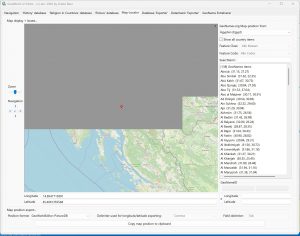
1) If the size of the map display is too big, let's say more than at least 1500x1500 pixel, a map refresh (after zooming, moving, etc.) causes flickering and finally half of the map display stays grey... if the map display is smaller, then no problem and the map display is working fine
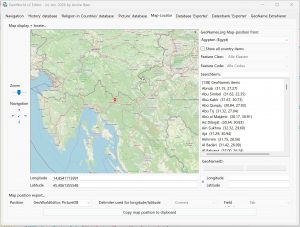
2) Using the PBMap display in a DPI-aware GUI on a 4k monitor with 200% font size, gives very small signs and labels (city names etc.) on the displayed map. Do you have any tips, how this can be solved with the existing PBMap functions?
Thank you very much!
Both effects can be seen on the following two screenshots from my application:
Re: PBMap - OSM, Here, Geoserver maps in a Canvas gadget
Posted: Wed Jan 14, 2026 10:35 pm
by thyphoon
Hello,
After your message, I tried to find a solution because I had the same problem. I tried the latest update. I think it works fairly well.
https://git.thyphoon.net/thyphoon/PBMap/
Unfortunately, the city names are too small... they are bitmap tiles that we download, and so that does cause a problem. I'm going to consider adding a DPI option to enlarge the tile display based on the DPI setting, but that might blur the image a bit.
Re: PBMap - OSM, Here, Geoserver maps in a Canvas gadget
Posted: Fri Jan 16, 2026 8:14 pm
by Andre
thyphoon wrote: Wed Jan 14, 2026 10:35 pm
After your message, I tried to find a solution because I had the same problem. I tried the latest update. I think it works fairly well.
https://git.thyphoon.net/thyphoon/PBMap/
Unfortunately, the city names are too small... they are bitmap tiles that we download, and so that does cause a problem. I'm going to consider adding a DPI option to enlarge the tile display based on the DPI setting, but that might blur the image a bit.
I just checked with the updated PBMap.pb include. Now even very large maps in a 4K GUI are correctly loaded (loading time of the tiles is depending on the day-time I think, so it's slower if there is heavy traffic on the OpenStreetMap (OSM) servers - a thing, which shouldn't habe anything to do with your include). So thank you very much for this fix!
About the very small names (city....) displayed on a high-res map I see two possibilities:
1. If there are any OSM API parameters you can use when requesting the tiles from the server this would be the prefered option. But I don't know, if and how you can handle this... (on the website they show names in bold / bigger font size here on a 4k screen:
https://www.openstreetmap.org/#map=6/51.32/10.46)
2. Your idea with DPI-depending map tiles request and resizing them. Let's say: calculate the needed map size on a 4k monitor (with 200% font size) like it is only 150% or less (for example: for a map display of 2000x1600 pixel request only the tiles for 1500x1200 pixel and enlarge/resize this image to 2000x1500 pixel => should give larger names etc., but maybe is a bit blurry... maybe an optional parameter in the PBMap functions?
 ) did a fantastic job improving it. Since his passing, I've continued to work on it. I've updated several features and added a clustering system for grouping markers when you have many. You can find the latest version here.