How to search image files in bin file.

Just starting out? Need help? Post your questions and find answers here.
infratec
Always Here
Always Here
Posts: 7836
Joined: Sun Sep 07, 2008 12:45 pm
Location: Germany

Re: How to search image files in bin file.

Post by infratec »

I modified it again:

Now it also removes the 16 bytes from the 'DDS files'.
I can use IrfanView now to show the files :mrgreen:

So you can start IrfanView from PB in commandline mode and convert the dds to png.
i_view32 name.dds /convert=name.png
Than open it in PB as normal image.

Bernd
moob
User
User
Posts: 68
Joined: Mon Aug 01, 2011 6:16 pm

Re: How to search image files in bin file.

Post by moob »

infratec wrote:I modified it again:

Now it also removes the 16 bytes from the 'DDS files'.
I can use IrfanView now to show the files :mrgreen:

So you can start IrfanView from PB in commandline mode and convert the dds to png.
i_view32 name.dds /convert=name.png
Than open it in PB as normal image.

Bernd
Thank very much guys..

i have one more question i can use FreeImage.dll to convert dds to png or jpeg??


thanks guys...
moob
User
User
Posts: 68
Joined: Mon Aug 01, 2011 6:16 pm

Re: How to search image files in bin file.

Post by moob »

thanks to all...

I use freeImage to show dds.

here is the example:

Code: Select all

IncludeFile "RW_FreeImage_Inc.pb"


Global dib     = FreeImage_Load(#FIF_DDS, "2.dds", #DDS_DEFAULT)
Global bitmap  = CreateDIBitmap_(GetDC_(#Null), FreeImage_GetInfoHeader(dib), #CBM_INIT, FreeImage_GetBits(dib), FreeImage_GetInfo(dib), #DIB_RGB_COLORS)

If OpenWindow(0, 0, 0, 245, 105, "Image with FreeImage", #PB_Window_SystemMenu | #PB_Window_ScreenCentered)
  CreateGadgetList(WindowID(0))
  ImageGadget(0,  10, 10, 100, 83, bitmap)
  ResizeWindow(0, 100, 100, FreeImage_GetWidth(dib)+20, FreeImage_GetHeight(dib)+20)
  Repeat : Until WaitWindowEvent() = #PB_Event_CloseWindow
EndIf

FreeImage_Unload(dib)


Thanks again guys...
moob
User
User
Posts: 68
Joined: Mon Aug 01, 2011 6:16 pm

Re: How to search image files in bin file.

Post by moob »

Danilo wrote:Image

Code: Select all

CompilerSelect #PB_Compiler_OS
  CompilerCase #PB_OS_Linux
    ImportC #PB_Compiler_Home + "purelibraries/linux/libraries/zlib.a"
CompilerCase #PB_OS_MacOS
  ImportC "/usr/lib/libz.dylib"
  CompilerCase #PB_OS_Windows
    ImportC "zlib.lib"
CompilerEndSelect
  uncompress(*dest, *destLen, *source, sourceLen)
EndImport


Procedure zipUnpackMemory(*source, sourceLen, *dest, destLen)
  If Not uncompress(*dest, @destLen, *source, sourceLen)
    ProcedureReturn destLen
  EndIf
  ProcedureReturn 0
EndProcedure

Structure WESYSFileEntry
    offset.l
    size.l
    fileNameOffset.l ; 0xFFFFFFF0 = unnamed file
EndStructure


Filename$ = "Emerson_face.bin"

File = ReadFile(#PB_Any, Filename$)
If File
  Size = Lof(File)
  *FileBuffer = AllocateMemory(Size)
  If *FileBuffer
    If ReadData(File, *FileBuffer, Size) = Size
      Magic$ = ""
      For i = 3 To 7
        Magic$ + Chr(PeekA(*FileBuffer + i))
      Next i
      Debug Magic$
      If Magic$ = "WESYS"
        CompressFlag = PeekA(*FileBuffer + 2)
        Debug "Compressed: "+Str(CompressFlag)
        If CompressFlag = $01
          UnCmprSize = PeekL(*FileBuffer + 12)
          *Temp = AllocateMemory(UnCmprSize)
          If *Temp
            If zipUnpackMemory(*FileBuffer + 16, Size - 16, *Temp, UnCmprSize) = UnCmprSize
                numFiles = PeekL(*temp)
                Debug "numFiles: "+Str(numFiles)
                *wsf.WESYSFileEntry = *Temp +8
                For i = 0 To numFiles-1
                    Debug *wsf\offset
                    Debug *wsf\size
                    Debug Hex(*wsf\fileNameOffset)
                    Debug PeekL(*Temp+*wsf\offset)
                    If PeekL(*Temp+*wsf\offset) = 808469847
                        If CreateFile(0, Str(i)+".dds")
                            Debug Str(PeekL(*Temp+*wsf\offset+4))
                            Debug Str(PeekL(*Temp+*wsf\offset+8))
                            Debug Str(PeekL(*Temp+*wsf\offset+12))
    
                           WriteData(0, *Temp+*wsf\offset+16, *wsf\size-16)
                           CloseFile(0)
                        EndIf
                    EndIf
                    *wsf+12
                Next i
            EndIf
            FreeMemory(*Temp)
          EndIf
        EndIf
      EndIf
    EndIf
    FreeMemory(*FileBuffer)
  EndIf
  CloseFile(File)
EndIf

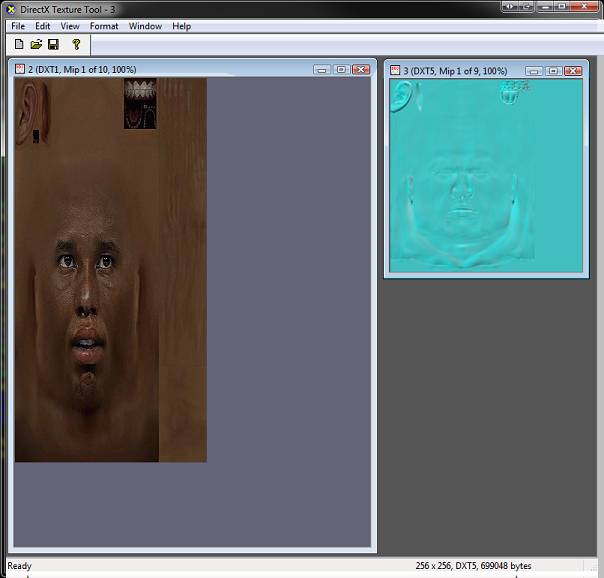
hi again...

I use the Danilo code but have a problem

in some faces only extract the face bump

Image

i try use the code of infratec but have problems too, in some face don't extract the dds file.


here is one of the many face i have tried and result is bump face.

http://www.mediafire.com/?p77zig4arcii0bf

i have use Devil wrapper to convert dds to png but the problem is the file dds extract with zlib code.

Danilo or infratec can you help me to correct this??

thanks...
infratec
Always Here
Always Here
Posts: 7836
Joined: Sun Sep 07, 2008 12:45 pm
Location: Germany

Re: How to search image files in bin file.

Post by infratec »

Hi moob,

I modified my listing from the first page.

The filename offset in this file is $FFFFFFF0 and not $FFFFFFFF.
But still it is not a valid offset for a own fielname.

Bernd
moob
User
User
Posts: 68
Joined: Mon Aug 01, 2011 6:16 pm

Re: How to search image files in bin file.

Post by moob »

infratec wrote:Hi moob,

I modified my listing from the first page.

The filename offset in this file is $FFFFFFF0 and not $FFFFFFFF.
But still it is not a valid offset for a own fielname.

Bernd
hi, infratec

i will test and post and i give you an an answer.


thanks infratec

edit:
----------------------------------------

infratec work well with the new face i put here, i will teste with more files.


infratec thanks you very much.
infratec
Always Here
Always Here
Posts: 7836
Joined: Sun Sep 07, 2008 12:45 pm
Location: Germany

Re: How to search image files in bin file.

Post by infratec »

Hi moob,

you are welcome.

Btw. the other files are KTMDL files. I know that these are 3D modells.
Do you know a program to view or convert them ?

Bernd
moob
User
User
Posts: 68
Joined: Mon Aug 01, 2011 6:16 pm

Re: How to search image files in bin file.

Post by moob »

infratec wrote:Hi moob,

you are welcome.

Btw. the other files are KTMDL files. I know that these are 3D modells.
Do you know a program to view or convert them ?

Bernd

Yes infratec i sent one PM

and i have one new problem with another face crash my application :(

if one face don't have the bump file, use this code crash.

the faces is here if anyone can help.

http://www.mediafire.com/?g4epqq333syc1g4

infratec if i try extract dds with your code on this face crash, but if i use the Danilo code not crash and extract.

So i need adapt the code to extract dds file on faces with bump file and without bump file.

but i don't have purebasic skills enought. :(

Thank you for help me :D
infratec
Always Here
Always Here
Posts: 7836
Joined: Sun Sep 07, 2008 12:45 pm
Location: Germany

Re: How to search image files in bin file.

Post by infratec »

Hi moob,

again a problem with the filename offset.
I hope I managed this now for all cases (l changed my first listing).
I check now if the fileofsset is larger than the file.
This should work in any cases :D

Bernd
moob
User
User
Posts: 68
Joined: Mon Aug 01, 2011 6:16 pm

Re: How to search image files in bin file.

Post by moob »

infratec wrote:Hi moob,

again a problem with the filename offset.
I hope I managed this now for all cases (l changed my first listing).
I check now if the fileofsset is larger than the file.
This should work in any cases :D

Bernd
thanks infratec...

i will try :D
Post Reply