ProGUI V3 Alpha 4 Ready for testing!
Posted: Mon Jul 01, 2024 8:51 pm
Hi Guys! Alpha 4 ready for testing! API is now 382 commands!
Lot's of new stuff with the most important feature (after many months of work), full window skinning! (which is the default when a window is created). Currently the WIP Windows 11 skin is hard coded to be the default used regardless of whether running on Windows 10 or 11.
https://www.progui.co.uk/downloads/ProGUI_V3_Alpha4.zip
"preliminary" docs here https://www.progui.co.uk/downloads/testhelp/index.html (This is a little out-of-date and I'll be updating soon)
Most source code examples should work, you might have to change "WindowShow(MyWindow, #True, #PG_Window_ScreenCentered)" to "WindowShow(MyWindow, #True, #PG_WindowShow_ScreenCentered).
Alpha 4
Alpha 3
New CSS style borders (with CreateBorder command) as well as Image borders (CreateBorderImg) and borders are now integrated into Widgets with WidgetSetBorder.
Also new Widget caching system which should improve rendering performance quite a bit! (the cache memory management is placeholder at the moment and still needs a bit of work however)
Take a look at the 'test_updateLayout.pb' example to see the new borders.
New commands:
Alpha 2.1
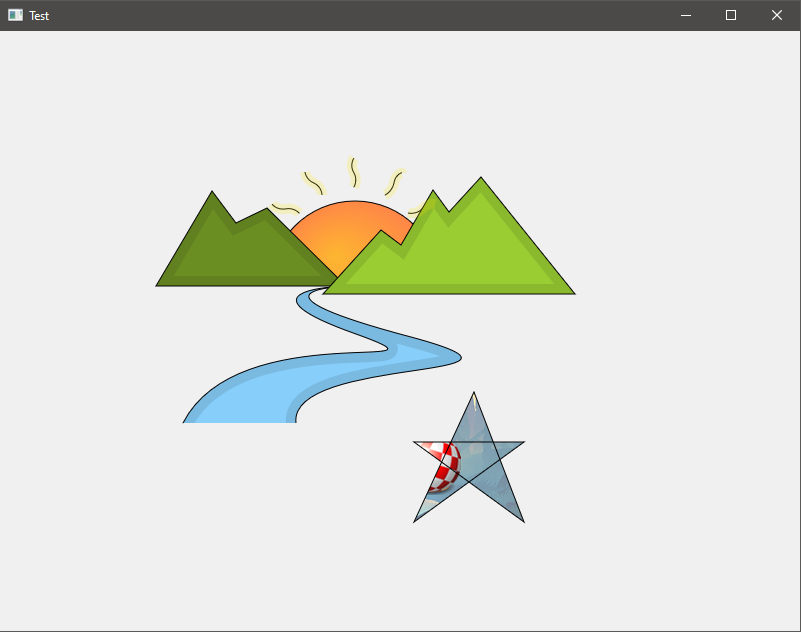
New vector drawing path commands:
test_path.pb:
https://www.youtube.com/shorts/6hz-ESyDErU
Alpha 2
Quite a few bug fixes, the GFX API has been fleshed out massively and the API has been simplified greatly for dealing with Layouts and Widgets (now using Getters/Setters instead of LayoutSetProperty/LayoutItemSetProperty).
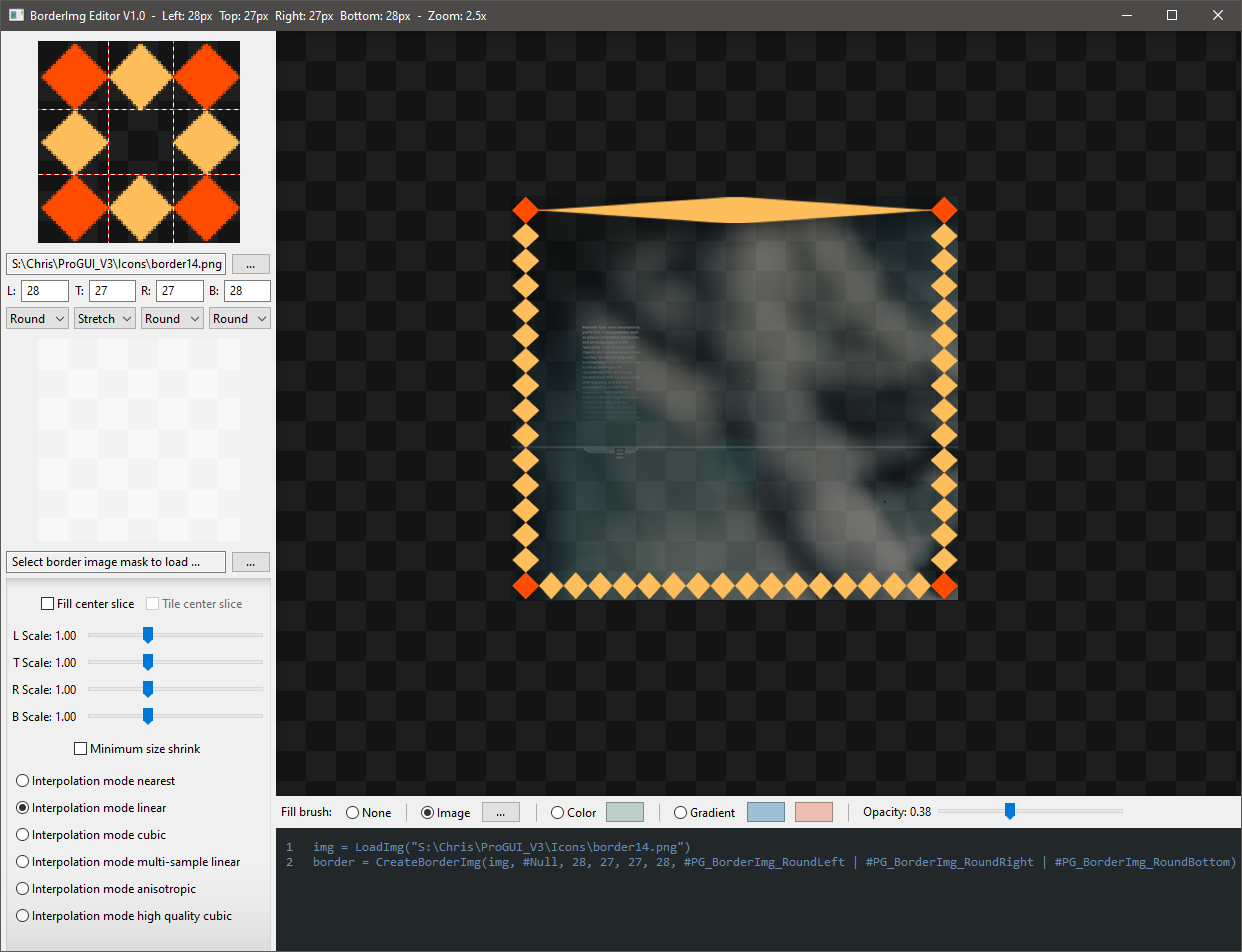
Also brand new BorderImgEditor tool with complete source (showcases how to create an app from scratch and how to incorporate a hybrid of PureBasic gadgets and ProGUI widgets). It's worth noting that this is a DirectX 11 window, all of the PureBasic gadget (Win32 Common control) rendering is diverted directly onto Direct2D bitmaps using some low level API hooks (this applies to all ProGUI windows and is automatic, some benefits are alpha composition with layers and alpha masking - this also applies to the WebView2 widget).
https://www.youtube.com/watch?v=kz6yhsJMPUk
Please bare in mind this is still alpha - there will be bugs, parts of the API missing / needs fleshing out etc..
Currently "preliminary" docs here https://www.progui.co.uk/downloads/testhelp/index.html (This is a little out-of-date and I'll be updating soon) Most source code examples should work, you might have to change "WindowShow(MyWindow, #True, #PG_Window_ScreenCentered)" to "WindowShow(MyWindow, #True, #PG_WindowShow_ScreenCentered). Also take a look at the 'ProGUI_pb.pbi' for constants and commands as well as the test examples (which are a bit rough and ready at the moment). But yep have a mess around with the examples (try uncommenting various bits) and have fun!
Core features implemented:
* Cross platform, currently Windows and Linux (although the Linux code is a little behind at the moment).
* Unified GFX API - DirectX 11/ Direct2D / DirectWrite on Windows and Cairo / Pango on Linux.
* Automatic per monitor DPI scaling using Device Independant Pixels.
* Advanced layout engines including Basic, Flex and Grid which can handle updating tens of thousands of items without breaking a sweat.
* Overflow and dynamic bucket system for virtual scrolling in layouts.
* Event handler engine that can be easily subclassed with many handlers per event.
* Animation with all rendering synced to the animation and render threads.
* Easily create custom widgets using the GFX API.
Windows specific features:
* Super fast rendering and glitch-free window resizing with direct integration with the Desktop Window Manager.
* Diverted rendering of all Win32 common controls (also includes PB Canvas and Scintilla) directly onto the Direct2D bitmaps (including UXTheme animation), allowing alpha transparency and masking.
* Native WebView2 widget with rendering diverted directly onto the Direct2D bitmaps.
Layout features:
All layouts support padding and item margins along with overflow and scrolling.
Layouts support automatic 'fit-to-content' and can be nested.
Commands (382):
Constants:
Cheers!
Chris.
Lot's of new stuff with the most important feature (after many months of work), full window skinning! (which is the default when a window is created). Currently the WIP Windows 11 skin is hard coded to be the default used regardless of whether running on Windows 10 or 11.
https://www.progui.co.uk/downloads/ProGUI_V3_Alpha4.zip
"preliminary" docs here https://www.progui.co.uk/downloads/testhelp/index.html (This is a little out-of-date and I'll be updating soon)
Most source code examples should work, you might have to change "WindowShow(MyWindow, #True, #PG_Window_ScreenCentered)" to "WindowShow(MyWindow, #True, #PG_WindowShow_ScreenCentered).
Alpha 4
Code: Select all
StopAnimation(Object, ID, Flags = #Null) -> new #PG_Animation_Kill and #PG_Any for ID
WidgetFree -> FreeWidget
FreeLayout
FreeWindow
WidgetSetLayout -> updated
WindowSetLayout
LayoutInsertWidget
WidgetGetLayoutIndex
WidgetGetParentLayout
WidgetGetParentWidget
LayoutGetParentWindow
LayoutGetParentWidget
LayoutGetParentLayout
SaveImg
LoadImg -> upgraded to handle multiple altSize imgs in path and snaptosize
dark theme for scrollbars
CreateText uses default system font and point size if not specified
TextSetFontName
TextSetPointSize
DrawSkinText
New root CSS class
CSS engine now supports inheritence with "inherit" keyword for property value
CSS engine automatically inherits font and text properties
CSS engine now supports individual widget styling by name/id (#myWidgetName) as well as class with missing properties inherited from the class if set
DrawImgShadow
DrawImgShadowEx
DrawImgShadowInset
DrawImgShadowInsetEx
DrawSkinBoxShadow
CSS "box-shadow" property now working complete with animation transitions, additional none standard CSS flags "inside" (shadow is rendered from inside the border radius), "outside" (shadow is rendered from the outside border radius), "background" (inset shadow is rendered on top of the background), "above" (inset shadow is rendered on top of the draw event rendering), "infront" (inset shadow is rendered on top of all widgets in the widget's layout), "ontop" (inset shadow is rendered on top of widgets and scrollbars)
Widgets now handle rendering the skin background and box-shadow automatically (as well as borders) so a draw event handler isn't always needed (only for rendering specific parts/elements inside the widget).
DrawBorder now has extra #PG_DrawBorder_MaskInside, #PG_DrawBorder_MaskOutside flags
CreateButton
LayoutSetScrollBarOverflow
LayoutGetScrollBarOverflow
CreateTitleBar
Windows are now fully skinned by default, #PG_Window_System in creation flags - uses a OS system window instead
CreateWindow - changed, removed flags and added new
WindowShow - renamed flags and added minimize / maximize
New widget flags #PG_Widget_DragWindow, #PG_Widget_NoSkinRender, #PG_Widget_NoBorder, #PG_Widget_NoSkinOutsetShadow, #PG_Widget_NoSkinBackground, #PG_Widget_NoSkinInsetShadow, #PG_Widget_NoSkinBorder
WindowGetX, WindowGetY changed (added #PG_Window_IncludeSkinDropShadow flag)
added border-mask css property with mask-inner/mask-outer and border shorthand
Skins support global variables with var(someglobalvar)
SkinSetGlobalVariable()
Window events can now be added to a widget as well as a window
Added #PG_Event_WindowActivate, #PG_Event_WindowDeactivate events
Added ImgGetContentBounds(), ImgTrim()
Added #PG_Img_Trim flag to LoadImg()
LoadImg() can now have "trim" as well as "snaptosize" commands in img path
Added #PG_Img_SnaptToDpi flag to LoadImg(), ImgSetProperty() and as command in img path.
ImgAddSize() now has optional DPI parameter.
'trim', 'snaptosize' and 'snaptodpi' commands work with CSS "url" command.
Skinned window titlebar text now working, with WindowSetTitle() and TitleBarSetTitle().
Fixed, changed CreateText() correctly uses point size for FontSize by default, added optional isFontSizeDIP param to use DIP pixels instead of point.
Changed TextSetPointSize() to TextSetFontSize() correctly uses point size for FontSize by default, added optional isFontSizeDIP param to use DIP pixels instead of point.
Improved quality of text rendering with premultiplied greyscale alpha to match Windows with internal CreateGdiCompatibleTextLayout and DWRITE_RENDERING_MODE_GDI_CLASSIC.
Added #PG_Widget_NoCache flag to CreateWidget() disables full widget bitmap caching for that widget (if it doesn't have a complex border i.e rounded corners).
New dynamic DirectComposition GPU commit wait for double buffered window resizing with roughly 2x rendering performance increase.
Added LoadImgResource()
Added 'exe-icon' path to CSS url() function to display exe app icon.
New CSS style borders (with CreateBorder command) as well as Image borders (CreateBorderImg) and borders are now integrated into Widgets with WidgetSetBorder.
Also new Widget caching system which should improve rendering performance quite a bit! (the cache memory management is placeholder at the moment and still needs a bit of work however)
Take a look at the 'test_updateLayout.pb' example to see the new borders.
New commands:
Code: Select all
DrawGetStroke.f(*Flags.Integer = #Null, *DashStartOffset.Float = #Null)
BrushSetDpiScaling(Brush, isEnabled.b)
BrushGetDpiScaling(Brush)
BorderSetDpiScaling(Border, isEnabled.b)
BorderGetDpiScaling(Border)
CreateBorder(StyleFlags = #Null, Width.d = 3, CornerRadius = #Null, Color = #PG_Ignore, Opacity.f = 1)
BorderSetFlags(Border, Flags)
BorderGetFlags(Border)
BorderSetWidth(Border, LeftWidth.d, TopWidth.d, RightWidth.d, BottomWidth.d)
BorderGetWidth.d(Border, *LeftWidth.Double = #Null, *TopWidth.Double = #Null, *RightWidth.Double = #Null, *BottomWidth.Double = #Null)
BorderSetColor(Border, LeftColor.l, LeftOpacity.f, TopColor.l, TopOpacity.f, RightColor.l, RightOpacity.f, BottomColor.l, BottomOpacity.f)
BorderGetColor.l(Border, *LeftColor.Long = #Null, *LeftOpacity.Float = #Null, *TopColor.Long = #Null, *TopOpacity.Float = #Null, *RightColor.Long = #Null, *RightOpacity.Float = #Null, *BottomColor.Long = #Null, *BottomOpacity.Float = #Null)
BorderSetRadius(Border, TopLeftRx.d, TopLeftRy.d, TopRightRx.d, TopRightRy.d, BottomLeftRx.d, BottomLeftRy.d, BottomRightRx.d, BottomRightRy.d)
BorderGetRadius.d(Border, *TopLeftRx.Double = #Null, *TopLeftRy.Double = #Null, *TopRightRx.Double = #Null, *TopRightRy.Double = #Null, *BottomLeftRx.Double = #Null, *BottomLeftRy.Double = #Null, *BottomRightRx.Double = #Null, *BottomRightRy.Double = #Null)
DrawSetAntialias(Mode.i)
DrawGetAntialias()
DrawSetBlendMode(Mode.i)
DrawGetBlendMode()
WidgetSetName(Widget, Name.s)
WidgetSetBorder(Widget, Border)
WidgetSetOpacity(Widget, Opacity.f)
WidgetGetOpacity.f(Widget)
CreateImg(Width, Height, BackgroundColor = #PG_Img_Transparent, PixelFormat = #PG_Img_Format_BGRA32)
New vector drawing path commands:
Code: Select all
PathMoveTo(x.d, y.d, Flags = #Null)
PathAddLine(x.d, y.d, Flags = #Null)
PathAddCurve(x1.d, y1.d, x2.d, y2.d, x3.d, y3.d, Flags = #Null)
PathAddArc(x.d, y.d, rx.d, ry.d, rotationAngle.d = 0, isSweepClockwise.b = #True, isLargeArc.b = #False)
PathClose()
PathReset()
PathGetCursorX()
PathGetCursorY()
DrawPath(Color.l, Opacity.f = 1, Flags = #Null)
DrawPathFill(Brush, Flags = #Null)
DrawPathStroke(Color.l, Opacity.f = 1, Flags = #Null)
DrawPathStrokeFill(Brush, Flags = #Null)
DrawSave()
DrawRestore()
BeginClipPath(Flags = #Null)
EndClip()
https://www.youtube.com/shorts/6hz-ESyDErU
Alpha 2
Quite a few bug fixes, the GFX API has been fleshed out massively and the API has been simplified greatly for dealing with Layouts and Widgets (now using Getters/Setters instead of LayoutSetProperty/LayoutItemSetProperty).
Also brand new BorderImgEditor tool with complete source (showcases how to create an app from scratch and how to incorporate a hybrid of PureBasic gadgets and ProGUI widgets). It's worth noting that this is a DirectX 11 window, all of the PureBasic gadget (Win32 Common control) rendering is diverted directly onto Direct2D bitmaps using some low level API hooks (this applies to all ProGUI windows and is automatic, some benefits are alpha composition with layers and alpha masking - this also applies to the WebView2 widget).
https://www.youtube.com/watch?v=kz6yhsJMPUk
Please bare in mind this is still alpha - there will be bugs, parts of the API missing / needs fleshing out etc..
Currently "preliminary" docs here https://www.progui.co.uk/downloads/testhelp/index.html (This is a little out-of-date and I'll be updating soon) Most source code examples should work, you might have to change "WindowShow(MyWindow, #True, #PG_Window_ScreenCentered)" to "WindowShow(MyWindow, #True, #PG_WindowShow_ScreenCentered). Also take a look at the 'ProGUI_pb.pbi' for constants and commands as well as the test examples (which are a bit rough and ready at the moment). But yep have a mess around with the examples (try uncommenting various bits) and have fun!
Core features implemented:
* Cross platform, currently Windows and Linux (although the Linux code is a little behind at the moment).
* Unified GFX API - DirectX 11/ Direct2D / DirectWrite on Windows and Cairo / Pango on Linux.
* Automatic per monitor DPI scaling using Device Independant Pixels.
* Advanced layout engines including Basic, Flex and Grid which can handle updating tens of thousands of items without breaking a sweat.
* Overflow and dynamic bucket system for virtual scrolling in layouts.
* Event handler engine that can be easily subclassed with many handlers per event.
* Animation with all rendering synced to the animation and render threads.
* Easily create custom widgets using the GFX API.
Windows specific features:
* Super fast rendering and glitch-free window resizing with direct integration with the Desktop Window Manager.
* Diverted rendering of all Win32 common controls (also includes PB Canvas and Scintilla) directly onto the Direct2D bitmaps (including UXTheme animation), allowing alpha transparency and masking.
* Native WebView2 widget with rendering diverted directly onto the Direct2D bitmaps.
Layout features:
All layouts support padding and item margins along with overflow and scrolling.
Layouts support automatic 'fit-to-content' and can be nested.
Commands (382):
Code: Select all
DispatchEvent(Object, EventType, *EventData = #Null)
AddEventHandler(Object, EventType, *Callback, *UserData = #Null)
AlphaBlendColor(Color1 , Color2 , Alpha)
GetGFXDriver()
CreateImg(Width, Height, BackgroundColor = #PG_Img_Transparent, PixelFormat = #PG_Img_Format_BGRA32)
LoadImg(Path.s, Flags = #Null)
LoadImgResource(Path.s, *lpName, *lpType, Flags = #Null)
SaveImg(Img, Path.s, ImgSaveFormat = #PG_Img_Save_PNG, Flags = #Null)
ImgGetWidth(Img)
ImgGetHeight(Img)
ImgGetContentBounds(Img, *Bounds.RECT)
ImgAddSize(Img, SrcImg, DPI = #Null)
ImgSetProperty(Img, Property, Value)
ImgSetInterpolationMode(Img, InterpolationMode)
ImgGetInterpolationMode(Img)
OutputImg(Img, DPI_X = #Null, DPI_Y = #Null)
BeginDraw(Output)
EndDraw()
DrawSave()
DrawRestore()
DrawDPI(DPI_X, DPI_Y = #Null)
DrawGetDPI(*DPI_Y.Integer = #Null)
DrawGetDPIScaleX.d()
DrawGetDPIScaleY.d()
DrawSetAntialias(Mode.i)
DrawGetAntialias()
DrawSetBlendMode(Mode.i)
DrawGetBlendMode()
BeginLayer(x.d, y.d, Width.d, Height.d, Opacity.f = 1, OpacityBrush = #Null, Border = #Null)
EndLayer()
BeginClipBox(x.d, y.d, Width.d, Height.d)
BeginClipPath(Flags = #Null)
EndClip()
CreateBrushImg(Img)
CreateBrushGradientLinear(StartX.d, StartY.d, EndX.d, EndY.d, StartColor.l, StartOpacity.f, EndColor.l, EndOpacity.f, StartPosition.f = 0, EndPosition.f = 1)
CreateBrushGradientLinearEx(StartX.d, StartY.d, EndX.d, EndY.d, *gradientStops.PG_GradientStop, gradientStopCount.i)
CreateBrushGradientRadial(CenterX.d, CenterY.d, OriginOffsetX.d, OriginOffsetY.d, RadiusX.d, RadiusY.d, StartColor.l, StartOpacity.f, EndColor.l, EndOpacity.f, StartPosition.f = 0, EndPosition.f = 1)
CreateBrushGradientRadialEx(CenterX.d, CenterY.d, OriginOffsetX.d, OriginOffsetY.d, RadiusX.d, RadiusY.d, *gradientStops.PG_GradientStop, gradientStopCount.i)
BrushGradientAddColor(Brush, Position.f, Color.l, Opacity.f)
BrushGradientLinearSetPoints(Brush, StartX.d, StartY.d, EndX.d, EndY.d)
BrushGradientRadialSetPoints(Brush, CenterX.d, CenterY.d, OriginOffsetX.d, OriginOffsetY.d, RadiusX.d, RadiusY.d)
BrushSetPosition(Brush, x.d, y.d)
BrushSetScale(Brush, ScaleX.d, ScaleY.d, CenterPx.d = 0, CenterPy.d = 0)
BrushSetRotation(Brush, Rotation.d, CenterPx.d, CenterPy.d)
BrushSetOpacity(Brush, Opacity.f)
BrushSetExtendMode(Brush, ExtendModeX, ExtendModeY)
BrushSetInterpolationMode(Brush, InterpolationMode)
BrushGetInterpolationMode(Brush)
BrushSetDpiScaling(Brush, isEnabled.b)
BrushGetDpiScaling(Brush)
BrushReset(Brush)
BrushSetImg(Brush, Img)
FreeBrush(Brush)
CreateBorder(StyleFlags = #Null, Width.d = 3, CornerRadius = #Null, Color = #PG_Ignore, Opacity.f = 1) ; Creates a border
CreateBorderImg(Img, ImgMask, LeftEdgeOffset, TopEdgeOffset, RightEdgeOffset, BottomEdgeOffset, Flags = #Null) ; Creates an Img border
BorderImgSetSlices(Border, LeftEdgeOffset, TopEdgeOffset, RightEdgeOffset, BottomEdgeOffset)
BorderImgGetSlices(Border, *LeftEdgeOffset.Integer, *TopEdgeOffset.Integer = #Null, *RightEdgeOffset.Integer = #Null, *BottomEdgeOffset.Integer = #Null)
BorderImgSetWidth(Border, leftScaleFactor.d, topScaleFactor.d = #PG_Ignore, rightScaleFactor.d = #PG_Ignore, bottomScaleFactor.d = #PG_Ignore)
BorderImgGetWidth.d(Border, *leftScaleFactor.Double, *topScaleFactor.Double = #Null, *rightScaleFactor.Double = #Null, *bottomScaleFactor.Double = #Null)
BorderImgSetFlags(Border, Flags)
BorderImgGetFlags(Border)
BorderImgSetInterpolationMode(Border, InterpolationMode)
BorderImgGetInterpolationMode(Border)
BorderSetDpiScaling(Border, isEnabled.b)
BorderGetDpiScaling(Border)
BorderSetFlags(Border, Flags)
BorderGetFlags(Border)
BorderSetWidth(Border, LeftWidth.d, TopWidth.d, RightWidth.d, BottomWidth.d)
BorderGetWidth.d(Border, *LeftWidth.Double = #Null, *TopWidth.Double = #Null, *RightWidth.Double = #Null, *BottomWidth.Double = #Null)
BorderSetColor(Border, LeftColor.l, LeftOpacity.f, TopColor.l, TopOpacity.f, RightColor.l, RightOpacity.f, BottomColor.l, BottomOpacity.f)
BorderGetColor.l(Border, *LeftColor.Long = #Null, *LeftOpacity.Float = #Null, *TopColor.Long = #Null, *TopOpacity.Float = #Null, *RightColor.Long = #Null, *RightOpacity.Float = #Null, *BottomColor.Long = #Null, *BottomOpacity.Float = #Null)
BorderSetRadius(Border, TopLeftRx.d, TopLeftRy.d, TopRightRx.d, TopRightRy.d, BottomLeftRx.d, BottomLeftRy.d, BottomRightRx.d, BottomRightRy.d)
BorderGetRadius.d(Border, *TopLeftRx.Double = #Null, *TopLeftRy.Double = #Null, *TopRightRx.Double = #Null, *TopRightRy.Double = #Null, *BottomLeftRx.Double = #Null, *BottomLeftRy.Double = #Null, *BottomRightRx.Double = #Null, *BottomRightRy.Double = #Null)
FreeBorder(Border)
DrawClear(Color = 0, Opacity.f = 0)
PathMoveTo(x.d, y.d, Flags = #Null)
PathAddLine(x.d, y.d, Flags = #Null)
PathAddCurve(x1.d, y1.d, x2.d, y2.d, x3.d, y3.d, Flags = #Null)
PathAddArc(x.d, y.d, rx.d, ry.d, rotationAngle.d = 0, isSweepClockwise.b = #True, isLargeArc.b = #False)
PathClose()
PathReset()
PathGetCursorX.d()
PathGetCursorY.d()
DrawPath(Color.l, Opacity.f = 1, Flags = #Null)
DrawPathFill(Brush, Flags = #Null)
DrawPathStroke(Color.l, Opacity.f = 1, Flags = #Null)
DrawPathStrokeFill(Brush, Flags = #Null)
DrawSetStroke(Width.f, Flags = #Null, DashStartOffset.f = 0)
DrawGetStroke.f(*Flags.Integer = #Null, *DashStartOffset.Float = #Null)
DrawSetStrokeCustom(*CustomDashArray.FLOAT, CustomDashArrayCount)
DrawSetStrokeMiterLimit(MiterLimit.f)
DrawImg(Img, x.d, y.d, Width.d = #PG_Ignore, Height.d = #PG_Ignore, Opacity.f = 1, Frame.i = #Null)
DrawImgEx(Img, x.d, y.d, Width.d, Height.d, dx.d, dy.d, dWidth.d, dHeight.d, Opacity.f)
DrawImgShadow(Img, x.d, y.d, Width.d = #PG_Ignore, Height.d = #PG_Ignore, BlurAmount.f = 10, Spread.f = 0, ShadowColor.l = 0, ShadowOpacity.f = 1, xOffset.d = 0, yOffset.d = 0, isHollow = #False)
DrawImgShadowEx(Img, x.d, y.d, Width.d, Height.d, dx.d, dy.d, dWidth.d, dHeight.d, BlurAmount.f = 10, Spread.f = 0, ShadowColor.l = 0, ShadowOpacity.f = 1, xOffset.d = 0, yOffset.d = 0, isHollow = #False)
DrawImgShadowInset(Img, x.d, y.d, Width.d = #PG_Ignore, Height.d = #PG_Ignore, BlurAmount.f = 10, Spread.f = 0, ShadowColor.l = 0, ShadowOpacity.f = 1, xOffset.d = 0, yOffset.d = 0)
DrawImgShadowInsetEx(Img, x.d, y.d, Width.d, Height.d, dx.d, dy.d, dWidth.d, dHeight.d, BlurAmount.f = 10, Spread.f = 0, ShadowColor.l = 0, ShadowOpacity.f = 1, xOffset.d = 0, yOffset.d = 0)
DrawBorder(Border, x.d, y.d, Width.d, Height.d, Opacity.f = 1, FillBrush = #Null, Flags = #Null)
DrawLine(x1.d, y1.d, x2.d, y2.d, Color.l, Opacity.f = 1)
DrawLineFill(x1.d, y1.d, x2.d, y2.d, Brush)
DrawBox(x.d, y.d, Width.d, Height.d, Color.l = 0, Opacity.f = 1)
DrawBoxFill(x.d, y.d, Width.d, Height.d, Brush, OpacityBrush = #Null)
DrawBoxStroke(x.d, y.d, Width.d, Height.d, Color.l, Opacity.f = 1)
DrawBoxStrokeFill(x.d, y.d, Width.d, Height.d, Brush)
DrawRoundBox(x.d, y.d, Width.d, Height.d, RadiusX.d, RadiusY.d, Color.l, Opacity.f = 1, NoRadiusDPIScaling.b = #False)
DrawRoundBoxFill(x.d, y.d, Width.d, Height.d, RadiusX.d, RadiusY.d, Brush, NoRadiusDPIScaling.b = #False)
DrawRoundBoxStroke(x.d, y.d, Width.d, Height.d, RadiusX.d, RadiusY.d, Color.l, Opacity.f = 1, NoRadiusDPIScaling.b = #False)
DrawRoundBoxStrokeFill(x.d, y.d, Width.d, Height.d, RadiusX.d, RadiusY.d, Brush, NoRadiusDPIScaling.b = #False)
DrawEllipse(x.d, y.d, RadiusX.d, RadiusY.d, Color.l, Opacity.f = 1)
DrawEllipseFill(x.d, y.d, RadiusX.d, RadiusY.d, Brush)
DrawEllipseStroke(x.d, y.d, RadiusX.d, RadiusY.d, Color.l, Opacity.f = 1)
DrawEllipseStrokeFill(x.d, y.d, RadiusX.d, RadiusY.d, Brush)
DrawTxt(Text.i, x.d, y.d, Color.l, Opacity.f = 1)
DrawTxtFill(Text.i, x.d, y.d, Brush)
ImgGrab(Img, x, y, Width, Height)
ImgTrim(Img)
FreeImg(Img)
CreateText(Content.s, FontName.s = "", FontSize.d = #Null, LayoutWidth.d = #Null, LayoutHeight.d = #Null, isFontSizeDIP.b = #False)
TextSetRenderMode(Text, RenderMode)
TextSetContent(Text, Content.s)
TextSetFontName(Text, FontName.s = "")
TextSetFontSize(Text, FontSize.d = #Null, isFontSizeDIP.b = #False)
TextSetJustify(Text, Justify)
TextSetAlign(Text, Align)
TextSetWeight(Text, Weight)
TextSetStyle(Text, Style)
TextSetUnderline(Text, IsUnderline.b)
TextSetStrikethrough(Text, IsStrikethrough.b)
TextSetWrap(Text, Wrap)
TextSetTrimming(Text, Trimming, Delimiter = #Null, DelimiterCount = #Null)
TextSetWidth(Text, LayoutWidth.d)
TextGetWidth.d(Text, ReturnLayoutWidth.b = #False)
TextSetHeight(Text, LayoutHeight.d)
TextGetHeight.d(Text, ReturnLayoutHeight.b = #False)
FreeText(Text)
CreateLayout(LayoutType = #PG_Layout_Type_Basic)
FreeLayout(Layout)
LayoutGetCurrent()
LayoutSetCurrent(Layout)
LayoutPush()
LayoutPop()
LayoutSetType(Layout, LayoutType, Flags = #Null)
LayoutGetType(Layout)
LayoutGetParentWindow(Layout = #Null)
LayoutGetParentWidget(Layout = #Null)
LayoutGetParentLayout(Layout = #Null)
LayoutInsertWidget(Layout, Widget, Index = #PG_Last, Flags = #Null)
LayoutSetScrollBarOverflow(Layout, Flags = #Null)
LayoutGetScrollBarOverflow(Layout)
LayoutGetScrollOffsetX.d(Layout)
LayoutGetScrollOffsetY.d(Layout)
LayoutSetPadding(Layout, Padding)
LayoutGetPadding(Layout, *PaddingLeft.Integer = #Null, *PaddingTop.Integer = #Null, *PaddingRight.Integer = #Null, *PaddingBottom.Integer = #Null)
LayoutSetPaddingLeft(Layout, Padding)
LayoutGetPaddingLeft(Layout)
LayoutSetPaddingTop(Layout, Padding)
LayoutGetPaddingTop(Layout)
LayoutSetPaddingRight(Layout, Padding)
LayoutGetPaddingRight(Layout)
LayoutSetPaddingBottom(Layout, Padding)
LayoutGetPaddingBottom(Layout)
LayoutFlexSetDirection(Layout, Direction)
LayoutFlexGetDirection(Layout)
LayoutFlexSetWrap(Layout, Wrap)
LayoutFlexGetWrap(Layout)
LayoutFlexSetJustify(Layout, Justify)
LayoutFlexGetJustify(Layout)
LayoutFlexSetAlignItems(Layout, AlignItems)
LayoutFlexGetAlignItems(Layout)
LayoutFlexSetAlignContent(Layout, AlignContent)
LayoutFlexGetAlignContent(Layout)
LayoutGridSetFlow(Layout, Flow)
LayoutGridGetFlow(Layout)
LayoutGridSetColumn(Layout, Index = #Null, Size.d = #PG_Grid_Default, isPercent.b = #False)
LayoutGridGetColumn.d(Layout, Index, *isPercent.Integer = #Null)
LayoutGridGetColumnCount(Layout)
LayoutGridSetColumnMin(Layout, Index = #Null, Size.d = #PG_Grid_Default)
LayoutGridGetColumnMin.d(Layout, Index)
LayoutGridSetColumnMax(Layout, Index = #Null, Size.d = #PG_Grid_Default)
LayoutGridGetColumnMax.d(Layout, Index)
LayoutGridSetRow(Layout, Index = #Null, Size.d = #PG_Grid_Default, isPercent.b = #False)
LayoutGridGetRow.d(Layout, Index, *isPercent.Integer = #Null)
LayoutGridGetRowCount(Layout) ;- !!!! needs looking at
LayoutGridSetRowMin(Layout, Index = #Null, Size.d = #PG_Grid_Default)
LayoutGridGetRowMin.d(Layout, Index)
LayoutGridSetRowMax(Layout, Index = #Null, Size.d = #PG_Grid_Default)
LayoutGridGetRowMax.d(Layout, Index)
LayoutGridSetGapSize(Layout, Size.d)
LayoutGridGetGapSize(Layout, *Columns.Integer = #Null, *Rows.Integer = #Null)
LayoutGridSetGapSizeColumns(Layout, Size.d)
LayoutGridGetGapSizeColumns(Layout)
LayoutGridSetGapSizeRows(Layout, Size.d)
LayoutGridGetGapSizeRows(Layout)
LayoutGridSetSpanMode(Layout, SpanMode)
LayoutGridGetSpanMode(Layout, *Columns.Integer = #Null, *Rows.Integer = #Null)
LayoutGridSetSpanModeColumns(Layout, SpanMode)
LayoutGridGetSpanModeColumns(Layout)
LayoutGridSetSpanModeRows(Layout, SpanMode)
LayoutGridGetSpanModeRows(Layout)
LayoutGridSetJustifyContent(Layout, JustifyContent)
LayoutGridGetJustifyContent(Layout)
LayoutGridSetAlignContent(Layout, AlignContent)
LayoutGridGetAlignContent(Layout)
LayoutGridSetJustifyItems(Layout, JustifyItems)
LayoutGridGetJustifyItems(Layout)
LayoutGridSetAlignItems(Layout, AlignItems)
LayoutGridGetAlignItems(Layout)
LayoutGridSetColumnDefault(Layout, Size.d, isPercent.b = #False)
LayoutGridGetColumnDefault.d(Layout, *isPercent.Integer = #Null)
LayoutGridSetColumnMinDefault(Layout, Size.d)
LayoutGridGetColumnMinDefault.d(Layout)
LayoutGridSetColumnMaxDefault(Layout, Size.d)
LayoutGridGetColumnMaxDefault.d(Layout)
LayoutGridSetRowDefault(Layout, Size.d, isPercent.b = #False)
LayoutGridGetRowDefault.d(Layout, *isPercent.Integer = #Null)
LayoutGridSetRowMinDefault(Layout, Size.d)
LayoutGridGetRowMinDefault.d(Layout)
LayoutGridSetRowMaxDefault(Layout, Size.d)
LayoutGridGetRowMaxDefault.d(Layout)
Transition_CubicBezier.d(t.d, b.d, c.d, d.d, P1x.d, P1y.d, P2x.d, P2y.d)
Transition_Linear.d(t.d, b.d, c.d, d.d)
Transition_Ease.d(t.d, b.d, c.d, d.d)
Transition_EaseIn.d(t.d, b.d, c.d, d.d)
Transition_EaseOut.d(t.d, b.d, c.d, d.d)
Transition_EaseInOut.d(t.d, b.d, c.d, d.d)
Transition_EaseInQuad.d(t.d, b.d, c.d, d.d)
Transition_EaseOutQuad.d(t.d, b.d, c.d, d.d)
Transition_EaseInOutQuad.d(t.d, b.d, c.d, d.d)
Transition_EaseOutInQuad.d(t.d, b.d, c.d, d.d)
Transition_EaseInCubic.d(t.d, b.d, c.d, d.d)
Transition_EaseOutCubic.d(t.d, b.d, c.d, d.d)
Transition_EaseInOutCubic.d(t.d, b.d, c.d, d.d)
Transition_EaseOutInCubic.d(t.d, b.d, c.d, d.d)
Transition_EaseInQuart.d(t.d, b.d, c.d, d.d)
Transition_EaseOutQuart.d(t.d, b.d, c.d, d.d)
Transition_EaseInOutQuart.d(t.d, b.d, c.d, d.d)
Transition_EaseOutInQuart.d(t.d, b.d, c.d, d.d)
Transition_EaseInQuint.d(t.d, b.d, c.d, d.d)
Transition_EaseOutQuint.d(t.d, b.d, c.d, d.d)
Transition_EaseInOutQuint.d(t.d, b.d, c.d, d.d)
Transition_EaseOutInQuint.d(t.d, b.d, c.d, d.d)
Transition_EaseInSine.d(t.d, b.d, c.d, d.d)
Transition_EaseOutSine.d(t.d, b.d, c.d, d.d)
Transition_EaseInOutSine.d(t.d, b.d, c.d, d.d)
Transition_EaseOutInSine.d(t.d, b.d, c.d, d.d)
Transition_EaseInExpo.d(t.d, b.d, c.d, d.d)
Transition_EaseOutExpo.d(t.d, b.d, c.d, d.d)
Transition_EaseInOutExpo.d(t.d, b.d, c.d, d.d)
Transition_EaseOutInExpo.d(t.d, b.d, c.d, d.d)
Transition_EaseInCirc.d(t.d, b.d, c.d, d.d)
Transition_EaseOutCirc.d(t.d, b.d, c.d, d.d)
Transition_EaseInOutCirc.d(t.d, b.d, c.d, d.d)
Transition_EaseOutInCirc.d(t.d, b.d, c.d, d.d)
Transition_EaseInElastic.d(t.d, b.d, c.d, d.d, amplitude.d = 1, period.d = 0.3)
Transition_EaseOutElastic.d(t.d, b.d, c.d, d.d, amplitude.d = 1, period.d = 0.3)
Transition_EaseInOutElastic.d(t.d, b.d, c.d, d.d, amplitude.d = 1, period.d = 0.3)
Transition_EaseOutInElastic.d(t.d, b.d, c.d, d.d, amplitude.d = 1, period.d = 0.3)
Transition_EaseInElastic2.d(t.d, b.d, c.d, d.d, easeInRatio.d = 0.2, amplitude.d = 10, wobbleAmount.d = 3)
Transition_EaseOutElastic2.d(t.d, b.d, c.d, d.d, easeInRatio.d = 0.2, amplitude.d = 10, wobbleAmount.d = 3)
Transition_EaseInBack.d(t.d, b.d, c.d, d.d, backAmount.d = 1.70158)
Transition_EaseOutBack.d(t.d, b.d, c.d, d.d, backAmount.d = 1.70158)
Transition_EaseInOutBack.d(t.d, b.d, c.d, d.d, backAmount.d = 1.70158)
Transition_EaseOutInBack.d(t.d, b.d, c.d, d.d, backAmount.d = 1.70158)
Transition_EaseOutBounce.d(t.d, b.d, c.d, d.d)
Transition_EaseInBounce.d(t.d, b.d, c.d, d.d)
Transition_EaseInOutBounce.d(t.d, b.d, c.d, d.d)
Transition_EaseOutInBounce.d(t.d, b.d, c.d, d.d)
StartAnimation(Object, ID = #PG_Any, Duration = 0, FPS = #Null, Flags = #Null, *UserData = #Null)
StopAnimation(Object, ID, Flags = #Null)
AnimationGetCurrentTime(Object, ID)
CreateWindow(x, y, Width, Height, Title.s = "", Flags = #PG_Window_Default, ParentWindowID = #Null)
FreeWindow(Window)
WindowGetClient(Window)
WindowSetLayout(Window, Layout)
WindowGetLayout(Window)
WindowGetWidth.d(Window, Flags.i = #Null)
WindowGetHeight.d(Window, Flags.i = #Null)
WindowGetX(Window, Flags.i = #Null)
WindowGetY(Window, Flags.i = #Null)
WindowGetDpiX.d(Window)
WindowGetDpiY.d(Window)
WindowGetDpiScaleX.d(Window)
WindowGetDpiScaleY.d(Window)
WindowSetMouseCapture(Window)
WindowReleaseMouseCapture()
WindowRedraw(Window, *Rect.RECT = #Null)
WindowUpdate(Window)
WindowResize(Window, x, y, Width, Height, Flags = #Null)
WindowShow(Window, isVisible = #True, Flags = #Null)
WindowSetTitle(Window, Title.s)
WindowGetTitle(Window)
WindowGetID(Window)
WindowIsValid(Window)
CreateWidget(x, y, Width, Height, *UserData = #Null, Flags = #Null)
CreateOsWidget(x, y, Width, Height, OS_ID)
WidgetSetName(Widget, Name.s)
WidgetGetName(Widget)
WidgetSetClass(Widget, ClassName.s)
WidgetGetClass(Widget)
WidgetSetSkin(Widget, Skin)
WidgetGetSkin(Widget)
WidgetGetSkinData(Widget, Component.s, Property.s, *ValueData.Integer, *ValueType.Integer)
WidgetGetSkinColor(Widget, Component.s, Property.s, *Color.Long, *Opacity.Float)
WidgetGetSkinBorder(Widget, Component.s, Property.s)
DrawSkinBackground(Widget, Component.s, x.d, y.d, Width.d, Height.d)
DrawSkinText(Widget, Component.s, x.d, y.d, Width.d, Height.d, Text.s)
DrawSkinBoxShadow(Widget, Component.s, x.d, y.d, Width.d, Height.d, Flags = #PG_Skin_BoxShadow_All)
WidgetSetSkinState(Widget, State.s = "", Component.s = "")
WidgetShow(Widget, Visibility = #Null)
WidgetSetLayout(Widget, Layout)
WidgetGetLayout(Widget)
WidgetGetLayoutIndex(Widget)
WidgetSetUserData(Widget, UserData)
WidgetGetUserData(Widget)
WidgetSetMouseCapture(Widget)
WidgetReleaseMouseCapture()
WidgetSetCursor(Widget, Cursor)
WidgetGetParentWindow(Widget)
WidgetGetParentLayout(Widget)
WidgetGetParentWidget(Widget)
WidgetSetWidth(Widget, Width.d)
WidgetGetWidth.d(Widget, ReturnLayoutDefined.b = #False)
WidgetSetHeight(Widget, Height.d)
WidgetGetHeight.d(Widget, ReturnLayoutDefined.b = #False)
WidgetGetX.d(Widget, ReturnLayoutDefined.b = #False)
WidgetGetY.d(Widget, ReturnLayoutDefined.b = #False)
WidgetSetMinWidth(Widget, Width.d)
WidgetGetMinWidth.d(Widget)
WidgetSetMinHeight(Widget, Height.d)
WidgetGetMinHeight.d(Widget)
WidgetSetMargin(Widget, Margin)
WidgetGetMargin(Widget, *MarginLeft.Integer = #Null, *MarginTop.Integer = #Null, *MarginRight.Integer = #Null, *MarginBottom.Integer = #Null)
WidgetSetMarginLeft(Widget, Margin)
WidgetGetMarginLeft(Widget)
WidgetSetMarginTop(Widget, Margin)
WidgetGetMarginTop(Widget)
WidgetSetMarginRight(Widget, Margin)
WidgetGetMarginRight(Widget)
WidgetSetMarginBottom(Widget, Margin)
WidgetGetMarginBottom(Widget)
WidgetSetJustify(Widget, Justify)
WidgetGetJustify(Widget)
WidgetSetAlign(Widget, Align)
WidgetGetAlign(Widget)
WidgetSetColumnStart(Widget, Column)
WidgetGetColumnStart(Widget)
WidgetSetColumnSpan(Widget, Span)
WidgetGetColumnSpan(Widget)
WidgetSetRowStart(Widget, Row)
WidgetGetRowStart(Widget)
WidgetSetRowSpan(Widget, Span)
WidgetGetRowSpan(Widget)
WidgetSetBorder(Widget, Border)
WidgetSetOpacity(Widget, Opacity.f)
WidgetGetOpacity.f(Widget)
WidgetRedraw(Widget, *Rect.RECT = #Null, RedrawFlags = #Null)
WidgetUpdate(Widget)
WidgetResize(Widget, x.d, y.d, Width.d, Height.d)
WidgetIsValid(Widget)
FreeWidget(Widget)
GetCurrentProcessFilePath()
CreateSkin(Name.s)
LoadSkin(Path.s = "", Flags = #Null)
SkinSave(Path.s = "", Skin = #Null)
SkinSetDefault(Skin)
SkinGetDefault()
SkinSetTheme(ThemeName.s, Skin = #Null)
SkinGetTheme(Skin = #Null)
SkinSetValue(Path.s, State.s, Component.s, Property.s, Value.s, Skin = #Null) ;- !!! makes sure this has rigorous error checking
SkinGetValue(Path.s, State.s, Component.s, Property.s, Skin = #Null)
SkinGetData(Path.s, State.s, Component.s, Property.s, *ValueData.Integer, *ValueType.Integer = #Null, *ValueSize.Integer = #Null, Skin = #Null)
SkinGetColor(Path.s, State.s, Component.s, Property.s, *Color.Long, *Opacity.Float, Skin = #Null)
SkinSetGlobalVariable(Name.s, Value.s, noUpdate = #False)
CreateScrollBar(x, y, Width, Height, Minimum, Maximum, PageSize, Flags = #Null)
ScrollBarSetValues(ScrollBar, Position = #PG_Ignore, Minimum = #PG_Ignore, Maximum = #PG_Ignore, PageSize = #PG_Ignore)
CreateWebView(x, y, Width, Height, URL.s = "", Flags = #Null)
WebViewNavigate(Webview, URL.s)
CreateButton(x, y, Width, Height, Text.s = "", Flags = #Null)
CreateTitleBar(x, y, Width, Height, Title.s = "", Flags = #PG_TitleBar_Default)
TitleBarSetTitle(Widget, Text.s)
StartProGUI(GfxDriver = #Null)
StopProGUI()
Code: Select all
; Ignore parameter
#PG_Ignore = -65535

#PG_Any = -1
#PG_First = 0
#PG_Last = -1

; Render sub-systems
#PG_InvalidDriver = 0
#PG_RenderDirect2D = 1
#PG_RenderCairo = 2

; Window creation flags
#PG_Window_MinimizeWidget = $1
#PG_Window_MaximizeWidget = $2
#PG_Window_Sizeable = $4
#PG_Window_TitleBar = $8
#PG_Window_System = $10
#PG_Window_Borderless = $20
#PG_Window_BackgroundDrag = $40
#PG_Window_LayoutFlex = $80
#PG_Window_LayoutGrid = $100
#PG_Window_Default = #PG_Window_MinimizeWidget | #PG_Window_MaximizeWidget | #PG_Window_Sizeable

; Window visibility flags
#PG_WindowShow_Minimize = $8
#PG_WindowShow_Maximize = $10
#PG_WindowShow_Restore = $20
#PG_WindowShow_NoActivate = $40
#PG_WindowShow_ScreenCentered = $80
#PG_WindowShow_WindowCentered = $100
#PG_WindowShow_NoUpdate = $200

; Window coordinate/size constants
#PG_Window_InnerCoordinate = $1
#PG_Window_OuterCoordinate = $2
#PG_Window_ReturnPixels = $4
#PG_Window_IncludeSkinDropShadow = $8

; Widget flags
#PG_Widget_Hide = $1
#PG_Widget_NoDraw = $2
#PG_Widget_NoMouse = $4
#PG_Widget_NoSkinBackground = $8
#PG_Widget_NoSkinOutsetShadow = $10
#PG_Widget_NoSkinInsetShadow = $20
#PG_Widget_NoSkinBorder = $40
#PG_Widget_NoBorder = $80
#PG_Widget_NoCache = $100
#PG_Widget_DragWindow = $200
#PG_Widget_LayoutBasic = $400
#PG_Widget_LayoutFlex = $800
#PG_Widget_LayoutGrid = $1000
#PG_Widget_FirstUserFlag = $2000
#PG_Widget_NoSkinRender = #PG_Widget_NoSkinBackground | #PG_Widget_NoSkinOutsetShadow | #PG_Widget_NoSkinInsetShadow | #PG_Widget_NoSkinBorder

; Widget cursors
#PG_Cursor_Default = 0
#PG_Cursor_Cross = 1
#PG_Cursor_IBeam = 2
#PG_Cursor_Hand = 3
#PG_Cursor_Busy = 4
#PG_Cursor_Denied = 5
#PG_Cursor_Arrows = 6
#PG_Cursor_LeftRight = 7
#PG_Cursor_UpDown = 8
#PG_Cursor_LeftUpRightDown = 9
#PG_Cursor_LeftDownRightUp = 10
#PG_Cursor_Invisible = 11

; Widget / Window redraw / update flags
#PG_Redraw_AllChildren = $2

; Layout engine types
#PG_Layout_Type_Basic = 0
#PG_Layout_Type_Flex = 1
#PG_Layout_Type_Grid = 2

; Layout properties
#PG_Layout_Padding = 0
#PG_Layout_PaddingTop = 1
#PG_Layout_PaddingLeft = 2
#PG_Layout_PaddingBottom = 3
#PG_Layout_PaddingRight = 4
#PG_Layout_ScrollBars = 5
#PG_Flex_Direction = 6
#PG_Flex_Wrap = 7
#PG_Flex_Justify = 8
#PG_Flex_AlignItems = 9
#PG_Flex_AlignContent = 10
#PG_Grid_TemplateColumnSize = 11
#PG_Grid_TemplateColumnMinSize = 12
#PG_Grid_TemplateColumnMaxSize = 13
#PG_Grid_TemplateRowSize = 14
#PG_Grid_TemplateRowMinSize = 15
#PG_Grid_TemplateRowMaxSize = 16
#PG_Grid_GapSize = 17
#PG_Grid_GapSizeColumns = 18
#PG_Grid_GapSizeRows = 19
#PG_Grid_JustifyContent = 20
#PG_Grid_AlignContent = 21
#PG_Grid_JustifyItems = 22
#PG_Grid_AlignItems = 23
#PG_Grid_Flow = 24
#PG_Grid_DefaultColumnSize = 25
#PG_Grid_DefaultColumnMinSize = 26
#PG_Grid_DefaultColumnMaxSize = 27
#PG_Grid_DefaultRowSize = 28
#PG_Grid_DefaultRowMinSize = 29
#PG_Grid_DefaultRowMaxSize = 30
#PG_Grid_SpanMode = 31
#PG_Grid_SpanModeColumns = 32
#PG_Grid_SpanModeRows = 33

; Flex direction property values
#PG_Flex_Direction_Row = 0
#PG_Flex_Direction_RowReverse = 1
#PG_Flex_Direction_Column = 2
#PG_Flex_Direction_ColumnReverse = 3

; Flex wrapping property values
#PG_Flex_Wrap_None = 0
#PG_Flex_Wrap_Enabled = 1

; Flex justify property values
#PG_Flex_Justify_Start = 1
#PG_Flex_Justify_Center = 2
#PG_Flex_Justify_End = 3
#PG_Flex_Justify_SpaceAround = 4
#PG_Flex_Justify_SpaceBetween = 5

; Flex align items property values
#PG_Flex_AlignItems_Stretch = 0
#PG_Flex_AlignItems_Start = 1
#PG_Flex_AlignItems_Center = 2
#PG_Flex_AlignItems_End = 3
#PG_Flex_AlignItems_Baseline  = 4

; Flex align content property values
#PG_Flex_AlignContent_Start = 0
#PG_Flex_AlignContent_Center = 1
#PG_Flex_AlignContent_End = 2
#PG_Flex_AlignContent_SpaceAround = 3
#PG_Flex_AlignContent_SpaceBetween = 4
#PG_Flex_AlignContent_Stretch = 5

; Layout flags
#PG_Layout_NoUpdate = $1
#PG_Grid_Percent = $2
#PG_Layout_ScrollBar_NoHorizontal = $4
#PG_Layout_ScrollBar_NoVertical = $8
#PG_Layout_ScrollBar_None = #PG_Layout_ScrollBar_NoHorizontal | #PG_Layout_ScrollBar_NoVertical

; Grid justify content property values
#PG_Grid_JustifyContent_Start = 0
#PG_Grid_JustifyContent_Center = 1
#PG_Grid_JustifyContent_End = 2
#PG_Grid_JustifyContent_SpaceAround = 3
#PG_Grid_JustifyContent_SpaceBetween = 4
#PG_Grid_JustifyContent_SpaceEvenly = 5

; Grid align content property values
#PG_Grid_AlignContent_Start = 0
#PG_Grid_AlignContent_Center = 1
#PG_Grid_AlignContent_End = 2
#PG_Grid_AlignContent_SpaceAround = 3
#PG_Grid_AlignContent_SpaceBetween = 4
#PG_Grid_AlignContent_SpaceEvenly = 5

; Grid justify items property values
#PG_Grid_JustifyItems_Start = 0
#PG_Grid_JustifyItems_Center = 1
#PG_Grid_JustifyItems_End = 2

; Grid Align items property values
#PG_Grid_AlignItems_Start = 0
#PG_Grid_AlignItems_Center = 1
#PG_Grid_AlignItems_End = 2

; Grid flow property values
#PG_Grid_Flow_Row = 0
#PG_Grid_Flow_RowDense = 1
#PG_Grid_Flow_Column = 2
#PG_Grid_Flow_ColumnDense = 3

; Grid span mode property values
#PG_Grid_SpanMode_Tight = 0
#PG_Grid_SpanMode_Even = 1

; Grid column/row template/auto property values
#PG_Grid_MaxContent = -3
#PG_Grid_Auto = -2
#PG_Grid_Default = -1

; Layout item properties
#PG_Layout_Item_Visiblity = 0
#PG_Layout_Item_MinWidth = 1
#PG_Layout_Item_MinHeight = 2
#PG_Layout_Item_IdealWidth = 3
#PG_Layout_Item_IdealHeight = 4
#PG_Layout_Item_Margin = 5
#PG_Layout_Item_MarginTop = 6
#PG_Layout_Item_MarginLeft = 7
#PG_Layout_Item_MarginBottom = 8
#PG_Layout_Item_MarginRight = 9
#PG_Layout_Item_Justify = 10
#PG_Layout_Item_Align = 11
#PG_Layout_Item_RowStart = 12
#PG_Layout_Item_RowSpan = 13
#PG_Layout_Item_ColumnStart = 14
#PG_Layout_Item_ColumnSpan = 15

#PG_Layout_FitContent = -1

; Layout item flags
#PG_Layout_Item_Justify_Start = $2000000
#PG_Layout_Item_Justify_Center = $4000000
#PG_Layout_Item_Justify_End = $8000000
#PG_Layout_Item_Align_Start = $10000000
#PG_Layout_Item_Align_Center = $20000000
#PG_Layout_Item_Align_End = $40000000

; Layout item visibility property values
#PG_Layout_Item_Show = 0
#PG_Layout_Item_Hide = 1
#PG_Layout_Item_NoDraw = 2

; ScrollBar flags
#PG_ScrollBar_Vertical = $2000

; DrawSkinBoxShadow flags
#PG_Skin_BoxShadow_Outset = $1
#PG_Skin_BoxShadow_Inset = $2
#PG_Skin_BoxShadow_Background = $4
#PG_Skin_BoxShadow_Above = $8
#PG_Skin_BoxShadow_Infront = $10
#PG_Skin_BoxShadow_Ontop = $20
#PG_SKin_BoxShadow_Inside = $40
#PG_Skin_BoxShadow_Outside = $80
#PG_Skin_BoxShadow_All = #PG_Skin_BoxShadow_Outset | #PG_Skin_BoxShadow_Inset | #PG_Skin_BoxShadow_Background | #PG_Skin_BoxShadow_Above | #PG_Skin_BoxShadow_Infront | #PG_Skin_BoxShadow_Ontop

; TitleBar flags
#PG_TitleBar_Minimize = $2000
#PG_TitleBar_Maximize = $4000
#PG_TitleBar_Close = $8000
#PG_TitleBar_Default = #PG_TitleBar_Minimize | #PG_TitleBar_Maximize | #PG_TitleBar_Close

#PG_Img_Transparent = -1

; Img pixel formats
#PG_Img_Format_BGRA32 = 0
#PG_Img_Format_A8 = 1

; Blend mode
#PG_Blend_SourceOver = 0
#PG_Blend_Copy = 1
#PG_Blend_Min = 2
#PG_Blend_Add = 3
#PG_Blend_Max = 4

; Event constants
#PG_Event_Draw = 0
#PG_Event_DrawForeground = 1
#PG_Event_AnimateSkin = 2
#PG_Event_Action = 3
#PG_Event_Animate = 4
#PG_Event_MouseLeftButtonDown = 5
#PG_Event_MouseLeftButtonUp = 6
#PG_Event_MouseLeftDoubleClick = 7
#PG_Event_MouseEnter = 8
#PG_Event_MouseLeave = 9
#PG_Event_MouseMove = 10
#PG_Event_MouseRightButtonDown = 11
#PG_Event_MouseRightButtonUp = 12
#PG_Event_MouseRightDoubleClick = 13
#PG_Event_MouseWheel = 14
#PG_Event_Destroy = 15
#PG_Event_WindowClose = 16
#PG_Event_WindowActivate = 17
#PG_Event_WindowDeactivate = 18
#PG_Event_WindowMinimize = 19
#PG_Event_WindowMaximize = 20
#PG_Event_WindowRestore = 21
#PG_Event_WindowTitle = 22
#PG_Event_DPI = 23

; Animation event states
#PG_Event_Animate_Start = 0
#PG_Event_Animate_Update = 1
#PG_Event_Animate_End = 2

; Img property flags
#PG_Img_SnapToSize = $1
#PG_Img_SnapToDPI = $2
#PG_Img_Trim = $4

; Img save formats
#PG_Img_Save_BMP = 0
#PG_Img_Save_PNG = 1
#PG_Img_Save_ICO = 2
#PG_Img_Save_JPG = 3
#PG_Img_Save_TIFF = 4
#PG_Img_Save_GIF = 5
#PG_Img_Save_WMP = 6

; Interpolation modes
#PG_InterpolationMode_Linear = 0
#PG_InterpolationMode_Nearest = 1
#PG_InterpolationMode_Cubic = 2
#PG_InterpolationMode_MultiSampleLinear = 3
#PG_InterpolationMode_Anisotropic = 4
#PG_InterpolationMode_HighQualityCubic = 5

; Brush extend modes
#PG_Brush_ExtendMode_None = 0
#PG_Brush_ExtendMode_Repeat = 1
#PG_Brush_ExtendMode_Mirror = 2
#PG_Brush_ExtendMode_Pad = 3

; Stroke flags
#PG_Stroke_Dash = $1
#PG_Stroke_Dot = $2
#PG_Stroke_CustomDash = $4
#PG_Stroke_NoDPIScaling = $8
#PG_Stroke_RoundEnd = $10
#PG_Stroke_SquareEnd = $20
#PG_Stroke_RoundCorner = $40
#PG_Stroke_BevelCorner = $80
#PG_Stroke_Center = $100
#PG_Stroke_Outside = $200

; CreateBorderImg flags
#PG_BorderImg_NoMask = $1
#PG_BorderImg_MaskOnly = $2
#PG_BorderImg_Stretch = $4
#PG_BorderImg_Repeat = $8
#PG_BorderImg_RepeatRound = $10
#PG_BorderImg_Round = $20
#PG_BorderImg_Space = $40
#PG_BorderImg_StretchLeft = $80
#PG_BorderImg_StretchTop = $100
#PG_BorderImg_StretchRight = $200
#PG_BorderImg_StretchBottom = $400
#PG_BorderImg_RepeatLeft = $800
#PG_BorderImg_RepeatTop = $1000
#PG_BorderImg_RepeatRight = $2000
#PG_BorderImg_RepeatBottom = $4000
#PG_BorderImg_RepeatRoundLeft = $8000
#PG_BorderImg_RepeatRoundTop = $10000
#PG_BorderImg_RepeatRoundRight = $20000
#PG_BorderImg_RepeatRoundBottom = $40000
#PG_BorderImg_RoundLeft = $80000
#PG_BorderImg_RoundTop = $100000
#PG_BorderImg_RoundRight = $200000
#PG_BorderImg_RoundBottom = $400000
#PG_BorderImg_SpaceLeft = $800000
#PG_BorderImg_SpaceTop = $1000000
#PG_BorderImg_SpaceRight = $2000000
#PG_BorderImg_SpaceBottom = $4000000
#PG_BorderImg_CenterStretch = $8000000
#PG_BorderImg_CenterTile = $10000000
#PG_BorderImg_MinSizeShrink = $20000000

; CreateBorder style flags
#PG_Border_NoMask = $1
#PG_Border_MaskOnly = $2
#PG_Border_Solid = $4
#PG_Border_Double = $8
#PG_Border_Inset = $10
#PG_Border_Outset = $20
#PG_Border_Groove = $40
#PG_Border_Ridge = $80
#PG_Border_Dot = $100
#PG_Border_Dash = $200
#PG_Border_LeftSolid = $400
#PG_Border_LeftDouble = $800
#PG_Border_LeftInset = $1000
#PG_Border_LeftOutset = $2000
#PG_Border_LeftGroove = $4000
#PG_Border_LeftRidge = $8000
#PG_Border_LeftDot = $10000
#PG_Border_LeftDash = $20000
#PG_Border_TopSolid = $40000
#PG_Border_TopDouble = $80000
#PG_Border_TopInset = $100000
#PG_Border_TopOutset = $200000
#PG_Border_TopGroove = $400000
#PG_Border_TopRidge = $800000
#PG_Border_TopDot = $1000000
#PG_Border_TopDash = $2000000
#PG_Border_RightSolid = $4000000
#PG_Border_RightDouble = $8000000
#PG_Border_RightInset = $10000000
#PG_Border_RightOutset = $20000000
#PG_Border_RightGroove = $40000000
#PG_Border_RightRidge = $80000000
#PG_Border_RightDot = $100000000
#PG_Border_RightDash = $200000000
#PG_Border_BottomSolid = $400000000
#PG_Border_BottomDouble = $800000000
#PG_Border_BottomInset = $1000000000
#PG_Border_BottomOutset = $2000000000
#PG_Border_BottomGroove = $4000000000
#PG_Border_BottomRidge = $8000000000
#PG_Border_BottomDot = $10000000000
#PG_Border_BottomDash = $20000000000
#PG_Border_MaskInside = $40000000000

; DrawBorder flags
#PG_DrawBorder_FillInside = $1
#PG_DrawBorder_NoMask = $2
#PG_DrawBorder_MaskOnly = $4
#PG_DrawBorder_DrawMask = $8
#PG_DrawBorder_MaskInside = $10
#PG_DrawBorder_MaskOutside = $20

; Text rendering modes
#PG_Text_RenderMode_GrayScale = 0
#PG_Text_RenderMode_ClearType = 1
#PG_Text_RenderMode_Aliased = 2

; Text justify modes
#PG_Text_Justify_Leading = 0
#PG_Text_Justify_Trailing = 1
#PG_Text_Justify_Center = 2
#PG_Text_Justify_Justified = 3

; Text align modes
#PG_Text_Align_Top = 0
#PG_Text_ALign_Bottom = 1
#PG_Text_Align_Center = 2

; Text weight modes
#PG_Text_Weight_Thin = 100
#PG_Text_Weight_ExtraLight = 200
#PG_Text_Weight_Light = 300
#PG_Text_Weight_SemiLight = 350
#PG_Text_Weight_Normal = 400
#PG_Text_Weight_Medium = 500
#PG_Text_Weight_SemiBold = 600
#PG_Text_Weight_Bold = 700
#PG_Text_Weight_ExtraBold = 800
#PG_Text_Weight_Black = 900
#PG_Text_Weight_ExtraBlack = 950

; Text style modes
#PG_Text_Style_Normal = 0
#PG_Text_Style_Oblique = 1
#PG_Text_Style_Italic = 2

; Text word wrap modes
#PG_Text_Wrap_None = 0
#PG_Text_Wrap_Wrap = 1
#PG_Text_Wrap_EmergencyBreak = 2
#PG_Text_Wrap_WholeWord = 3
#PG_Text_Wrap_Character = 4

; Text trimming modes
#PG_Text_Trimming_None = 0
#PG_Text_Trimming_Character = 1
#PG_Text_Trimming_Word = 2

; Path flags
#PG_Path_Preserve = $1
#PG_Path_Winding = $2
#PG_Path_Relative = $4

; Antialias modes
#PG_Antialias_PerPrimitive = 0
#PG_Antialias_Aliased = 1

#PG_DrawDPI_Auto = -1

; Animation flags
#PG_Animation_IsContinue = $1
#PG_Animation_Kill = $2

; Widget justify
#PG_Widget_Justify_Start = #PG_Layout_Item_Justify_Start
#PG_Widget_Justify_Center = #PG_Layout_Item_Justify_Center
#PG_Widget_Justify_End = #PG_Layout_Item_Justify_End

; Widget align
#PG_Widget_Align_Start = #PG_Layout_Item_Align_Start
#PG_Widget_Align_Center = #PG_Layout_Item_Align_Center
#PG_Widget_Align_End = #PG_Layout_Item_Align_End

#PG_Widget_FitContent = #PG_Layout_FitContent

; Skin value data types
#PG_Skin_Type_Transition = 1
#PG_Skin_Type_Color = 2
#PG_Skin_Type_Border = 3
#PG_Skin_Type_Background = 4
#PG_Skin_Type_Text = 5
#PG_Skin_Type_BoxShadow = 6

; Skin resource types
#PG_Skin_Resource_Img = 1
Chris.
 yes the beta will have the first set of 'Pro' controls such as the menus etc.. It's very quick and easy to create them now with the layout engines for example a toolbar is pretty much just a widget with a Flex row-rap layout. I'll be fleshing out the GFX API, adding borders to widgets (integrated) and getting the skinning engine up and running over the coming weeks first
