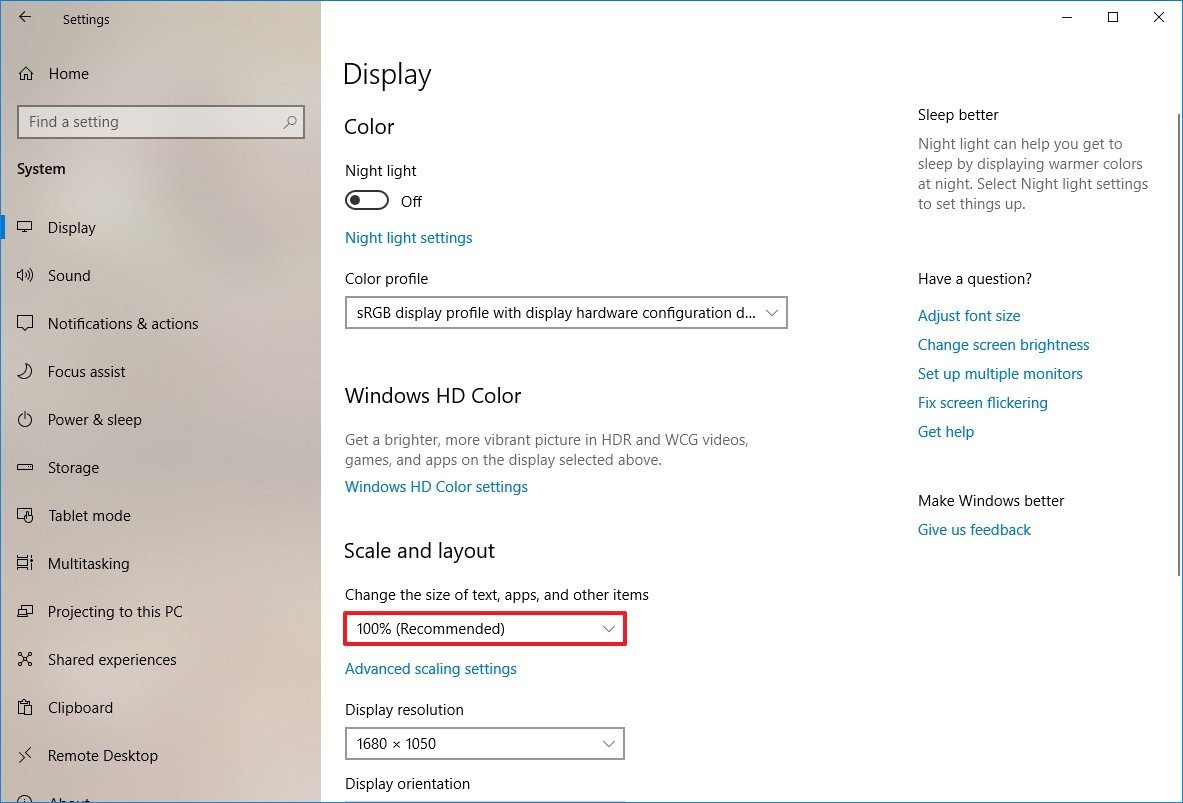
In the example picture it is 100
How do I read that value in PureBasic code?

 - There is usually a lot of "try this, maybe do that" but ONLY an example that one can test for themself and get an immediate result actually brings people forward.
Code: Select all
DesktopScaledX(100)Code: Select all
HRESULT GetDpiForMonitor(
  HMONITOR         hmonitor,
  MONITOR_DPI_TYPE dpiType,
  UINT             *dpiX,
  UINT             *dpiY
);
Code: Select all
int GetDeviceCaps(
  HDC hdc,
  int index
);

;with LOGPIXELSX and LOGPIXELSY
Code: Select all
EnableExplicit

Procedure.i GetDPI(*X.Double,*Y.Double)
  Protected hdc.i
  hdc = GetDC_(#Null)
  If hdc
    *X\d = GetDeviceCaps_(hdc,#LOGPIXELSX) / 96.0
    *Y\d = GetDeviceCaps_(hdc,#LOGPIXELSY) / 96.0
    ReleaseDC_(#Null,hdc)
    ProcedureReturn #True
  EndIf
  ProcedureReturn #False
EndProcedure

Procedure.i Main()
  Protected factor_x.d
  Protected factor_y.d
  Debug GetDPI(@factor_x,@factor_y)
  Debug factor_x
  Debug factor_y
  ProcedureReturn #Null
EndProcedure

Main()

End
Code: Select all
hdc = GetDC_(0)
Debug GetDeviceCaps_(hdc, #LOGPIXELSY) / 96.0
ReleaseDC_(0, hdc)Code: Select all
;DISPLAYCONFIG_VIDEO_OUTPUT_TECHNOLOGY: uint
#DISPLAYCONFIG_OUTPUT_TECHNOLOGY_OTHER                   = $FFFFFFFF
#DISPLAYCONFIG_OUTPUT_TECHNOLOGY_HD15                    = 0
#DISPLAYCONFIG_OUTPUT_TECHNOLOGY_SVIDEO                  = 1
#DISPLAYCONFIG_OUTPUT_TECHNOLOGY_COMPOSITE_VIDEO         = 2
#DISPLAYCONFIG_OUTPUT_TECHNOLOGY_COMPONENT_VIDEO         = 3
#DISPLAYCONFIG_OUTPUT_TECHNOLOGY_DVI                     = 4
#DISPLAYCONFIG_OUTPUT_TECHNOLOGY_HDMI                    = 5
#DISPLAYCONFIG_OUTPUT_TECHNOLOGY_LVDS                    = 6
#DISPLAYCONFIG_OUTPUT_TECHNOLOGY_D_JPN                   = 8
#DISPLAYCONFIG_OUTPUT_TECHNOLOGY_SDI                     = 9
#DISPLAYCONFIG_OUTPUT_TECHNOLOGY_DISPLAYPORT_EXTERNAL    = 10
#DISPLAYCONFIG_OUTPUT_TECHNOLOGY_DISPLAYPORT_EMBEDDED    = 11
#DISPLAYCONFIG_OUTPUT_TECHNOLOGY_UDI_EXTERNAL            = 12
#DISPLAYCONFIG_OUTPUT_TECHNOLOGY_UDI_EMBEDDED            = 13
#DISPLAYCONFIG_OUTPUT_TECHNOLOGY_SDTVDONGLE              = 14
#DISPLAYCONFIG_OUTPUT_TECHNOLOGY_MIRACAST                = 15
#DISPLAYCONFIG_OUTPUT_TECHNOLOGY_INTERNAL                = $80000000
#DISPLAYCONFIG_OUTPUT_TECHNOLOGY_FORCE_UINT32            = $FFFFFFFF


;DISPLAYCONFIG_SCANLINE_ORDERING: uint
#DISPLAYCONFIG_SCANLINE_ORDERING_UNSPECIFIED                 = 0
#DISPLAYCONFIG_SCANLINE_ORDERING_PROGRESSIVE                 = 1
#DISPLAYCONFIG_SCANLINE_ORDERING_INTERLACED                  = 2
#DISPLAYCONFIG_SCANLINE_ORDERING_INTERLACED_UPPERFIELDFIRST  = #DISPLAYCONFIG_SCANLINE_ORDERING_INTERLACED
#DISPLAYCONFIG_SCANLINE_ORDERING_INTERLACED_LOWERFIELDFIRST  = 3
#DISPLAYCONFIG_SCANLINE_ORDERING_FORCE_UINT32                = $FFFFFFFF


;DISPLAYCONFIG_ROTATION: uint
#DISPLAYCONFIG_ROTATION_IDENTITY     = 1
#DISPLAYCONFIG_ROTATION_ROTATE90     = 2
#DISPLAYCONFIG_ROTATION_ROTATE180    = 3
#DISPLAYCONFIG_ROTATION_ROTATE270    = 4
#DISPLAYCONFIG_ROTATION_FORCE_UINT32 = $FFFFFFFF


;DISPLAYCONFIG_SCALING: uint
#DISPLAYCONFIG_SCALING_IDENTITY                  = 1
#DISPLAYCONFIG_SCALING_CENTERED                  = 2
#DISPLAYCONFIG_SCALING_STRETCHED                 = 3
#DISPLAYCONFIG_SCALING_ASPECTRATIOCENTEREDMAX    = 4
#DISPLAYCONFIG_SCALING_CUSTOM                    = 5
#DISPLAYCONFIG_SCALING_PREFERRED                 = 128
#DISPLAYCONFIG_SCALING_FORCE_UINT32              = $FFFFFFFF


;DISPLAYCONFIG_PIXELFORMAT : uint
#DISPLAYCONFIG_PIXELFORMAT_8BPP          = 1
#DISPLAYCONFIG_PIXELFORMAT_16BPP         = 2
#DISPLAYCONFIG_PIXELFORMAT_24BPP         = 3
#DISPLAYCONFIG_PIXELFORMAT_32BPP         = 4
#DISPLAYCONFIG_PIXELFORMAT_NONGDI        = 5
#DISPLAYCONFIG_PIXELFORMAT_FORCE_UINT32  = $ffffffff


;DISPLAYCONFIG_MODE_INFO_TYPE : uint
#DISPLAYCONFIG_MODE_INFO_TYPE_SOURCE = 1
#DISPLAYCONFIG_MODE_INFO_TYPE_TARGET = 2
#DISPLAYCONFIG_MODE_INFO_TYPE_FORCE_UINT32 = $FFFFFFFF


;DISPLAYCONFIG_DEVICE_INFO_TYPE : uint
#DISPLAYCONFIG_DEVICE_INFO_GET_SOURCE_NAME             = 1
#DISPLAYCONFIG_DEVICE_INFO_GET_TARGET_NAME             = 2
#DISPLAYCONFIG_DEVICE_INFO_GET_TARGET_PREFERRED_MODE   = 3
#DISPLAYCONFIG_DEVICE_INFO_GET_ADAPTER_NAME            = 4
#DISPLAYCONFIG_DEVICE_INFO_SET_TARGET_PERSISTENCE      = 5
#DISPLAYCONFIG_DEVICE_INFO_GET_TARGET_BASE_TYPE        = 6
#DISPLAYCONFIG_DEVICE_INFO_FORCE_UINT32                = $FFFFFFFF

#DISPLAYCONFIG_DEVICE_INFO_GET_DPI_SCALE = -3


#QDC_ALL_PATHS = $1
#QDC_ONLY_ACTIVE_PATHS = $2
#QDC_DATABASE_CURRENT = $4

#SDC_TOPOLOGY_INTERNAL = $1
#SDC_TOPOLOGY_CLONE = $2
#SDC_TOPOLOGY_EXTEND = $4
#SDC_TOPOLOGY_EXTERNAL = $8
#SDC_TOPOLOGY_SUPPLIED = $10
#SDC_USE_DATABASE_CURRENT = #SDC_TOPOLOGY_INTERNAL | #SDC_TOPOLOGY_CLONE | #SDC_TOPOLOGY_EXTEND | #SDC_TOPOLOGY_EXTERNAL

#SDC_USE_SUPPLIED_DISPLAY_CONFIG = $20
#SDC_VALIDATE = $40
#SDC_APPLY = $80
#SDC_NO_OPTIMIZATION = $100
#SDC_SAVE_TO_DATABASE = $200
#SDC_ALLOW_CHANGES = $400
#SDC_PATH_PERSIST_IF_REQUIRED = $800
#SDC_FORCE_MODE_ENUMERATION = $1000
#SDC_ALLOW_PATH_ORDER_CHANGES = $2000

#DISPLAYCONFIG_MODE_INFO_TYPE_SOURCE = 1
#DISPLAYCONFIG_MODE_INFO_TYPE_TARGET = 2
#DISPLAYCONFIG_MODE_INFO_TYPE_FORCE_UINT32 = $FFFFFFFF

#DISPLAYCONFIG_PATH_ACTIVE = 1

;DISPLAYCONFIG_TOPOLOGY_ID
#DISPLAYCONFIG_TOPOLOGY_INTERNAL = $1
#DISPLAYCONFIG_TOPOLOGY_CLONE = $2
#DISPLAYCONFIG_TOPOLOGY_EXTEND = $4
#DISPLAYCONFIG_TOPOLOGY_EXTERNAL = $8
#DISPLAYCONFIG_TOPOLOGY_FORCE_UINT32 = $FFFFFFFF

#DISPLAYCONFIG_PATH_MODE_IDX_INVALID = $FFFFFFFF

#DISPLAYCONFIG_SOURCE_IN_USE = $1

;DISPLAYCONFIG_DEVICE_INFO_TYPE;
#DISPLAYCONFIG_DEVICE_INFO_GET_SOURCE_NAME = 1
#DISPLAYCONFIG_DEVICE_INFO_GET_TARGET_NAME = 2
#DISPLAYCONFIG_DEVICE_INFO_GET_TARGET_PREFERRED_MODE = 3
#DISPLAYCONFIG_DEVICE_INFO_GET_ADAPTER_NAME = 4
#DISPLAYCONFIG_DEVICE_INFO_SET_TARGET_PERSISTENCE = 5
#DISPLAYCONFIG_DEVICE_INFO_GET_TARGET_BASE_TYPE = 6
#DISPLAYCONFIG_DEVICE_INFO_GET_SUPPORT_VIRTUAL_RESOLUTION = 7
#DISPLAYCONFIG_DEVICE_INFO_SET_SUPPORT_VIRTUAL_RESOLUTION = 8
#DISPLAYCONFIG_DEVICE_INFO_FORCE_UINT32 = $FFFFFFFF

#CCHDEVICENAME = 32

#CCHFORMNAME = 32

Structure DISPLAYCONFIG_PATH_SOURCE_INFO
  adapterId.LUID
  id.l
  StructureUnion
    modeInfoIdx.l

    cloneGroupId.l
    sourceModeInfoIdx.l
  EndStructureUnion
  statusFlags.l
EndStructure

Structure DISPLAYCONFIG_RATIONAL
  Numerator.l
  Denominator.l
EndStructure

Structure DISPLAYCONFIG_PATH_TARGET_INFO
  adapterId.LUID
  id.l
  StructureUnion
    modeInfoIdx.l

    desktopModeInfoIdx.l
    targetModeInfoIdx.l
  EndStructureUnion
  outputTechnology.l
  rotation.l
  scaling.l
  refreshRate.DISPLAYCONFIG_RATIONAL
  scanLineOrdering.l
  targetAvailable.l
  statusFlags.l
EndStructure

Structure DISPLAYCONFIG_PATH_INFO
  sourceInfo.DISPLAYCONFIG_PATH_SOURCE_INFO
  targetInfo.DISPLAYCONFIG_PATH_TARGET_INFO
  flags.l
EndStructure

Structure DISPLAYCONFIG_2DREGION
  cx.l
  cy.l
EndStructure

Structure DISPLAYCONFIG_VIDEO_SIGNAL_INFO
  pixelRate.q
  hSyncFreq.DISPLAYCONFIG_RATIONAL
  vSyncFreq.DISPLAYCONFIG_RATIONAL
  activeSize.DISPLAYCONFIG_2DREGION
  totalSize.DISPLAYCONFIG_2DREGION
  StructureUnion
    videoStandard.l
    vSyncFreqDivider.l
    reserved.l
    ;videoStandard.l
  EndStructureUnion
  scanLineOrdering.l
EndStructure

Structure DISPLAYCONFIG_TARGET_MODE
  targetVideoSignalInfo.DISPLAYCONFIG_VIDEO_SIGNAL_INFO
EndStructure

Structure DISPLAYCONFIG_SOURCE_MODE
  width.l
  height.l
  pixelFormat.l
  position.POINT
EndStructure

Structure DISPLAYCONFIG_DESKTOP_IMAGE_INFO
  PathSourceSize.POINT
  DesktopImageRegion.RECT
  DesktopImageClip.RECT
EndStructure

Structure DISPLAYCONFIG_MODE_INFO
  infoType.l
  id.l
  adapterId.LUID
  StructureUnion
    targetMode.DISPLAYCONFIG_TARGET_MODE
    sourceMode.DISPLAYCONFIG_SOURCE_MODE
    desktopImageInfo.DISPLAYCONFIG_DESKTOP_IMAGE_INFO
  EndStructureUnion
EndStructure


Structure DISPLAYCONFIG_DEVICE_INFO_HEADER
  type.l
  size.l
  adapterId.LUID
  id.l
EndStructure

Structure DISPLAYCONFIG_TARGET_DEVICE_NAME_FLAGS
  StructureUnion
    friendlyNameFromEdid.l
    friendlyNameForced.l
    edidIdsValid.l
    reserved.l

    value.l
  EndStructureUnion
EndStructure

Structure DISPLAYCONFIG_TARGET_DEVICE_NAME
  header.DISPLAYCONFIG_DEVICE_INFO_HEADER
  flags.DISPLAYCONFIG_TARGET_DEVICE_NAME_FLAGS
  outputTechnology.l
  edidManufactureId.w
  edidProductCodeId.w
  connectorInstance.l
  monitorFriendlyDeviceName.c[64]
  monitorDevicePath.c[128]
EndStructure

Structure DISPLAYCONFIG_SOURCE_DEVICE_NAME
  header.DISPLAYCONFIG_DEVICE_INFO_HEADER
  viewGdiDeviceName.c[#CCHDEVICENAME]
EndStructure

Structure PathArray
  dp.DISPLAYCONFIG_PATH_INFO[0]
EndStructure

Structure ModeArray
  dm.DISPLAYCONFIG_MODE_INFO[0]
EndStructure


Structure DISPLAYCONFIG_SOURCE_DPI_SCALE_GET
  header.DISPLAYCONFIG_DEVICE_INFO_HEADER
  minScaleRel.l
  curScaleRel.l
  maxScaleRel.l
EndStructure

Prototype.l ptGetDisplayConfigBufferSizes(flags.i, *numPathArrayElements, *numModeInfoArrayElements)
Prototype.l ptQueryDisplayConfig(flags.i, *numPathArrayElements, *pathArray, *numModeInfoArrayElements, *modeInfoArray, *currentTopologyId)
Prototype.l ptDisplayConfigGetDeviceInfo(*requestPacket)

Define GetDisplayConfigBufferSizes.ptGetDisplayConfigBufferSizes
Define QueryDisplayConfig.ptQueryDisplayConfig
Define DisplayConfigGetDeviceInfo.ptDisplayConfigGetDeviceInfo

Define PathArraySize, ModeArraySize, i, minAbs

Dim DPI_List.i(11)

DPI_List(0) = 100
DPI_List(1) = 125
DPI_List(2) = 150
DPI_List(3) = 175
DPI_List(4) = 200
DPI_List(5) = 225
DPI_List(6) = 250
DPI_List(7) = 300
DPI_List(8) = 350
DPI_List(9) = 400
DPI_List(10) = 450
DPI_List(11) = 500

Define DevTargetName.DISPLAYCONFIG_TARGET_DEVICE_NAME
Define ScaleFactor.DISPLAYCONFIG_SOURCE_DPI_SCALE_GET

Define *PathArray.PathArray
Define *ModeArray.ModeArray

If OpenLibrary(0, "user32.dll")

  GetDisplayConfigBufferSizes = GetFunction(0, "GetDisplayConfigBufferSizes")
  QueryDisplayConfig = GetFunction(0, "QueryDisplayConfig")
  DisplayConfigGetDeviceInfo = GetFunction(0, "DisplayConfigGetDeviceInfo")

  If GetDisplayConfigBufferSizes And QueryDisplayConfig And DisplayConfigGetDeviceInfo

    If GetDisplayConfigBufferSizes(#QDC_ONLY_ACTIVE_PATHS, @PathArraySize, @ModeArraySize) = #ERROR_SUCCESS

      ;Debug PathArraySize
      ;Debug ModeArraySize
      ;Debug "-----"

      *PathArray = AllocateMemory(PathArraySize * SizeOf(DISPLAYCONFIG_PATH_INFO))
      *ModeArray = AllocateMemory(ModeArraySize * SizeOf(DISPLAYCONFIG_MODE_INFO))

      If QueryDisplayConfig(#QDC_ONLY_ACTIVE_PATHS, @PathArraySize, *PathArray, @ModeArraySize, *ModeArray, 0) = #ERROR_SUCCESS

        For i = 1 To PathArraySize

          DevTargetName\header\type = #DISPLAYCONFIG_DEVICE_INFO_GET_TARGET_NAME
          DevTargetName\header\size = SizeOf(DISPLAYCONFIG_TARGET_DEVICE_NAME)
          DevTargetName\header\id = *PathArray\dp[i - 1]\targetInfo\id
          DevTargetName\header\adapterId = *PathArray\dp[i - 1]\targetInfo\adapterId

          If DisplayConfigGetDeviceInfo(DevTargetName) = #ERROR_SUCCESS
            ;Debug PeekS(@DevTargetName\monitorDevicePath, 128)
            Debug "Monitor Name: " + PeekS(@DevTargetName\monitorFriendlyDeviceName, 64)
            Debug ""
          EndIf

          ScaleFactor\header\type = #DISPLAYCONFIG_DEVICE_INFO_GET_DPI_SCALE
          ScaleFactor\header\size = SizeOf(DISPLAYCONFIG_SOURCE_DPI_SCALE_GET)
          ScaleFactor\header\id = *PathArray\dp[i - 1]\sourceInfo\id
          ScaleFactor\header\adapterId = *PathArray\dp[i - 1]\sourceInfo\adapterId

          If DisplayConfigGetDeviceInfo(ScaleFactor) = #ERROR_SUCCESS

            If ScaleFactor\curScaleRel < ScaleFactor\minScaleRel
              ScaleFactor\curScaleRel = ScaleFactor\minScaleRel
            ElseIf ScaleFactor\curScaleRel > ScaleFactor\maxScaleRel
              ScaleFactor\curScaleRel = ScaleFactor\maxScaleRel
            EndIf

            minAbs = Abs(ScaleFactor\minScaleRel)
            If ArraySize(DPI_List()) + 1 >= (minAbs + ScaleFactor\maxScaleRel + 1)
              Debug "Recommended scale: " + DPI_List(minAbs)
              Debug "Current scale: " + DPI_List(minAbs + ScaleFactor\curScaleRel)
              Debug "Max scale: " + DPI_List(minAbs + ScaleFactor\maxScaleRel)
              Debug "------------------------------------------------"
            EndIf

          EndIf
        Next

      EndIf

    EndIf
  EndIf

  CloseLibrary(0)

EndIfMonitor Name: 2777M
Recommended scale: 100
Current scale: 100
Max scale: 175
------------------------------------------------
Monitor Name: PHL 275M8RZ
Recommended scale: 100
Current scale: 125
Max scale: 225
------------------------------------------------

Code: Select all
; Get_DPI_Scale.exe
; Compile it as Console and with DPI aware
OpenConsole()
DPI$ = Str(DesktopResolutionX() * 100)
Print(DPI$)Code: Select all
; Get_DPI_Scale.exe
; Compile it with as Console and with DPI aware
Compiler = RunProgram("Get_DPI_Scale.exe", "", "", #PB_Program_Open | #PB_Program_Read)
If Compiler
  While ProgramRunning(Compiler)
    If AvailableProgramOutput(Compiler)
      Debug ReadProgramString(Compiler)
    EndIf
  Wend
  CloseProgram(Compiler)
EndIf
End
Code: Select all
100

Code: Select all
  Global ScaleX1.d,ScaleY1.d,ScaleX2.d,ScaleY2.d,ScaleX.d,ScaleY.d

  ScaleX1 = GetDeviceCaps_(GetDC_(0),#LOGPIXELSX) / 96
  ScaleY1 = GetDeviceCaps_(GetDC_(0),#LOGPIXELSY) / 96
  ExamineDesktops()
  h.WINDOWPLACEMENT
  GetWindowPlacement_(GetDesktopWindow_(),@h)
  ScaleX2 =  DesktopWidth(0) / h\rcNormalPosition\right
  ScaleY2 =  DesktopHeight(0) / h\rcNormalPosition\bottom
  If ScaleX1 > ScaleX2
     ScaleX = ScaleX1
  Else
     ScaleX = ScaleX2
  EndIf
  If ScaleY1 > ScaleY2
     ScaleY = ScaleY1
  Else
     ScaleY = ScaleY2
  EndIf
  If OSVersion() < #PB_OS_Windows_Vista
    ScaleX = ScaleX1
    ScaleY = ScaleY1
  EndIf
  MessageRequester("Info","ScaleX : "+StrD(ScaleX) +#CRLF$ +"ScaleY : "+StrD(scaleY),#PB_MessageRequester_Ok|#MB_ICONINFORMATION)
  Debug ScaleX
  Debug ScaleY


